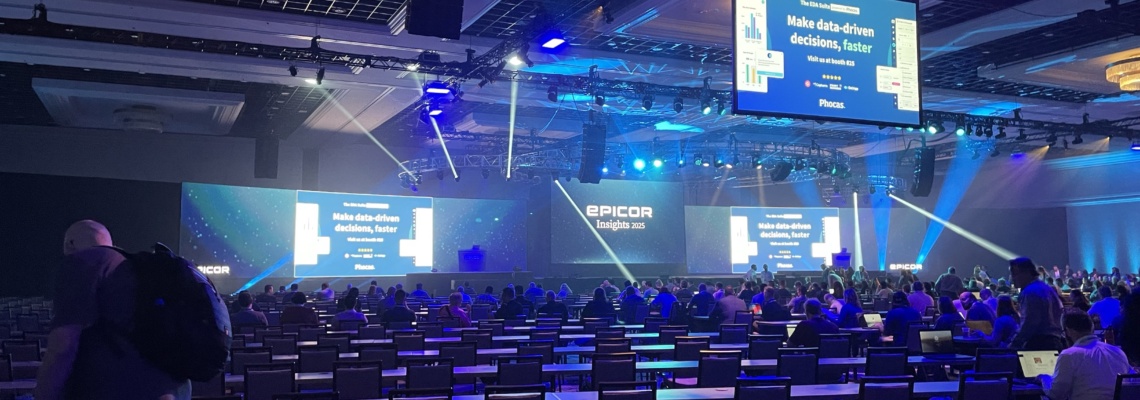
Innovation is what drives the future, and it drives our partnership with Epicor. Which is why we attended Epicor Insights 2025 to find out where things are going in this evolving ecosystem. If you use Epicor…or are considering an ERP…then it’s worth learning a bit about our and their insights for the future.

What’s Next with ERP: Key Takeaways from Epicor Insights 2025

The focus of Epicor Insights 2025 was on agentic AI. Epicor’s CEO, Steve Murphy, discussed  AI and the fact that Epicor is approaching integrating AI vertically, focusing on those existing Make, Move, and Sell verticals. With the current challenges that manufacturers are facing, particularly around realigning supply chains overnight due to tariffs, and how AI can be used to respond to these challenges if used correctly. Murphy mentioned that Epicor values the impact of AI and how it is an accelerator to help people gain insights into the data within an ERP, versus a tool that would replace them.

Epicor also unveiled Epicor Prism and Epicor Grow AI. The latter covers more than 200 use cases, while Epicor Prism can now integrate with Epicor Industry ERP Cloud, including Epicor Prophet 21, and Epicor Kinetic (which is our specialty).

This means our Kinetic customers can now experience faster employee onboarding, enhance decision making with rapid visual analysis, streamline information retrieval, and more. And Grow AI provides predictive AI modeling. Our Director of Operations and Advanced Support, Jason Claggett, had this to say: “Epicor showcased their AI solution, ‘Prism, ‘ that is aimed to empower the workforce.”

They also added a new Carbon Cost Rollup solution to Kinetic to support carbon tracking and treat CO2 emissions as currency.

Introduction – Why Epicor Insights 2025 Matters

Epicor Insights 2025 is a significant conference with around 4,000 attendees – large for a company-specific conference and an impactful event with 45 extended education sessions and 85 hands-on labs.

This allows customers, partners, and influencers to interact with the company and move their use of Epicor to their next level. For us, it’s a way to learn what Epicor is doing and changing, and how they are moving forward. We can then pass this knowledge on to our customers and help them use the platform better. We can, in particular, help current and future Epicor users customize tools and leverage people-centric AI to get the most value out of their ERP software.

Epicor’s Five Innovation Principles – Building a Future-Ready ERP

Epicor has long focused on five principles of innovation to build its ERP, and Epicor Insights is a timely reminder of them. They are:

  1. Great Experience. Epicor’s ERP is easy to use, keeping everything centralized. It provides a great, streamlined experience for employees and allows them to do more in less time.
  2. Data-Driven Insights. Using AI to crunch data, Epicor builds a data supply chain that improves accuracy and collaboration without compromising security. This allows you to use your data to the full.
  3. Industry Expertise. Epicor has deep experience in five areas – automotive, building supply, distribution, manufacturing, and retail. This allows thousands of companies to get the best out of Epicor and benefit from their expertise.
  4. Co-Innovation with Customers. This means working with customers to improve and listening to feedback – which is a major driving force behind Epicor Insights.
  5. People-Centric AI. AI that does not replace humans but rather makes their lives easier and more productive.

Spotlight on Emerging Solutions and Tools

A major purpose of Epicor Insights is to showcase emerging solutions and tools and give customers a chance to try them with the company’s help. Some of the new solutions Epicor demonstrated include:

  • SparkCentral – GROW. Epicor’s Grow AI provides predictive modeling and analysis to help customers manage their supply chain and predict demand.
  • Inventory Planning & Optimization (IP&O). Epicor continues to improve its IP&O solution. Adding more AI improves sales and inventory planning by offering probabilistic forecasting to help connect inventory optimization to your bottom line.
  • Prism, Ascend, Acadia, Kyklo. These AI solutions continue to develop. Acadia, for example, helps frontline workers gain real-time insights directly, instead of through dispatch.
  • Insights GO Demo. Epicor also demonstrated GO, 3D visual intelligence that will further improve data-driven insights and be a fantastic tool for showing data to stakeholders.

In particular, Ashley Limbers, our Marketing Manager, enjoyed the focus on AI. “It’s exciting to see how Epicor’s commitment to AI is already sparking action—and will continue to drive growth and competitiveness for our clients.”

Epicor Connected Process Control (CPC) and Acadia

Another focus was connected process control, which uses digital work instructions to enforce process control, connects devices to harvest IoT data, provides embedded quality management, and supports preventive maintenance. All of this allows manufacturing employees to work more effectively. The Andon solution allows all employees to view real-time production information and empowers them.

Acadia does the same thing for front-line workers. Both of these solutions improve employee trust by allowing them direct access to the data they need to do their jobs and encourage innovative solutions from the front line or factory floor.

CPC also matters for workforce readiness and compliance. It allows for the development of a Skills Matrix that directs job-based training so that employees have the skills and knowledge they need and opportunities to continuously improve.

Closing the Visibility Gap and Overcoming Data Challenges

According to Epicor, 79% of companies lack tier 1 supplier visibility, and 48% ignore critical insights. These pain points are something Epicor is working hard to address.

One way is the data supply chain, which ensures that accurate data is transmitted across companies to the people who need it. In many cases, insights are “ignored” because people simply don’t see them. Data from tier 1 suppliers can easily be brought into the data ecosystem.

Epicor also provides solutions for supply chain resilience that include improving visibility so that sourcing can be switched and balanced as needed. Supplier disruptions don’t turn into production disruptions.

3D data visualization is going to be another tool for overcoming data challenges by making data easily visible to stakeholders and showing them, clearly, the impact of changes on their bottom line.

Real-World AI Use Cases That Deliver ROI

Back to AI. Epicor’s AI is designed to support human innovation. Here are four areas in which Epicor’s AI really can help:

  1. Quoting. AI can analyze the supply chain, predict demand, and help you assess costs so you can provide more accurate quotes.
  2. Onboarding. New employees can get on track faster, with onboarding even starting before they come on-site.
  3. Ordering. AI ordering can allow for targeted upselling, dramatically increasing revenue.
  4. Analysis. Last, but far from least, AI can automate the interpretation of lists and charts so humans don’t have to spend hours poring over them.

Epicor AI – functional, practical, human-first.

Strategic Growth and Vision

Epicor also talked about its growth as a company. Since 2021, they have made 14 acquisitions. Their growth has averaged 12% year-over-year.

They have made over 100 major project releases and over 600 minor ones. All of this reinforces their deep vertical focus in the Make, Move, Sell economy.

Final Thoughts – Empowering the Maker Community

A clear thread through the Epicor Insights 2025 was that while AI has much potential, it is only valuable when applied in context. AI use cases need to be industry-specific, well-thought-out, and centered around supporting people in their activities. Our Director of Professional Services, Dave Cranshaw, had this to say: “I’m excited to work with Kinetic as not just a static ERP as we have all been working with most of our careers, but now as a platform to truly provide actionable insights to our customers very soon. What’s key is clients should be cleaning up their data so it’s good, then moving to the cloud, so they can use PRISM, and lastly turn on GROW post go-live so they can start being part of the change in the industry.”

Epicor also reinforced its commitments to innovation, security, and, above all, community.

At Encompass Solutions, we are here to help our clients learn what is coming next and take advantage of it to improve operations and your bottom line.

Are you ready to see how these innovations fit your business strategy? Talk to your Encompass Solutions account manager today or contact us to explore Epicor and how AI can be used can help your business.


Revolutionizing Worker Productivity with AI and Prism

Experience a paradigm shift in manufacturing productivity with Epicor Kinetic 2025.1, featuring leading AI-driven tools that take worker efficiency to the next level. The new release sets a new standard as the ERP for manufacturing, boosting operational capabilities with cutting-edge technology designed to streamline workflows and maximize productivity. At the top of its list of innovative advancements is Prism, an ECM (Enterprise Content Management) agent fully integrated into the Kinetic platform.

Prism: Enhancing Efficiency through Intelligent Automation

Prism offers a fundamental shift in how document management and task automation are approached using AI in manufacturing. Consequently, this tool gives users everything they need to boost their operational efficiency and streamline workflows. Prism revolutionizes worker productivity on many different fronts:

  • Document Management Reinvented: Document handling is simplified by smarter categorization, organization, and information storage. Critical documents are always readily accessible, which is a huge time saver.
  • Accelerated Information Retrieval: Advanced search algorithms are used to rapidly retrieve key information from even the largest repositories. Users can easily find and extract what they’re looking for quickly, helping them make quicker, informed decisions.
  • Automated Task Execution: One of Prism’s best features is the ability to automate repetitive tasks across a manufacturing workflow, saving workers valuable time to spend on more important matters. It can reliably handle everything from simple data entry to more complex tasks with greater accuracy.
  • Intuitive User Experience: Designed to improve the user experience, Prism can easily integrate with existing workflows without disrupting your operation. Users of all skill levels can use its intuitive interface and interactive features to use the power of its AI-driven enhancements.

With Prism within Epicor Kinetic 2025.1, manufacturers will see administrative overhead greatly reduced and time-to-market projections for new products accelerated. It’s a transformation tool setting a new standard for productivity in manufacturing that will pave the way for smarter operations.

Supporting Sustainable Manufacturing with New Capabilities

As global expectations for manufacturing sustainability increase, manufacturers scramble to face the growing pressure of guaranteeing their operations are aligned with environmental initiatives. Therefore, Epicor Kinetic 2025.1 meets this challenge by introducing innovative tools that give manufacturers what they need to measure and reduce their environmental footprints.

Tracking and Reducing Environmental Footprints

The new Epicor Kinetic release introduces the Carbon Cost Rollup for Purchase Orders, Jobs, and Quotes as one of its standout features. It’s an advanced tool that allows manufacturers to thoroughly analyze and track their carbon footprints across every facet of their operations.

  • Comprehensive Carbon Footprint Analysis: Kinetic 2025.1 integrates carbon tracking into core operations, giving manufacturers the ability to measure the environmental impact of their activities. It gives a comprehensive view of carbon contributions through the manufacturing lifecycle, including emissions associated with purchase orders, production jobs, and project quotes.
  • Data-Driven Sustainability Insights: Using detailed analytics and reporting, manufacturers now receive actionable insights into their environmental footprint. The Carbon Cost Rollup feature gathers data from different operational sources, giving them the information they need to make informed decisions on how to reduce carbon emissions and optimize resource use.
  • Alignment with Global Sustainability Standards: Kinetic 2025.1 also helps manufacturers meet compliance regulations and stakeholder demands.  With the ability to monitor and manage environmental impacts, businesses can be responsible corporate citizens and meet their long-term sustainability goals.
  • Operational Efficiency and Cost Savings: Managing resource usage and reducing waste through sustainability initiatives can save a lot of money and streamline operations. Kinetic 2025.1 gives manufacturers the tools they need to identify areas for improvement, implement new sustainable practices, and boost overall business performance.

In addition, Kinetic ERP gives manufacturers a competitive edge in a sustainability-focused market landscape. The development of carbon tracking and environmental management tools is Epicor’s pledge to driving meaningful change in the manufacturing sector.

Delivering Customer-Driven Improvements and Accelerating Digital Transformation

As a result, Epicor Kinetic also supercharges the way manufacturers address the needs of their customers through a digital transformation within their operations. This newest release uses extensive feedback harvested through Epicor Ideas, generating 1,346 enhancements to enhance both system productivity and user experience.

Key Enhancements in Kinetic 2025.1

  • New Warehouse Inactive Option: The new Warehouse Inactive Option helps streamline inventory management. Manufacturers can optimize warehouse space and other resources by effectively managing inactive or slower-moving inventory items. A reduction in inventory carrying costs and smarter space usage helps manufacturers better use their resources and save money.
  • Reason Code Maintenance Improvements: Improvements in Reason Code Maintenance gives manufacturers smarter reporting capabilities.  Kinetic 2025.1 simplifies data analysis and reporting by standardizing and automating the process of assigning reason codes to operational events and transactions. Manufacturers will be able to identify and pinpoint issues, trends, and opportunities for improvement faster than ever before, improving their ability to make data-driven decisions.
  • Enhanced MRP Urgent Planning: Kinetic 2025.1 took dynamic market demands into consideration and improved Material Requirements Planning (MRP) Urgent Planning capabilities. Manufacturers can now quickly respond to demand or supply disruptions, guaranteeing production schedule continuity.  This improvement in production planning and inventory management allows manufacturers to respond faster, shorten lead times, and exceed customer expectations.

Expanding Integrations for Enhanced Digital Transformation

In addition to these cutting-edge enhancements, Epicor Kinetic 2025.1 continues to add integration capabilities across popular key solutions. These integrations are vital in enabling manufacturing enterprises to speed up their digital transformation journey and improve their overall operations.

Integrations Across Solutions

Kinetic integrates seamlessly with a range of ERP cloud solutions, including:

  • Grow: Makes business growth strategies easier through enhanced insights and scalability.
  • ECM (Enterprise Content Management): Streamlines document management and information retrieval.
  • Quick Ship: Greatly improves order fulfillment and logistics management to boost customer satisfaction.
  • Automation Studio: Streamlines repetitive tasks to make automations better.
  • CPQ (Configure Price Quote): Complex quoting processes make accelerating sales cycles and improving accuracy easier.
  • Epicor IP&O Quickstart: Provides a rapid deployment solution for Inventory Planning and Optimization (IP&O).
  • Field Service Management (FSM): Improves service delivery and customer experience using field service operations.

Therefore, these integrations give businesses data-driven insights, automate critical workflows, and enhance collaboration across departments. Kinetic 2025.1 allows manufacturing organizations to adapt swiftly to market demands and drive sustainable growth by using a unified approach to digital transformation.

Unlock the Full Power of Kinetic 2025.1

The future of manufacturing is smarter, greener, and more connected today than it has been before.  This Epicor Kinetic update gives you what you need to be a leader in this transformative era. Are you ready to harness these new capabilities and propel your business forward?

Contact us today at Encompass Solutions and let us show you how Kinetic 2025.1 can revolutionize your operations, help you reduce your environmental footprint, and help you reach your goal of digital excellence faster. Stay ahead of your competition and embrace the power of Kinetic ERP to shape the future of manufacturing.


Unlocking Data Insights: Master Epicor ERP Reporting Tools

In modern business, data insights are one of the most powerful tools you can command. The ability to derive patterns, trends, and performance indicators from data generated by your everyday operations can help to inform decisions, shape strategies, mitigate risks, and prepare for growth.

Unlocking data insights is essential for today’s manufacturers. One of the greatest advantages of using an all-encompassing ERP solution like Epicor Kinetic is the ability to compile data and prepare reports from every facet of your company. Epicor ERP users have a wealth of reporting tools at their fingertips, ready to help them make the most of their resources from problem-solving to growth planning.

Encompass Solutions is an expert in Epicor implementation and data management. Today, our goal with this article is to help you improve your Epicor Kinetic reporting processes, gain deeper insights from your data, and enhance your decision-making capabilities through the discovery of tools that simplify reporting and help you leverage your Epicor ERP more effectively.

Whether you are trying to optimize financial reporting, enhance operational visibility, or tailor reports to meet unique business needs, this content series will help you find the Epicor reporting tools you need.

Epicor Kinetic Reporting Tools

Epicor ERP transforms your operations into valuable data insights. Every order, invoice, and project is made up of data points. Epicor makes these accessible through a wide range of ERP reporting tools designed to streamline your reporting processes and enhance your decision-making capabilities.

Each reporting tool is tailored to specific business needs. A quick look can help you get a sense of the tools we are about to cover in depth.

GROW translates your data through real-time interactive dashboards. Financial Planning and Analysis provides financial reports and forecasts. SSRS enhances operational reporting with the help of an SQL server. BarTender simplifies label printing and documentation for compliance and operational efficiency.

GL Report generates general ledger reports, Enform manages paperwork inside the Epicor ERP system, and Custom Reporting helps you build tailored reports that address more unique business needs.

1. GROW

GROW is the Epicor Business Intelligence toolkit, which allows organizations to create innovative and interactive dashboards of custom data. You decide what data is most important and how you want it presented, and GROW will do the rest. GROW empowers real-time business intelligence, offering interactive dashboards and reports that simplify complex data analysis.

GROW implements an innovative back-end that utilizes ETL Processes (Extract, Translate, Load) to acquire the data you need from each source, then stores your real-time data in a data warehouse so it is ready to present through an interactive chart at any time.

Organizations can build a large number of custom dashboards, accessing data extracted from throughout the ERP system and integrations such as Kinetic. It can be used by top leadership or implemented for specific roles and departments. Once you decide the data you want to display, you can organize and refine it into the most useful charts for quick visual presentation and detailed analysis.

Dashboards designed with GROW can be used to monitor operations, create powerful presentations, and inform data-driven decision-making.

2. Financial Planning and Analysis (FP&A)

The Epicor FP&A or Financial Planning and Analysis toolkit helps you to streamline financial reporting for smarter forecasting and budgeting. It is designed to assist your organization in making data-driven financial decisions using in-depth analysis of your financial health, ongoing operations, and potential opportunities.

FP&A is a cloud-based solution that uses machine-learning technology to provide powerful financial insights based on your company’s real-time financial data. It is designed to empower your organization by improving the way you access financial reports, enhancing your operations, and helping your business adapt to an ever-changing financial environment.

With the Financial Planning and Analysis toolkit, you will be able to quickly generate reports that both ensure compliance and accurately predict future revenues, profits, and cash flows based on both recent and historical financial data. This allows you to craft goal-oriented and driver-based plans by presenting models of complete financial operations and even exploring what-if scenarios to stay agile in the ever-changing marketplace.

The tools provided by FP&A can also help you analyze and discover which products, customers, and segments of the business are generating the greatest profits so you can prioritize and adapt your strategy for a more successful future. Then, consolidate your reports with ease across entities so you can compare financial performance in a compact yet comprehensive way.

3. SSRS – SQL Server Reporting Services

The SQL Server Reporting Service (SSRS) is designed to enhance your access to operational reporting with the help of SQL Server operations. Epicor SSRS Reports are customizable data representations built using Microsoft SQL Server Reporting Services, tailored to Epicor ERP users. This allows you to build and deploy robust, interactive reports using truly complex and innovative methods.

SSRS provides an interface that makes it possible to visualize complex data that is empowered by the dynamic and in-depth data management toolkits built into the Microsoft SQL Server Reporting Services. It is an extremely effective and powerful method to extract, analyze, and present your business data.

Benefits of the SSRS reporting system include dynamic data representation, customization, integration, and accessibility. Take control of real-time data analysis and engage in accurate data-driven decision-making. You can also personalize reports to fit unique requirements and generate reports in multiple formats such as Excel, PDF, and Word.

For even more access to your data, SSRS integrates seamlessly with other Epicor ERP modules for fully connected data presentation.

4. BarTender

The Epicor BarTender toolkit was designed to simplify label printing and documentation processing. It will improve traceability, compliance, and operational efficiency by creating and automating the printing and control of labels, barcodes, RFID tags, plastic cards, and other essential forms of physical data output.

BarTender is a unique method of accessing data that is essential to manufacturing businesses because it allows you to print accurate labels and documents regarding your products. The toolkit primarily focuses on design for product labels, cards, RFID tags, and other related output types. You can enter print time easily and ensure your data is presented through customizable forms.

With Bar Tender, it’s easy to consolidate design with intelligent templates and ensure that each label represents the most current data. Then you can apply secure document control to ensure your business is always within regulatory compliance.

BarTender represents a set of tools that help you design labels and label templates with ease and efficiency. You can configure and connect to data sources through your Epicor-managed business systems and then launch print commands. It is also designed to empower automated printing, automate print status, manage printing supplies, and streamline print production while providing complete control over the process.

5. GL Report

General Ledger reports are an essential part of your company’s financial performance. This led to the Epicor GL Reports toolkit to help your business generate clear and comprehensive general ledger reports that provide visibility into your financial performance. A general ledger report is a financial tool that summarizes all of a business’s financial transactions, is organized by account type, and provides a comprehensive record of account balances.

The General Ledger module is linked to all aspects of business operations. By mastering it, you can achieve better financial reporting. Ig gives you the ability to record and report on finances from throughout your ERP system with no repeat data entry.

The Chart of Accounts (COA) feature shows up to 20 user-defined segments. This makes it possible to record, store, allocate, and report financial data with granular control.

The Fastclose Financial Intelligence feature helps you build reports on customer and project profitability. You can break down your data between multiple sites or branches to compare performance easily.

The multiple books function can help you build unlimited financial books, seamlessly combined into a single consolidated report for a unified financial truth. You can also build multiple financial schedules, which will be compiled gracefully into your GL reports. From tracking subsidiaries to forecasting to consolidations, GLreports is a great way to compile your financial insights and remove needless complexity from the process.

6. Enform

Business forms play a vital role in operations and data management. EnForm is the Encompass Solutions answer to the Epicor Standard Style business forms. Enform makes it possible to improve your forms with superior formatting, unified data types, and clear, detailed information to empower more efficient and integrated paperwork management. Enform Reports improves Epicor’s Standard Style business forms for any organization that uses the Epicor Kinetic ERP system.

EnForm Reports makes use of a more modern style of document that is both pleasing to see and easier to read for both your workforce and business partners. Users can also hide unused form fields to streamline formatting and improve the readability of each form in every use case across your business operations.

EnForm reports transform the Epicor Standard Style of forms to make better use of each page. We ensure word-wrapping occurs less often than standard reports while maintaining sufficient white space for clarity and optimal legibility. This means fewer pages that you need to print per report while ensuring the same level of usefulness and detail. Each report appears as a new option in the Report Style field to help you print reports with ease, using fewer pages for an eco-friendly update across the board.

7. Custom Reporting

Epicor also makes it possible to design custom reports based on needs that are not predicted by common Epicor Kinetic use cases. Custom reporting allows you to tailor your reports and dashboards any time out-of-the-box tools do not quite align with your needs.

Building custom reports requires more attention to detail and fine-tuning your report’s data curation and dashboard assembly. However, with the tools available and the comprehensive source-of-truth data within the Epicor EPR system, you will be able to create valuable data insights and presentations based on the unique needs of your business, operations, projects, collaborations, and goals.

Custom reporting makes it possible for a company to operate outside of standard procedures, whether you are innovating new internal operations or planning industry-disruptive strategies. Reports are valuable no matter your purpose, and custom reports with Epicor reporting tools will empower your progress.

Unlock Powerful Insights with Epicor Reporting Tools

Epicor ERP empowers comprehensive business management and collects a treasure-trove of both real-time and historical data in the process. Epicor’s powerful reporting tools put that data at your fingertips with intuitive charts, reports, dashboards, and ways to put the data to work through label creation, GL reports, and standard forms. Encompass Solutions is an expert Encor ERP consultant who can help you get more from your ERP infrastructure, tools, and more.

To receive more information about these reporting tools, see this guide, or to see a live demo, fill out a form here: https://content.oldencompass.sevenagesdesign.com/encompass-solutions-erp-edi-consulting-rfq-request-a-demo

Contact us for a personalized consultation on how we can improve your Epicor implementation.


Artificial intelligence (AI) is a broad term attached to various Enterprise Resource Planning (ERP) services for manufacturing automation. These AI-powered ERP solutions aim to enhance efficiency, streamline processes, and provide valuable insights for manufacturing operations. By leveraging machine learning algorithms and predictive analytics, AI-enhanced ERP systems can anticipate potential issues, optimize resource allocation, and automate routine tasks. Integrating AI in ERP technology empowers manufacturers to make data-driven decisions faster, adapt to market changes more effectively, and maintain a competitive edge in an increasingly digital industry landscape.  Having introduced AI’s role in manufacturing automation, let’s delve deeper into its integration with ERP systems such as Epicor Kinetic. 

AI in ERP

AI is a predictive computer model that enables programs to contextualize questions or tasks and generate responses based on trained data. Enterprise Resource Planning (ERP) systems, such as Epicor Kinetic, provide customizable, robust software solutions to track information for manufacturing services, financial systems, and efficiency studies. When integrated with ERP systems, AI broadens the scope, improves accuracy, and enhances the efficiency of individual tools offered.  

This connection between AI and ERP creates a powerful platform for businesses to optimize their operations and make data-driven decisions in real-time. This connection of technologies allows companies to automate complex processes, forecast trends more accurately, and adapt swiftly to changing market conditions, giving them a significant competitive advantage.  

How AI is used in Manufacturing

AI is utilized in various tools that automate manufacturing and enhance data accuracy. It sorts through numerous suppliers using specific parameters to find optimal matches and initiate orders. AI analyzes historical data on submitted orders and inventory requirements to provide predictive insights for company preparedness. Additionally, it improves data collection quality for studying production efficiency and status.   

These AI-driven capabilities enable manufacturers to make more informed decisions, optimize their supply chains, and respond swiftly to market changes. Furthermore, AI integration in manufacturing processes can lead to significant cost reductions and improved product quality by identifying inefficiencies and predicting maintenance needs before equipment failures occur.  

Common Myths Surrounding AI

While AI is developing rapidly and powerfully, its output types and scope remain limited. Accurate, targeted AI models require abundant clean, high-quality data. Many companies overestimate their data resources, lacking the volume or quality needed for effective model training. Contrary to common belief, AI doesn’t create information or expand its understanding independently. It requires extensive data because it predicts actions solely based on its accessible information history. Consequently, the more quality data fed to the model, the more accurately it can predict optimal responses.   

Lastly, due to AI’s novelty, businesses seeking customized solutions face a scarcity of quality information and expert assistance. This challenge underscores the importance of partnering with experienced AI consultants who can guide companies through the complexities of data preparation, model selection, and implementation to maximize the benefits of AI integration.  

How AI Can Automate Your Business

Although there are many conflicts and misunderstandings surrounding AI, when used correctly, the added functionality of a trained model is compelling at bringing automation to your business. Products like Epicor Grow and Prism provide models that can interact with suppliers, offer predictive analysis for inventory and production, and provide insights into potential efficiency improvements. Sorting through the vast array of different products, performing a study to determine what needs to be implemented, and executing the physical implementation steps can be a complex undertaking for a busy company.   

As an Epicor premier partner in this field, Encompass Solutions can provide the expertise needed for Automation Audits to understand better your specific needs, as well as continued support through the implementation process to ensure long-term adoption is successful.

How Encompass Solutions Can Be a Part of Your Journey

Encompass Solutions understands how manufacturing automation provides companies with the know-how and services to implement ever-evolving AI tools that enhance productivity.  

  • Expert Guidance: Leading companies through each stage of the ERP implementation process with expertise and best practices. 
  • Customization: Offering direct customization of Epicor’s AI solutions to meet each company’s unique specifications and requirements. 
  • Training: Providing comprehensive training to equip staff with the necessary skills to fully leverage AI functions and capabilities. 
  • Ongoing Consulting: Delivering continuous support and service to address any post-deployment issues or challenges promptly.

Integrating AI in ERP systems represents a powerful opportunity for manufacturing businesses to revolutionize their operations. While the implementation of AI technology comes with its challenges, the potential benefits of efficiency, accuracy, and decision-making capabilities are substantial. Partnering with an experienced consultant like Encompass Solutions can help navigate the complexities of AI adoption, ensuring a smooth transition and maximizing the return on investment. As AI continues to evolve, businesses that embrace this technology will be well-positioned to thrive in an increasingly competitive and digital manufacturing landscape. For more information on how Encompass Solutions can help automation your AI and ERP journey, visit www.oldencompass.sevenagesdesign.com


Accounting might not be a favorite topic, but it’s essential for your team and business. The days of relying on spreadsheets are behind us, and many small to medium-sized companies use QuickBooks, a popular accounting program. However, as your business grows, you may outgrow QuickBooks. When should you switch to a more robust solution like Enterprise Resource Planning (ERP) software? This ERP vs. QuickBooks comparison will help you understand the best option to keep your business moving forward.

What is QuickBooks?

QuickBooks is a widely used accounting solution ideal for sole proprietors and small to medium-sized companies, including some manufacturing operations. It offers invoicing, payroll, financial reporting, and basic accounting capabilities. However, it focuses solely on accounting. If you need software for other functions, such as production planning, you’ll need separate solutions that may not integrate well.

QuickBooks works well for small companies with a user limit of 40. It helps businesses keep track of finances, handle taxes, and plan for the future.

What is ERP Software?

Enterprise Resource Planning (ERP) software, like Epicor, is a comprehensive solution that, although more expensive, becomes cost-effective as your company grows. It is designed for larger teams and complex operations, scaling with your success. ERP software handles multiple locations, currencies, and extensive customization options, and integrates various business functions, including manufacturing processes, supply chain, and customer relationship management.

ERP systems manage all your complex operations, reducing errors and redundancy compared to using multiple systems.

When Should You Consider Switching?

QuickBooks is a good solution for smaller businesses, but as you grow, you might need more robust support. Here are signs that indicate it’s time to consider switching to ERP software:

  • You are approaching or have hit the 40-user cap, and scaling QuickBooks further becomes expensive.
  • You use multiple software platforms to manage different parts of your business, leading to mounting errors and inefficiencies.
  • QuickBooks inventory management can no longer keep up with your needs.
  • Employees spend too much time transferring and re-entering data.
  • Data tracking issues arise because information is scattered across different systems.
  • Inventory problems lead to customer service issues.
  • Demand forecasting relies heavily on guesswork.
  • You engage in made-to-order and discrete manufacturing.

Outgrowing QuickBooks can be subtle, but addressing these issues early saves money and boosts employee morale.

What Does ERP Software Offer?

ERP software is customizable to meet your team’s needs, with modular functionality allowing you to add or remove features as necessary. An ERP consultant, like Encompass Solutions, can help navigate your specific needs and implement a tailored solution. ERP software offers:

  • Accounting in multiple currencies, languages, and locations.
  • Cloud-based solutions for accessible business data.
  • Integration of finance, supply chain, and customer relationship management.
  • Real-time data visibility across your organization.
  • Advanced tools for production planning and scheduling.
  • Real-time inventory management for raw materials, works-in-progress, and finished goods.
  • Demand forecasting without guesswork.

ERP software consolidates multiple functions into one platform, simplifying IT management and reducing the need for multiple integrations.

Will You Outgrow Your ERP?

No, ERP platforms are scalable. You can add features and users as needed, with costs increasing reasonably. A consultant can help future-proof your ERP, ensuring it evolves with your company.

ERP systems are tailored to your needs, whether managing international contractors, supply chains, or peak production periods. They allow for growth without losing data, minimizing the risk of human error during migrations.

Can an ERP Integrate with Existing Systems?

Yes, ERPs can integrate with your existing software, allowing smooth data transfer. They are often cloud-based, compatible with various devices, and support remote work.

What If I Like QuickBooks?

In regards to ERP vs. QuickBooks, QuickBooks is excellent for smaller businesses and is user-friendly. If your business remains small, it might suffice. However, growing businesses with expanding teams and formal manufacturing processes may need more comprehensive features.

How to Choose the Right ERP System?

Choosing the right ERP involves assessing your needs, evaluating vendors, and considering your budget. Encompass Solutions can help with ERP solutions designed to streamline manufacturing processes, support growth, and integrate cross-functional teams.

We assist in selecting, negotiating, and supporting the right ERP system for your team. Our custom development services ensure your ERP system is a perfect match, keeping you ahead in your industry.

If QuickBooks no longer meets your growing business needs, contact Encompass Solutions. As an Epicor partner, we provide ERP solutions tailored to made-to-order and mixed-mode manufacturing companies, ensuring your business thrives with advanced support and integration.

Ready to take the next step? Contact us today to schedule a consultation by filling out a form and discovering how our ERP solutions can transform your business. Understanding ERP vs. QuickBooks is crucial for making the right decision for your company’s future.


In the dynamic manufacturing world, where efficiency and optimization are paramount, Enterprise Resource Planning (ERP) systems stand out as key players. These tools streamline operations, enhance collaboration, and offer real-time insights into critical business processes.

In this blog, we begin a comprehensive journey, guiding you through the process of selecting the right ERP system for your manufacturing enterprise. Together, we’ll explore the steps that lead to operational excellence, charting a path toward a more agile and competitive future. 

This exploration aims to gain the expertise needed to navigate the ERP landscape, empowering your business with the transformative potential of these robust systems. So, let’s uncover the secrets of harnessing ERP’s capabilities and aligning them with your manufacturing goals.

Understanding ERP Systems

To begin the selection process, it’s vital to grasp the ERP systems’ essence. In simple terms, ERP systems are intricate software solutions designed to seamlessly manage essential business processes and data across an organization. Imagine them as the linchpin orchestrating harmonious operations, covering manufacturing, finance, supply chain, and customer relationship management.

The significance of ERP systems in transforming operations is immense. They eliminate data silos, automate repetitive tasks, and establish standardized processes. This efficiency spreads throughout the organization. ERP systems excel by providing real-time insights into resource availability and utilization. With this capability, organizations can precisely allocate resources, boosting productivity.

But there’s more to the story. ERP systems foster cross-functional teamwork, bridging communication gaps between departments. This creates a shared knowledge ecosystem, fueling growth. These systems channel collaborative energy, breaking down barriers and uniting departments. This unity drives organizations towards goals, turning visions into reality through seamless cooperation.

Assessing Business Needs and Requirements

As you begin your search for an ERP system, conducting a comprehensive needs assessment becomes your guiding compass. This pivotal step ensures that the chosen ERP system seamlessly aligns with your unique business requirements. Begin by pinpointing existing pain points and inefficiencies within your manufacturing process. This examination sheds light on areas needing improvement.

Moving forward, pinpoint the specific functionalities and modules your operations demand. From inventory management to production planning and supply chain optimization, identifying these needs lays the groundwork for an effective ERP solution. Also, consider the critical aspect of scalability. Your chosen ERP system should effortlessly accommodate your business’s growth trajectory, ensuring your technology investment remains relevant in the long run.

Integration with your current systems and technologies is another crucial facet. The seamless flow of data between systems minimizes hiccups and compatibility challenges. These considerations establish a strong foundation for efficient business operations. Naturally, budget and financial parameters are integral to your decision-making process. Balancing the value of the ERP system with your organization’s financial feasibility ensures a well-rounded approach to selection.

Researching and Evaluating ERP Vendors

Armed with your needs assessment, the next step is delving into the realm of potential ERP vendors. Vendor selection is an important step demanding scrutiny. Seek out vendors with a solid grasp of the manufacturing industry – their specialized knowledge guarantees a solution tailored to your needs. It’s also recommended that you assess the sustainability of the vendor’s offerings and their standing within the market.

Distinguishing factors lie in the realm of support and implementation services. A vendor’s commitment to guide you through the transition and beyond speaks volumes about their commitment to your success. While evaluating, keep the concept of total cost of ownership (TCO) in view. 

This involves considering not only the initial costs but also ongoing expenses like license fees, implementation charges, and maintenance.

Remember, the vendor you choose isn’t just a provider but a partner in your business journey. Their expertise and dedication will significantly impact the success of your ERP implementation and its subsequent performance. Careful vendor evaluation forms the cornerstone of an ERP implementation that aligns with your organization’s aspirations.

Vendor Selection and Implementation

The synergy between your selected vendor and your business objectives holds immense significance. A vendor that comprehends your strategic aims presents tailored solutions, and adds value to your organization becomes a partner in your journey. This alliance extends to change management – a pivotal aspect of any ERP implementation. A vendor equipped to guide you through the intricacies of organizational change that accompany new systems ensures a smoother transition and heightened user engagement.

As you arrive at your final decision, consider the system’s functionalities of your business requisites. Delve into the vendor’s standing, their history of support and implementation, and the overall cost of ownership. Collaborating with your chosen vendor initiates the implementation phase – a process inaugurated by project planning and team establishment. This stage encompasses data migration, system setup, user training, and change management. The triumph of a successful implementation hinges on transparent communication and astute execution.

Remember, the chosen vendor is more than a mere transaction; they become a cornerstone of your ERP journey. Their expertise and alignment with your goals are instrumental in shaping the trajectory of your ERP system’s efficacy and subsequent business performance. Optimal vendor selection catalyzes a seamless ERP implementation that resonates with your organizational aspirations.

Best Practices and Lessons Learned

As you navigate through the stages of selection and implementation, it’s important to heed these invaluable best practices. Engage key stakeholders consistently, ensuring their involvement at every juncture. Rigorously test and evaluate systems, emphasizing user adoption and fostering a smooth transition. Sustain transparent communication with your selected vendor, nurturing a partnership that bolsters your ERP journey.

Despite the well-charted path to ERP implementation, challenges can arise. Prepare for potential pitfalls by acknowledging the lessons learned by those who’ve walked this path before. Inadequate planning can lead to scope creep and delays, underscoring the necessity of meticulous preparation. Change management, often underestimated, is pivotal to addressing resistance and securing user commitment. Data migration complexities are a reality, emphasizing the importance of comprehensive planning and execution. Guard against over-customization, which can inflate costs and complexity, by aligning your ERP system with core requirements. Resource allocation and project management play pivotal roles, requiring dedicated teams and adept oversight.

Each challenge presents an opportunity for growth. Embrace these lessons and best practices to steer your ERP implementation toward a beneficial outcome. Remember, the journey toward successful ERP integration isn’t just about the destination; it’s about honing your processes, fostering collaboration, and realizing efficiencies that propel your organization toward excellence.

Ongoing Maintenance, Updates, and Optimizations

Ensuring your ERP system’s continued effectiveness is a vital undertaking that parallels its initial implementation. Just as the foundation of a building needs consistent upkeep to stand strong, your ERP system requires ongoing attention to thrive. Regular system health checks, like routine medical check-ups, detect and address potential issues before they escalate. Staying on top of updates and patches is like keeping your vehicle well-maintained to ensure optimal performance.

Periodic system reviews, like home inspections, ensure that your ERP aligns with evolving business needs. User training acts as a steady stream of nourishment, ensuring your team’s proficiency. Leveraging your vendor’s support services is akin to consulting a trusted advisor, invaluable in times of need. The implementation of change management practices during updates and enhancements ensures a seamless transition, similar to navigating a smoothly paved road.

Tips for ongoing ERP systems maintenance, updates, and optimizations

  • Regular Health Checks: Schedule routine system health checks to identify and address potential issues before they escalate.
  • Stay Up-to-Date: Keep your ERP system updated with the latest patches and updates provided by your vendor to ensure security and functionality.
  • Periodic Reviews: Conduct periodic reviews of your system’s performance and user feedback to identify areas for improvement.
  • User Training: Provide ongoing training to users to ensure they are familiar with new features and functionalities, promoting efficient usage.
  • Vendor Support: Engage with your vendor’s support services to address any technical issues or queries promptly.
  • Change Management: Implement change management practices for updates and enhancements to ensure a smooth transition for users.
  • Performance Monitoring: Utilize performance monitoring tools to track system performance and identify any bottlenecks.
  • Data Cleanup: Regularly clean up outdated or unnecessary data to optimize system speed and efficiency.
  • Data Security: Implement robust data security measures to protect sensitive information from breaches.
  • Continuous Improvement: Foster a culture of continuous improvement by seeking user feedback and incorporating suggestions for system enhancements.

Maintaining your ERP system is a commitment to its enduring vitality. Just as gardens require nurturing to flourish, your ERP demands continual care. Each action you take—health checks, updates, reviews, training—cultivates a landscape of efficient operations. By prioritizing ongoing maintenance, you guarantee that your ERP continues to boost your organization, supporting growth and enhancing your competitive edge.

Conclusion

ERP systems have the remarkable power to boost your manufacturing business’s efficiency, productivity, and profitability to new heights. By carefully following each step described here, from understanding ERP systems and assessing your business needs to selecting vendors, implementing the system, and ongoing maintenance, you’ll have the wisdom to make wise decisions aligned with your organizational goals.

It’s vital to acknowledge that every ERP journey is a unique voyage, often accompanied by its own set of challenges. However, bolstered by these astute insights and time-tested best practices, you’re ready to steer through these challenges, emerging triumphant with a seamlessly integrated ERP system that serves as your business’s catalyst for progress.

Are you a manufacturer aiming for streamlined operations, improved collaboration, and real-time insights? If so, Encompass Solutions has the tools and knowledge to help you get there. We understand the challenges manufacturers face and we’re here to guide you through every stage of your journey. Download our free handcrafted guide, “Enterprise Resource Planning Software for Manufacturers,” you’ll have everything you need to make an informed decision. The opportunity to elevate your manufacturing business is right here, waiting for you. Contact us today!


In today’s fast-paced business landscape, organizations constantly search for ways to optimize their operations and gain a competitive advantage. One particular area that often presents challenges is supply chain management. The smooth flow of goods and information from suppliers to customers is critical for the success of any company. This is where the power of Enterprise Resource Planning (ERP) comes into play. ERP systems provide a comprehensive solution for streamlining supply chain management by integrating various processes and departments into one centralized platform. From procurement and inventory management to production planning and customer relationship management, ERP empowers businesses to make informed decisions, cut costs, and enhance overall efficiency. In this article, we will explore the potential of ERP in revolutionizing supply chain management and how it can help businesses stay ahead in today’s competitive marketplace.

What is ERP?

At its core, ERP is a software system that integrates various processes and departments into one centralized platform. It allows companies to manage and automate a wide range of business activities, including finance, human resources, procurement, inventory management, production planning, and customer relationship management. By providing a holistic view of the organization’s operations, ERP enables businesses to make informed decisions, reduce costs, and improve overall efficiency.

Benefits of Using ERP in Supply Chain Management

Implementing an ERP system for supply chain management offers numerous benefits. First, it enables real-time visibility into the entire supply chain. With a single source of truth, businesses can track inventory levels, monitor production processes, and identify potential bottlenecks or delays. This visibility allows for better planning and forecasting, ensuring the right products are available at the right time.

Secondly, ERP systems facilitate better collaboration and communication between different departments and stakeholders involved in the supply chain. By breaking down silos and enabling seamless information sharing, teams can work together more efficiently, resulting in faster decision-making and improved customer service.

Additionally, ERP streamlines critical supply chain processes such as procurement and inventory management. With automated workflows and integrated tools, businesses can optimize their purchasing activities, reduce lead times, and minimize stockouts or excess inventory. This not only saves costs but also improves overall supply chain performance.

Streamlining the Supply Chain with ERP

ERP systems play a vital role in streamlining the supply chain. One way they achieve this is through demand planning and forecasting. By analyzing historical data and market trends, ERP software can accurately predict demand and help businesses align their production and inventory levels accordingly. This proactive approach ensures that products are available when customers need them, reducing lead times and enhancing customer satisfaction.

Another key aspect of supply chain management that ERP addresses is order fulfillment. With integrated order management functionality, businesses can automate and streamline the order-to-cash process. ERP systems ensure smooth and efficient order fulfillment, from capturing customer orders to managing shipping and invoicing, reducing errors and delays.

Furthermore, ERP allows for effective inventory management. By providing real-time visibility into inventory levels, ERP systems help businesses optimize their stock levels, minimize carrying costs, and prevent stockouts or overstocking. This level of control ensures that the right products are available at the right time, reducing lead times and improving customer satisfaction.

Key Features of ERP for Supply Chain Management

To effectively streamline supply chain management, ERP systems offer a range of key features. These include:

Demand Planning and Forecasting

ERP software leverages historical data and market insights to accurately predict demand, enabling businesses to optimize their production and inventory levels.

Order Management

Integrated order management functionality allows businesses to automate and streamline the entire order-to-cash process, reducing errors and delays.

Inventory Management

Real-time visibility into inventory levels helps businesses optimize stock levels, minimize carrying costs, and prevent stockouts or overstocking.

Supplier Management

ERP systems enable businesses to effectively manage their supplier relationships, ensuring timely deliveries and maintaining high product quality.

Warehouse Management

ERP systems improve efficiency, reduce errors, and optimize storage and picking processes by automating warehouse operations.

Transportation Management

Integrated transportation management functionality allows businesses to optimize shipping routes, reduce costs, and improve delivery times.

Implementing ERP for Supply Chain Management

Implementing an ERP system for supply chain management is a complex undertaking that requires careful planning and execution. It involves several steps, including:

  1. Needs Assessment: Identify the specific requirements and goals of the organization to determine the right ERP solution.
  2. Vendor Selection: Research and evaluate different ERP vendors based on factors such as functionality, scalability, ease of use, and customer support.
  3. System Customization: Customize the ERP system to align with the organization’s unique supply chain processes and requirements.
  4. Data Migration: Transfer existing data from legacy systems to the new ERP system, ensuring data integrity and accuracy.
  5. User Training: Provide comprehensive training to employees to ensure they can effectively use and maximize the benefits of the ERP system.
  6. Testing and Deployment: Thoroughly test the ERP system before deploying it across the organization, ensuring a smooth transition and minimal disruption to operations.

Challenges and Considerations When Implementing ERP

While implementing an ERP system can bring significant benefits, it also comes with its fair share of challenges. Some common challenges and considerations include:

  • Cost: ERP implementation can be expensive, including upfront costs for software licenses, hardware infrastructure, customization, and ongoing maintenance and support.
  • Change Management: Introducing a new system can disrupt existing workflows and require employees to adapt to new processes. Effective change management strategies are essential to ensure a smooth transition.
  • Data Integrity: Migrating data from legacy systems to the new ERP system requires careful planning to ensure data integrity and accuracy.
  • Scalability: As businesses grow and evolve, the ERP system needs to be scalable to accommodate increased data volumes, users, and functionality.
  • User Adoption: Ensuring user buy-in and providing comprehensive training is crucial for successful implementation.

Best Practices for Optimizing Supply Chain Management with ERP

To maximize the benefits of ERP in supply chain management, businesses should follow these best practices:

  1. Define clear goals and objectives: Clearly define the desired outcomes and objectives of implementing an ERP system for supply chain management.
  2. Involve key stakeholders: Involve key stakeholders from different departments and levels of the organization to ensure their needs and requirements are considered throughout the implementation process.
  3. Ensure data accuracy and integrity: Invest time and resources in data cleansing and migration to ensure accurate and reliable data in the ERP system.
  4. Provide comprehensive training: Train employees on how to effectively use the ERP system and its specific features for supply chain management.
  5. Continuously monitor and improve: Regularly monitor key performance indicators and metrics to identify areas for improvement and optimize supply chain processes.

Conclusion

In today’s competitive marketplace, streamlining supply chain management is essential for businesses to stay ahead. ERP systems offer a comprehensive solution for integrating and optimizing supply chain processes, enabling real-time visibility, better collaboration, and improved efficiency. By leveraging key features such as demand planning, order management, and inventory management, businesses can unlock the full power of ERP in revolutionizing their supply chain. However, implementing ERP for supply chain management comes with challenges and considerations that need to be carefully addressed. By following best practices and learning from successful case studies, businesses can successfully harness the power of ERP to streamline their supply chain and gain a competitive edge in the market.

ERP streamlines supply chain management by integrating processes and departments, automating activities, and providing real-time visibility. It optimizes procurement, inventory, and order fulfillment, reducing lead times and ensuring product availability. However, implementing ERP has challenges like cost, change management, and data integrity. Best practices and involving key stakeholders help businesses harness ERP’s power to stay competitive.

If you’re ready to unlock the true potential of ERP in revolutionizing your supply chain management, contact us today for a consultation and take the first step towards operational excellence. You can learn more about Encompass Solutions by visiting our website or contacting us as sales@oldencompass.sevenagesdesign.com.


ERP for Furniture Manufacturing

The global furniture industry is expected to grow in market size from $541.52 billion in 2023 to $780.43 billion by 2030. It is a highly competitive market, with businesses striving to keep up with changing consumer demands and the latest technological trends.

For instance, today’s consumers are more likely to favor furniture that is customized and made with sustainable materials. They also seek multipurpose units that meet various needs, e.g., a sofa that doubles as a bed.

In recent years, furniture manufacturing companies have increasingly relied on Enterprise Resource Planning (ERP) software to better manage their operations and meet changing consumer demands. ERP for the furniture industry helps businesses automate processes, improve accuracy, streamline workflow, and gain real-time visibility into inventory and customer information. So by leveraging the technology, you, too, can improve client satisfaction, enhance competitiveness, and drive sustainable growth.

Common Challenges in the Furniture Manufacturing Industry

No industry is exempt from challenges, and furniture manufacturing is no different. Here are some of the common problems that companies often face:

  • Market competition. As one of the most in-demand and competitive industries, furniture manufacturers always search for innovative solutions to remain competitive.
  • Shifting consumer preferences. Consumers get driven by trends and changing fashions, leading to difficult decisions regarding design, materials, and colors.
  • Global supply chain complexities. You must navigate complex global supply chains if you’re a manufacturer that sources raw materials overseas.
  • Cost management. Furniture manufacturing can be costly, requiring you to manage costs effectively and efficiently.
  • Sustainability and compliance. With the ever-increasing focus on sustainability and compliance, furniture manufacturers must adhere to the latest regulations.
  • Design and innovation. You must keep up with the latest trends and design innovations to meet customer expectations.
  • Changing retail landscape. As online retail continues to expand, furniture manufacturers must adapt to the new landscape and offer a seamless customer experience.
  • Seasonality and inventory management. With the furniture industry being highly seasonal, you must effectively manage your inventory and ensure that customers can find what they need in-store or online.
  • Consumer expectations for customization. Consumers now expect more customization options for their furniture, and manufacturers must be able to meet those needs.
  • Talent acquisition and retention. You must find and retain quality talent to remain competitive.

How ERP Software Improves Furniture Manufacturing Processes

ERP systems can help furniture manufacturing companies overcome these challenges by streamlining operations and providing real-time visibility into data. But you should note that the importance of specific ERP needs may vary depending on the unique needs of each furniture manufacturing company. That said, below are some of the most critical functionalities:

Production Planning and Scheduling

The best ERP for furniture manufacturing should include modules that comprehensively overview production processes and stock management. Production planning and scheduling tools help you make timely decisions, manage your resources better, and reduce costs by optimizing the use of materials at each stage of production.

Inventory Management

For furniture manufacturers, managing inventory is critical to success. ERP software can help you track inventory in real time and build smarter forecasting models to maximize margins and minimize shrinkage. With a reliable ERP solution, you can effortlessly track raw materials, work-in-progress, and finished goods, improving overall supply chain efficiency.

Supply Chain Management

ERP systems help you manage global supply chains more effectively, including vendor management, procurement, and logistics coordination. That way, you can streamline processes, automate tasks, and monitor current stock levels to minimize costs and ensure materials get delivered on time.

Financial Management

ERP solutions should also include financial modules that enable you to track expenses, analyze profitability, monitor financial performance, and manage budgets more efficiently. With a comprehensive ERP system, you can easily create financial reports and get access to valuable insights into current spending and profits.

Business Intelligence and Analytics

The easiest way to edge over your competitors is to take advantage of ERP’s powerful reporting and analytics capabilities. You can improve your decision-making by gaining first-hand insights into customer behavior, production performance, and inventory management.

Quality Control and Compliance

ERP software can also help you comply with industry regulations and safety standards. Quality control modules enable you to monitor production processes, track materials used, and ensure all products meet quality standards. Moreover, you can effortlessly perform inspections, unmask non-conformities, and gain insights into potential risks.

Customer Relationship Management (CRM)

Did you know? Integrating a CRM module into your ERP system can give you an edge over your competition, allowing you to build better customer relationships and provide more personalized services. With ERP-CRM integration, you can track orders, monitor customer service, automate marketing processes, and access valuable insights into customer behavior.

Mobility and Remote Access

As a furniture manufacturer, you’re not limited to your office or production plant. A reliable ERP system allows you to access vital data and gain insights remotely from any device or location. You can also use mobile apps to stay connected with customers, vendors, and partners in real-time — an invaluable capability that enables you to manage operations more efficiently.

Scalability and Integration

Investing in a first-class ERP solution is like building a strong foundation for future growth. Your ERP system should enable you to easily scale up and down and integrate other applications or portals into your existing infrastructure without disruption. For example, a well-built ERP system can accommodate or encompass solutions like e-commerce stores, manufacturing execution systems (MES), accounting software, and CRM solutions.

Encompass is Your No.1 Rated ERP Software Consulting Firm!

ERP for furniture manufacturing is the ultimate solution for efficient inventory management, supply chain optimization, financial forecasting, and customer relationship management. By combining the power of ERP software with other business solutions, you can maximize process efficiency and gain invaluable insights into customer behavior to stay competitive in the ever-evolving furniture market.

At Encompass Solutions Inc., we take pride in helping manufacturers like you to modernize and optimize their operations. As Epicor’s Premier Partner and preferred value-added reseller, we aim to help you implement the most suitable ERP solution that meets your needs and requirements. So whether you’re in the market for a mission-critical ERP solution, custom development services, or process optimization, we have the expertise and experience to make it happen.

Make sure to reach out to us today and connect with one of our knowledgeable experts. We also encourage you to take advantage of our valuable resource, the guide on 7 Ways ERP Can Revolutionize Your Furniture Manufacturing Business. You can download it now.


In today’s ever-evolving and highly competitive manufacturing sector, companies require a comprehensive solution that not only increases productivity and reduces expenses but also empowers them to make informed, strategic decisions.

Given the multiple procedures that must occur daily to keep a plant operating, advanced support solutions have so far shown to be an appropriate solution for the manufacturing sector. So what’s in store with these solutions? To better understand its benefits to manufacturers, it is crucial to understand their basics.

This article will highlight the importance of advanced support for ERP systems, the types of advanced support available for ERP, the impacts of ERP system downtime and data loss, and the key considerations when looking for an advanced support solution. Let’s dive in.

The Importance of Advanced ERP Support Solutions

Modern-day manufacturing firms have a lot to gain from ERP systems. With numerous features, these advanced support systems bring many advantages, including increasing short- and long-term planning effectiveness. Other key factors why companies need advanced support for ERP systems include:

Reduced Costs

Advanced support solutions help manufacturers lower operational costs through automation and real-time business data. Additionally, by boosting worker productivity, these advanced support systems reduce labor costs, while improved precision and decreased error rates reduce losses. 

Increased Efficiency and Visibility

Advanced support solutions make data from every division readily available, giving companies complete access to every crucial company process. For instance, companies can monitor inventory levels daily, including those presently en route and future shipments that still need to be received. This way, they can more effectively manage their working capital.

Enhanced Collaboration Between Teams

Advanced support provides access to all business-related data, which enhances collaboration between executive branches or divisions. They improve the effectiveness of the entire firm by decreasing communication lag times. This benefits manufacturing businesses with a dispersed network of affiliates in numerous states or continents.

Increased Competitive Edge in the Industry

Advanced ERP support systems give manufacturing businesses the crucial competitive edge they need to surpass their competitors. With advanced reporting and analyzing tools at their disposal, companies can better evaluate their processes and implement adjustments that enhance performance and productivity before their competitors.

Streamline Operations

Advanced support solutions streamline processes by ensuring that manufacturing data is readily accessible in a single location. Additionally, employees, either on the production line or overhead management can keep track of the production progress without depending on other teams or personnel.

Improve Decision Making

With advanced support solutions for manufacturing, organizations can better have the necessary data to support their decision-making capacity. With access to crucial performance indicators like total sales, total production, revenue margins, etc., manufacturing businesses can better take actions that ensure they remain on course to achieve their goals or make adjustments.

The Types of Advanced ERP Support Available 

There are several different types of Advanced Support for ERP that are available for manufacturing companies to take advantage of. They include:

  • Patch Management: This consists of small and large updates that an ERP service provider will periodically do within a year.
  • EDI: This involves analyzing inbound and outbound transactions of EDI documents.
  • Cloud Services: This is where your ERP runs on the provider’s servers, enabling quick access through the internet. It is financially sound, quicker to adopt, and accessible on a subscription basis. 
  • On-Prem Services: This is where the ERP is set up on the company’s computer systems and servers. It gives businesses a lifetime perpetual license, but they’ll still be responsible for paying for ongoing support, upgrades, and training.
  • Custom Development: This involves building an ERP system for a company’s specific requirements and processes.
  • Security & Compliance: This is where advanced support is used to configure security features to ensure all users have access to the tools they use daily. It also ensures that all accounting processes are set up to comply with laws and reporting regulations.

The Impacts of ERP System Downtime and Data Loss

The issue of downtime plagues many manufacturing companies. They lose money every minute when they’re out of commission due to needing to deploy a newer system or procedure. By the numbers, manufacturing downtimes create high costs. Manufacturing companies claim that unplanned downtime costs them 1% -10% of their total production time. In some cases, like the automotive industry, this can cost them up to $22,000 per minute.

Advanced ERP support services are designed to help you launch, implement, install, or update any system or solution swiftly and efficiently with the least downtime. With it in place, you can troubleshoot possible issues, manage threats, and prevent expensive downtime while installing and updating the equipment in your facilities.

On the other hand, data loss, be it production data, orders, financial records, etc., can have serious ramifications for any manufacturing business. Manufacturers often experience serious delays in production, compliance and legal liabilities, and reputational damage.

Advanced ERP support solutions are designed to enable you to protect both your physical resources and digital data. Plus, you won’t have to do data backups and restoration manually. As such, all your data will be available to help you meet your goals and those of the customers and regulators.

Key Considerations When Looking for an Advanced Support Solution

If your company has been If your company is struggling with outdated ERP systems or isolated solutions, it may be time to invest in a complete overhaul of your business operations. So what do you look for?

  • Industry Expertise: You should examine how long the support provider has been in business. It will help you determine how well they can fulfill your needs.
  • Customization Options: A good advanced support solution should be flexible to accommodate your specific needs, from manufacturing and shipping to finance, marketing, sales, and communication.
  • Service Level Agreements (SLA): You should ensure that your service level agreements with your provider are manageable and reasonable. If possible, you should opt for one that is customizable to your needs. 
  • Security and Compliance: Data security and regulation compliance should be a priority in any advanced support solution. Ideally, you’ll want a provider who can offer complex data security techniques that are sure to keep your data safe.
  • Scalability: An effective advanced support solution shouldn’t be restricted to the confines of a manufacturing facility but should instead facilitate interaction with other business entities.
  • Training and Support: A proper advanced support solution provider should offer support and training that is specific for you when you onboard new employees.
  • Certifications: It’s important to ensure your provider has crucial industry certifications. It will help assess their commitment level to uphold industry standards.

Incorporate Advanced Solutions Today

At Encompass Solutions, we know how important advanced support solutions are to the manufacturing industry. Having worked extensively with manufacturing businesses, we possess a deep understanding of the sector and its various factors that impact productivity. Our experience enables us to provide advanced support solutions that cater to the unique needs of every manufacturing firm.

Furthermore, we understand how an ERP solution can handle your workforce and supply chain problems to boost efficiency and support expansion. Don’t wait any longer to enhance your manufacturing business with advanced support solutions. Reach out to our team today and share your business needs so we can provide tailored solutions that will help you thrive in the competitive industry.


Small manufacturing companies often struggle to keep up with the demands of managing their operations using outdated systems like Excel spreadsheets and QuickBooks. As the business grows, these manual processes become increasingly inefficient and time-consuming. Implementing an Enterprise Resource Planning (ERP) solution can revolutionize the way these businesses operate, streamlining processes, enhancing productivity, and providing valuable insights for informed decision-making. But, if not approached strategically, ERP implementations can be complex and challenging. Let’s explore key steps and best practices to ensure a seamless ERP implementation for your manufacturing business.

Conduct a Thorough Needs Assessment

Before embarking on the journey of ERP implementation, it’s important to thoroughly assess your company’s unique needs and requirements. This involves conducting a comprehensive evaluation of your current processes, identifying pain points, and gaining a deep understanding of the areas that require improvement. It’s essential to engage your team throughout this assessment process to gather insights from different perspectives and ensure that all relevant aspects are taken into consideration.

Define Clear Goals and Objectives

Clearly defining your goals and objectives for implementing a solution is a critical step toward a seamless ERP implementation. It’s essential to have a clear understanding of what you hope to achieve through the process. By setting specific and measurable goals, you can track progress and assess the success of your ERP implementation.

Remember that setting realistic goals is crucial to avoid unrealistic expectations or disappointment. Consider the resources available, the complexity of your business processes, and the potential timeline for achieving your objectives. By setting achievable goals, you can maintain motivation and momentum throughout the ERP implementation process.

Create a Comprehensive Implementation Plan

Developing a well-thought-out implementation plan is a crucial step in ensuring the success of your seamless ERP implementation. It provides a roadmap that guides the entire process, minimizing disruptions and keeping the implementation on track. To create an effective plan, it’s important to break down the implementation process into manageable phases, set realistic timelines, and allocate resources accordingly.

  • Break the implementation process down into phases allowing you to tackle the project in a structured and systematic manner. Each phase can focus on specific areas or modules of the ERP system, ensuring that the implementation progresses smoothly and efficiently. 
  • Set realistic timelines to avoid unnecessary pressure or delays. Carefully consider the complexity of your business processes, the scope of the implementation, and the availability of resources when creating the timeline. Strike a balance between completing the implementation within a reasonable timeframe and allowing sufficient time for testing, training, and addressing any unforeseen challenges.
  • Define roles and responsibilities within your organization. Assign tasks and responsibilities to individuals or teams involved in the implementation process. 
  • Communicate expectations to everyone involved in the implementation. Clearly outline the goals, objectives, and desired outcomes of the ERP implementation. 

Remember, the implementation plan should be flexible enough to accommodate unexpected challenges or changes in requirements. Regularly review and update the plan as needed to adapt to evolving circumstances. 

Choose the Right ERP Partner

Selecting the right ERP partner is one of the most important decisions you’ll make in this process. It’s imperative to thoroughly evaluate potential vendors, looking for those with specific experience in the manufacturing industry and a proven track record of successful ERP implementations. 

When assessing ERP partners, consider their customer support capabilities. A responsive and knowledgeable support team is essential to address any issues or concerns that may arise during and after the implementation. Look for vendors that offer timely and reliable support channels, such as phone, email, or live chat, to ensure that you have access to assistance when you need it most.

Also, evaluate the training programs provided by ERP vendors. A comprehensive training program is crucial to equip your team with the necessary skills to effectively use the new ERP system. Look for vendors that offer a combination of on-site or virtual training sessions, user manuals, and online resources. The availability of training materials and ongoing support will empower your team to maximize the benefits of the ERP solution.

Remember, ERP systems evolve, and it’s vital to partner with a vendor that’s committed to continuous improvement. Inquire about the frequency of system updates, the process for implementing these updates, and any additional costs associated with them. 

Prepare and Train Your Team

Effective training and change management are key to user adoption and successful ERP implementation. Involve your team from the early stages and provide comprehensive training programs to familiarize them with the new system. Address any concerns or resistance to change, emphasizing the benefits and long-term value of the ERP solution.

Engaging your team early on creates a sense of ownership and fosters a positive attitude towards the ERP solution. By involving key stakeholders and end-users, you can gain their input, address their concerns, and leverage their expertise to tailor the system to meet the specific needs of your organization. This collaborative approach also promotes a smooth transition from legacy systems to the new ERP solution.

Data Migration and Testing

Migrating data from existing systems to the new ERP solution is a critical step that demands meticulous planning and rigorous testing. To ensure accuracy and consistency, it’s important to cleanse and validate the data before the migration process begins. This involves reviewing and standardizing data formats, removing duplicate or irrelevant information, and verifying data integrity.

Thorough testing of the ERP system is necessary for identifying and resolving any issues or discrepancies before going live. It’s recommended to replicate various scenarios and use cases to assess the system’s performance and functionality. 

User acceptance testing (UAT) is a crucial phase involving end-users in the testing process. This gathers valuable feedback and insights on the user experience and functionality that can be used for further improvements and adjustments before the system is fully deployed. 

Go-Live and Continuous Improvement

When it’s time to go live, ensure a smooth transition by closely monitoring the implementation process. Address any initial challenges promptly and provide adequate support to your team. Post-implementation, continuously monitor and evaluate the system’s performance, gather feedback from users, and implement necessary enhancements to optimize the ERP solution for your specific business needs.

Remember, a successful ERP implementation is not a one-time event but an ongoing process of improvement and optimization. By closely monitoring the implementation process, providing timely support to your team, continuously evaluating system performance, and gathering user feedback, you can maximize the value derived from your ERP solution. The goal is to ensure that the system remains aligned with your evolving business needs and enables you to streamline operations, enhance productivity, and drive growth in the long run.

Conclusion

Implementing an ERP solution is a significant undertaking, but with the right partner and proper planning, small manufacturing businesses can reap substantial benefits. By conducting a thorough needs assessment, defining clear goals, choosing the right ERP partner, preparing and training the team, and following best practices throughout the implementation process, you can position your business for success for a seamless ERP implementation. Embrace the opportunity to enhance efficiency, productivity, and decision-making capabilities with a modern ERP system.

To further assist you in your ERP journey, our team at Encompass Solutions has developed a comprehensive guide, “8 Essential ERP Selection Strategies.” This valuable resource will provide you with expert insights and practical tips to help you navigate the ERP selection process successfully. Download your copy today!