You do not have a Rock Builder Form with this shortcode : [rockthemes_fb id="5"]
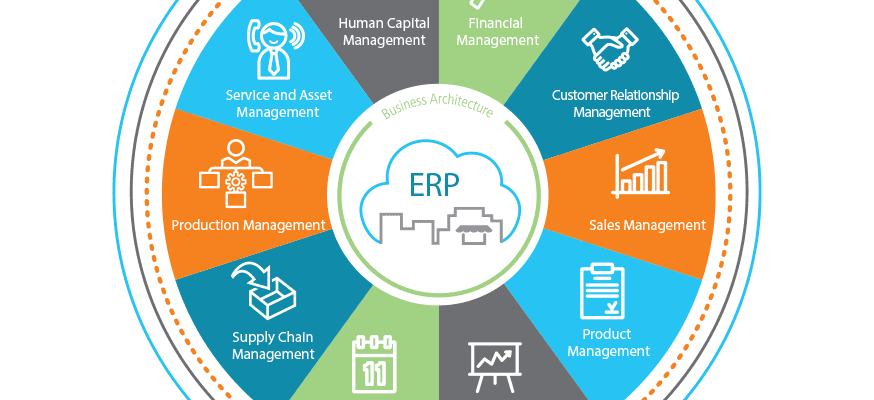
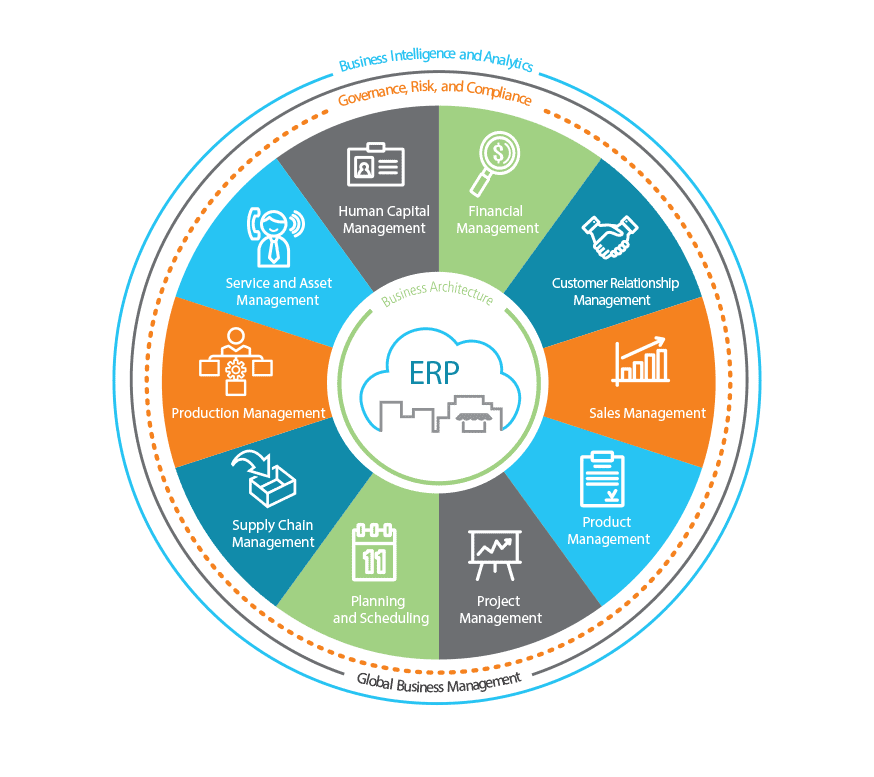
Epicor designs and builds its enterprise applications from the ground up using state of the art connected systems architecture, referred to as the Epicor Business Architecture. A connected systems focus was chosen because enterprise resource planning (ERP) systems thrive as high-performing, approachable services that connect people, systems, and processes. Business strategy today is tightly coupled with technology strategy, and technology is partly responsible for shaping the culture within a company that ultimately drives competitiveness.
Table of Contents
- Epicor Internet Component Environment (Epicor ICE)
- Epicor Business Architecture
- Epicor ICE User Experience
- Epicor Everywhere Framework
- Information Worker
- Business Activity Query
- Epicor Portal
- Business Process Management and Workflow Management
- Web 2.0
1. Epicor Internet Component Environment (Epicor ICE)
Epicor separates the design and development of the technology platform from the production of the applications themselves. The tools and frameworks that comprise the Epicor platform ensure users have a consistent experience across the system, allow for collaboration with ERP constantly in context, and provide the ability to create an optimized ERP experience. This unique blend of tools and technology is called Epicor ICE.
Epicor ICE is the business architecture that underpins the Epicor enterprise business software and offers a true service-based Microsoft .Net architecture with SQL Server Optimization. This agile technology enables business process and builds on an already complete and robust framework. The toolset is helping our customers to both use and enhance Epicor applications at a business level—rather than a technology level—with minimum overhead. Epicor ICE addresses a number of key needs required by modern enterprises, including:
- Flexible deployment options—in the cloud or on-premises
- Service-based architecture
- High-end scalability
- Web Access Framework
- Windows forms, web forms, and mobile device forms
- Built-in customization engine
- Comprehensive BPM Platform
- Embedded dashboards
- Connected people, systems, and processes
2. Epicor Business Architecture
Epicor ERP is built using a service-oriented architecture (SOA). Epicor business architecture includes several core components businesses of all sizes can leverage towards streamlined operations and performance management. They include:
- Epicor ICE
- Epicor Everywhere Framework
- Information Worker
- Business Activity Query
- Epicor Portal
- Business Process Management and Workflow Management
- Web 2.0
- System Tools
- Service Connect
3. Epicor ICE User Experience
Epicor ICE delivers user interface (UI) options that are at once easy to use, rich and intuitive, and give users choice in deployment and experience. Unique technology within Epicor ICE offers the ability to have multiple user interfaces interact with the same SOA-based business logic simultaneously including a “Smart Client,“ a Web browser-based Client or Microsoft Office applications. All UI options are intuitive, flexible, aesthetic, and promote user productivity. Comprehensive features include:
- Mobile workers
- Personalized keyboard shortcuts
- Tool tips
- Simplified navigation
- User-defined searches
- Comprehensive cut-and-paste
- Transaction visualization
- Advanced grid management
- User-based translation
- Styling and themes
Active Home Page
The Active Home Page offers an intuitive experience for users with favorites, social streams, and custom links to other applications, and it delivers key indicators needed to help prioritize the day for optimum efficiency and satisfaction.
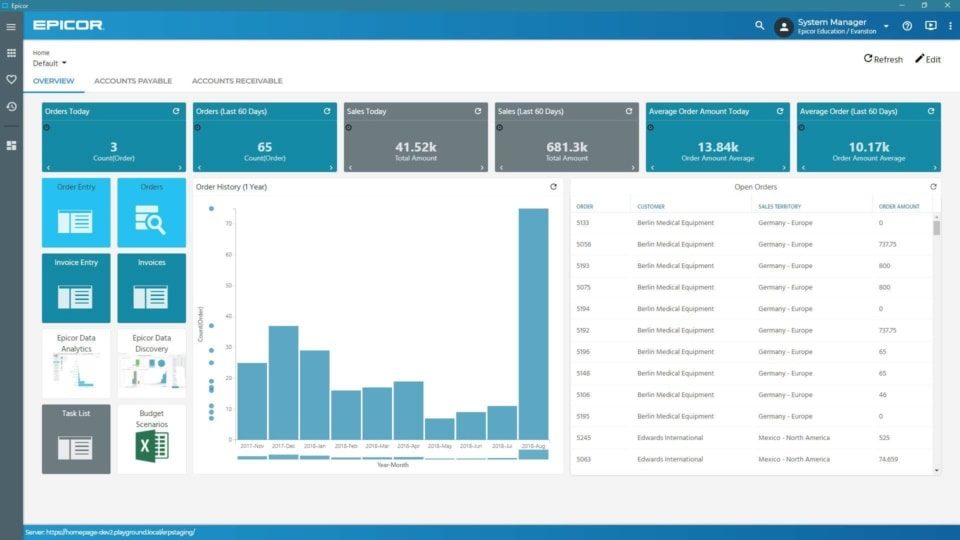
Active Home Page— Built on the Epicor Kinetic Framework, the Active Home Page offers a user experience that is both intuitive and visual for optimum productivity.
Personalization
Personalize the way in which all forms look for users—including how many forms are viewable, tab order, fonts, colors, menu shortcuts, tree view, hide panels, change grid orders, and whether specific interaction dialogs should be suppressed.
Customization
For businesses looking to tailor ERP to match unique business practices, Epicor ERP offers an embedded customization layer that saves modifications to forms based on Visual Studio .NET. Business tailoring includes multiple editions of any form, add user fields, add dynamic user-defined field, add user logic, add sheets, add Microsoft Visual Basic® .NET or C# code, hide fields, and make fields mandatory. Modifications are upgradable as they are held in the data layer, reducing the impact on upgrades and potential version lock. Managing modifications is greatly simplified with the use of a Solution Manager where modifications can be bundled together and managed.
4. Epicor Everywhere Framework
Today many enterprise applications are being rewritten to support mobile devices and browser-based clients, which provide easier more convenient access to business information and easier deployment. These clients are generally considered “zero-footprint“ or “thin“ clients. Rather than rewriting application forms to support mobile devices and the Web, the Epicor Everywhere Framework was developed. This unique technology stores all client business logic as tagged XML metadata. This permits Epicor applications to run as smart clients or Web clients or on mobile devices, all from the same source code. This framework also ensures that user customizations and personalization remain intact, whatever the UI.
For example, users can customize smart client forms to meet specific business needs and then simply re-generate the form’s metadata and output it as a Web form with all customizations included. ICE delivers a new usability feature whereby a Web user has the option of switching to the Windows smart client for certain forms, thereby running a hybrid application designed to improve performance and user flexibility. In addition to this key feature, Epicor ICE introduces “Group By” and Personalization” functionality for Epicor Web Access forms similar to that found in the Windows client version.
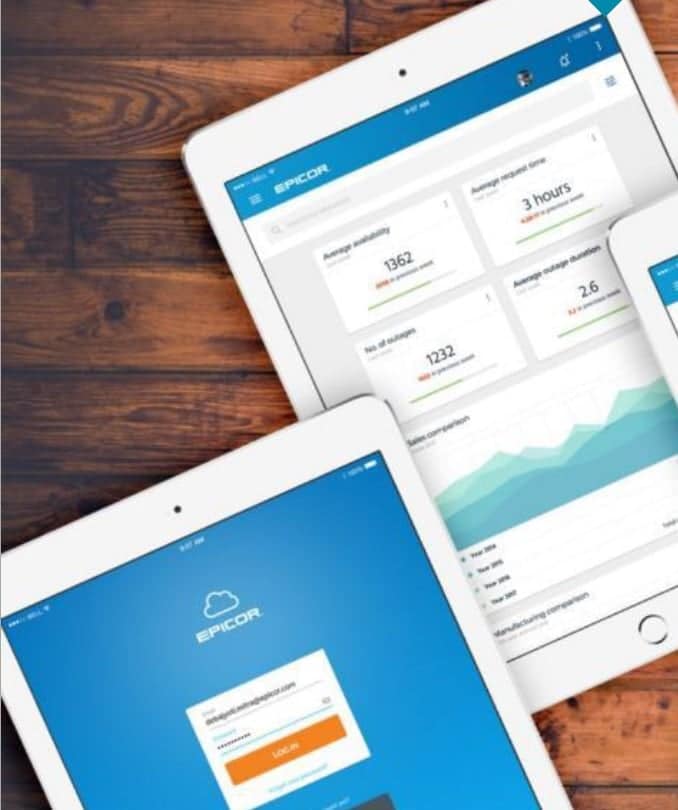
Epicor ICE supports the generation of asynchronous JavaScript and extensible markup language (AJAX) Web browser-based forms from existing Windows forms (C#). For added flexibility Web forms can be accessed from different mobile devices and browsers, including Microsoft Internet Explorer®, Mozilla® Firefox® or Apple® Safari® and can run on any operating system, including Windows, UNIX, Linux, or Mac®.
Mobile Access framework
In Epicor ICE, the Epicor Everywhere Framework™ has been extended to support mobile dashboards which are rendered as Web applications that may run on a number of mobile devices including BlackBerry® and iPhone™. Since the mobile dashboards that support Epicor Mobile Access are built using dashboard technology and Updatable BAQ technology, it is simple to create Web applications that implement business functionality on mobile devices. Epicor 9.05 ships with sample mobile forms that can be copied, modified, and customized to meet specific business requirements.
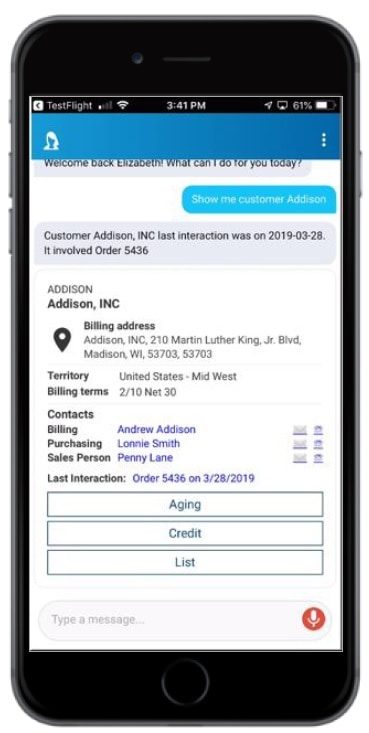
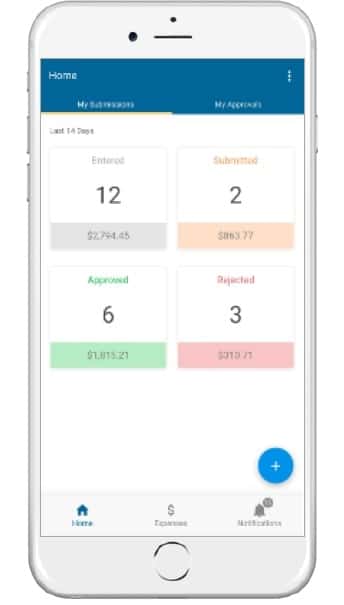
The Epicor Mobile Framework (EMF) was developed at Epicor as a new user experience to meet the needs of a wide range of applications across the Epicor portfolio. It offers a flexible and responsive platform that supports modern HTML5-compliant browsers. EMF is responsive, as forms can be displayed in full size on a browser, but they can also be resized for mobile use. Some examples of mobile applications built using the EMF include:
Mobile CRM
Epicor Mobile CRM empowers your salesforce by providing mobile access to the entire CRM suite of capabilities on any iOS™ or Android™ device. You can manage the sales cycle from lead to order shipment—anytime, anywhere.
Epicor Mobile Access
Epicor Mobile Access supports mobile dashboards that are rendered as web applications that may run on a number of mobile devices—including iOS or Android. Since the mobile dashboards that support Epicor Mobile Access are built using dashboard technology and updatable BAQ technology, it is possible to create web applications that implement business functionality on mobile devices. Epicor ships with sample mobile forms that can be copied, modified, and customized to meet specific business requirements.
Epicor Data Discovery
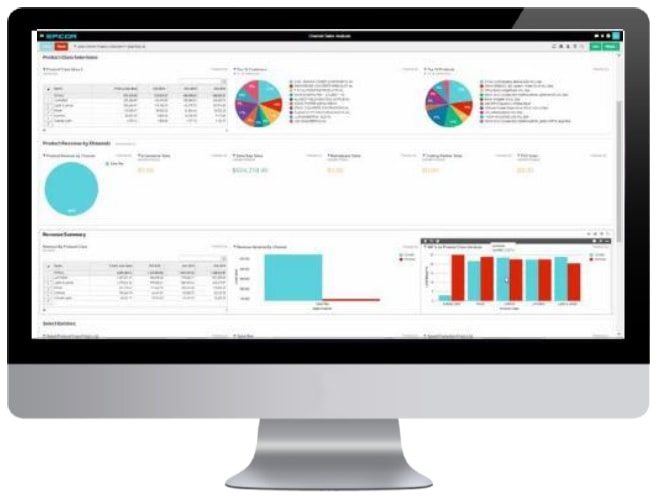
Built to extend the existing Epicor dashboard capabilities, Epicor Data Discovery (EDD) is part of the Epicor data platform that enables Epicor ERP users to access greater visualization and self-discovery tools for their existing and growing library of dashboards and BAQs. EDD is an analytics solution intended to provide an easy-to-use data exploration and data visualization experience, and it is a major component of the overall Epicor data platform—which encompasses a broad set of capabilities for managing, accessing, sharing, cleansing,
Web Access framework
Rather than rewriting application forms to support mobile devices and the web, we’ve developed the Web Access Framework—a unique technology that stores all client business logic as tagged XML metadata. This permits Epicor applications to run as smart clients or web clients or on mobile devices—all from the same source code. This framework also ensures that user customizations and personalization remain intact—whatever the UI. Web forms can be accessed from many different browsers, and for added flexibility, web forms can be accessed using most popular browsers—including Microsoft Internet Explorer®, Microsoft Edge®, Mozilla® Firefox®, or Apple Safari.
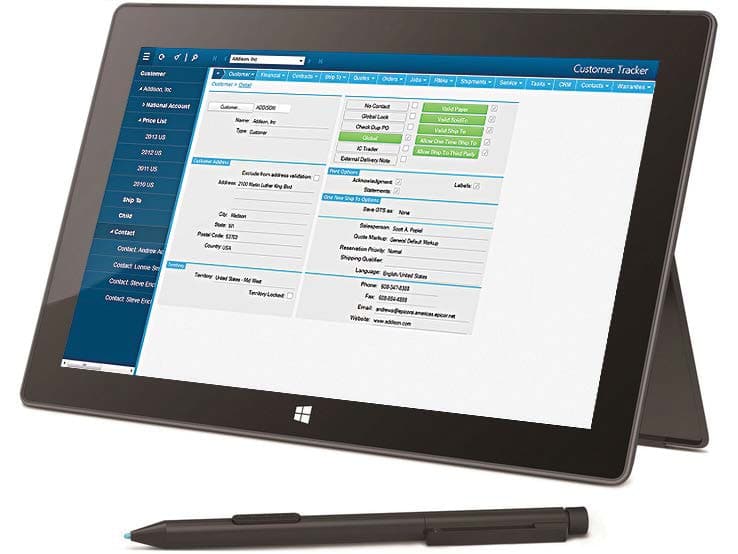
Web Access Framework—Web Access provides a rich user experience over the Web.
Smart Client
Epicor takes full advantage of Microsoft’s .NET smart client technology to deliver an easy to use, rich user experience in a traditional local client environment. Smart clients are easily deployed and managed client applications that offer users a powerful interactive experience—an experience that takes advantage of local resources to connect intelligently to distributed data sources. Business workers can take advantage of increased opportunities to extract, consume, analyze, and distribute information to help create new products, expand into new markets, streamline business procedures, and provide better operational control. The Epicor smart client delivers the rich functionality that users expect, including tear-off sheets; user sizeable screens; navigation trees; non-modal forms; publish and subscribe; advanced searches; drag and drop attachments; drill-down navigation and exploration; and HTML online help and tutorials.
Unlimited Comments
Enter unlimited comments throughout the system.
Keyboard Shortcuts
Personalize keyboard shortcuts for all functions.
Tool Tips
Provides for user-controlled (on or off) fly-over text-based tooltips.
Indication of Attachments, Memos, Audits, Etc.
This feature makes it visible to users when memos or attachments are present.
Open With
Simplify navigation throughout the system with “open with.“ Right-click on any field to highlight all related areas of the system that can be accessed. Powerful publish and subscribe technology automatically associates all open forms together. Changes in one form affect the information the subscribing forms show.
User-Defined Searches
Define searches in all parts of the system. Search criteria can be saved and reused in the future. Auto-load searches can be applied to forms so the search is automatically applied when the form is opened. Auto-search can be applied so that when a form is opened, the search screen is automatically opened.
Cut-and-Paste
Cut-and-paste information to and from all areas of the system and other applications (e.g., rows can be cut and pasted to and from Microsoft Excel).
Transaction Visualization
View all transactions within a user-defined tree structure, allowing users to pinpoint information even in the largest of transactions.
Form Worksets and Navigation
Select multiple records to work with during a session. Move forward and backward within the set. Go straight to a particular record. Save to work with it later or e-mail to a colleague to process.
Advanced Grid Management
Freeze multiple areas of a grid vertically or horizontally so multiple areas of a grid can be seen simultaneously. Multitiered “group-by“ functionality quickly makes sense of large amounts of data. Sort multiple grid columns.
Personalization
Personalize the way in which all forms look for users; how many forms are viewable; tab order; fonts; colors; menu shortcuts; tree view; hide panels; change grid orders; interaction dialogs (e.g., suppressing alert questions like, “Are you sure you want to delete this record?“).
Customization
Do everything available in personalization. The customization engine is based on Visual Studio .NET. Build multiple versions of forms; add user fields; add user logic; add sheets; add Microsoft Visual Basic® .NET code; hide fields; make fields mandatory. Layered customizations ensure no impact on upgrades.
Customization Wizard
Customization wizards are available to streamline the use of the customization and personalization engine. This ability allows “visual behavior“ for a field or set of fields and can be extended to include the setting of behaviors for fields in any defined view based on complex comparisons.
Dynamic User Defined Fields
Supports a range of user-defined fields in all primary tables in the database. The Epicor schema can be extended via customization to include any number of additional user-defined fields against such tables thus allowing unlimited growth in usage of these fields which may be used for both customer installations and for Epicor localizations.
Localization
Localization refers to the fact that Epicor is designed for global-ready applications. Epicor utilizes Microsoft’s standard transactional format assemblies to ensure that resources that require localization and translation have been separated from the rest of the application’s code so that source code need not be modified during localization. To enable this, the Epicor ICE customization engine has been extended to include a separate localization layer. Creating a separate framework localization layer makes version migration easier for customers and localization partners and provides an area within the framework and application for the development of local addons which go beyond the needs of the base application.
External Update Method Added to All Business Objects
An external update method (UpdateExt) is available on all transactional business objects to support bulk updates via integration engines such as Epicor Service Connect. This method implements the functionality previously incorporated in the Epicor Web Service Update method to accept a complete dataset containing hierarchical data and multiple records and to call the base Update method of each business object repeatedly for each row in the dataset and for all records in the dataset. Since all processing is conducted on the server within one login session, the use of this method eliminates much of the latency within the Web services and improves performance for bulk updates.
Styling and Themes
Styling offers complete control over the look and feel of the entire user interface. It works by letting users define the look of each item within the interface—buttons, checkboxes, fields, etc. Because themes can be deployed for a company or plant, multi-plant and multi-company deployments can set their unique theme for easy recognition and brand loyalty.
5. Information Worker
According to current industry surveys, desktop productivity tools are used by 95% of business workers, with Microsoft Office as the standard for desktop applications. Epicor Information Worker provides a secure, seamless interface to the Epicor application from within Microsoft Outlook, Microsoft Excel, or Microsoft Word, blurring the lines between enterprise software and desktop productivity software to create a single immersive solution. Imagine the productivity and business visibility gained by using Epicor Information Worker as an interface for both traditional and non-traditional Epicor users.
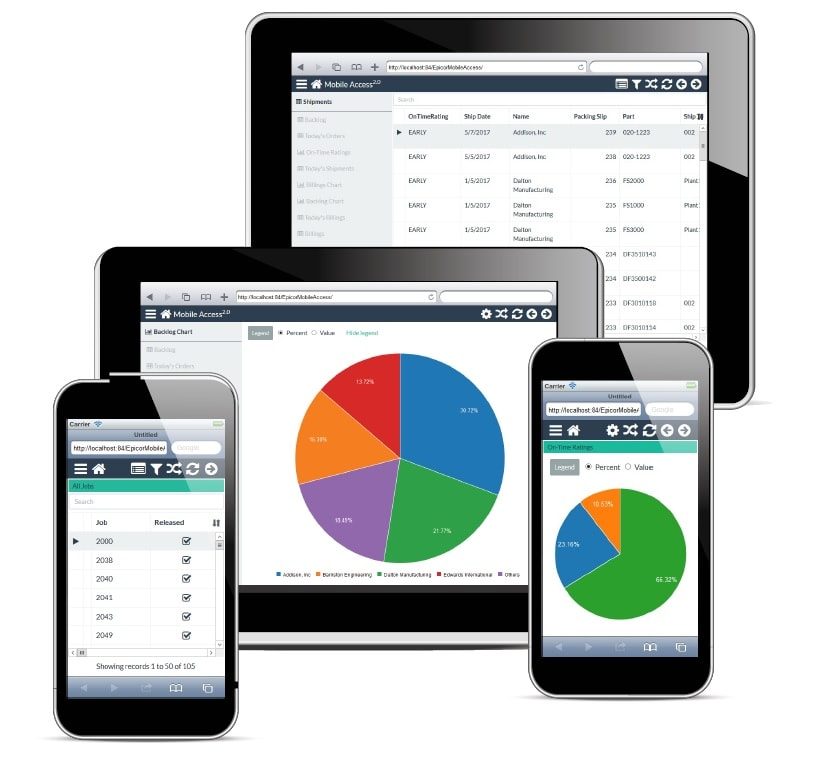
Epicor Mobile Access—Epicor Mobile Access fr the Information Worker offers anywhere access to any Epicor ERP dashboard, including updatable capabilities to promote greater productivity.
With changes in ICE, the underlying architecture provides direct access to Updatable BAQs. Information Worker also is able to call Epicor Web Access forms as well as smart client forms from the Information Worker menus.
Extend the Reach of Epicor Applications
Many business workers simply don’t need to utilize all the powerful features of their Epicor applications, but they do need access to the data. Epicor Information Worker allows authorized users to retrieve, view, and modify Epicor data. Epicor application licenses are utilized efficiently—minimizing the licensing impact on an organization and easily allowing more users access to the Epicor solution.
Work in Context, Online, and Offline
With Epicor Information Worker, users no longer have to leave what they are currently doing to get the data they need. Simply download the data directly into the Microsoft Office application. With a few clicks of the mouse, add Epicor contacts, tasks, calendar items, and other data into Microsoft Outlook lists. Outgoing and incoming customer emails can be automatically logged as calls. Customer, supply chain, manufacturing, and customer relationship management (CRM) data are all available online or offline.
Support Customer Relationship Initiatives
Epicor Information Worker can help businesses exceed customers’ expectations. Customers will be impressed with how well everyone in the organization knows the details of their account anywhere, anytime. From the sales organization, customer service workers and business executives—everyone in the company—can easily retrieve and update information within Microsoft Office while at work or on the road. The powerful combination of Microsoft Outlook, Word, Excel, and Epicor data empowers all business workers to offer informed and responsive customer service, which translates to higher customer satisfaction.
6. Business Activity Query
Every business needs an intuitive and easy to use query engine, and for this Epicor created business activity query (BAQ), which allows users to create personalized queries or to copy standard queries. Once the query is created, it can be used throughout the application—to generate Crystal Reports, for quick searches, to support Portal views, or to view results in a Dashboard. Epicor BAQ lets users create queries that display the data they need, when they need it. Complete functionality includes:
- BAQ design wizards
- Graphical table links
- Embedded calculations
- Multiple data views
- Analyze/test query tabs
- Updatable BAQs
- External BAQs
- Configurable dashboard applications
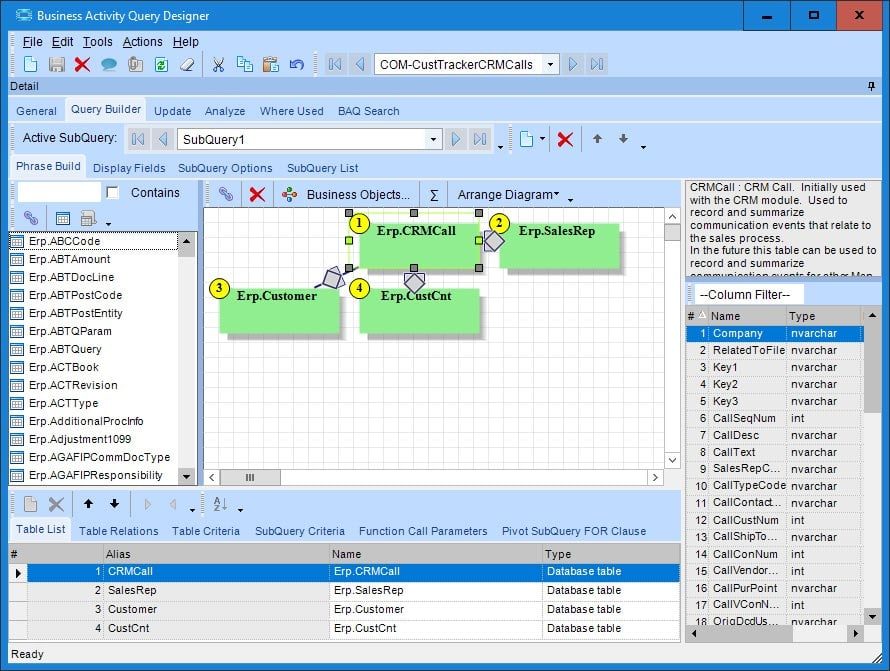
Business Activity Query—The BAQ Designer provides many easy to use features for
creating business queries.
Easy to Use Wizards
The BAQ Designer includes easy to use wizards to help users define a query—or they can create the query free-form. The BAQ can be accessed from various parts of the application.
Graphical Links
A graphical display for table links.
Use of Temp Tables and Variables
BAQ includes the ability to use temp tables and variables in a query. This is especially useful for BPM.
Calculations
Embed calculations within query data for rapid reporting and use throughout.
Views of Data
Create multiple views of standard system information for rapid reporting and dashboard generation. Also, allow multiple instances of a single table.
Easily Analyze and Test Queries
In addition to providing a visual presentation of the query being created, the BAQ designer also provides tabs where users can analyze, test the syntax, and run the query to confirm the query is correct before it goes into production. There is also a tab to display where an existing query is being used— dashboard, quick search, or dynamic report. The BAQ designer provides all the tools they need to quickly and easily create queries that return the relevant data they need.
Updatable BAQ’s (UBAQ)
The ICE platform and the BAQ designer has been extended to support updatable Business Activity Queries (UBAQs). The query designer supports both the ability to update the database via the new External Update method or, to update via a BPM directive which in turn may call a Service Connect workflow for complex updates. In either case, the update is performed through the framework business objects thus protecting the integrity of the data. The UBAQ is supported in both dashboards and in the Mobile framework. UBAQs are enabled for a user via User Maintenance as “Advanced BAQ Designer.”
Dashboard Applications
The Dashboard designer provides a standardizes user experience and supports UBAQs. While the dashboard designer can run dashboards in interpreted mode, UBAQs are only available when the dashboard is deployed as an application or as a mobile dashboard. When configured with UBAQs, the dashboard behaves in much the same way as a delivered Epicor form thus allowing the user to construct dashboard applications that streamline the business process.
7. Epicor Portal
It is essential to have current enterprise data at users’ fingertips to make the decisions that drive a business to success. But sometimes important business decisions need to be put on hold because users have to wait for someone else to get them the data they need to make those important decisions. Epicor Portal can help by providing the framework and tools that allow users to gather and share enterprise data without having to depend on others. With Epicor Portal, users can get the information they need from the enterprise system when needed, without having to wait in line.
Reduced IT Burden, Secure Data Access
Epicor Portal moves the function of gathering and publishing data out of the hands of IT and into the organization for easier collaboration and knowledge sharing. By leveraging Microsoft SharePoint products and technologies, the industry-leading portal infrastructure, Epicor Portal is able to provide the rapid deployment of a secure and collaborative portal environment that reaches across the enterprise. Epicor Portal provides a management console where roles and security settings are maintained. Admins and managers determine exactly what portal users can do by creating specific security settings for every Epicor Portal content consumer or group.
Ease of Use
Epicor Portal includes the Epicor Administration Console which is used for specifying data sources and maintaining roles and security settings and the Epicor Portal Explorer, an easy-to-use data visualization tool which allows end-users to intuitively create data views without any knowledge of the underlying database or querying language. The Epicor Portal Explorer is a personalized workspace to build, edit, preview, and export data views. Epicor Portal Explorer runs within Microsoft Internet Explorer and can be accessed from any computer that can connect to the Portal server.
Improve Collaboration and Increase Productivity
Epicor Portal allows users to build specific content within a portal and make that content available for use throughout an organization. The ability to provide this level of information access will boost productivity and improve collaboration between people, departments, and divisions. Additionally, Epicor Portal can provide secured enterprise data access to outside entities such as partners, suppliers, and customers for added visibility and business opportunities. Once Epicor Portal views have been created, they can be published as Microsoft SharePoint Web parts for use by any qualified user. Users are able to access business data either through the Epicor Portal Explorer or Microsoft SharePoint. Data discovery and visualization within Microsoft SharePoint empowers information workers and other stakeholders to build and share business data and events in addition to performing ad hoc online queries.
Integration with Sharepoint Business Data Catalog
Integration with SharePoint Business Data Catalog enables Office SharePoint Server 2007 to surface business data from back-end server applications without any coding. Business Data Catalog bridges the gap between the portal site and business applications and enables users to bring in key data from various business applications to Office SharePoint Server 2007 lists, Web Parts, search, user profiles, and custom applications.
Take Action Immediately
Epicor Portal allows companies to do much more than simply view business data—it allows them to take action. With Epicor Portal, users may create views that allow users to create new or update existing business data without having to open the application. For example, a bunsiess might want to allow customers to create an order that will go directly to the ERP system without anyone else touching it. This acceleration of information delivery-decision-action process can improve the responsiveness and performance of an entire organization.
Unified View of Your Organization
Epicor Portal enables transparent and secure interaction with Epicor applications throughout the organization. Additionally, non-Epicor data sources can be incorporated into security and data discovery wizards to provide an integrated view of the business.
Epicor Portal Customer Content Pack
Improve business efficiency by extending traditional boundaries for doing business with customers. The Epicor Portal Customer Content Pack provides interactive customer-facing content that supports strategic goals for improved customer communication and direct collaboration on day-to-day business, right from a company’s Web site. Additionally, customers enjoy 24×7 self-service and can access, review, and make online requests for quotations. The Epicor Portal Customer Content Pack is designed to deliver the information customers are looking for; open and closed orders, shipments, RMAs, invoices, credit memos, payment history, service calls and more. Customers are becoming more demanding for information. Use Epicor Portal’s flexible environment for further defining the content to which customers have access and securing it based on the customer and what you want them to see. Customer-focused businesses can provide the details customers are looking for without taxing internal customer service resources. With Epicor Portal, customers can drill into the details to which you give them access. For companies looking to take new opportunities electronically, customers can submit a request for quotes with quote details electronically. Behind the scenes, the Epicor solution will accept these details and automatically generate a quote with appropriate tasks and follow-ups to complete. The Epicor solution is updated the same as if someone was sitting in the office entered the new quote, including business-specific quoting workflows, approvals, and automated e-mail communication.
Epicor Portal Supplier Content Pack
Improve business efficiency by extending traditional boundaries for doing business with suppliers. The Epicor Portal Supplier Content Pack provides interactive supplier facing content that supports strategic goals for improved supplier communication and direct collaboration on day-to-day business, right from the company Web site. Suppliers enjoy 24×7 self-service and can access, review, approve purchase orders and changes and submit pricing in response to RFQs.
Real-Time Collaboration with Suppliers
The Epicor Portal Supplier Content Pack is designed to provide real-time collaboration with suppliers on current business and drive new efficiencies and performance in a supplier network. Communicating electronically and in real-time with suppliers reduces lead times and improves responsiveness to customer’s demands. Suppliers can approve and reject purchase orders and purchase order changes electronically as well as respond to new pricing requests. Behind the scenes, the Epicor solution automatically responds to supplier input, improving buyer response to estimators request for quotations, and more.
Secure Content Delivery
Suppliers have the information they need when they need it; freeing up buyers to do more important things than making phone calls when purchase orders become late and answering supplier questions about delivery, payment and more. Use Epicor Portal’s flexible environment to define the content access and securing it based on the supplier and what you want them to see. With Epicor Portal and the Epicor Portal Supplier Content Pack, suppliers can drill only into the details to which you give them access.
8. Business Process Management and Workflow Management
Epicor takes into account the real-life circumstances that define the complex and dynamic business environment, both during the planning and the actual process. Embedded within Epicor applications is a comprehensive and flexible workflow solution that gives you the tools you need to respond quickly to critical business requirements. The workflow facilities available within Epicor enable you to quickly begin managing and automating even the most complex business processes, including working toward ISO certification. Epicor Workflow Management is comprised of five major components: Task Management; Workbench Views; Business Activity Management (BAM); and Business Process Management (BPM).
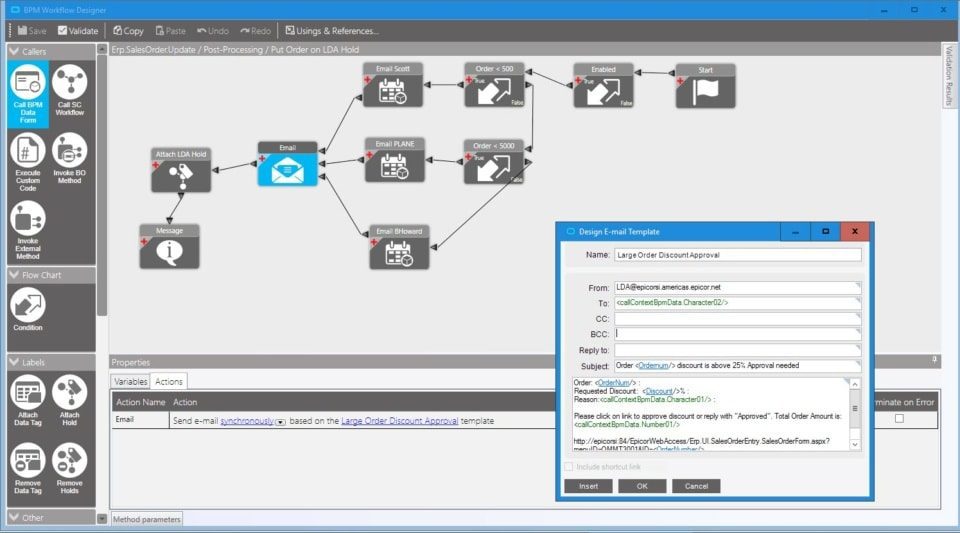
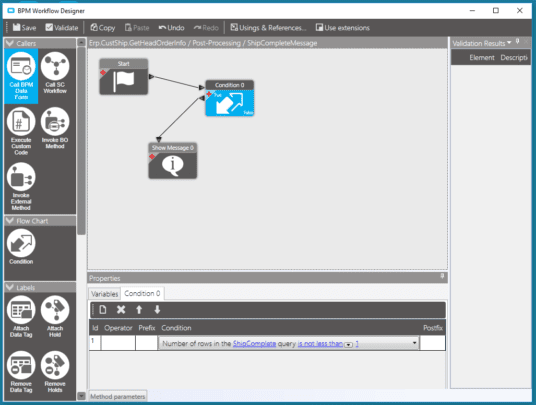
Business Process Management—Build new controls and validate easier with BPM.
Task Management
Systematically automate and execute routine processes using a set of tools provided by Epicor. The inherent systematic nature of processing tasks via these tools contributes to the speed, consistency, accuracy, and ability to document procedures for regulatory compliance. Multi- and Single-Tiered Task Management Define workflow processes which key transactions must follow for completion. Tasks may be a single step process, or they may be a series of interlinked processes involving many different parties. Create custom workflows specific to your business using task sets. Such task sets may define a single step process or a series of interlinked processes involving many different resources. These task sets can contain Multilevel tasks, milestones, mandatory tasks, and alternative routes.
The Epicor Task Management system allows you to connect your people with processes and the ERP system itself. As business processes become more complex and dynamic, it’s important for any enterprise application to recognize situations and help drive people toward the right efforts and the right decisions. Complete functionality includes:
- Multi- and single-tiered task management
- Easily definable tasks
- Electronic sign-offs
- Type-based task categorization
- Definable task lists
- Detailed message log
- Automatic work assignment and routing X Automatic WIP notification
- Automatic alert notification
- Automatic carry-out processes
Task Definition
Define tasks to accurately represent the work to be done within your enterprise. Tasks can be created on-the-fly, or users can select from predefined tasks (e.g., pricing approval, revision update, generate quote) to identify different types of work to be completed. After creating a task, you can assign it to the appropriate employee.
Electronic Sign-Offs
Optionally require password clearance for sign-off on key tasks, providing traceability and adherence to procedures. Task sets ensure that transactions can only be updated if the task set is at the right status.
Streamline
Categorize tasks by type, streamlining assignment and task set generation. Task types are user-defined (e.g., to-do, urgent item, follow-up) and simplify categorization of work.
Task Lists
Specify task lists to each employee, and automatically deliver them to the area where the work needs to be done.
Message Log
Document e-mails and calls regarding the task with a message log.
Automatic Assignment and Routing of Work
Automatically assign tasks using required resources and the context of the transaction. Dynamically assign task sets based on circumstances. The task management system will automatically assign and route the work needed to process the change.
Staying Up-to-Date
Choose to have Epicor automatically send an e-mail notifying key personnel when a task has been created or completed.
Send Alert
Automatically and immediately send an e-mail alerting internal or external resources when key areas of the system are changed. E-mails can be automatically constructed by Epicor, or you can construct sophisticated HTML-based e-mail messages.
Carry Out Processes
When critical information has changed, automatically carry out processes to update other parts of the system.
Workbench and Tracker Views
Epicor provides a series of role-based workbenches to streamline and expedite workflows throughout your company. Workbenches provide a focused, paperless, single entry point from which internal and external users can automate and execute routine processes. Epicor comes with many predefined workbenches including buyers, planning, engineering, inspection, service, sales, credit manager, and plant workbenches.
Business Activity Management
Epicor extends Workflow Management with integral business activity management (BAM). BAM enables you to build simple proactive business rules into any of your system transactions and has four major components:
Change Log
Identify key data areas to track including who, what and when data has been changed.
Alerts
Immediately send an e-mail alerting internal or external personnel when key transactions have been changed. E-mails can be automatically created or you can design sophisticated HTML-based e-mail messages using related information from your database. You can specify e-mail addresses manually, use scripts to identify e-mails based on rules, or automatically derive e-mail addresses based on transaction-specific information.
Execute Processes
Automatically execute a process to update other parts of the system when a key transaction has changed.
Manage Exceptions
Easily activate alerts, enabling you to immediately begin gaining control of potentially expensive exceptions. Epicor includes a library of predefined alerts ranging from “customer credit hold flag changed“ to “employee clocked out early.“
Business Process Management (BPM)
Building on and extending beyond the simple rules enforced by BAM, Epicor Business Process Management is all about identifying and improving processes to make your business more efficient, more disciplined, and better able to adapt to change. Epicor incorporates BPM technology to enable organizations to automate and streamline business processes for continuous improvement. Epicor BPM augments your current efforts of continuous improvement by allowing you to more closely tailor your Epicor solution to reflect the best practices you have developed.Complete functionality includes:
- Seamless integration and workflow capabilities
- Easy-to-use designer with wizard interface
- Pre-process condition builder
- Post-process routine automation
- Customizable base process
Seamless Integration and Workflow Capabilities
When coupled with Epicor Service Connect, Epicor BPM gives Epicor customers seamless integration capabilities with any service-driven application. Epicor BPM automates the delivery of information to customers and suppliers directly from within the Epicor application. As an integral part of the Epicor business architecture, Epicor BPM provides a layer to each Epicor service for applying rules and conditions whether the service is called from a client, another service, or another program. Epicor BPM includes the ability to track data changes within the database and automatically send alerts or print reports when change events occur.
Easy-to-Use Wizard Interface
Epicor BPM provides a Microsoft Outlook-style rules wizard so you can easily intercept Web service methods with Method Directives and add custom logic to perform actions before, after, or in place of a Web service method. Every Method Directive is executed as though it were part of the standard code itself. Epicor BPM will allow the simultaneous update of changed rows to support new BPM method directives and to improve processing performance.
Pre-Process
Epicor BPM allows you to build pre-process conditions that require approvals or other conditions to be met before processing continues. For example: require approval for customer credit limit change.
Post Process
With Epicor BPM you can automate post-process routines such as an Epicor Service Connect workflow that provides integration to an outside system, send an e-mail, invoke a .NET method, execute code, or create a record such as a workflow task.
Base Process
Epicor BPM also lets you replace an existing business service with your own.
9. Web 2.0
Epicor understands the value that mass participation and collaboration, with the Web as an enabler, can bring to a business. Substantial advances and the ongoing maturity of the consumer Web have brought new levels of productivity and self-evident usability to today’s technology consumers. Even the rise in social computing and related technologies has an outlet in enterprise business software, and are manifested in capabilities such as enterprise search and presence. Epicor ICE merges these emerging technologies, often referred to as Web 2.0 with Epicor True SOA to deliver unprecedented support for harnessing the knowledge, rapidly finding information, and taking collaborative actions upon it.
Electronic Commerce Platform
Businesses looking to improve customer service, reduce lead times through new business efficiency, and deliver new opportunities to sales will often invest in eCommerce solutions. Epicor Commerce Connect (ECC) was designed to solve the challenges of manufacturers and their unique needs as they integrate an eCommerce solution. ECC is built on the Magento platform—a leader in eCommerce—with a comprehensive ecosystem and tooling in constant development to enable businesses to stay current with latest commerce trends. Epicor Commerce Connect is also fully integrated with Epicor ERP and offers the synchronization required by most commerce sites while boasting additional capabilities needed by manufacturers—including full integration with Epicor ERP product configuration capabilities. Finally, ECC easily extends to new data elements and provides a platform for eCommerce business growth.
While many companies can provide eCommerce services, very few leading providers are able to deliver the value and rapid results that Epicor Commerce Connect affords. It can extend business boundaries with a proven commerce architecture that connects businesses to consumers, customers, and suppliers—and enables Epicor ERP customers to utilize their websites to help drive revenue, increase customer satisfaction, and grow their businesses.
Enterprise Content Management
Enterprise content management (ECM) supports paperless operations and reduces document control costs by enabling users to easily add documents and retrieve information from nearly everywhere within the system. Epicor ECM delivers essential attachment/document management capabilities by extending them to include use of Microsoft SharePoint (Microsoft SQL Server) document repositories. This means that document versioning is also supported along with the option to integrate to other best-of-breed document management systems.
Drag and Drop Attachments
Epicor supports drag and drop document attachments, document versioning, and advanced document meta-data tracking and searches through attachment vaulting in Microsoft SharePoint. The electronic document is not stored anywhere in the system; just the file location is stored and linked to the business object used in the form. Multiple content management storage options are supported including; SharePoint Document (documents stored in a SharePoint document list), File System Document (documents stored in a defined file system location), Attachment Link (specific document link to a file location), and Collaboration Link (specific link to a SharePoint Document List).
Simple and Secure
Simply drag and drop a document from your secure document repository and the system generates a secure link that can be accessed based on user network security.
Retrieval
Retrieve documents for viewing, editing, or printing by contextually searching within your Epicor application and accessing related attachments.
Document Viewing
Epicor ECM offers support for industry-leading AutoVue™ 2D Professional Desktop Edition and AutoVue 3D Professional
Desktop Edition for viewing of hundreds of file formats. These include technical document types such as 2D/3D CAD and Electronic Design Automation (EDA), as well as business documents such as Office and Graphics. These solutions also include redlining capabilities.
Product Documentation Workflow
Automated product documentation workflow ensures the flow of accurate product documents to the production floor for viewing, redlining, and updating of drawings and other documentation related to the product, process, or material used.
Enterprise Search
Today’s business workers are typically savvy internet users in their personal lives and have come to expect the same sort of access and community in their business lives. By utilizing Web 2.0 technologies and the building blocks of Microsoft Search, such as SQL Full Text Indexing, Epicor delivers Enterprise Search, a Google-like search tool that brings the personal Internet experience to the workplace. Enterprise Search provides embedded search capabilities through tag clouds of Epicor structured data that span all Epicor applications built upon it and extends beyond enterprise data, to unstructured data (Word documents, etc.) if desired, and in a secure manner. Epicor Enterprise Search also supports extensible actions from search results including task-specific actions, internal and external Web service calls and direct links to applications or application forms in context. Complete functionality includes:
- Secure search results
- User-definable searching
- Easily find relevant business data
- Data drill-down capability
- Complete search results in browser
- Epicor Administration Console-Based System Configuration
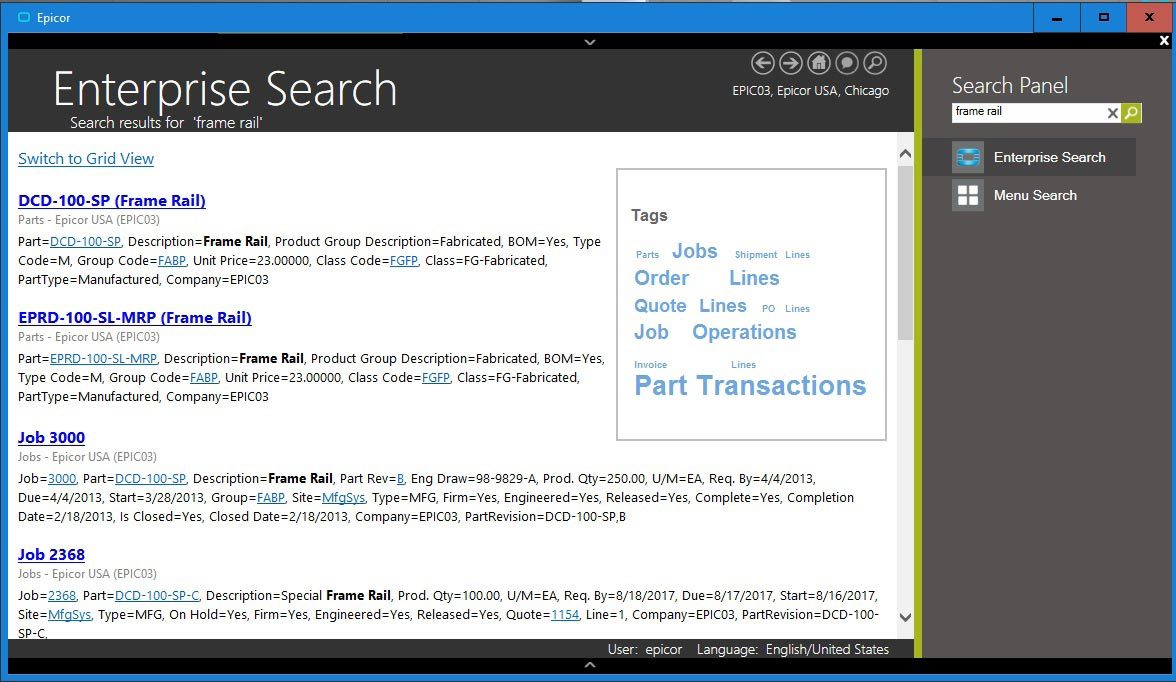
Enterprise Search—Epicor Enterprise Search delivers search options for relevant business information in a format similar to Google.
Secure Search Results
Business workers will be able to search for data that resides within the Epicor application as well as data stored locally, on the network, or on the internet. Application data search results are returned to workers based on access rights—if a user is not permitted to view certain data, it will not be listed in the results. Search results are bound to the BAQ security rules—if a user does not have access to columns, they are not displayed for that user.
Easily Find Relevant Business Data
With Enterprise Search, business workers are no longer tied to traditional ways of accessing information—now they can specify exactly what they are looking for and pick and choose from the result set to see the data. Enterprise Search will
also include the ability to “drill down“ into related data. For example, if you search for a customer, you will be able to see results that drill down into sales orders, invoices, payments, or CRM calls, to name a few.
Get the Information You Need Right from Your Browser
With Enterprise Search, users get the information they need with less input and without having to move from form to form within the application. Enterprise Search allows you to set the sensitivity level so you don’t get irrelevant data.
Enterprise Data Without Utilizing an Application License
With Enterprise Search you get fast, relevant and secure access to all of your information, without utilizing a license. Enterprise Search brings relevant business information to employees and customers in a familiar and easy-to-use setting.
Search Administration and Management
Configuration of Enterprise Search and of the BAQs that populate the search is available in the Epicor Administration Console allowing much easier system configuration.
Social Enterprise
Epicor Social Enterprise (ESE) is a collaboration solution that provides a fundamental shift in the way organizations collaborate around a project, customer incident, quality issue, procurement challenge, or planning event. It enables people to fully engage within their businesses and leverage their ERP data in the process to make more informed decisions. Online social engagement reduces the frequency of company meetings, improves the speed of decision making, and ultimately drives a new level of business efficiency. Fully embedded within Epicor ERP to deliver easier access to business information, ESE fosters cross-company collaboration by bringing social media concepts and contextual ERP information together in a single tool. This allows people to share information with each other—working together to solve problems while building up a knowledge base repository in which good ideas are never lost. Because it is an embedded component of Epicor ERP, users already have the ability to subscribe and unsubscribe to the information relevant to their role in the business. Complete functionality includes:
- Embedded capabilities
- Business notification
- In-context and on-demand
- Activity streams
- Collaboration
- Knowledgebase
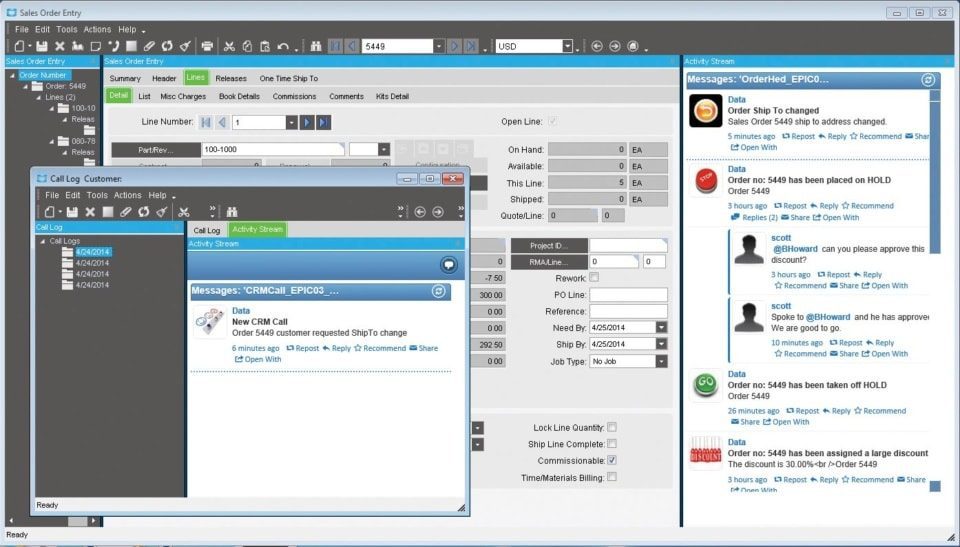
Social Enterprise—Monitor changes using activity streams within an Epicor application.
Subscription Services
Epicor ICE extends RSS subscription capabilities to Epicor application data. This means that business users may subscribe to specific information that they wish to be kept appraised of. One area where this is enabled is within Epicor Portal, where the entire schema of Epicor applications is accessed for end-user query development and Web deployment. By subscribing to a particular query using RSS, users will see information proactively pushed to them when the data behind that query changes. For example, a user may wish to attach an RSS feed to a particular contact at a customer site. Any time something happens to that contact they can receive a note about it. RSS information can be pushed to your container of choice including the RSS Feeds Outlook Syndicated Content (RSS) Directory within Microsoft Office or via Windows Gadgets.
Composite Applications
Enabled by the Epicor Everywhere Framework, Epicor application Web forms generated from XML metadata, and their related linked business logic, can be used in composite application development. Each Web form supports publication and subscription, allowing specific business functionality to be “mashed-up“ with other lines of business developments.
Epicor Portal Mashups
Within Microsoft Office SharePoint Server it is possible to build composite applications that combine various connected Web Parts, such as Epicor Web forms, Epicor Portal Web queries, Epicor EPM analytical Web parts, and more.
Mobile
Enabled by the Epicor Everywhere Framework, Epicor application Web forms generated from XML metadata, and their related linked business logic, can be accessed via mobile device. Additionally, Epicor EPM KPIs can also be deployed direct to mobile devices and include full search capabilities to rapidly find and drill-down to applicable data.
System Tools
Epicor ICE offers a series of system facilities and tools to enable the effective management of Epicor applications, extending to system security, document management, advanced software development, software deployment, and product documentation. System tool functionality includes:
- Centralized administration console
- Comprehensive system monitor
- Email integration
- Separation of Epicor ICE from Epicor Applications
- Multiple system agents
- Extended reporting framework
- Customizable printed forms
- Auto print control
Centralized Administration Console
This feature delivers a single management area for your Epicor system, which removes redundancy and in so doing boosts user productivity, accuracy and efficiency.
System Monitor
Schedule tasks to be run in the background on a one-off or regular basis (e.g., daily, weekly, monthly, etc.). Tasks can be jobs such as MRP or reports and forms. Reports and forms can be frozen at a point in time so the data can be referenced at a future time.
Integrated E-mail
Automatically e-mail employees, suppliers, customers, and partners from the system based on key actions. Attach documents so the recipient need only click on the attachment to drill into the associated transaction.
Separation of Epicor ICE from Epicor Applications
Epicor ICE business architecture is developed separately from Epicor enterprise business applications, allowing each to be modified and updated in separation and potentially under differing release cycles. Epicor ICE framework components have been extracted from application source control and given their own build and delivery schedules resulting in a more robust application development environment that allows staged delivery of Epicor ICE to application developers using the Epicor ICE software development kit (SDK).
Multiple System Agents
ICE gives the ability to run Multiple System Agents. This feature allows customers to set up multiple defined areas for the generation of reports and processes. Application servers can now be located in many different physical servers to distribute the processing load or remain on just a single physical server. Multiple System Agents also allows for greater flexibility in system tuning and security configurations. Epicor also provides the ability to execute reports on alternate databases. A System Agent can be expanded to have connection information for alternate database servers. This allows a user to log in once to a company and run reports using data from an alternate reporting database, thereby offloading reporting overhead from the main transactional database.
Extended Reporting Framework
The reporting framework within Epicor ICE allows optional Server-based printing. This is done via the creation of an Enterprise (or Server based) printing option for users who wish to leverage the associated Crystal Reports, Microsoft SQL Server Reporting Services (SSRS) or other enterprise reporting software. Epicor’s server-based reporting option includes Microsoft’s SQL Server Reporting Services (SSRS). SSRS reports add the capability to e-mail and fax reports in addition to printing from the server or previewing on the client.
Customizable Printed Forms
Access the laser-generated and preprinted customizable continuous forms that are provided with auto-fax and e-mail capability.
Auto Print Control
This feature handles the automatic printing of forms and barcode labels upon the completion of a predetermined list of Epicor transactions. Auto-print control lets you define the events that trigger the printing, rules that define the conditions, and the action to take on a form-by-form basis.
Advanced Print Management
Automate document delivery with Advanced Print Management. Whether e-mailing, faxing, or printing and mailing.
Support for Multiversion Environments
The Epicor ICE framework now provides the ability to define and manage certain master data elements and processes across an environment that includes multiple versions of Epicor solutions.
Automation Tool for Epicor
The Automation Tool for Epicor (ATE) can do everything your users can do in Epicor ERP and is a very efficient way to either run repetitive tasks that may differ only in the selection criteria or run tasks that need to be launched late at night when other users are off the system—like data-intensive tasks such as very large print runs, MRP, etc. ATE can also be used as part of your change management process to test the latest Epicor hotfixes using automated test scripts matched to your business activities and data. Users can easily revalidate results with ATE.
Security
Multi-company Menu
This feature provides secure access to multiple companies without having to close all forms or carry out different logins when switching companies.
Operating System Security
Epicor ICE provides the option for Microsoft Windows Authentication and Windows Single Sign-on and Password Policy.
Method Security
Secure the types of processing users are able to carry out (e.g., allow a user to update an existing part but not add a new part) by user or group.
Data Level Security
Secure which data users are allowed to access. This can be done at a dataset (e.g., all sales order information), data table (e.g., sales order header information) or field level (e.g., sales order due date).
Security Reporting
More closely manage user security with security reporting.
Online Edits and Audits
Monitor all changes to records (before and after values), who made those changes, and when those changes were made. Prompt users for audit notes of why changes have been made.
Date and Time (Using Server Time) and User Name for Auditing
Epicor ICE introduces a true date-time field which involves the creation of a Microsoft SQL Server style date/time data type or data control that can then be used by application developers to easily render local time. All date fields are of this date/time data type and are only stored in universal date format.
Software Development Kit
For those requirements that cannot be satisfied by the embedded customization layers, Epicor also offers an advanced SDK which is available at an extra cost and supplies the client source, framework UI and business logic tools necessary to write your own additions and extensions to the application. The SDK is a toolset used to create new software elements (or modify existing software elements if the adoption of future releases is not a concern).
REST Services
Representational state transfer (REST) services are a type of web service based on the architecture of the internet. Through this application program interface (API), these services link applications more easily through Internet type connections.
These services use the OData REST Protocol, which adds query capabilities and metadata descriptions to enable OData aware applications such as Microsoft Excel, Power BI®, or similar third-party applications to display real-time Epicor data. REST does this by exposing data and functions as unique Uniform Resource Locators (URLs) resources. Applications can then communicate with the REST services in the same way a web browser interacts with a website.
The REST services implement the full functionality of the Epicor ERP business objects. As with any use of the business objects, the services can be used to extract data to other systems and to provide interfaces for data Import and Update, but they should not be used in applications designed to provide transactional functionality that would otherwise require a concurrent user login.
Use the Tools Our Developers Use
Epicor ICE SDK is a packaging of some of the tools that are used by the Epicor development group in the creation of base code. These tools allow a developer to make modifications or extensions to the base application or create new software within the same framework used for the base product. The Epicor ICE SDK allows developers to build their own custom modules and integrate and embed them into the product as though it were part of the base system.
Audit Control
Within the Epicor ICE SDK users can make changes to underlying business processes via the Object Designer. This allows users to tailor the system to meet their needs while at the same time tracking these changes as they represent a functional change to the software application that might need to be tracked for governance and compliance auditing. This is a significant addition to the customization options within the application framework.
Epicor Service Connect
Epicor Service Connect is a powerful business integration platform, functioning as a central integration point for secure workflow orchestrations within Epicor applications as well as external connectivity to Epicor and non-Epicor applications. Because Epicor Solutions are built using Epicor True SOA, the power of Service Connect can be used to streamline processing within the application framework.
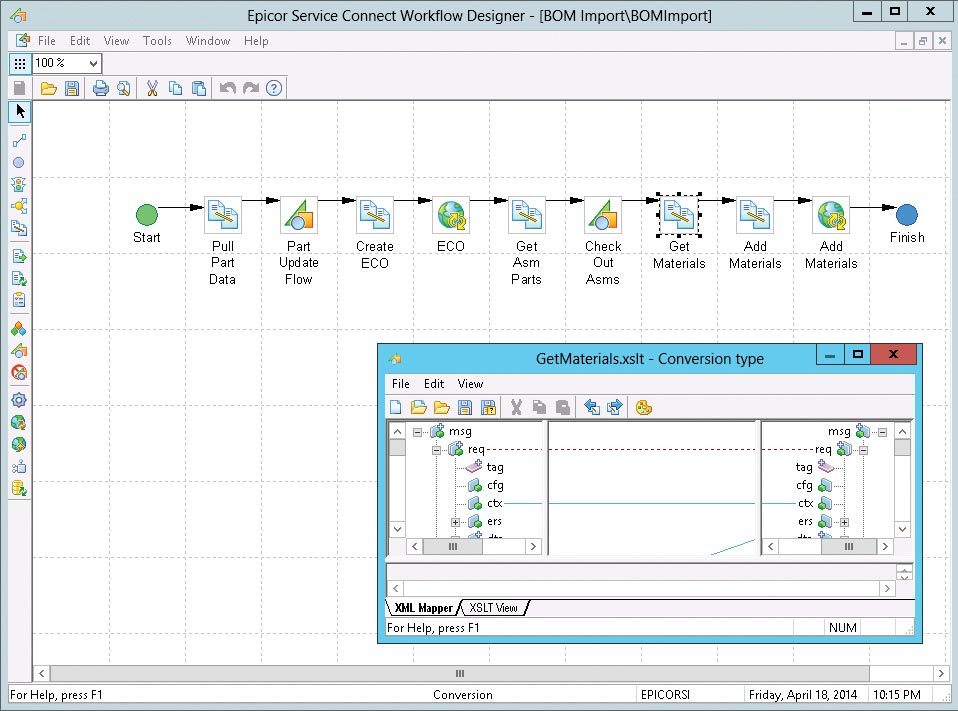
Epicor Service Connect—a rapid platform for incorporating workflow and system orchestration through visual designers with little to no programming effort.
Promote Lean Principles
Users can automate tasks and processes within the application to promote lean principles, continuous performance initiatives and Six Sigma quality within the organization or across the supply chain. Service Connect lets employees focus on value-added activities and management by exception instead of repetitive data (re)entry tasks. Built to support collaborative processes, Service Connect links different business entities, applications or users using open, industry-wide standards and technology that enables businesses to deploy solutions— confident that their investment will remain intact for the future. Service Connect harnesses the openness of XML and includes service-bus functionality for Security, Messaging, Orchestration, Transformation, Scheduling, Notification, and Exception Handling to deliver rock-solid reliability combined with ease of use.
Much More Than A Programming Interface
Typically, the effort to connect different applications requires code for mapping the integration, proper error handling, scheduling, and so on. The aim of Epicor Service Connect is to eliminate this extra coding effort required to integrate an Epicor solution. Epicor Service Connect is more than a tool for integration; it is a platform for rapidly incorporating workflow and system orchestration through visual designers with little to no programming effort. Integrations can be easily built by using the Service Connect Visual Data Mapping tool to link and transform XML documents to map to different systems along multiple communication channels and protocols to support a wide range of integration scenarios.
Secure Audit Trail
Service Connect logs workflow processing for both transactional integrity and compliance. Processes are available for review and tracking while in progress or after the process completes. If for any reason processes error or stop, transactions are rolled back and queued for subsequent correction and resubmit. Notification services can be incorporated into the workflow to alert either the submitting application (e.g., system integration or EDI process) or an administrator.
Direct Database Updates
Epicor Service Connect includes workflow support for Epicor business objects directly in addition to the existing Web service elements. This feature can be used with the UpdateExt method to update full datasets and multiple records in the same way as the Web service Update method processes data. Since the business objects are called directly and within a single login session, much of the latency in Web services can be eliminated.
Epicor Documentation, Education, and Content Delivery
Epicor offers an approach to documentation and content delivery that puts relevant, context-driven information in the hands of stakeholders and end-users. This comprehensive solution set shortens your return on investment while maximizing utilization of your investment in Epicor.
Epicor deploys a worldwide team of dedicated content writers and trainers to bring together the feature summary, online help, technical reference user guides, online training courses, and online tutorials through a single-source technology.
Epicor University delivers a suite of tools, aligning to the different learning styles and needs of your employees. Resources include:
- Training on Demand videos
- Embedded Education self-paced courses X Role-based training agendas
- Course tests
- Live training
- Online help
- System and user documentation
Embedded Education
Embedded Education is a self-paced training module accessed directly within a training installation of Epicor ERP. Users can access more than 100 courses—each with detailed explanations and hands-on exercises. Learners are able to easily navigate between courses and the related application using real-life business data through an Epicor education database. The courses provide a structured and repeatable learning experience for initial and ongoing training. As this is a licensed module, new training comes with each release of Epicor ERP, so users can more easily be trained and ready.
Epicor Compliance and Structured Reporting Framework
The Compliance and Structured Reporting Framework consists of functionality designed to allow the definition, generation, and distribution of electronic documents in formats such as XML, JSON, and CSV. In many countries, there are specific reporting requirements—including electronic accounting, invoicing, and SAF-T reporting—mandated by government agencies that must be generated from the ERP system. Such regulatory requirements can change periodically and rapidly. The functionality is designed to allow definition and distribution of document formats. The functionality also has broad use for generation of document formats used for system integrations and other data reporting applications.
Epicor Learning Center
Your Epicor Learning Center (ELC) allows you to deliver, manage, and track your company’s training needs from one central location. Here, you can access course materials, set and manage employee assignments, register for classes, and track training progress and test scores. The ELC contains a broad catalog of Training on Demand courses and tests. Role-based agendas help you align courses and exams to each employee’s training needs, so they can learn a new topic, prepare for an upgrade, launch a new application, or dive more deeply into current applications. Administrators may view individual test results or aggregate scores across the entire organization to easily track knowledge levels. Best of all, tests are not limited to Epicor content. You can add proprietary questions and tests to the ELC, and then assign and track them as desired.
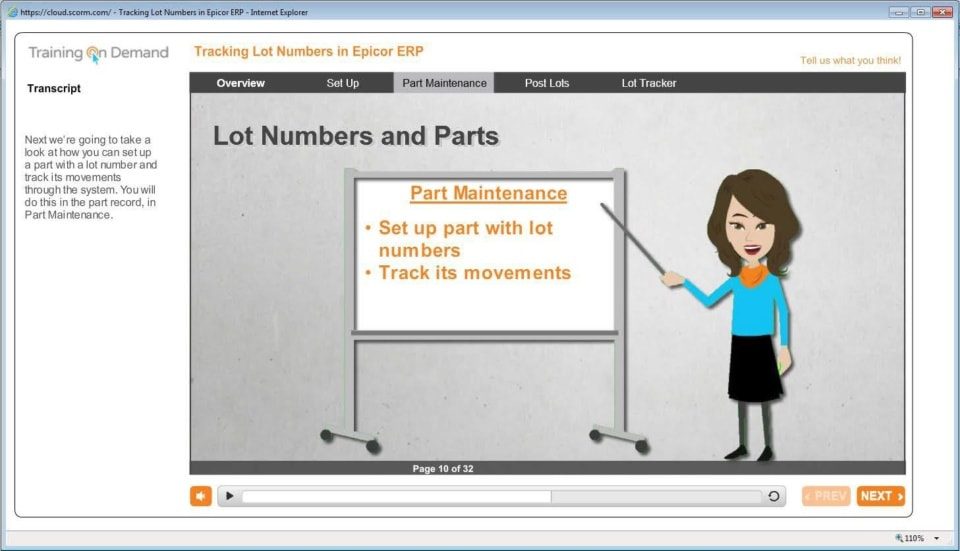
Epicor Learning Center—Epicor Learning Center offers Training on Demand for users for optimum productivity and greater utilization of ERP.
Enterprise Content Management
Enterprise Content Management (ECM) helps your business achieve growth by enabling you to streamline and automate reporting processes, reduce the risk of error, and improve business efficiency. ECM is the technology used to capture, manage, store, preserve, and deliver content and documents related to organizational processes. ECM tools and strategies allow the management of organizations’ unstructured information—wherever that electronic information exists. Complete functionality includes:
- Drag-and-drop attachments
- Secure document repository
- Contextual retrieval
- Multiformat document viewing
- Automated product documentation workflow
- Advanced Print Routing
- Epicor DocStar ECM
Advanced Print Routing
Epicor ERP Advanced Print Routing lets you email multiple recipients in multiple formats, send output to one or more designated printers, or save reports to a network folder in a desired format. With an easy-to-use graphical workflow builder, you can quickly and easily manage reports by filtering and assigning alternative reports styles. Advanced Print Routing allows you to send order confirmations or invoices to customers, generate and submit required financial reports, deliver parts reports
or pick-lists to others, or save critical information to a business archive.
Epicor DocStar ECM
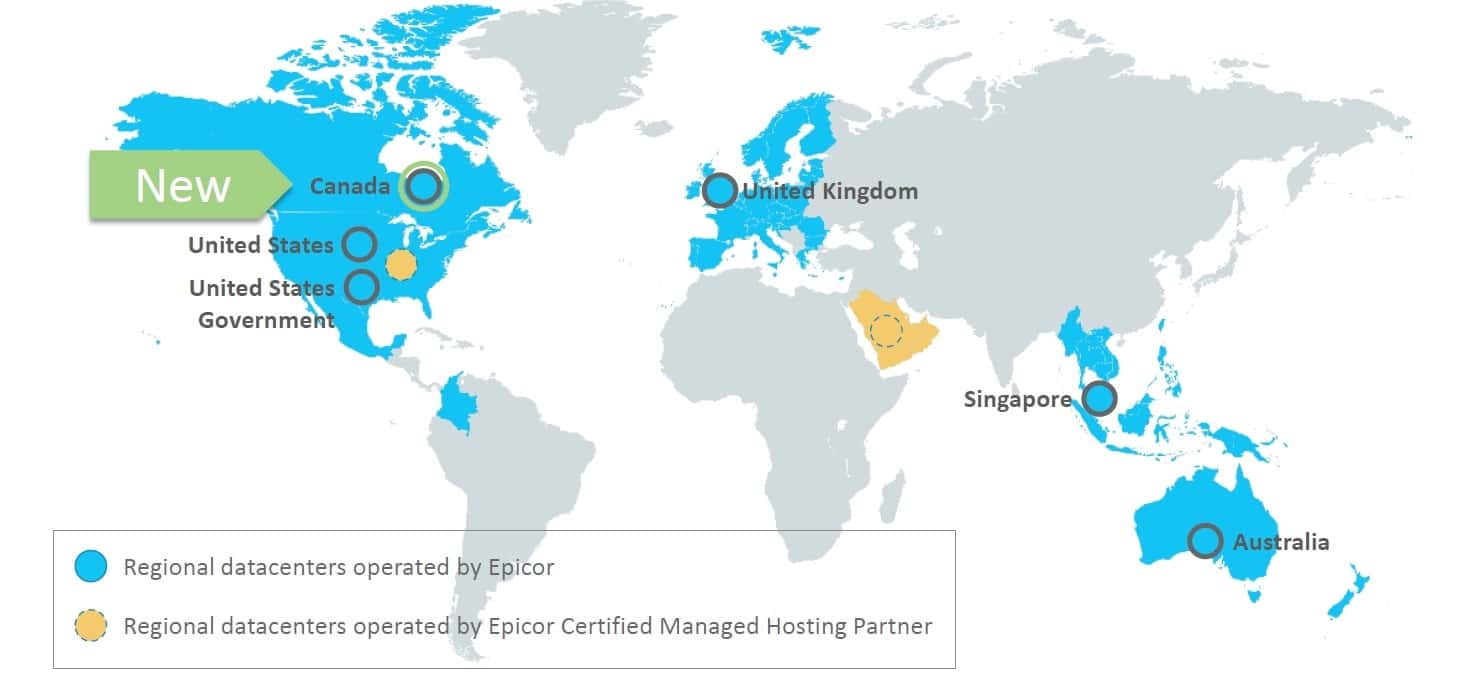
Epicor DocStar ECM is an industry-leading solution that’s built for the web and delivers deployment choice. Users can install DocStar ECM on their hardware or use DocStar in the cloud. The same software offers the same user experience and the same great results. DocStar ECM supports all popular browsers and mobile devices to deliver access anytime, anywhere. Epicor DocStar ECM manages electronic assets with:
- Security
- Audit Trail
- Data Center
- Workflow
- Intelligent Capture
- Custom Forms
- Search and Retrieve
- Document Retention
XML-based Content Delivery
Built on XML DITA technologies, the team pulls information from a unified content library to create deliverables with consistent tone and structure. Creation of deliverables is more efficient, as one writer can seamlessly reuse content generated by another writer, making the creation of deliverables more efficient and thus provide cost savings for both creation and translation.
Feature Summary
Understand the impact of updates to every line of the business. Feature summaries provide comprehensive role-based help that explains business cases alongside impact topics for rapid adoption of new releases.
Online Help/Field Help
The comprehensive online help that is tied to the application functionality they are using reduces frustration from users and optimizes performance.
Intuitive Field Level Help
Epicor ICE offers a “quick“ viewer to display Field Level Help embedded in a Sheet but available to be docked or torn off as an independent window. If docked, then help can be set up with a pinned or unpinned capability that allows it to slide out /slide back when the sheet is activated. The quick viewer also supports Links and provides Rich Text functionality (colors, variable fonts, bold, italics, etc.).
Customizable Help
Users have the option to display help for a specific field where field definitions, field specifications, or both can be added. Epicor ICE provides a “help property“ for each control available in UI customization. When field-level help is requested, the text in the Help property is added or merged into the standard field-level help prior to display. This also allows text to be run through standard translation logic before being merged into standard help, enabling customers and partners to create multi-lingual field-level help.
Layered Help
This feature also allows help to be customized and modified by partners and end-user customers. Help customizations are “layered“ in much the same way that UI customizations are layered. Epicor Help content is used as the base and then can be amended by a partner (or Epicor Custom Programming) using the verticalization or productization layers of the Epicor Layered Client Stack, which can then be further updated by the end customer.
User Guides
Epicor User Guides provides a complete overview of the major functions within Epicor. These printable documents offer full-colour explanations of system functions and walk users through the system, step-by-step. In addition to an application user guide, there are guides on Epicor Business Architecture, user experience and customization associated with the Epicor Business Architecture, and Epicor Service Connect.
Technical Reference Guides
The Technical Reference Guides provide detailed instructions focusing on technical audiences. Epicor offers technical reference guides on scheduling, MRP, product configurator, job costing, and the posting engine.
Embedded Courses
Courses are embedded within the Epicor application to simplify role-based learning and optimize deployment.
Customization Toolkit
The Customization Toolkit allows users to leverage standard content by editing according to their business processes. Users can add annotations to topics on the same tab as the help content. Course content can also be made available for larger deployments with advanced customization requirements.
Contact Us