As we near the Epicor ERP Cloud 10.2.600 Update, here are the important dates and enhancements you should know.

Epicor ERP Cloud 10.2.600 Update Important Dates

  • Tuesday, April 7, 2020, New Kinetic forms are turned on in your pilot environment. Your systems will not experience any downtime during this simple enhancement, and your version will not change. Details can be found in the Epicor ERP Kinetic FAQ for Customers.
  • Wednesday, April 8, 2020 Deadline for Flex customers to submit an EpicCare ticket indicating their preference to defer their upgrade to one of the alternate upgrade dates. This has been extended from April 6.
  • Saturday, April 11, 2020, The new Kinetic forms are turned on in your production environment. Your systems will not experience any downtime, and your version will not change.
  • Tuesday, April 14, 2020, and Wednesday, April 15, 2020 Upgrade webinars are held live, recorded, and posted as documentation. Please plan to join or watch the replay so you are aware of the upgrade process. Registration information will be sent shortly.
  • Friday, April 17, 2020 – Saturday, April 18, 2020 Pilot system upgrade to 10.2.600. During this time, your pilot system will be unavailable while Epicor performs your upgrade, but don’t worry—your production system will not be affected by the new release. Once it is complete, log in to your pilot system and start exploring what’s new.
  • Tuesday, May 12, 2020 Pilot system update to 10.2.600.2 and UBC Opt-In Deadline. The final version that will be loaded into your Production system will be 10.2.600.2, so we’ll update your Pilot environment on this date. Also, if you want Epicor to move your UBCs from your Pilot environment to your Production environment, you must submit an EpicCare ticket to opt into the process. If you do not submit an EpicCare ticket to opt into the process, the UBCs from your Pilot environment will not be moved by Epicor to the Production environment.
  • Saturday, May 16, 2020 – Sunday, May 17, 2020 Production system upgrade to 10.2.600.2. Your upgrade weekend arrives! While Epicor upgrades your production system to Epicor Cloud ERP 10.2.600.2, your system will be unavailable for several hours during this time.

Note that dates are subject to change.

What’s New in Epicor ERP Cloud 10.2.600

A few highlights include:

  • Multi-region Multi-company Cloud Transactions—Accelerate your growth plans. New in 10.2.600 is the ability to connect separate instances of Epicor ERP across Azure datacenters—or even across Azure datacenters to on-premises locations—through multi-company transactions to enable a distributed cloud or hybrid cloud business model.
  • User Experience—Ease of use continues to be a top priority. We’re introducing new personalization tools, enhancing Epicor Functions, and updating visuals throughout the application. You get new file attachment options with Google Drive and Dropbox. And for your mobile time and expense apps, get the ability to edit timesheets and expense reports in offline mode.
  • Epicor Collaborate—Get connected to get it done. Building on the first release of Epicor Collaborates in our last release, 10.2.600 features so much more. Epicor Collaborate will offer custom notifications, multiple channels and groups, filtering options, translation support for eleven more languages, and fit-for-purpose integrations with Epicor Data Discovery, Epicor Virtual Agent, Epicor IoT, and Microsoft Teams.
  • General Enhancements—This release features enhancements throughout the applications, including Epicor Advanced Project Management, Financials for Epicor Data Analytics, four new modules in Epicor Cash Collect, full cloud enablement for Epicor Quick Ship, and more.

How to Prepare Epicor will upgrade your pilot system one month before your production system so you have the opportunity to explore the updates in 10.2.600 without affecting your production system. As a best practice, please use this time to review and make any necessary changes to your Unique Business Components—custom reports, BPMs, User Interface customizations, etc.—to ensure everything continues to operate as expected. If you submit an EpicCare ticket for help with moving your UBCs from Pilot to Production, Epicor will do so for you during the upgrade weekend.

Flexing Your Upgrade Subscribers to the Epicor Public Cloud Flex Option can follow the same schedule, but you have the option to defer your upgrade to Epicor Cloud ERP 10.2.600. Below are the two date options for your flex upgrade.

Epicor ERP Cloud 10.2.600 Upgrade Pilot/Production Schedule

Option 1: Week of Jun 22, 2020

Jul 25/26, 2020

Option 2: Week of Jul 20, 2020

Aug 22/23, 2020

If you choose to defer, you must submit an EpicCare ticket with your selected upgrade date (Option 1 or Option 2) and we will send you a personalized confirmation with your instructions. We must receive your deferral no later than Wednesday, April 8, 2020. If you do not choose to defer, we’ll keep you on cadence and automatically upgrade your system in April 2020.

Note: If you choose to defer your upgrade, you will not receive any 600.x updates after the 10.2.500.10 update, but you will continue to receive any planned Kinetic form enhancements that we turn on during the Flex period. We only host the upgrade webinars on April 14 and 15, but replays are accessible at any time afterwards as documentation on EpicWeb. If you defer, you are strongly encouraged to either attend or watch the replay so you are aware of the upgrade process.

About the Upgrade Epicor Cloud ERP, 10.2.600 is the first of two major upgrades planned for 2020, as part of our regular cadence and commitment to helping your business grow through innovation. Unlike the more frequent monthly updates that are minor yet enhance your daily experience, major releases like this bring you greater usability, performance, and strategic value in a single upgrade. That’s why we give you advance notice and the opportunity to test and explore the updates in the pilot before upgrading your production system.

Next Steps You are invited to join educational webinars on April 14 and April 15 to learn more about Epicor ERP 10.2.600, how to prepare, and ways to leverage the new functionality for driving business growth. Documentation will also be made available on the Epicor customer portal EpicWeb. And as a reminder, reach out to EpicCare anytime you have a question or need application support.

What’s New in Epicor ERP Cloud 10.2.600 and How to Prepare Webcast Option 1

  • Date: Tuesday, April 14, 2020
  • Time: 9:30 am – 10:30 am CT

What’s New in Epicor ERP Cloud 10.2.600 and How to Prepare Webcast Option 2

  • Date: Wednesday, April 15, 2020
  • Time: 3:00 pm – 4:00 pm CT

We hope you are excited about the innovations coming soon in Epicor ERP 10.2.600.

About Encompass Solutions

Encompass Solutions is a business and software consulting firm that specializes in ERP systems, EDI, and Managed Services support for Manufacturers and Distributors. Serving small and medium-sized businesses since 2001, Encompass modernizes operations and automates processes for hundreds of customers across the globe. Whether undertaking full-scale implementation, integration, and renovation of existing systems, Encompass provides a specialized approach to every client’s needs. By identifying customer requirements and addressing them with the right solutions, we ensure our clients are equipped to match the pace of the Industry.


Epicor Advanced Projects Module addresses the industry need for project-based ERP software with embedded contract management and billing. With this unique tool, you can manage projects, contracts, claims, subcontractors, variations and revenue recognition within one single user-friendly system. Take advantage of a tool that gives you full ERP functionality, including manufacturing and supply chain management, for a complete solution.

Advanced Projects for Epicor ERP

Advanced Projects for Epicor ERP is built in the Epicor development framework and is a fully integrated software solution. Built for businesses that have a need to manage complex contracts and multi-faceted projects within their Enterprise Resource Planning (ERP) system Epicor Advanced Projects is the solution.

Advanced Projects for Epicor ERP is a specialist solution, addressing the challenges of complex contract management in a world-class modern ERP environment. Enjoy a consistent experience while unique business requirements can be easily accommodated within the flexible toolset.

Capture all costs and invoice everything, on time, as per the contract

Many companies involved in the design, delivery, fabrication and construction of major projects need to capture costs on a project for labour, equipment usage, material, expenses and subcontractors. These costs then need to be invoiced based on the agreed contractual billing terms which could be fixed price, progress percentage, quantity-based or a complex combination of all of these. On top of this, these businesses also need to manage retentions, claims and variations, all of which add another layer of complexity to the billing process.

Improve cash flow and forecasting through effective management of contracts and projects

Large, complex projects present a lot more risk to the business. Managing cash flow is critical, and if claims are missed, it impacts more than just the bottom line. Businesses need the visibility to enable them to bill or claim everything they can, at the time they are allowed contractually. This process must be systemised with workflows and automation, to help the Project Managers and Cost Accounting team do their jobs effectively and keep the projects on a profitable track.

Get control of the numerous subcontractor obligations and on-charges

Complex projects are rarely a 1:1 relationship between the customer and the vendor. More often than not, many aspects of the job are contracted out to other companies and this web of multiple contracts must be managed very carefully. The management of subcontractor terms and deliverables can prove challenging, especially if they are not linked with the one or more customer contracts they are working on. Spreadsheets and memory soon become unreliable and more revenue is lost through charges not being billed.

Eliminate spreadsheets and manual journals from your revenue recognition process

Long term contracts are not unusual in these industries, so the management of revenue recognition is key, especially with the changes to the revenue recognition standards. Gone are the days when Cost Accounting teams battled with spreadsheets to manipulate period accruals at month and year-end, hoping they have captured all costs and revenue. What they need is an easy to use workbench that generates proposed accruals but allows them to make changes to the calculations as required. When the accruals are agreed, the GL journals are posted automatically upon commitment. What they want and need is flexibility.

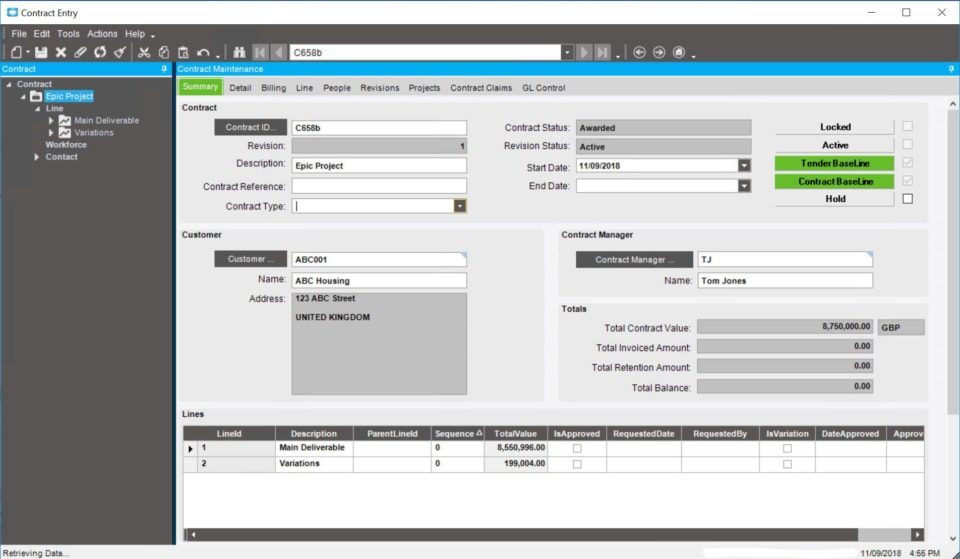
Epicor Advanced Projects module contract summary dashboard

Epicor Advanced Projects Contract Management

• Manage complex contracts.
• Contracts can be tied to a single project, or many projects.
• Manage small and long-duration contracts.
• Multi-level item/scope definition.
• Revision control and variation controls.
• Retention management.
• Ability to do complex invoices with a mixture of fixed-price, progress, and quantity-based billing methods.

Epicor Advanced Projects Project Accruals

• Financial recognition of revenue and expenses based on various valuations methods, including; amount billed, progress percentage, cash received.
• Enables true project profitability based
on current performance and expected completion.
• Ability to adjust accrual calculations as required.
• Automatic posting of accruals to the GL.
• Manual journal adjustments to projects as needed.

Epicor Advanced Projects Claims Management

• Cumulative claims management.
• Applications for payment/proforma invoice processing.
• An approval process to validate prior to submission to the customer.
• Integration to Accounts Receivable to enable holistic customer reporting.
• Invoicing based on valuations, not just part shipping.
• Flexible invoice and claim layouts to show summary or detailed lines.

Epicor Advanced Projects Enhanced Project Budgeting

• A budget approval process to lock in an original/baseline budget.
• Cost code/cost head budgets.
• Comparison of spent vs recognised.
• Budget and capture costs by phase and by cost code.

Epicor Advanced Projects Subcontract Management

• Manage complex contracts.
• Subcontracts can be tied to a single deliverable or many.
• Revision control and variation controls.
• Retention management.

Epicor Advanced Projects Subcontract Claims

• Cumulative claims management.
• Integration to accounts payable to enable holistic vendor reporting.
• Payments based on valuations, not just goods received.

Epicor Advanced Projects Built-in ERP Benefits

• Advanced workflows and approval functionality to manage everyday business functions.
• Integrated procurement functionality to manage the requisition, purchase and invoicing lifecycle.
• Full project sub-ledger with cost capture from the core ERP system.

Managing the financial aspects of large and complex contracts is not an easy task, and if it isn’t done well, can result in costly mistakes.

• Variations not billed, resulting in missed revenue.
• Penalties and potential lawsuits through not meeting contractual obligations.
• Manual integration of disparate systems, costing time and facilitating mistakes.
• Cashflow stress caused by the mismanagement of claims and subcontractor payments.
• Lack of collaboration across the business due to misalignment of contract obligations within departments.
• Poor customer, subcontractor and employee experience due to lack of visibility, inaccurate invoicing and processes that aren’t consistent.
• Reporting that is slow, manual and always historical, with no real-time visibility of the health of the business and the status of the projects.

Ask yourself can your business afford to continue working like this?

How many more contracts can you take on when it is a challenge handling the ones you already have? What you really need is an integrated system that works for you. One that generates efficiencies in the business, automates manual tasks and streamlines processes so that mistakes are kept to the bare minimum, if at all. You need to ensure that every project is profitable so that your business flourishes.

The benefits are endless and extend beyond systemisation. Epicor ERP teamed with Advanced Projects has been built with your challenges and goals top of mind. We know and understand the importance of managing complex contracts and multifaceted projects within companies like yours.

About Encompass Solutions

Encompass Solutions is a business and software consulting firm that specializes in ERP systems, EDI, and Managed Services support for Manufacturers and Distributors. Serving small and medium-sized businesses since 2001, Encompass modernizes operations and automates processes for hundreds of customers across the globe. Whether undertaking full-scale implementation, integration, and renovation of existing systems, Encompass provides a specialized approach to every client’s needs. By identifying customer requirements and addressing them with the right solutions, we ensure our clients are equipped to match the pace of Industry.


For customers on cadence, the Epicor Cloud Operations team will deploy your Epicor ERP Cloud update version 10.2.500.10 next week. This routine update includes enhancements to product quality and Kinetic user experiences. Testing is optional. For more details, please read this email and refer to the release notes in the 10.2.500 folder on your EpicWeb Customer Portal.

What To Expect During Epicor ERP Cloud Update Version 10.2.500.10

Pilot Update 

  • Tuesday, February 11, 7:00 PM to 11:00 PM Local Server Time

Production Update

  • Saturday, February 15, 4:00 PM to Sunday, February 16, 8:59 PM Local Server Time

While the 10.2.500.10 update deploys, your application may be unavailable for 30-60 minutes during the update window. Once complete you will be prompted to update the Epicor ERP Smart Client. If you happen to encounter unexpected behavior, please open an EpicCare case and include 10.2.500.10 in the details.

More Kinetic Experiences Are Here In 10.2.500.10, we’ve updated five reports and five processes (below) with the sleek, new Kinetic User Interface. As these and other Kinetic forms are periodically enabled in your environment, there will be nothing you need to do. All business logic is exactly the same. Simply enjoy the ease-of-use, modern design, and clear interface.

Like what you see? We rely on your feedback to drive our Kinetic innovations, so we encourage you to share your thoughts. Epicor’s customer experience team will randomly contact several customers to gather input, but please email Kinetic-Feedback@epicor.com at any time to send your comments or request a call.

For more information about the new Kinetic experiences, watch this 90-second video and check out Frequently Asked Questions.

Kinetic Reports in 10.2.500.10:

  • Sales Order Backlog
  • Sales Order on Hold
  • Scheduled Shipments
  • Open RMA
  • Stock Status

Kinetic Processes in 10.2.500.10:

  • Build Project Analysis
  • Build WBS Phase Analysis
  • Capture Project Revenue Recognition
  • Capture WBS Phase Revenue Recognition
  • Project Invoice Preparation

Epicor Cloud ERP Update Schedule

Here is the latest information on the release and update schedule for Epicor Cloud ERP.

To learn more about Epicor version numbering and deferred release upgrades, see the bottom section of this post.

​The Cloud ERP environment is updated as indicated in the table below. Each date represents the day your update is complete. Keep in mind that these dates and update notes are subject to change without notice at the behest of Epicor Software Corporation.

​Update ​Pilot ​Production
​10.2.500.5 ​19 Nov 2019 ​23 Nov 2019
​10.2.500.7 ​17 Dec 2019 ​21 Dec 2019
​10.2.500.8 ​14 Jan 2020 ​18 Jan 2020
​10.2.500.10 ​11 Feb 2020 ​15 Feb 2020
​10.2.500.13 ​24 Mar 2020 ​28 Mar 2020
10.2.600.2
(Release 10.2.600)
​17-18 April 2020
(one month to test)
​16-17 May 2020
The Public Cloud Deferred Customers environment upgrade options for major release are as indicated in the tables below. Subject to change.
​​Upgrade 400 to 500 Pilot​ ​Production
Flex Option 1: ​10.2.500.xx ​Week of 16 Dec 2019 ​25-26 Jan 2020
​Flex Option 2: 10.2.500.xx ​Week of 20 Jan 2020 ​22-23 Feb 2020​
NotePrior to 10.2.500, if you chose to defer your upgrade, you continued to receive 400.x updates up to your scheduled deferred upgrade date.
With 10.2.500, if you choose to defer your upgrade, you will not receive any 400.x updates after the 10.2.400.11 update.
​​Upgrade 500 to 600 Pilot​ ​Production
Flex Option 1: ​10.2.600.xx ​Week of 22 June 2020 ​25-26 July 2020
​Flex Option 2: 10.2.600.xx ​Week of 20 July 2020 ​22-23 August 2020​
NoteWith 10.2.600, if you choose to defer your upgrade, you will not receive any 500.x updates after the 10.2.500.13 update.

Epicor ERP Cloud Version Numbering and Timing

A typical Epicor ERP version number is ‘10.2.500.7’. In this example, ’10’ represents the Product, ‘2’ represents the Version, ‘500’ represents the Release, and ‘7’ the Update level.

  • Updates. Updates are generally applied on a bi-weekly or monthly basis. Updates are applied to the customer’s ‘pilot’ environment on Tuesday or Wednesday evening, and then promoted to ‘production’ environments during Saturday night local datacenter time. You may test if you like, but these are non-disruptive updates to our system, and do not introduce schema changes. We avoid month-end and calendar year-end for your convenience.
  • Releases. Releases are scheduled twice a year with black-out dates to avoid calendar year end. Because they tend to be larger releases and may introduce new functionality release upgrades are installed into a customer’s pilot environment no less than one month before their promotion to production, allowing customers to test the new features and updates.
  • Versions. Version upgrades occur approximately every 18-24 months. These often include changes to schema, user interface, and business objects. Like release updates, testing is required, so the upgrades are applied to the customer’s pilot environment thirty days prior to the scheduled production upgrade. Customers also receive an additional sandbox environment for more extensive testing.
  • Products. Product updates are typically more involved; and accordingly, we allow extended time and support to test and prepare before introduction into production.

Deferred Release Upgrades

If your business is subject to fluctuating seasonal demands or other time constraints, Epicor offers its premium “Epicor Public Cloud Flex Option,” which allows clients to defer upgrades for up to 90 days, for an additional subscription fee.  With the Epicor Public Cloud Flex Option you may select among two or three alternate pre-selected dates for your upgrade.

Regardless if you select this option and choose to stay on cadence or select a later date to upgrade, you still receive the standard one month to test releases in the pilot environment. Customers with this option would not have the full 90 days to test upgrades, but rather have the option to test and upgrade up to 90 days later if business needs require. Please contact your Epicor Sales Representative for more information.

Change Notifications Preferences

Use these steps to manage your notification preferences in order to receive alerts regarding Cloud releases.

  1. Navigate to System Setup > System Maintenance > System Monitor. From the Actions menu, select Notifications Preferences.
  2. The In-App Notifications User Preferences window opens. In the Select Roles section, specify the following:
    – In the Titles/Levels field, to receive notifications, you must select either User-PowerExecutive, or Manager.
    Note: If you select a different option, or if you enter your own title, you will not be included in the scheduled in-app messages or email notifications.
    – In the Functions/Departments field, you can specify your specific business detail.
  3. In the Types of Business section, define your Primary Sector and Primary Industry.
  4. Use the Select Interests section to indicate what type of notifications you want to receive. Note: This area is configurable and depends on your admin settings.
  5. Verify your email address in the Email field.
  6. Select the Send Notifications via email too checkbox if you are not a regular user of Epicor ERP and you want to receive notifications using email.
  7. Click Close.

Upgrading Custom Items in Cloud Environments

If you are upgrading your cloud environment, you can use the Unique Business Component Dashboard to locate and then update your custom items. To learn how to upgrade your custom items, watch the free, self-paced Epicor University course “Upgrading Custom Items in Cloud Environments”. This course is designed to assist System Administrators in understanding the tools and processes to effectively manage Unique Business Components during a system upgrade. To take the self-paced course, click here.

Alternatively, Encompass is here to help as your Certified Epicor Partner. We can help you upgrade custom business items in cloud environments any time you like. Reach out using the Contact Us link below to discuss your next project.

About Encompass Solutions

Encompass Solutions, Inc. is an ERP consulting firm, NetSuite Solution Provider and Epicor Gold Partner that offers professional services in business consulting, project management, and software implementation. Whether undertaking full-scale implementation, integration, and renovation of existing systems or addressing the emerging challenges in corporate and operational growth, Encompass provides a specialized approach to every client’s needs. As experts in identifying customer requirements and addressing them with the right solutions, we ensure our clients are equipped to match the pace of Industry.


With Industry 4.0 taking the lion’s share of headline space, smart manufacturing technologies are bigger than ever. For many manufacturers, these concepts can seem more than just a little intimidating, if not worthy of some cautious skepticism. Fortunately, there are manufacturing technologies that have been proven by years of practical application. Industry 4.0 concepts support them with more informed data and more efficient process improvements. We’re looking at you EDI. The concept of a digital twin is another one of these manufacturing technologies anyone can implement to improve operations.

What Is A Digital Twin?

The term “digital twin” refers to a digital replica of a physical asset. This asset can be any common hardware found on any factory floor. This includes heavy equipment, a smart machine, a robot, a work cell, an inspection station, or a manufacturing line. These “Physical Twins” are anything that can provide data to the Digital Twin for interpretation. Connection bridges the physical and digital to create a cyber-physical system, whereby data flows through and informs a process.

The digital twin concept can be broken down into three distinct parts:

  • a physical product
  • a digital/virtual product
  • connections between the two products

Digital Twins birthed in the Apollo Missions

The digital twin is a true example of the Industrial Internet of Things (IIoT) at work. However, the concept outdates the term Internet of Things by decades.  The term was coined by John Vickers of NASA in a 2010 Roadmap Report. however, the concept goes back even further in the NASA toolbox when the Apollo program utilized digital twins of the Command Module, Lunar Module, and Lunar Rover to carry out maintenance, support, and troubleshooting activities.

How Are Digital Twins Used In Manufacturing?

As we stated before, the connection between physical and digital twins creates a cyber-physical system that feeds real-time performance data to operators, analysts, and managers.

Individuals and groups fulfilling these roles within an organization can leverage Industry 4.0 concepts to analyze and interpret data to make sound predictions and carry out appropriate actions. Here, the Industrial Internet of Things (IIoT), Artificial Intelligence (AI), and Machine Learning (ML) all come together to troubleshoot, raise alarms to identify potential problems, view maintenance conditions, and support the various condition-based maintenance required to maintain seamless operations.

How Do The Components Of A Digitial Twin Work Together?

Analytics, Industrial Internet of Things (IIoT), Artificial Intelligence (AI), and Machine Learning (ML) technologies all have a hand in making Digital Twins work for manufacturers. Here’s how they come together to deliver leaps in process and operational improvement:

  • Industrial Internet Of Things (IIoT): Connects the physical and digital systems to provide accurate data in real time.
  • Artificial Intelligence (AI): Intelligent software analyzes the data, and provides an interpretation of what is physically taking place, what outcomes or problems may arise, and what actions should be carried out to maximize performance.
  • Machine Learning (ML): Builds on scenarios, both experienced and potential, to execute analysis more quickly and orchestrate improvements for the physical counterpart, ideally, without human intervention.
  • Analytics: Additional tools that simplify the data to communicate, diagnose, predict, and prescribe actions to optimize the operation of physical systems.

How Do Digital Twins Optimize Or Diagnose To Improve Operations?

By leveraging the data they receive, Digital Twins get a snapshot of how machinery or other physical systems operate throughout a process. The data serve to build a picture of what is good performance and what is bad or what is streamlined and what is bottlenecked.

Optimization comes into the picture when historical data can inform future operations to “say” This didn’t work well last time, let’s try something else. One example of how digital twins are used in optimizing machines emerges with the maintenance of power generation equipment such as power generation turbines, jet engines, and locomotives. How can we make this piece of machinery more efficient? Let’s look at the historical data and improve on past performance by trying other tweaks our engineers and machinists can implement. Or, better yet, what hypothetical concepts can we experiment with within the digital realm? The same is true for Enterprise Resource Planning (ERP) software. In enterprise architecture (EA), architects create EA blueprints as a digital twin for the organization.

A more relatable example may be found in autonomous vacuums. Many homes now employ robotic servants to clean while their owners are away. Digital twin technologies could effectively map the optimal vacuum path of a room and then employ that strategy to mitigate wasted energy and clean living spaces more quickly.

Diagnostics are another huge component of digital twins’ utility. By referencing historical data for machinery, a digital twin may be able to predict maintenance intervals, make service recommendations, and ensure downtime is kept to a minimum. In his case, the digital twin isn’t relegated to just one machine or just one plant. IIoT technology can connect like machines across an organization or several organizations to show a more complete picture of how machines perform under an array of conditions. This includes when they are most likely to break down or characteristics that can indicate a serious issue is looming on the horizon.

Leveraging The Digital Twin

To be certain, a digital twin and the technological concepts it relies on are no substitute for a skilled workforce. Those autonomous vacuums don’t dust or polish just yet. However, digital twins can inform and supplement your skilled workers to better utilize their machinery and improve operations overall. By now, it should be clear that implementing the concept of a Digital Twin within your organization can yield real benefits. Consider adding this invaluable tool as a complement to your business operations and remain competitive.

Epicor ERP delivers this technology in the form of a production environment. This component of the solution allows users to map their entire production process or even back-office process for simulated activities. This way, any company using Epicor ERP can experiment with their mad scientist, and what if we tried this idea on how to improve operations without the hassle of interrupting day-to-day operations? The result is a fine-tuned approach to process improvement that can be utilized in real time after pushing the changes into the live Epicor ERP environment.

About Encompass Solutions

Encompass Solutions, Inc. is an ERP consulting firm, NetSuite Solution Provider, and Epicor Gold Partner that offers professional services in business consulting, project management, and software implementation. Whether undertaking full-scale implementation, integration, and renovation of existing systems or addressing emerging challenges in corporate and operational growth, Encompass provides a specialized approach to every client’s needs. As experts in identifying customer requirements and addressing them with the right solutions, we ensure our clients are equipped to match the pace of the Industry.


Once upon a time, ERP systems were reserved for companies with hundreds and often thousands of employees, multiple locations, and even global points of operation. Who ever thought of evaluating ERP For start-ups?

Those days are gone, ERP has been re-imagined and redesigned to fit the build for companies of just about any size. These powerful and affordable software solutions can streamline your daily operations and make your start-ups success much easier to achieve.

While you may still think your start-up, small or medium business isn’t ready for ERP, you may be missing out on some essential tools that will set you up for positive outcomes and scale as you grow. You may be small now, but that won’t be the case for long. You may already have more business than you can handle.

In any case, you need to be able to manage the company operations and responsibilities to your stakeholders, staff, and customers. Evaluating ERP for start-ups is the first step into satisfying those responsibilities and making good on your obligations.

ERP will make your start-up run more efficiently, drive consistent outcomes, and deliver the data you need to inform business decisions.

This data comes from all the departments of your organization, including finance, sales, operations, inventory, and more. It delivers your staff a single source of truth they can rely on to improve their performance and deliver on the expectations your start-up must satisfy to succeed.

Here are just a few ways to begin evaluating ERP for start-ups.

When to Begin Evaluating ERP For Start-Ups

While each unique situation will dictate the process of evaluating ERP for start-ups, these indicators will reinforce the idea that it’s time to start looking. The more these examples crop up in your day to day, the stronger a candidate you are for implementation.

Waste Is Plentiful – Whether it’s time or capital, waste is one of the biggest contributing factors to a start-up’s success. Whether you are building widgets or delivering a service, processes that produce waste leave room for improvement. This is one of the areas of business management that ERP shines most.

Consolidating software and housing all your data in one central location is perhaps one of the most valuable moves your start-up can make. It cuts out the time spent searching for reports and invoices or delays when production materials can’t be found in the warehouse or worse, were never ordered when safety stock ran low.

Demand Is Outpacing Delivery – Not entirely a bad problem to have, right? Think again. If you get a reputation for missing deadlines and leaving customers with a sour taste in their mouth after doing business with you, know your competitors are waiting to step in and deliver.

Customer Relationship Management, production planning, scheduling, and Sales Management tools provided by ERP solutions ensure you have the tools you need to manage volume with a lean staff, budgets, and space.

Erroneous and Duplicate Data Is Abundant – Multiple points of data entry between disparate systems slow down your operations. It also leaves room for errors and errors can end up costing your critical customer accounts.

ERP ensures you only need to enter data once. That data can easily be verified within that same system. Add to that the risk of human error at the point of entry is kept to a minimum and your business does not suffer.

This means data used downstream is more likely to be accurate and ensure your orders, supply chain, and analytics give a true picture of your start-up’s performance.

You’re Missing the Forest For The Trees – the metaphor may seem obscure, but it’s about as apt as can be when we’re talking about access to the bigger picture of your business’ performance.

ERP will give your start-up the visibility it needs to see how you’re delivering on KPIs, grant access to analytics that illustrate where investments need to be made or scaled back, and superior reporting tools that show everyone you’re on the right track.

What to look for when Evaluating ERP For Start-Ups

By now, it should be clear that ERP can be a real boon to businesses at any size. However, for the start-up environment, there are specific qualities that make some ERP solutions better suited than others. Here are the most basic qualities you can evaluate in your search.

Cost vs. Price – while the two words may seem interchangeable, when it comes to ERP they most certainly are not. The true cost of not implementing an ERP system can easily be higher than shouldering the price of purchase.

Price is also not about what you can afford right here, right now. Keep in mind that sticker shock is just as real for enterprise-wise software. However, we have to remember that these are powerful systems that take a lot of time and engineering to develop. Not to mention save resources immensely but cutting down errors and non-revenue generating tasks. Fortunately, grants, tax write-offs, and financing are available to make the lessen the impact of the purchasing process on your overall business operations.

That said, the price of your system should be in line not only for the tools you need now but also those necessary to facilitate easy expansion as you grow. Which leads to the next characteristic to consider when Evaluating ERP for start-ups, scalability.

Scalability – Often, businesses evaluate ERP software vendors and decide what they have to offer is too rich and expansive for what they need here and now. That may be true. Instead, they may opt for a static product that is meant for small-scale operations that don’t expand capability or functionality as a business grows.

You also need to consider the future development of the product. Patches, updates, and versions that build on the ERP’s current state are essential to keep up with Industry as a whole.

It’s important to understand where your ERP vendor’s vision for their product will lead. Does that vision for the future include the functionality your business will need to remain competitive? Are they developing tools to enhance UI, automate manual processes, and facilitate superior eCommerce or self-service portal interactions?

Scalability is also a consideration for those evaluating open-source ERP solutions. Open source ERP vendors might only develop a product up to a certain point, package it, and sell it. Further development may cost significantly, fall on your shoulders directly, or be left up to the user community at large.

Accessibilitythink about who is going to use this system. Will they find it intuitive? How much training will they need before they can use the ERP system to its full potential? What about ongoing maintenance and customization to your unique business components?

Accessibility also means permission. Can you easily segment who gets to see what in the system or is it a free for all with the data available?

When evaluating ERP for start-ups, make sure to get plenty of demos that include your company workflow. If possible, get an NDA in place so you can see that workflow in real-time with your own data. This will give you the best picture of what is possible and how transactions, projects, and reporting progress within any given ERP solution.

Who to consider as a partner when Evaluating ERP for Start-Ups

If you’re currently Evaluating ERP for a start-up, this information is probably quite intimidating. Fortunately, you don’t have to go through the process alone. Vendors, consultants, value-added resellers, industry peers, investors and stakeholders all have a vested interest in your success.

Consider what it means to partner with an experienced implementer and reap the benefits of streamlined project methodology, knowing where to avoid pitfalls, achieve quantifiable milestones, and lead to Go-Live success.

Encompass Solutions here to help, let’s talk about where you’re going next.

About Encompass Solutions

Encompass Solutions is a business and software consulting firm that specializes in ERP systems, EDI, and Managed Services support for Manufacturers. Serving small and medium-sized businesses since 2001, Encompass modernizes operations and automates processes for hundreds of customers across the globe. Whether undertaking full-scale implementation, integration, and renovation of existing systems, Encompass provides a specialized approach to every client’s needs. By identifying customer requirements and addressing them with the right solutions, we ensure our clients are equipped to match the pace of Industry.


Epicor recently sent out an Epicor ERP 10.2 Costing Issue Alert. This notification details a costing issue reported within the Core Application. If you use backflushing within job costing and are on an earlier version of 10.2 than the versions listed below, please contact Encompass Solutions, Inc. at support to receive an expedited fix:

  • 10.2.200.34 GA 11/31/19
  • 10.2.400.14 GA 10/25/19
  • 10.2.500.3   GA 10/23/19

You may have received this notification because records indicate you are on a prior version of 10.2.  If you feel you received this in error, you can update your version information on the portal by going to the Configurations > Product Configuration Profiles menu, or please let us know so we can help correct the version information on record. If you did not receive the notification and have observed any of the issues below, it may be because your version is incorrect in the Epicor ERP customer database. You can contact Encompass Solutions support to have the information updated.

Epicor ERP 10.2 Costing Issue Alert Details

Description of issue(s):

  • Incorrect job costing when backflushed is being used.
  • This is causing incorrect variance (MFG-VAR) calculations on jobs.
  • Multiple scenarios were found and corrected
  • Dollars to Inventory are not correct
  • Dollars seem to be doubled using the Qty x Cost Components
  • Dollars remain in WIP despite the job being closed

This may also be causing Negative Material depending on the costing components of the part.

Example:

  • Unit Material:
  • Unit Labor: (too high of an amount going to inventory)
  • Unit Burden: (too high of an amount going to inventory)
  • Unit Subcontract: (Not cleared out of WIP)
  • Unit Material Burden: (Not cleared out of WIP)

Epicor ERP 10.2 Costing Issue Alert Solution

How we’ll approach the fix is simple. We would install the latest version of Epicor 10 to your Pilot system and assist you with running the necessary tests to ensure this issue is addressed, as well as ensure that the patch doesn’t have negative implications to other system areas. This includes EDI and critical reports.

Finding your Current Version of Epicor ERP

Not sure of your current Epicor version? Follow the steps below to find your current Epicor software version.

For Active Homepage Users:

  1. Navigate to the main menu and follow the path: Epicor Education > Main > System Setup > System Maintenance > About Epicor
  2. A new window will pop up displaying your Epicor system information. The current version of your software will be located next to the Epicor logo in large black text.

For Classic users:

  1. Navigate to and click the help icon in the top right-hand portion of the Epicor ERP interface.
  2. Then, click the About Epicor link located towards the bottom of the options on the left-hand side of the screen.
  3. A new window will pop up displaying your Epicor system information. The current version of your software will be located next to the Epicor logo in large black text.

About Encompass Solutions

Encompass Solutions, Inc. is an ERP consulting firm, NetSuite Solution Provider and Epicor Gold Partner that offers professional services in business consulting, project management, and software implementation. Whether undertaking full-scale implementation, integration, and renovation of existing systems or addressing the emerging challenges in corporate and operational growth, Encompass provides a specialized approach to every client’s needs. As experts in identifying customer requirements and addressing them with the right solutions, we ensure our clients are equipped to match the pace of Industry.


ERP and automation technologies have grown by leaps and bounds to address small business’ need for efficiency, productivity, and profitability. Modern process automation and efficiency increases are essential to departments like finance, accounting, human resources, production, material management, quality management, distribution, and sales. Without a proper framework to bring these departments together and working in harmony, a business of any size risks catastrophic failure. ERP supply chain management solutions deliver focused tools to businesses, providing better overall performance, accountability, and customer satisfaction.

Enterprise Resource Planning (ERP) And Supply Chain Management (SCM)

Affordable Enterprise Resource Planning software for manufacturers and accessible automation technologies for manufacturers enable competitiveness in an industry that is constantly evolving. Supply chain automation technology is in higher demand with each passing day. Built to increase the efficiency of operations that extend beyond the four walls of the factory, supply chain management software holds suppliers accountable, builds stronger trading partnerships, and delivers increased customer satisfaction that earns businesses brand loyalty.

How ERP Software Enables Better Supply Chain Management

When a business considers all the parties involved in the supply chain, from manufacturers, suppliers, distributors, retailers, and customers, it can be difficult to control. The process of keeping everything in line requires careful and diligent planning, execution, control, and ongoing monitoring of supply chain activities.

Businesses will find that an ERP system built with the supply chain in mind will be more than effective in handling the storing, transporting, managing demand for manufactured goods. From procurement to product delivery, the integration of material, information, and financial information flow cement ERP as an essential tool for efficient supply chain management.

The Roles Of ERP In Supply Chain Management Processes

From the global conglomerate the mom-and-pop job shop, ERP and SCM software may seem intimidating. However, their viability for businesses at any size cannot be overstated. It simply becomes a matter of size and scope of the software. Placing a focus on efficient supply chain activities and strategy going forward will enhance facility productivity, product quality, and cost-efficiency.

ERP software scales businesses, plain and simple. With growth, the subject of Supply Chain Management demands greater emphasis. Mixed-mode, make-to-order, make-to-stock, Engineered -to-order, and configured-to-order manufacturing operations all have a need for these advanced technologies. This doesn’t even consider the supply chain automation opportunities that arise when ERP systems in place. Replenishment, communications between partners, manufacturers, and customers, even automated profiling of suppliers to get the next replenishment from your favored vendors are possible with automated supply chain management software embedded within ERP.

ERP software doesn’t just enable supply chain management strategies, it informs your teams and keeps them running at peak efficiency. This ensures your business runs smoothly in the face of supply chain disruption. We can break down the role of Epicor ERP alongside supply chain management into eight main categories:

  • Purchase Management
  • Demand Management
  • Inventory Management
  • Shipping And Receiving
  • Warehouse Management
  • Advanced Material Management
  • Supplier Relationship Management
  • Supplier Connect

ERP Supply Chain Purchasing Management

Collaboration is key during the purchasing process to ensure orders move smoothly in and out of an ERP system. Tracking the performance of collaborative activities becomes more difficult as an organization grows. ERP fills the gap, providing businesses with the means to track, control, and comply with regulation and governance standards of their given industry. The result is accuracy, compliance, and security in supplier relationships.

  • Automated purchasing tools improve supplier collaboration, order accuracy, and negotiating while streamlining purchase order writing and tracking of supplier performance.
  • Improved on-time delivery reduces inventory levels, which improves cash flow and enables cross-referencing, mass purchase order receipts, requisition tracking, and more.

an image of a purchasing manager in a warehouse as part of ERP Supply Chain Management solutions

ERP Supply Chain Demand Management

Convert demand into sales orders and forecasts thanks to the efficient management of short- and long-term customer demand contracts. As a result, fulfillment decisions become second nature.

  • inventory management is made easy with statistical forecasting and planning tools that enable collaboration, consolidation, and aggregation.
  • Leverage invaluable insights to decrease on-the-shelf inventory, enhance flexibility, improve fill rates, and deliver a better customer experience overall.
  • Visual tools make interacting with supply chain demand data efficient and easy.

ERP Supply Chain Inventory Management

Digitize, automate, and simplify your processes for greater profitability at any scale, all while minimizing the inventory costs and risks associated with conforming to industry standards.

  • Meeting customer expectations becomes easy with superior visibility into costing, tracking, and country of origin.
  • From purchase order through manufacturing and shipping, material flow management becomes easy with an extensive suite of analysis tools, including shortage monitoring, reorder analysis, stock status, and many more.
  • Reduce annual audit costs significantly by leveraging automated control and regular inventory counting tools provided by ERP solutions for the supply chain.

an image of a full warehouse as part of ERP Supply Chain Management solutions


ERP Supply Chain Shipping And Receiving Management

Ensuring accuracy and customer satisfaction becomes easy with the shipping and receiving logistics solutions provided by ERP. The ability to monitor incoming and outgoing items for orders, subcontract parts being sent to a supplier, raw materials being received, or filling an order from stock all contribute to the enhanced shipping and receiving tools found in a robust ERP solution.

  • Efficiency, speed, and a consistent interface promote the rapid processing of shipments and receipts to provide reliable tracking at every stage of the journey.
  • By tracking container shipments and regularly updating purchase orders with enhanced accuracy and information visibility, your business can improve reliability and deliver on expectations without sacrificing time, money, or customer goodwill.
  • By driving out the cost of freight, insurance, and import duties with landed cost processing functionality margins improve significantly.

an image of shipping and receiving workers as part of ERP Supply Chain Management solutions

ERP Supply Chain Warehouse Management

ERP systems link warehouses with order processing and manufacturing operations seamlessly to optimize pick, pack, ship, and receiving processes.

  • Drive out errors and wasted resources by automating pick-and-pack, mobile-driven, and pre-pack fulfillment processes.
  • Leverage greater visibility into resource utilization throughout your warehouse to optimize processes and improve efficiency.
  • Rapid fulfillment capability enables businesses to better compete not just on cost and quality but on speed, as well.

an image of two warehouse management workers as part of ERP Supply Chain Management solutions

ERP Supply Chain Advanced Material Management

Track materials with real-time visibility and control with an advanced material management module, like that found with Epicor ERP. This function enables the monitoring of raw materials and work in process (WIP) activities throughout an entire enterprise using mobile devices and bar-coding technology.

  • By simply scanning a bar code tag you can produce accurate and timely electronic requests for materials.
  • Ensure that the right parts are delivered to the right resource at the right time utilizing an online queue of raw material and WIP parts
  • Track movement of raw materials and WIP to continuously improve efficiency

ERP Supply Chain Supplier Relationship Management

Supplier relationship management is a critical and ongoing process for manufacturers. Identifying the best partners to work with and improving supplier collaboration is easier with ERP supply chain management tools that enable buyers, procurement staff, and purchasing agents or those providing quotes, to request quotes for raw materials or subcontract services from one or multiple suppliers.

  • Make smarter and more informed sourcing decisions thanks to greater visibility and insight into supplier communications
  • Create centralized records for buyers, parts, and suppliers to maintain accuracy, simplify workflows, and eliminate redundant data entry
  • Reduce transaction times with automated tools that quickly convert supplier responses into actionable purchase orders

Epicor Supplier Connect For ERP Supply Chain management

Supplier Connect is unique to Epicor ERP and a feature of Epicor Commerce Connect. It is specifically tailored for suppliers It delivers an intuitive environment use to update their information via the supplier portal, answer requests for information, and confirm changes to purchase orders.

  • Enable business partners and customers transact with your brand online for a competitive advantage.
  • Improve collaboration by offering supplier self-service on open orders, part information, and access to invoice history.
  • Reduce staff time spent answering email, phone, or fax inquiries and increase efficiencies of your sales team.

The Competitive Benefits Of ERP Supply Chain Management

It’s a cutthroat world and businesses need every legitimate advantage they can get to ensure competitiveness. ERP competitive benefits are about as integral to the success of an enterprise as it gets.  Providing visibility and efficiency across departments, automating workflows with ERP from procurement to product delivery leads to lower overhead and operational costs.

By streamlining the path materials, financial information, and operational data take from source to destination, Epicor ERP delivers SCM that results in better control over performance, costs, and customer satisfaction. Here’s how:

  • The cost of inventory is minimized through effective demand forecasting lean inventory levels. This ensures just-in-time production methods can be effectively put into practice to bring down production costs while maintaining supply chain flexibility.
  • Epicor ERP supply chain management reduces production bottlenecks between internal processes and your external supplier. By enabling procurement best practices, the supply of goods, services, and other resources throughout the supply chain are more readily accessible and more easily leveraged.
  • Whether production revolves around children’s toys or Aerospace and Defense, transparency throughout the supply chain is key to ensure quality, accountability, and safety. Epicor ERP supply chain management delivers that transparency alongside the consolidated supply chain visibility that a business needs to thrive.

How ERP Supply Chain Management Contributes To Organizational Growth

ERP and SCM software go hand-in-hand to contribute to the overall growth of an organization. By tying in all the essential components of the procurement process, warehousing, and sales, Epicor ERP supply chain management module informs the business to a much greater degree. As a result, businesses of every size using Epicor ERP gain greater insight and operational capability.

  • The Small Business – Take advantage of an agile, cost-effective supply chain management solution that scales rapidly, effectively future-proofing your business for long-term innovation and growth.
  • The Midsize Business – Accelerate entry into new markets, quickly add new product lines and engagement with customers more easily and effectively.
  • The Enterprise – Enable team flexibility and responsiveness across verticals, whether B2B, B2C or B2X, at a global scale.

About Encompass Solutions

Encompass Solutions is a business and software consulting firm that specializes in ERP systems, EDI, and Managed Services support for Manufacturers and Distributors. Serving small and medium-sized businesses since 2001, Encompass modernizes operations and automates processes for hundreds of customers across the globe. Whether undertaking full-scale implementation, integration, and renovation of existing systems, Encompass provides a specialized approach to every client’s needs. By identifying customer requirements and addressing them with the right solutions, we ensure our clients are equipped to match the pace of Industry.


The decision to choose one ERP system over another is a difficult one for manufacturers to make. The evaluation process is extensive and requires juggling a business’ unique requirements, a product’s specialized offerings, the partner relationship, and so much more. Here’s how one of our customers weighed the pros and cons of Epicor versus IQMS to make their final selection in favor of the former.

Epicor Versus IQMS

We asked Metaphase Technologies’ President Kevin High three questions regarding how Metaphase reached their ultimate decision to implement Epicor ERP with Encompass Solutions as their manufacturing technology partner. Three questions of Epicor versus IQMS made it clear which of the two was a better fit for their organization.

an image of epicor versus IQMS as chosen by metaphase technologies

What were the perceived shortcomings of IQMS?

IQMS is great for manufacturers who are in the business of running high volume products. It is not flexible for companies who, like ourselves, have a high number of skews and produce low volume. Because of the nature of IQMS, we were not able to fully implement and utilize it for the reasons we liked it. Our employees also did not find it so user-friendly. It was rather ugly out-of-the-box and required a lot of customization that was beyond our scope. We simply did not have the funds at the time to throw into customizing it.

What criteria informed your decision to select Epicor as a replacement?

We were attracted to Epicor because of the simplicity of it for our users. There are a lot of drop-down options for our users to select from when they’re on a screen which simplifies a lot of the job on the floor. Things flow nicely from sales order to shipping. A couple of our top reasons for choosing Epicor was the integrated shipping module (Manifest – which integrates UPS, FEDEX, and DHL into Epicor) and also the integration to our Engineering programs (CadLink).

Are you satisfied with the implementation and functionality of Epicor?

Implementation is a long process. We used a third party (Encompass) to help us integrate which definitely helped me, as PM of the implementation. Epicor is so simple for the users since the data is selectable but that also means A LOT of data needs to be loaded and it requires quite a bit of set up before users can use it smoothly. Once that data is in there, the functionality of Epicor is great when everything in the process is perfect for that order.

Depending on the business, Epicor requires a lot of custom reporting.  If you have an internal resource who is able to do report writing for you then that would be helpful.

Lastly, I have no IT background but I have been able to learn how to customize screens and create queries in Epicor to pull specific data our company is looking for. Which means almost anybody else should be able to learn too. This is a huge plus!

Overall, I’m happy we went with Epicor but we just need to finish getting all of our ducks in a row before we get the rest of operations fully integrated into the software. I’m happy with the functionality of it since it is extremely customizable.

The One downfall: they don’t have a robust CRM for Sales.

About Metaphase Technologies

For more than two decades, Metaphase Technologies has been developing products that advance “The Quality of Light” through the engineering and manufacture of uniform diffuse high brightness and ultra brightness LED illuminators. Metaphase’s illuminators are specially designed for applications in machine vision, military, and specialty lighting. Metaphase boasts expertise in engineering flexible lighting solutions for ease of integration into vision systems design. The company’s LED illuminators are currently utilized in thousands of applications throughout the world, including vision-guided robotics, automation systems, line scan inspection units, and many others across the machine vision industry.

Metaphase Technologies Selects Encompass Solutions For Epicor ERP Implementation

As the first to standardize built-in constant current drivers, Metaphase continues to synergize cutting-edge machine vision LED lighting & control technologies in an effort to simplify innovation and increase customer return on investment.

About Encompass Solutions

Encompass Solutions, Inc. is an ERP consulting firm, NetSuite Solution Provider, Suite Success Partner, and Epicor Gold Partner that offers professional services in business consulting, project management, and software implementation. Whether undertaking full-scale implementation, integration, and renovation of existing systems or addressing the emerging challenges in corporate and operational growth, Encompass provides a specialized approach to every client’s needs. As experts in identifying customer requirements and addressing them with the right solutions, we ensure our clients are equipped to match the pace of Industry.


You do not have a Rock Builder Form with this shortcode : [rockthemes_fb id="5"]

Epicor designs and builds its enterprise applications from the ground up using state of the art connected systems architecture, referred to as the Epicor Business Architecture. A connected systems focus was chosen because enterprise resource planning (ERP) systems thrive as high-performing, approachable services that connect people, systems, and processes. Business strategy today is tightly coupled with technology strategy, and technology is partly responsible for shaping the culture within a company that ultimately drives competitiveness.

Table of Contents

  1. Epicor Internet Component Environment (Epicor ICE)
  2. Epicor Business Architecture
  3. Epicor ICE User Experience
  4. Epicor Everywhere Framework
  5. Information Worker
  6. Business Activity Query
  7. Epicor Portal
  8. Business Process Management and Workflow Management
  9. Web 2.0

1. Epicor Internet Component Environment (Epicor ICE)

Epicor separates the design and development of the technology platform from the production of the applications themselves. The tools and frameworks that comprise the Epicor platform ensure users have a consistent experience across the system, allow for collaboration with ERP constantly in context, and provide the ability to create an optimized ERP experience. This unique blend of tools and technology is called Epicor ICE.

Epicor ICE is the business architecture that underpins the Epicor enterprise business software and offers a true service-based Microsoft .Net architecture with SQL Server Optimization. This agile technology enables business process and builds on an already complete and robust framework. The toolset is helping our customers to both use and enhance Epicor applications at a business level—rather than a technology level—with minimum overhead. Epicor ICE addresses a number of key needs required by modern enterprises, including:

  • Flexible deployment options—in the cloud or on-premises
  • Service-based architecture
  • High-end scalability
  • Web Access Framework
  • Windows forms, web forms, and mobile device forms
  • Built-in customization engine
  • Comprehensive BPM Platform
  • Embedded dashboards
  • Connected people, systems, and processes
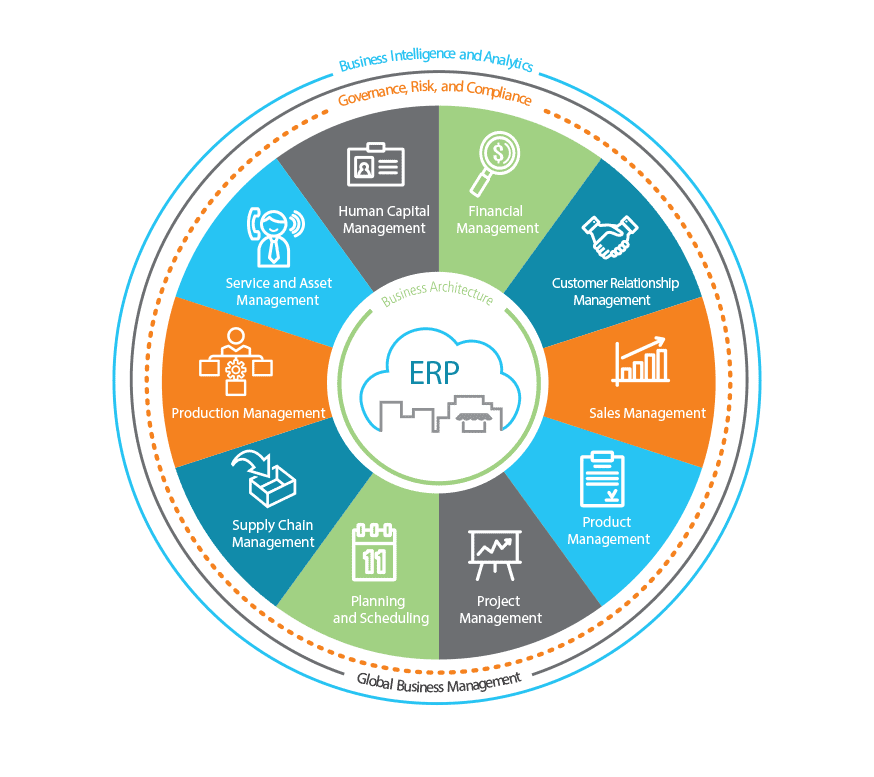
an image of the Epicor Business Architecture foundation for epicor erp

2. Epicor Business Architecture

Epicor ERP is built using a service-oriented architecture (SOA). Epicor business architecture includes several core components businesses of all sizes can leverage towards streamlined operations and performance management. They include:

  • Epicor ICE
  • Epicor Everywhere Framework
  • Information Worker
  • Business Activity Query
  • Epicor Portal
  • Business Process Management and Workflow Management
  • Web 2.0
  • System Tools
  • Service Connect

3. Epicor ICE User Experience

Epicor ICE delivers user interface (UI) options that are at once easy to use, rich and intuitive, and give users choice in deployment and experience. Unique technology within Epicor ICE offers the ability to have multiple user interfaces interact with the same SOA-based business logic simultaneously including a “Smart Client,“ a Web browser-based Client or Microsoft Office applications. All UI options are intuitive, flexible, aesthetic, and promote user productivity. Comprehensive features include:

  • Mobile workers
  • Personalized keyboard shortcuts
  • Tool tips
  • Simplified navigation
  • User-defined searches
  • Comprehensive cut-and-paste
  • Transaction visualization
  • Advanced grid management
  • User-based translation
  • Styling and themes

Active Home Page

The Active Home Page offers an intuitive experience for users with favorites, social streams, and custom links to other applications, and it delivers key indicators needed to help prioritize the day for optimum efficiency and satisfaction.
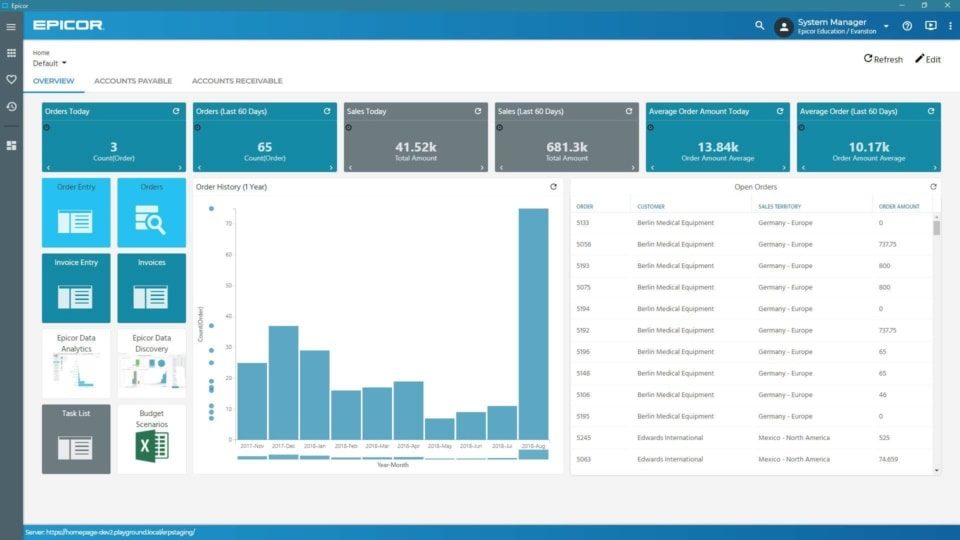
Active Home Page— Built on the Epicor Kinetic Framework, the Active Home Page offers a user experience that is both intuitive and visual for optimum productivity as part of the Epicor Business Architecture

Active Home Page— Built on the Epicor Kinetic Framework, the Active Home Page offers a user experience that is both intuitive and visual for optimum productivity.

Personalization

Personalize the way in which all forms look for users—including how many forms are viewable, tab order, fonts, colors, menu shortcuts, tree view, hide panels, change grid orders, and whether specific interaction dialogs should be suppressed.

Customization

For businesses looking to tailor ERP to match unique business practices, Epicor ERP offers an embedded customization layer that saves modifications to forms based on Visual Studio .NET. Business tailoring includes multiple editions of any form, add user fields, add dynamic user-defined field, add user logic, add sheets, add Microsoft Visual Basic® .NET or C# code, hide fields, and make fields mandatory. Modifications are upgradable as they are held in the data layer, reducing the impact on upgrades and potential version lock. Managing modifications is greatly simplified with the use of a Solution Manager where modifications can be bundled together and managed.

4. Epicor Everywhere Framework

Today many enterprise applications are being rewritten to support mobile devices and browser-based clients, which provide easier more convenient access to business information and easier deployment. These clients are generally considered “zero-footprint“ or “thin“ clients. Rather than rewriting application forms to support mobile devices and the Web, the Epicor Everywhere Framework was developed. This unique technology stores all client business logic as tagged XML metadata. This permits Epicor applications to run as smart clients or Web clients or on mobile devices, all from the same source code. This framework also ensures that user customizations and personalization remain intact, whatever the UI.

For example, users can customize smart client forms to meet specific business needs and then simply re-generate the form’s metadata and output it as a Web form with all customizations included. ICE delivers a new usability feature whereby a Web user has the option of switching to the Windows smart client for certain forms, thereby running a hybrid application designed to improve performance and user flexibility. In addition to this key feature, Epicor ICE introduces “Group By” and Personalization” functionality for Epicor Web Access forms similar to that found in the Windows client version.

Epicor ICE supports the generation of asynchronous JavaScript and extensible markup language (AJAX) Web browser-based forms from existing Windows forms (C#). For added flexibility Web forms can be accessed from different mobile devices and browsers, including Microsoft Internet Explorer®, Mozilla® Firefox® or Apple® Safari® and can run on any operating system, including Windows, UNIX, Linux, or Mac®.

Mobile Access framework

In Epicor ICE, the Epicor Everywhere Framework™ has been extended to support mobile dashboards which are rendered as Web applications that may run on a number of mobile devices including BlackBerry® and iPhone™. Since the mobile dashboards that support Epicor Mobile Access are built using dashboard technology and Updatable BAQ technology, it is simple to create Web applications that implement business functionality on mobile devices. Epicor 9.05 ships with sample mobile forms that can be copied, modified, and customized to meet specific business requirements.

The Epicor Mobile Framework (EMF) was developed at Epicor as a new user experience to meet the needs of a wide range of applications across the Epicor portfolio. It offers a flexible and responsive platform that supports modern HTML5-compliant browsers. EMF is responsive, as forms can be displayed in full size on a browser, but they can also be resized for mobile use. Some examples of mobile applications built using the EMF include:

Mobile CRM

Epicor Mobile CRM empowers your salesforce by providing mobile access to the entire CRM suite of capabilities on any iOS™ or Android™ device. You can manage the sales cycle from lead to order shipment—anytime, anywhere.

Epicor Mobile Access

Epicor Mobile Access supports mobile dashboards that are rendered as web applications that may run on a number of mobile devices—including iOS or Android. Since the mobile dashboards that support Epicor Mobile Access are built using dashboard technology and updatable BAQ technology, it is possible to create web applications that implement business functionality on mobile devices. Epicor ships with sample mobile forms that can be copied, modified, and customized to meet specific business requirements.

Epicor Data Discovery

Built to extend the existing Epicor dashboard capabilities, Epicor Data Discovery (EDD) is part of the Epicor data platform that enables Epicor ERP users to access greater visualization and self-discovery tools for their existing and growing library of dashboards and BAQs. EDD is an analytics solution intended to provide an easy-to-use data exploration and data visualization experience, and it is a major component of the overall Epicor data platform—which encompasses a broad set of capabilities for managing, accessing, sharing, cleansing,

Web Access framework

Rather than rewriting application forms to support mobile devices and the web, we’ve developed the Web Access Framework—a unique technology that stores all client business logic as tagged XML metadata. This permits Epicor applications to run as smart clients or web clients or on mobile devices—all from the same source code. This framework also ensures that user customizations and personalization remain intact—whatever the UI. Web forms can be accessed from many different browsers, and for added flexibility, web forms can be accessed using most popular browsers—including Microsoft Internet Explorer®, Microsoft Edge®, Mozilla® Firefox®, or Apple Safari.
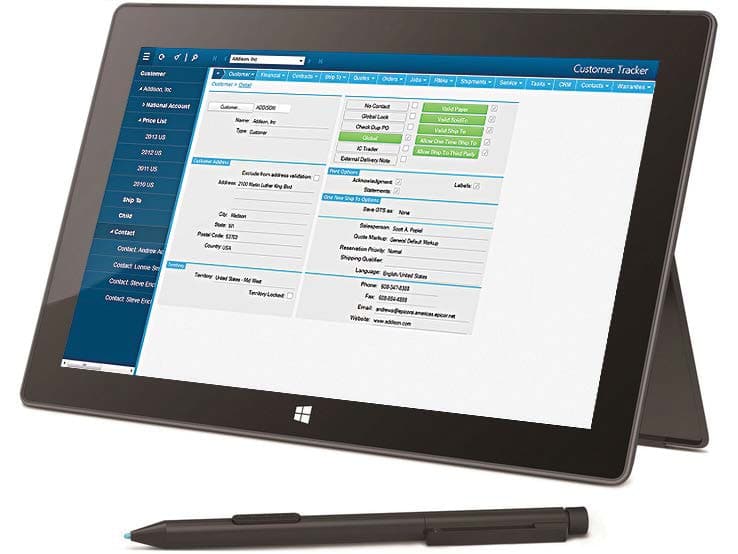
Web Access Framework—Web Access provides a rich user experience over the Web as part of the Epicor Business Architecture

Web Access Framework—Web Access provides a rich user experience over the Web.

Smart Client

Epicor takes full advantage of Microsoft’s .NET smart client technology to deliver an easy to use, rich user experience in a traditional local client environment. Smart clients are easily deployed and managed client applications that offer users a powerful interactive experience—an experience that takes advantage of local resources to connect intelligently to distributed data sources. Business workers can take advantage of increased opportunities to extract, consume, analyze, and distribute information to help create new products, expand into new markets, streamline business procedures, and provide better operational control. The Epicor smart client delivers the rich functionality that users expect, including tear-off sheets; user sizeable screens; navigation trees; non-modal forms; publish and subscribe; advanced searches; drag and drop attachments; drill-down navigation and exploration; and HTML online help and tutorials.

Unlimited Comments

Enter unlimited comments throughout the system.

Keyboard Shortcuts

Personalize keyboard shortcuts for all functions.

Tool Tips

Provides for user-controlled (on or off) fly-over text-based tooltips.

Indication of Attachments, Memos, Audits, Etc.

This feature makes it visible to users when memos or attachments are present.

Open With

Simplify navigation throughout the system with “open with.“ Right-click on any field to highlight all related areas of the system that can be accessed. Powerful publish and subscribe technology automatically associates all open forms together. Changes in one form affect the information the subscribing forms show.

User-Defined Searches

Define searches in all parts of the system. Search criteria can be saved and reused in the future. Auto-load searches can be applied to forms so the search is automatically applied when the form is opened. Auto-search can be applied so that when a form is opened, the search screen is automatically opened.

Cut-and-Paste

Cut-and-paste information to and from all areas of the system and other applications (e.g., rows can be cut and pasted to and from Microsoft Excel).

Transaction Visualization

View all transactions within a user-defined tree structure, allowing users to pinpoint information even in the largest of transactions.

Form Worksets and Navigation

Select multiple records to work with during a session. Move forward and backward within the set. Go straight to a particular record. Save to work with it later or e-mail to a colleague to process.

Advanced Grid Management

Freeze multiple areas of a grid vertically or horizontally so multiple areas of a grid can be seen simultaneously. Multitiered “group-by“ functionality quickly makes sense of large amounts of data. Sort multiple grid columns.

Personalization

Personalize the way in which all forms look for users; how many forms are viewable; tab order; fonts; colors; menu shortcuts; tree view; hide panels; change grid orders; interaction dialogs (e.g., suppressing alert questions like, “Are you sure you want to delete this record?“).

Customization

Do everything available in personalization. The customization engine is based on Visual Studio .NET. Build multiple versions of forms; add user fields; add user logic; add sheets; add Microsoft Visual Basic® .NET code; hide fields; make fields mandatory. Layered customizations ensure no impact on upgrades.

Customization Wizard

Customization wizards are available to streamline the use of the customization and personalization engine. This ability allows “visual behavior“ for a field or set of fields and can be extended to include the setting of behaviors for fields in any defined view based on complex comparisons.

Dynamic User Defined Fields

Supports a range of user-defined fields in all primary tables in the database. The Epicor schema can be extended via customization to include any number of additional user-defined fields against such tables thus allowing unlimited growth in usage of these fields which may be used for both customer installations and for Epicor localizations.

Localization

Localization refers to the fact that Epicor is designed for global-ready applications. Epicor utilizes Microsoft’s standard transactional format assemblies to ensure that resources that require localization and translation have been separated from the rest of the application’s code so that source code need not be modified during localization. To enable this, the Epicor ICE customization engine has been extended to include a separate localization layer. Creating a separate framework localization layer makes version migration easier for customers and localization partners and provides an area within the framework and application for the development of local addons which go beyond the needs of the base application.

External Update Method Added to All Business Objects

An external update method (UpdateExt) is available on all transactional business objects to support bulk updates via integration engines such as Epicor Service Connect. This method implements the functionality previously incorporated in the Epicor Web Service Update method to accept a complete dataset containing hierarchical data and multiple records and to call the base Update method of each business object repeatedly for each row in the dataset and for all records in the dataset. Since all processing is conducted on the server within one login session, the use of this method eliminates much of the latency within the Web services and improves performance for bulk updates.

Styling and Themes

Styling offers complete control over the look and feel of the entire user interface. It works by letting users define the look of each item within the interface—buttons, checkboxes, fields, etc. Because themes can be deployed for a company or plant, multi-plant and multi-company deployments can set their unique theme for easy recognition and brand loyalty.

5. Information Worker

According to current industry surveys, desktop productivity tools are used by 95% of business workers, with Microsoft Office as the standard for desktop applications. Epicor Information Worker provides a secure, seamless interface to the Epicor application from within Microsoft Outlook, Microsoft Excel, or Microsoft Word, blurring the lines between enterprise software and desktop productivity software to create a single immersive solution. Imagine the productivity and business visibility gained by using Epicor Information Worker as an interface for both traditional and non-traditional Epicor users.
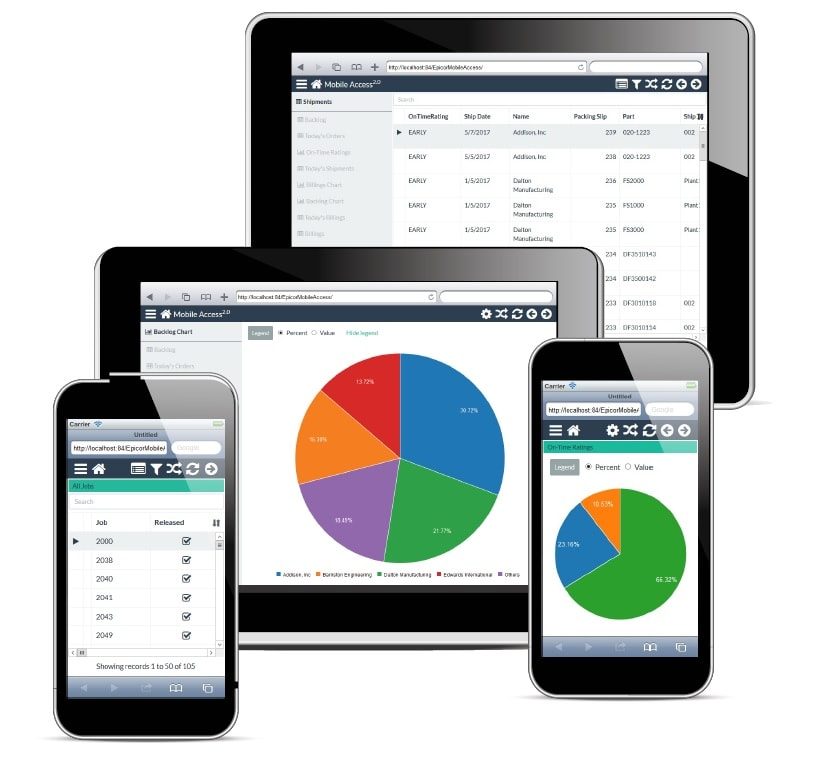
Epicor Mobile Access—Epicor Mobile Access fr the Information Worker offers anywhere access to any Epicor ERP dashboard, including updatable capabilities to promote greater productivity as part of the Epicor Business Architecture.

Epicor Mobile Access—Epicor Mobile Access fr the Information Worker offers anywhere access to any Epicor ERP dashboard, including updatable capabilities to promote greater productivity.

With changes in ICE, the underlying architecture provides direct access to Updatable BAQs. Information Worker also is able to call Epicor Web Access forms as well as smart client forms from the Information Worker menus.

Extend the Reach of Epicor Applications

Many business workers simply don’t need to utilize all the powerful features of their Epicor applications, but they do need access to the data. Epicor Information Worker allows authorized users to retrieve, view, and modify Epicor data. Epicor application licenses are utilized efficiently—minimizing the licensing impact on an organization and easily allowing more users access to the Epicor solution.

Work in Context, Online, and Offline

With Epicor Information Worker, users no longer have to leave what they are currently doing to get the data they need. Simply download the data directly into the Microsoft Office application. With a few clicks of the mouse, add Epicor contacts, tasks, calendar items, and other data into Microsoft Outlook lists. Outgoing and incoming customer emails can be automatically logged as calls. Customer, supply chain, manufacturing, and customer relationship management (CRM) data are all available online or offline.

Support Customer Relationship Initiatives

Epicor Information Worker can help businesses exceed customers’ expectations. Customers will be impressed with how well everyone in the organization knows the details of their account anywhere, anytime. From the sales organization, customer service workers and business executives—everyone in the company—can easily retrieve and update information within Microsoft Office while at work or on the road. The powerful combination of Microsoft Outlook, Word, Excel, and Epicor data empowers all business workers to offer informed and responsive customer service, which translates to higher customer satisfaction.

6. Business Activity Query

Every business needs an intuitive and easy to use query engine, and for this Epicor created business activity query (BAQ), which allows users to create personalized queries or to copy standard queries. Once the query is created, it can be used throughout the application—to generate Crystal Reports, for quick searches, to support Portal views, or to view results in a Dashboard. Epicor BAQ lets users create queries that display the data they need, when they need it. Complete functionality includes:

  • BAQ design wizards
  • Graphical table links
  • Embedded calculations
  • Multiple data views
  • Analyze/test query tabs
  • Updatable BAQs
  • External BAQs
  • Configurable dashboard applications
Business Activity Query—The BAQ Designer provides many easy to use features for creating business queries as part of Epicor Business Architecture

Business Activity Query—The BAQ Designer provides many easy to use features for
creating business queries.

Easy to Use Wizards

The BAQ Designer includes easy to use wizards to help users define a query—or they can create the query free-form. The BAQ can be accessed from various parts of the application.

Graphical Links

A graphical display for table links.

Use of Temp Tables and Variables

BAQ includes the ability to use temp tables and variables in a query. This is especially useful for BPM.

Calculations

Embed calculations within query data for rapid reporting and use throughout.

Views of Data

Create multiple views of standard system information for rapid reporting and dashboard generation. Also, allow multiple instances of a single table.

Easily Analyze and Test Queries

In addition to providing a visual presentation of the query being created, the BAQ designer also provides tabs where users can analyze, test the syntax, and run the query to confirm the query is correct before it goes into production. There is also a tab to display where an existing query is being used— dashboard, quick search, or dynamic report. The BAQ designer provides all the tools they need to quickly and easily create queries that return the relevant data they need.

Updatable BAQ’s (UBAQ)

The ICE platform and the BAQ designer has been extended to support updatable Business Activity Queries (UBAQs). The query designer supports both the ability to update the database via the new External Update method or, to update via a BPM directive which in turn may call a Service Connect workflow for complex updates. In either case, the update is performed through the framework business objects thus protecting the integrity of the data. The UBAQ is supported in both dashboards and in the Mobile framework. UBAQs are enabled for a user via User Maintenance as “Advanced BAQ Designer.”

Dashboard Applications

The Dashboard designer provides a standardizes user experience and supports UBAQs. While the dashboard designer can run dashboards in interpreted mode, UBAQs are only available when the dashboard is deployed as an application or as a mobile dashboard. When configured with UBAQs, the dashboard behaves in much the same way as a delivered Epicor form thus allowing the user to construct dashboard applications that streamline the business process.

7. Epicor Portal

It is essential to have current enterprise data at users’ fingertips to make the decisions that drive a business to success. But sometimes important business decisions need to be put on hold because users have to wait for someone else to get them the data they need to make those important decisions. Epicor Portal can help by providing the framework and tools that allow users to gather and share enterprise data without having to depend on others. With Epicor Portal, users can get the information they need from the enterprise system when needed, without having to wait in line.

Reduced IT Burden, Secure Data Access

Epicor Portal moves the function of gathering and publishing data out of the hands of IT and into the organization for easier collaboration and knowledge sharing. By leveraging Microsoft SharePoint products and technologies, the industry-leading portal infrastructure, Epicor Portal is able to provide the rapid deployment of a secure and collaborative portal environment that reaches across the enterprise. Epicor Portal provides a management console where roles and security settings are maintained. Admins and managers determine exactly what portal users can do by creating specific security settings for every Epicor Portal content consumer or group.

Ease of Use

Epicor Portal includes the Epicor Administration Console which is used for specifying data sources and maintaining roles and security settings and the Epicor Portal Explorer, an easy-to-use data visualization tool which allows end-users to intuitively create data views without any knowledge of the underlying database or querying language. The Epicor Portal Explorer is a personalized workspace to build, edit, preview, and export data views. Epicor Portal Explorer runs within Microsoft Internet Explorer and can be accessed from any computer that can connect to the Portal server.

Improve Collaboration and Increase Productivity

Epicor Portal allows users to build specific content within a portal and make that content available for use throughout an organization. The ability to provide this level of information access will boost productivity and improve collaboration between people, departments, and divisions. Additionally, Epicor Portal can provide secured enterprise data access to outside entities such as partners, suppliers, and customers for added visibility and business opportunities. Once Epicor Portal views have been created, they can be published as Microsoft SharePoint Web parts for use by any qualified user. Users are able to access business data either through the Epicor Portal Explorer or Microsoft SharePoint. Data discovery and visualization within Microsoft SharePoint empowers information workers and other stakeholders to build and share business data and events in addition to performing ad hoc online queries.

Integration with Sharepoint Business Data Catalog

Integration with SharePoint Business Data Catalog enables Office SharePoint Server 2007 to surface business data from back-end server applications without any coding. Business Data Catalog bridges the gap between the portal site and business applications and enables users to bring in key data from various business applications to Office SharePoint Server 2007 lists, Web Parts, search, user profiles, and custom applications.

Take Action Immediately

Epicor Portal allows companies to do much more than simply view business data—it allows them to take action. With Epicor Portal, users may create views that allow users to create new or update existing business data without having to open the application. For example, a bunsiess might want to allow customers to create an order that will go directly to the ERP system without anyone else touching it. This acceleration of information delivery-decision-action process can improve the responsiveness and performance of an entire organization.

Unified View of Your Organization

Epicor Portal enables transparent and secure interaction with Epicor applications throughout the organization. Additionally, non-Epicor data sources can be incorporated into security and data discovery wizards to provide an integrated view of the business.

Epicor Portal Customer Content Pack

Improve business efficiency by extending traditional boundaries for doing business with customers. The Epicor Portal Customer Content Pack provides interactive customer-facing content that supports strategic goals for improved customer communication and direct collaboration on day-to-day business, right from a company’s Web site. Additionally, customers enjoy 24×7 self-service and can access, review, and make online requests for quotations. The Epicor Portal Customer Content Pack is designed to deliver the information customers are looking for; open and closed orders, shipments, RMAs, invoices, credit memos, payment history, service calls and more. Customers are becoming more demanding for information. Use Epicor Portal’s flexible environment for further defining the content to which customers have access and securing it based on the customer and what you want them to see. Customer-focused businesses can provide the details customers are looking for without taxing internal customer service resources. With Epicor Portal, customers can drill into the details to which you give them access. For companies looking to take new opportunities electronically, customers can submit a request for quotes with quote details electronically. Behind the scenes, the Epicor solution will accept these details and automatically generate a quote with appropriate tasks and follow-ups to complete. The Epicor solution is updated the same as if someone was sitting in the office entered the new quote, including business-specific quoting workflows, approvals, and automated e-mail communication.

Epicor Portal Supplier Content Pack

Improve business efficiency by extending traditional boundaries for doing business with suppliers. The Epicor Portal Supplier Content Pack provides interactive supplier facing content that supports strategic goals for improved supplier communication and direct collaboration on day-to-day business, right from the company Web site. Suppliers enjoy 24×7 self-service and can access, review, approve purchase orders and changes and submit pricing in response to RFQs.

Real-Time Collaboration with Suppliers

The Epicor Portal Supplier Content Pack is designed to provide real-time collaboration with suppliers on current business and drive new efficiencies and performance in a supplier network. Communicating electronically and in real-time with suppliers reduces lead times and improves responsiveness to customer’s demands. Suppliers can approve and reject purchase orders and purchase order changes electronically as well as respond to new pricing requests. Behind the scenes, the Epicor solution automatically responds to supplier input, improving buyer response to estimators request for quotations, and more.

Secure Content Delivery

Suppliers have the information they need when they need it; freeing up buyers to do more important things than making phone calls when purchase orders become late and answering supplier questions about delivery, payment and more. Use Epicor Portal’s flexible environment to define the content access and securing it based on the supplier and what you want them to see. With Epicor Portal and the Epicor Portal Supplier Content Pack, suppliers can drill only into the details to which you give them access.

8. Business Process Management and Workflow Management

Epicor takes into account the real-life circumstances that define the complex and dynamic business environment, both during the planning and the actual process. Embedded within Epicor applications is a comprehensive and flexible workflow solution that gives you the tools you need to respond quickly to critical business requirements. The workflow facilities available within Epicor enable you to quickly begin managing and automating even the most complex business processes, including working toward ISO certification. Epicor Workflow Management is comprised of five major components: Task Management; Workbench Views; Business Activity Management (BAM); and Business Process Management (BPM).
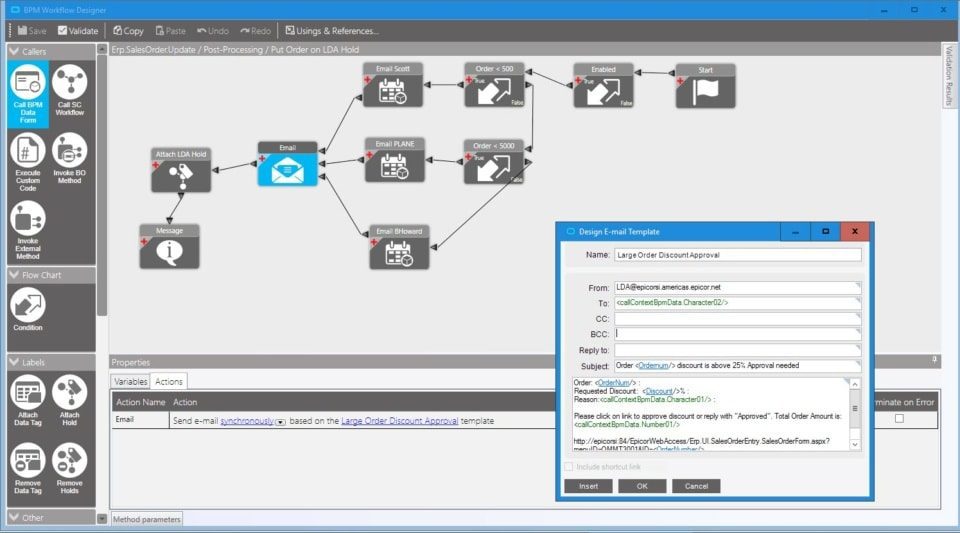
Business Process Management—Build new controls and validate easier with BPM as part of the Epicor Business Architecture

Business Process Management—Build new controls and validate easier with BPM.

Task Management

Systematically automate and execute routine processes using a set of tools provided by Epicor. The inherent systematic nature of processing tasks via these tools contributes to the speed, consistency, accuracy, and ability to document procedures for regulatory compliance. Multi- and Single-Tiered Task Management Define workflow processes which key transactions must follow for completion. Tasks may be a single step process, or they may be a series of interlinked processes involving many different parties. Create custom workflows specific to your business using task sets. Such task sets may define a single step process or a series of interlinked processes involving many different resources. These task sets can contain Multilevel tasks, milestones, mandatory tasks, and alternative routes.

The Epicor Task Management system allows you to connect your people with processes and the ERP system itself. As business processes become more complex and dynamic, it’s important for any enterprise application to recognize situations and help drive people toward the right efforts and the right decisions. Complete functionality includes:

  • Multi- and single-tiered task management
  • Easily definable tasks
  • Electronic sign-offs
  • Type-based task categorization
  • Definable task lists
  • Detailed message log
  • Automatic work assignment and routing X Automatic WIP notification
  • Automatic alert notification
  • Automatic carry-out processes

Task Definition

Define tasks to accurately represent the work to be done within your enterprise. Tasks can be created on-the-fly, or users can select from predefined tasks (e.g., pricing approval, revision update, generate quote) to identify different types of work to be completed. After creating a task, you can assign it to the appropriate employee.

Electronic Sign-Offs

Optionally require password clearance for sign-off on key tasks, providing traceability and adherence to procedures. Task sets ensure that transactions can only be updated if the task set is at the right status.

Streamline

Categorize tasks by type, streamlining assignment and task set generation. Task types are user-defined (e.g., to-do, urgent item, follow-up) and simplify categorization of work.

Task Lists

Specify task lists to each employee, and automatically deliver them to the area where the work needs to be done.

Message Log

Document e-mails and calls regarding the task with a message log.

Automatic Assignment and Routing of Work

Automatically assign tasks using required resources and the context of the transaction. Dynamically assign task sets based on circumstances. The task management system will automatically assign and route the work needed to process the change.

Staying Up-to-Date

Choose to have Epicor automatically send an e-mail notifying key personnel when a task has been created or completed.

Send Alert

Automatically and immediately send an e-mail alerting internal or external resources when key areas of the system are changed. E-mails can be automatically constructed by Epicor, or you can construct sophisticated HTML-based e-mail messages.

Carry Out Processes

When critical information has changed, automatically carry out processes to update other parts of the system.

Workbench and Tracker Views

Epicor provides a series of role-based workbenches to streamline and expedite workflows throughout your company. Workbenches provide a focused, paperless, single entry point from which internal and external users can automate and execute routine processes. Epicor comes with many predefined workbenches including buyers, planning, engineering, inspection, service, sales, credit manager, and plant workbenches.

Business Activity Management

Epicor extends Workflow Management with integral business activity management (BAM). BAM enables you to build simple proactive business rules into any of your system transactions and has four major components:

Change Log

Identify key data areas to track including who, what and when data has been changed.

Alerts

Immediately send an e-mail alerting internal or external personnel when key transactions have been changed. E-mails can be automatically created or you can design sophisticated HTML-based e-mail messages using related information from your database. You can specify e-mail addresses manually, use scripts to identify e-mails based on rules, or automatically derive e-mail addresses based on transaction-specific information.

Execute Processes

Automatically execute a process to update other parts of the system when a key transaction has changed.

Manage Exceptions

Easily activate alerts, enabling you to immediately begin gaining control of potentially expensive exceptions. Epicor includes a library of predefined alerts ranging from “customer credit hold flag changed“ to “employee clocked out early.“

Business Process Management (BPM)

Building on and extending beyond the simple rules enforced by BAM, Epicor Business Process Management is all about identifying and improving processes to make your business more efficient, more disciplined, and better able to adapt to change. Epicor incorporates BPM technology to enable organizations to automate and streamline business processes for continuous improvement. Epicor BPM augments your current efforts of continuous improvement by allowing you to more closely tailor your Epicor solution to reflect the best practices you have developed.Complete functionality includes:

  • Seamless integration and workflow capabilities
  • Easy-to-use designer with wizard interface
  • Pre-process condition builder
  • Post-process routine automation
  • Customizable base process

Seamless Integration and Workflow Capabilities

When coupled with Epicor Service Connect, Epicor BPM gives Epicor customers seamless integration capabilities with any service-driven application. Epicor BPM automates the delivery of information to customers and suppliers directly from within the Epicor application. As an integral part of the Epicor business architecture, Epicor BPM provides a layer to each Epicor service for applying rules and conditions whether the service is called from a client, another service, or another program. Epicor BPM includes the ability to track data changes within the database and automatically send alerts or print reports when change events occur.

Easy-to-Use Wizard Interface

Epicor BPM provides a Microsoft Outlook-style rules wizard so you can easily intercept Web service methods with Method Directives and add custom logic to perform actions before, after, or in place of a Web service method. Every Method Directive is executed as though it were part of the standard code itself. Epicor BPM will allow the simultaneous update of changed rows to support new BPM method directives and to improve processing performance.

Pre-Process

Epicor BPM allows you to build pre-process conditions that require approvals or other conditions to be met before processing continues. For example: require approval for customer credit limit change.

Post Process

With Epicor BPM you can automate post-process routines such as an Epicor Service Connect workflow that provides integration to an outside system, send an e-mail, invoke a .NET method, execute code, or create a record such as a workflow task.

Base Process

Epicor BPM also lets you replace an existing business service with your own.

9. Web 2.0

Epicor understands the value that mass participation and collaboration, with the Web as an enabler, can bring to a business. Substantial advances and the ongoing maturity of the consumer Web have brought new levels of productivity and self-evident usability to today’s technology consumers. Even the rise in social computing and related technologies has an outlet in enterprise business software, and are manifested in capabilities such as enterprise search and presence. Epicor ICE merges these emerging technologies, often referred to as Web 2.0 with Epicor True SOA to deliver unprecedented support for harnessing the knowledge, rapidly finding information, and taking collaborative actions upon it.

Electronic Commerce Platform

Businesses looking to improve customer service, reduce lead times through new business efficiency, and deliver new opportunities to sales will often invest in eCommerce solutions. Epicor Commerce Connect (ECC) was designed to solve the challenges of manufacturers and their unique needs as they integrate an eCommerce solution. ECC is built on the Magento platform—a leader in eCommerce—with a comprehensive ecosystem and tooling in constant development to enable businesses to stay current with latest commerce trends. Epicor Commerce Connect is also fully integrated with Epicor ERP and offers the synchronization required by most commerce sites while boasting additional capabilities needed by manufacturers—including full integration with Epicor ERP product configuration capabilities. Finally, ECC easily extends to new data elements and provides a platform for eCommerce business growth.

While many companies can provide eCommerce services, very few leading providers are able to deliver the value and rapid results that Epicor Commerce Connect affords. It can extend business boundaries with a proven commerce architecture that connects businesses to consumers, customers, and suppliers—and enables Epicor ERP customers to utilize their websites to help drive revenue, increase customer satisfaction, and grow their businesses.

Enterprise Content Management

Enterprise content management (ECM) supports paperless operations and reduces document control costs by enabling users to easily add documents and retrieve information from nearly everywhere within the system. Epicor ECM delivers essential attachment/document management capabilities by extending them to include use of Microsoft SharePoint (Microsoft SQL Server) document repositories. This means that document versioning is also supported along with the option to integrate to other best-of-breed document management systems.

Drag and Drop Attachments

Epicor supports drag and drop document attachments, document versioning, and advanced document meta-data tracking and searches through attachment vaulting in Microsoft SharePoint. The electronic document is not stored anywhere in the system; just the file location is stored and linked to the business object used in the form. Multiple content management storage options are supported including; SharePoint Document (documents stored in a SharePoint document list), File System Document (documents stored in a defined file system location), Attachment Link (specific document link to a file location), and Collaboration Link (specific link to a SharePoint Document List).

Simple and Secure

Simply drag and drop a document from your secure document repository and the system generates a secure link that can be accessed based on user network security.

Retrieval

Retrieve documents for viewing, editing, or printing by contextually searching within your Epicor application and accessing related attachments.

Document Viewing

Epicor ECM offers support for industry-leading AutoVue™ 2D Professional Desktop Edition and AutoVue 3D Professional

Desktop Edition for viewing of hundreds of file formats. These include technical document types such as 2D/3D CAD and Electronic Design Automation (EDA), as well as business documents such as Office and Graphics. These solutions also include redlining capabilities.

Product Documentation Workflow

Automated product documentation workflow ensures the flow of accurate product documents to the production floor for viewing, redlining, and updating of drawings and other documentation related to the product, process, or material used.

Enterprise Search

Today’s business workers are typically savvy internet users in their personal lives and have come to expect the same sort of access and community in their business lives. By utilizing Web 2.0 technologies and the building blocks of Microsoft Search, such as SQL Full Text Indexing, Epicor delivers Enterprise Search, a Google-like search tool that brings the personal Internet experience to the workplace. Enterprise Search provides embedded search capabilities through tag clouds of Epicor structured data that span all Epicor applications built upon it and extends beyond enterprise data, to unstructured data (Word documents, etc.) if desired, and in a secure manner. Epicor Enterprise Search also supports extensible actions from search results including task-specific actions, internal and external Web service calls and direct links to applications or application forms in context. Complete functionality includes:

  • Secure search results
  • User-definable searching
  • Easily find relevant business data
  • Data drill-down capability
  • Complete search results in browser
  • Epicor Administration Console-Based System Configuration
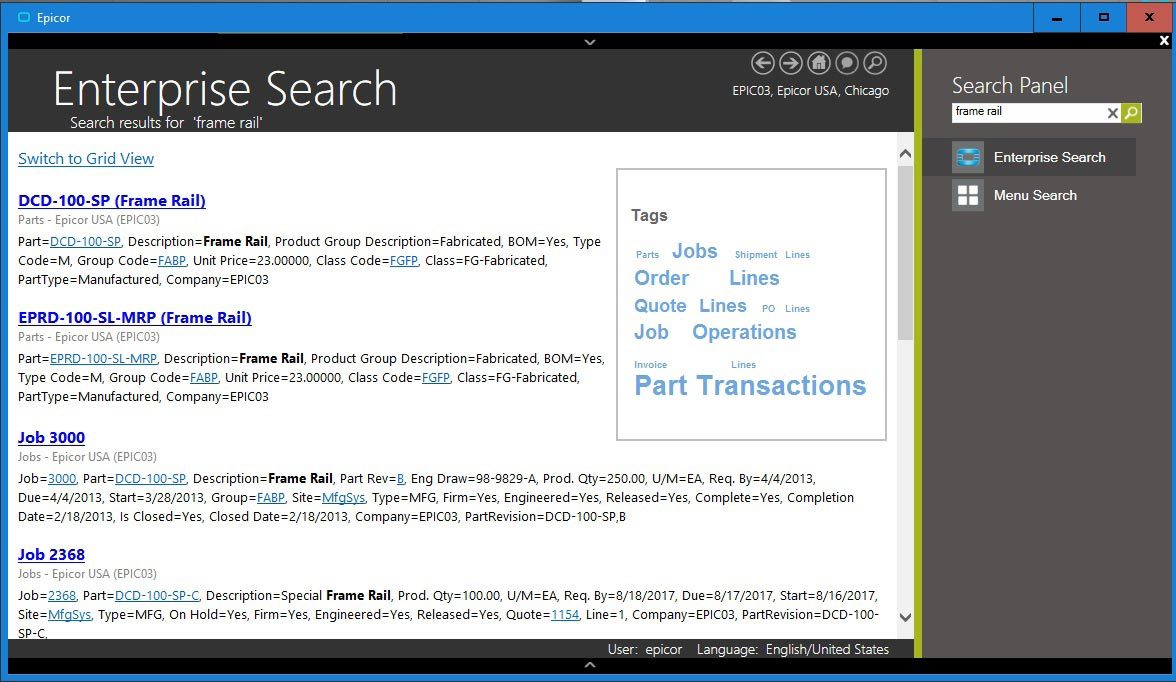
Enterprise Search—Epicor Enterprise Search delivers search options for relevant business information in a format similar to Google as part of the Epicor Business Architecture

Enterprise Search—Epicor Enterprise Search delivers search options for relevant business information in a format similar to Google.

Secure Search Results

Business workers will be able to search for data that resides within the Epicor application as well as data stored locally, on the network, or on the internet. Application data search results are returned to workers based on access rights—if a user is not permitted to view certain data, it will not be listed in the results. Search results are bound to the BAQ security rules—if a user does not have access to columns, they are not displayed for that user.

Easily Find Relevant Business Data

With Enterprise Search, business workers are no longer tied to traditional ways of accessing information—now they can specify exactly what they are looking for and pick and choose from the result set to see the data. Enterprise Search will

also include the ability to “drill down“ into related data. For example, if you search for a customer, you will be able to see results that drill down into sales orders, invoices, payments, or CRM calls, to name a few.

Get the Information You Need Right from Your Browser

With Enterprise Search, users get the information they need with less input and without having to move from form to form within the application. Enterprise Search allows you to set the sensitivity level so you don’t get irrelevant data.

Enterprise Data Without Utilizing an Application License

With Enterprise Search you get fast, relevant and secure access to all of your information, without utilizing a license. Enterprise Search brings relevant business information to employees and customers in a familiar and easy-to-use setting.

Search Administration and Management

Configuration of Enterprise Search and of the BAQs that populate the search is available in the Epicor Administration Console allowing much easier system configuration.

Social Enterprise

Epicor Social Enterprise (ESE) is a collaboration solution that provides a fundamental shift in the way organizations collaborate around a project, customer incident, quality issue, procurement challenge, or planning event. It enables people to fully engage within their businesses and leverage their ERP data in the process to make more informed decisions. Online social engagement reduces the frequency of company meetings, improves the speed of decision making, and ultimately drives a new level of business efficiency. Fully embedded within Epicor ERP to deliver easier access to business information, ESE fosters cross-company collaboration by bringing social media concepts and contextual ERP information together in a single tool. This allows people to share information with each other—working together to solve problems while building up a knowledge base repository in which good ideas are never lost. Because it is an embedded component of Epicor ERP, users already have the ability to subscribe and unsubscribe to the information relevant to their role in the business. Complete functionality includes:

  • Embedded capabilities
  • Business notification
  • In-context and on-demand
  • Activity streams
  • Collaboration
  • Knowledgebase
Social Enterprise—Monitor changes using activity streams within an Epicor application as part of the Epicor Business Architecture

Social Enterprise—Monitor changes using activity streams within an Epicor application.

Subscription Services

Epicor ICE extends RSS subscription capabilities to Epicor application data. This means that business users may subscribe to specific information that they wish to be kept appraised of. One area where this is enabled is within Epicor Portal, where the entire schema of Epicor applications is accessed for end-user query development and Web deployment. By subscribing to a particular query using RSS, users will see information proactively pushed to them when the data behind that query changes. For example, a user may wish to attach an RSS feed to a particular contact at a customer site. Any time something happens to that contact they can receive a note about it. RSS information can be pushed to your container of choice including the RSS Feeds Outlook Syndicated Content (RSS) Directory within Microsoft Office or via Windows Gadgets.

Composite Applications

Enabled by the Epicor Everywhere Framework, Epicor application Web forms generated from XML metadata, and their related linked business logic, can be used in composite application development. Each Web form supports publication and subscription, allowing specific business functionality to be “mashed-up“ with other lines of business developments.

Epicor Portal Mashups

Within Microsoft Office SharePoint Server it is possible to build composite applications that combine various connected Web Parts, such as Epicor Web forms, Epicor Portal Web queries, Epicor EPM analytical Web parts, and more.

Mobile

Enabled by the Epicor Everywhere Framework, Epicor application Web forms generated from XML metadata, and their related linked business logic, can be accessed via mobile device. Additionally, Epicor EPM KPIs can also be deployed direct to mobile devices and include full search capabilities to rapidly find and drill-down to applicable data.

System Tools

Epicor ICE offers a series of system facilities and tools to enable the effective management of Epicor applications, extending to system security, document management, advanced software development, software deployment, and product documentation. System tool functionality includes:

  • Centralized administration console
  • Comprehensive system monitor
  • Email integration
  • Separation of Epicor ICE from Epicor Applications
  • Multiple system agents
  • Extended reporting framework
  • Customizable printed forms
  • Auto print control

Centralized Administration Console

This feature delivers a single management area for your Epicor system, which removes redundancy and in so doing boosts user productivity, accuracy and efficiency.

System Monitor

Schedule tasks to be run in the background on a one-off or regular basis (e.g., daily, weekly, monthly, etc.). Tasks can be jobs such as MRP or reports and forms. Reports and forms can be frozen at a point in time so the data can be referenced at a future time.

Integrated E-mail

Automatically e-mail employees, suppliers, customers, and partners from the system based on key actions. Attach documents so the recipient need only click on the attachment to drill into the associated transaction.

Separation of Epicor ICE from Epicor Applications

Epicor ICE business architecture is developed separately from Epicor enterprise business applications, allowing each to be modified and updated in separation and potentially under differing release cycles. Epicor ICE framework components have been extracted from application source control and given their own build and delivery schedules resulting in a more robust application development environment that allows staged delivery of Epicor ICE to application developers using the Epicor ICE software development kit (SDK).

Multiple System Agents

ICE gives the ability to run Multiple System Agents. This feature allows customers to set up multiple defined areas for the generation of reports and processes. Application servers can now be located in many different physical servers to distribute the processing load or remain on just a single physical server. Multiple System Agents also allows for greater flexibility in system tuning and security configurations. Epicor also provides the ability to execute reports on alternate databases. A System Agent can be expanded to have connection information for alternate database servers. This allows a user to log in once to a company and run reports using data from an alternate reporting database, thereby offloading reporting overhead from the main transactional database.

Extended Reporting Framework

The reporting framework within Epicor ICE allows optional Server-based printing. This is done via the creation of an Enterprise (or Server based) printing option for users who wish to leverage the associated Crystal Reports, Microsoft SQL Server Reporting Services (SSRS) or other enterprise reporting software. Epicor’s server-based reporting option includes Microsoft’s SQL Server Reporting Services (SSRS). SSRS reports add the capability to e-mail and fax reports in addition to printing from the server or previewing on the client.

Customizable Printed Forms

Access the laser-generated and preprinted customizable continuous forms that are provided with auto-fax and e-mail capability.

Auto Print Control

This feature handles the automatic printing of forms and barcode labels upon the completion of a predetermined list of Epicor transactions. Auto-print control lets you define the events that trigger the printing, rules that define the conditions, and the action to take on a form-by-form basis.

Advanced Print Management

Automate document delivery with Advanced Print Management. Whether e-mailing, faxing, or printing and mailing.

Support for Multiversion Environments

The Epicor ICE framework now provides the ability to define and manage certain master data elements and processes across an environment that includes multiple versions of Epicor solutions.

Automation Tool for Epicor

The Automation Tool for Epicor (ATE) can do everything your users can do in Epicor ERP and is a very efficient way to either run repetitive tasks that may differ only in the selection criteria or run tasks that need to be launched late at night when other users are off the system—like data-intensive tasks such as very large print runs, MRP, etc. ATE can also be used as part of your change management process to test the latest Epicor hotfixes using automated test scripts matched to your business activities and data. Users can easily revalidate results with ATE.

Security

Multi-company Menu

This feature provides secure access to multiple companies without having to close all forms or carry out different logins when switching companies.

Operating System Security

Epicor ICE provides the option for Microsoft Windows Authentication and Windows Single Sign-on and Password Policy.

Method Security

Secure the types of processing users are able to carry out (e.g., allow a user to update an existing part but not add a new part) by user or group.

Data Level Security

Secure which data users are allowed to access. This can be done at a dataset (e.g., all sales order information), data table (e.g., sales order header information) or field level (e.g., sales order due date).

Security Reporting

More closely manage user security with security reporting.

Online Edits and Audits

Monitor all changes to records (before and after values), who made those changes, and when those changes were made. Prompt users for audit notes of why changes have been made.

Date and Time (Using Server Time) and User Name for Auditing

Epicor ICE introduces a true date-time field which involves the creation of a Microsoft SQL Server style date/time data type or data control that can then be used by application developers to easily render local time. All date fields are of this date/time data type and are only stored in universal date format.

Software Development Kit

For those requirements that cannot be satisfied by the embedded customization layers, Epicor also offers an advanced SDK which is available at an extra cost and supplies the client source, framework UI and business logic tools necessary to write your own additions and extensions to the application. The SDK is a toolset used to create new software elements (or modify existing software elements if the adoption of future releases is not a concern).

REST Services

Representational state transfer (REST) services are a type of web service based on the architecture of the internet. Through this application program interface (API), these services link applications more easily through Internet type connections.

These services use the OData REST Protocol, which adds query capabilities and metadata descriptions to enable OData aware applications such as Microsoft Excel, Power BI®, or similar third-party applications to display real-time Epicor data. REST does this by exposing data and functions as unique Uniform Resource Locators (URLs) resources. Applications can then communicate with the REST services in the same way a web browser interacts with a website.

The REST services implement the full functionality of the Epicor ERP business objects. As with any use of the business objects, the services can be used to extract data to other systems and to provide interfaces for data Import and Update, but they should not be used in applications designed to provide transactional functionality that would otherwise require a concurrent user login.

Use the Tools Our Developers Use

Epicor ICE SDK is a packaging of some of the tools that are used by the Epicor development group in the creation of base code. These tools allow a developer to make modifications or extensions to the base application or create new software within the same framework used for the base product. The Epicor ICE SDK allows developers to build their own custom modules and integrate and embed them into the product as though it were part of the base system.

Audit Control

Within the Epicor ICE SDK users can make changes to underlying business processes via the Object Designer. This allows users to tailor the system to meet their needs while at the same time tracking these changes as they represent a functional change to the software application that might need to be tracked for governance and compliance auditing. This is a significant addition to the customization options within the application framework.

Epicor Service Connect

Epicor Service Connect is a powerful business integration platform, functioning as a central integration point for secure workflow orchestrations within Epicor applications as well as external connectivity to Epicor and non-Epicor applications. Because Epicor Solutions are built using Epicor True SOA, the power of Service Connect can be used to streamline processing within the application framework.
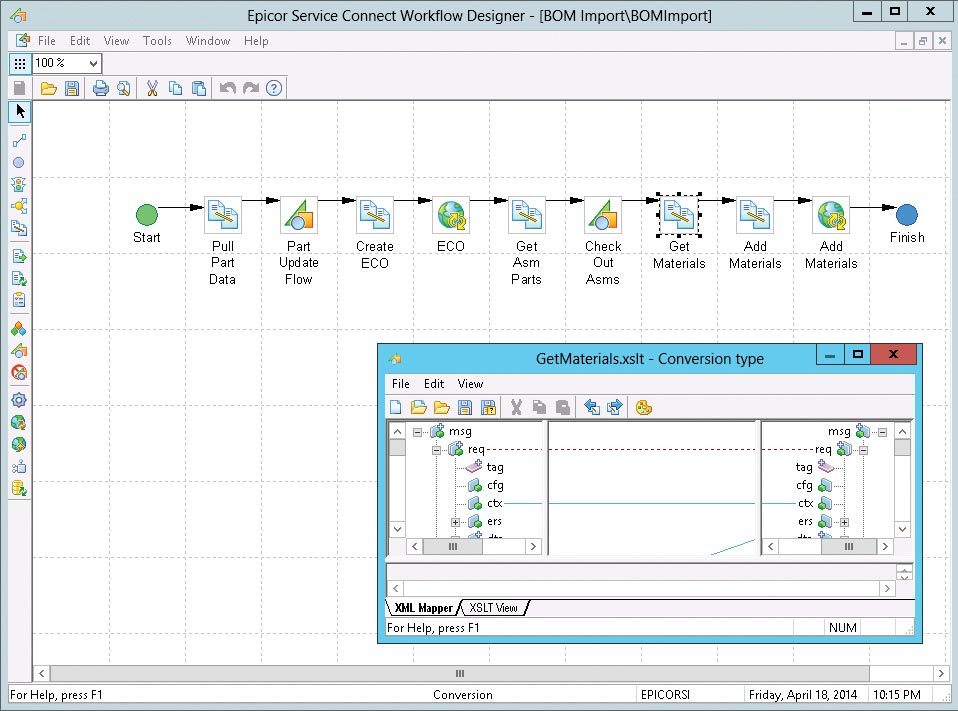
Epicor Service Connect—a rapid platform for incorporating workflow and system orchestration through visual designers with little to no programming effort as part of the Epicor Business Architecture

Epicor Service Connect—a rapid platform for incorporating workflow and system orchestration through visual designers with little to no programming effort.

Promote Lean Principles

Users can automate tasks and processes within the application to promote lean principles, continuous performance initiatives and Six Sigma quality within the organization or across the supply chain. Service Connect lets employees focus on value-added activities and management by exception instead of repetitive data (re)entry tasks. Built to support collaborative processes, Service Connect links different business entities, applications or users using open, industry-wide standards and technology that enables businesses to deploy solutions— confident that their investment will remain intact for the future. Service Connect harnesses the openness of XML and includes service-bus functionality for Security, Messaging, Orchestration, Transformation, Scheduling, Notification, and Exception Handling to deliver rock-solid reliability combined with ease of use.

Much More Than A Programming Interface

Typically, the effort to connect different applications requires code for mapping the integration, proper error handling, scheduling, and so on. The aim of Epicor Service Connect is to eliminate this extra coding effort required to integrate an Epicor solution. Epicor Service Connect is more than a tool for integration; it is a platform for rapidly incorporating workflow and system orchestration through visual designers with little to no programming effort. Integrations can be easily built by using the Service Connect Visual Data Mapping tool to link and transform XML documents to map to different systems along multiple communication channels and protocols to support a wide range of integration scenarios.

Secure Audit Trail

Service Connect logs workflow processing for both transactional integrity and compliance. Processes are available for review and tracking while in progress or after the process completes. If for any reason processes error or stop, transactions are rolled back and queued for subsequent correction and resubmit. Notification services can be incorporated into the workflow to alert either the submitting application (e.g., system integration or EDI process) or an administrator.

Direct Database Updates

Epicor Service Connect includes workflow support for Epicor business objects directly in addition to the existing Web service elements. This feature can be used with the UpdateExt method to update full datasets and multiple records in the same way as the Web service Update method processes data. Since the business objects are called directly and within a single login session, much of the latency in Web services can be eliminated.

Epicor Documentation, Education, and Content Delivery

Epicor offers an approach to documentation and content delivery that puts relevant, context-driven information in the hands of stakeholders and end-users. This comprehensive solution set shortens your return on investment while maximizing utilization of your investment in Epicor.

Epicor deploys a worldwide team of dedicated content writers and trainers to bring together the feature summary, online help, technical reference user guides, online training courses, and online tutorials through a single-source technology.

Epicor University delivers a suite of tools, aligning to the different learning styles and needs of your employees. Resources include:

  • Training on Demand videos
  • Embedded Education self-paced courses X Role-based training agendas
  • Course tests
  • Live training
  • Online help
  • System and user documentation

Embedded Education

Embedded Education is a self-paced training module accessed directly within a training installation of Epicor ERP. Users can access more than 100 courses—each with detailed explanations and hands-on exercises. Learners are able to easily navigate between courses and the related application using real-life business data through an Epicor education database. The courses provide a structured and repeatable learning experience for initial and ongoing training. As this is a licensed module, new training comes with each release of Epicor ERP, so users can more easily be trained and ready.

Epicor Compliance and Structured Reporting Framework

The Compliance and Structured Reporting Framework consists of functionality designed to allow the definition, generation, and distribution of electronic documents in formats such as XML, JSON, and CSV. In many countries, there are specific reporting requirements—including electronic accounting, invoicing, and SAF-T reporting—mandated by government agencies that must be generated from the ERP system. Such regulatory requirements can change periodically and rapidly. The functionality is designed to allow definition and distribution of document formats. The functionality also has broad use for generation of document formats used for system integrations and other data reporting applications.

Epicor Learning Center 

Your Epicor Learning Center (ELC) allows you to deliver, manage, and track your company’s training needs from one central location. Here, you can access course materials, set and manage employee assignments, register for classes, and track training progress and test scores. The ELC contains a broad catalog of Training on Demand courses and tests. Role-based agendas help you align courses and exams to each employee’s training needs, so they can learn a new topic, prepare for an upgrade, launch a new application, or dive more deeply into current applications. Administrators may view individual test results or aggregate scores across the entire organization to easily track knowledge levels. Best of all, tests are not limited to Epicor content. You can add proprietary questions and tests to the ELC, and then assign and track them as desired.
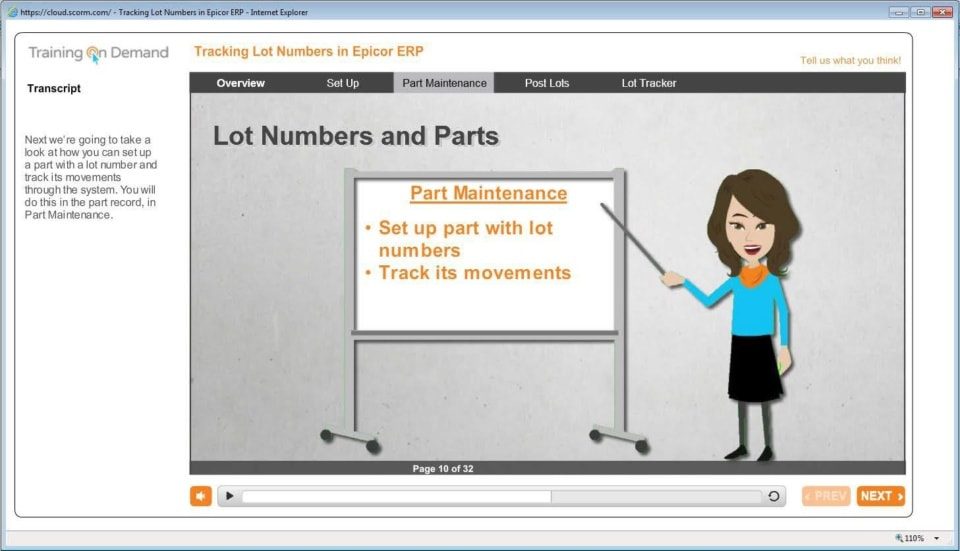
Epicor Learning Center—Epicor Learning Center offers Training on Demand for users for optimum productivity and greater utilization of ERP as part of the Epicor Business Architecture

Epicor Learning Center—Epicor Learning Center offers Training on Demand for users for optimum productivity and greater utilization of ERP.

Enterprise Content Management

Enterprise Content Management (ECM) helps your business achieve growth by enabling you to streamline and automate reporting processes, reduce the risk of error, and improve business efficiency. ECM is the technology used to capture, manage, store, preserve, and deliver content and documents related to organizational processes. ECM tools and strategies allow the management of organizations’ unstructured information—wherever that electronic information exists. Complete functionality includes:

  • Drag-and-drop attachments
  • Secure document repository
  • Contextual retrieval
  • Multiformat document viewing
  • Automated product documentation workflow
  • Advanced Print Routing
  • Epicor DocStar ECM

Advanced Print Routing

Epicor ERP Advanced Print Routing lets you email multiple recipients in multiple formats, send output to one or more designated printers, or save reports to a network folder in a desired format. With an easy-to-use graphical workflow builder, you can quickly and easily manage reports by filtering and assigning alternative reports styles. Advanced Print Routing allows you to send order confirmations or invoices to customers, generate and submit required financial reports, deliver parts reports
or pick-lists to others, or save critical information to a business archive.

Epicor DocStar ECM

Epicor DocStar ECM is an industry-leading solution that’s built for the web and delivers deployment choice. Users can install DocStar ECM on their hardware or use DocStar in the cloud. The same software offers the same user experience and the same great results. DocStar ECM supports all popular browsers and mobile devices to deliver access anytime, anywhere. Epicor DocStar ECM manages electronic assets with:

  • Security
  • Audit Trail
  • Data Center
  • Workflow
  • Intelligent Capture
  • Custom Forms
  • Search and Retrieve
  • Document Retention

XML-based Content Delivery

Built on XML DITA technologies, the team pulls information from a unified content library to create deliverables with consistent tone and structure. Creation of deliverables is more efficient, as one writer can seamlessly reuse content generated by another writer, making the creation of deliverables more efficient and thus provide cost savings for both creation and translation.

Feature Summary

Understand the impact of updates to every line of the business. Feature summaries provide comprehensive role-based help that explains business cases alongside impact topics for rapid adoption of new releases.

Online Help/Field Help

The comprehensive online help that is tied to the application functionality they are using reduces frustration from users and optimizes performance.

Intuitive Field Level Help

Epicor ICE offers a “quick“ viewer to display Field Level Help embedded in a Sheet but available to be docked or torn off as an independent window. If docked, then help can be set up with a pinned or unpinned capability that allows it to slide out /slide back when the sheet is activated. The quick viewer also supports Links and provides Rich Text functionality (colors, variable fonts, bold, italics, etc.).

Customizable Help

Users have the option to display help for a specific field where field definitions, field specifications, or both can be added. Epicor ICE provides a “help property“ for each control available in UI customization. When field-level help is requested, the text in the Help property is added or merged into the standard field-level help prior to display. This also allows text to be run through standard translation logic before being merged into standard help, enabling customers and partners to create multi-lingual field-level help.

Layered Help

This feature also allows help to be customized and modified by partners and end-user customers. Help customizations are “layered“ in much the same way that UI customizations are layered. Epicor Help content is used as the base and then can be amended by a partner (or Epicor Custom Programming) using the verticalization or productization layers of the Epicor Layered Client Stack, which can then be further updated by the end customer.

User Guides

Epicor User Guides provides a complete overview of the major functions within Epicor. These printable documents offer full-colour explanations of system functions and walk users through the system, step-by-step. In addition to an application user guide, there are guides on Epicor Business Architecture, user experience and customization associated with the Epicor Business Architecture, and Epicor Service Connect.

Technical Reference Guides

The Technical Reference Guides provide detailed instructions focusing on technical audiences. Epicor offers technical reference guides on scheduling, MRP, product configurator, job costing, and the posting engine.

Embedded Courses

Courses are embedded within the Epicor application to simplify role-based learning and optimize deployment.

Customization Toolkit

The Customization Toolkit allows users to leverage standard content by editing according to their business processes. Users can add annotations to topics on the same tab as the help content. Course content can also be made available for larger deployments with advanced customization requirements.

Contact Us


The Epicor ERP cloud framework is one that modern businesses are increasingly looking toward with an interest in more agile and efficient operations. Lending the environment necessary to deliver leading intelligent ERP software to businesses all over the world, cloud ERP systems are not a fringe fad, but the platforms of the future.

Epicor ERP Cloud Features

As with many other cloud-based technologies, Epicor ERP cloud deployments deliver access from anywhere, at any time. The impacts on productivity and performance can be realized almost immediately. Designed to fit a business’s unique needs and industry requirements, Epicor ERP Cloud users reap the benefits of modern tools built for a modern workforce.

Want to simplify your company’s technology landscape? Cloud ERP features a distilled technology profile to reduce the costs a business incurs with upfront purchasing and ongoing maintenance of in-house hardware. This leaves more room for IT teams to focus on internal projects and improvements. Not to mention, Epicor delivers one of the most trusted and secure ERP cloud solutions that are easy to deploy, use, scale, and extend.

an image of the epicor erp cloud and Microsoft azure logos

The Cloud ERP trifecta consists of security, performance, and innovation. Incorporating these essential three concepts continually, Epicor ERP on Azure keeps your business data protected and your competitive edge strong.

“Microsoft’s focus on the ‘Intelligent Cloud’ and ‘Intelligent Edge’ complement our customer-centric focus. We looked at several public cloud options. Microsoft Azure offers the best foundation for building and deploying enterprise business applications that will enable our customers’ businesses to adapt and grow. Today, we are seeing more than three-quarters of prospects ask about cloud ERP. As that deployment model becomes the norm, we are ready to enable our customers to move to the cloud with confidence leveraging the reliability, security, and scalability of Microsoft Azure.”
-Steve Murphy, CEO, Epicor

The Great Migration To Cloud ERP

By staying abreast of the most innovative and forward-thinking technologies available to businesses, it is more likely for a business to succeed in growth and remain competitive. Clinging to manual, disconnected processes makes it increasingly difficult for a business to do exactly that.

The great migration to cloud platforms is well underway and businesses leading the movement are already reaping the benefits. IT operations, inventory management, product manufacturing, and keeping mobile workforces connected are all part of the equation. The result is increased development in even more efficient and powerful technologies, including big data analytics, robotics, eCommerce, digitization, Internet of Things (IoT) connectivity, and more. Microsoft Azure and Epicor ERP work together to deliver an enterprise-grade global cloud platform that is value-driven and cost-effective.

What Is Microsoft Azure?

Microsoft Azure is an open, flexible, and enterprise-grade public cloud computing platform. It serves more than 50 regions globally and leads the industry in security and privacy standards. With hundreds of data centers around the world and millions of servers, Microsoft Azure is the leading, most trusted public cloud platform for the enterprise. Epicor leverages this proven foundation to build and deploy enterprise business applications that enable your business to adapt and grow.

“Standardizing cloud deployment of its world-class manufacturing and distribution solutions on Microsoft Azure is a natural step for Epicor with its history of leveraging forward-looking technology to deliver the utmost value to its customers. With Epicor solutions running in the cloud, customers will reap the benefits of greater agility, faster innovation, and favorable economics of Azure as they embrace digital transformation.”
-David Willis, Corporate Vice President Microsoft

Learn More About Microsoft Azure And Epicor ERP Cloud Options

For a complete breakdown of the Epicor Cloud deployment options available with Microsoft Azure, download the free brochure: Download

About Encompass Solutions

Encompass Solutions, Inc. is an ERP consulting firm, NetSuite Solution Provider, and Epicor Gold Partner that offers professional services in business consulting, project management, and software implementation. Whether undertaking full-scale implementation, integration, and renovation of existing systems or addressing emerging challenges in corporate and operational growth, Encompass provides a specialized approach to every client’s needs. As experts in identifying customer requirements and addressing them with the right solutions, we ensure our clients are equipped to match the pace of the Industry.