Every year, millions of workers brave the cold to perform year-end full physical inventories in the final weeks of the fiscal year – with mixed results. While this annual ritual is in many cases the only way to reconcile inventory variances incurred throughout the year, it doesn’t need to be. Enter the cycle count.

Cycle Counts That Count will help you implement better cycle counting on a daily, weekly, or monthly basis starting in April and let you potentially conduct your last ever year-end full physical inventory that same year. The final full physical will validate your efforts at daily counting and provide management with the data they need to determine when to switch to a cycle only inventory process.

Cycle Counts That Count Or…How I Learned To Stop Worrying About The Year-End Full Physical Inventory And Love The Cycle Count

An effectively implemented cycle count program can, within 9 months, effectively do away with conducting a full physical inventory. That’s right. You can free your organization from the dreaded yearly shutdown that pulls staff away from their families during the holiday season and closes your shipping doors for a week.

Now, what if we told you that our workshop would ensure you’d never have to perform another year-end full physical inventory, ever?

Contact Us today to set up your workshop and we can help you perform Cycle Counts that Count!

We can work with you to level work out over sessions that coincide with your low periods.

Cycle Count Project Management

Partner with your Encompass team to lay out a simple project for implementing daily or weekly cycle counting for your organization. The audience should include senior management, such as plant managers, the controller, or the executive team, as well as staff responsible for inventory control.

Our first workshop will review how a typical daily cycle counting program looks, how much time will be required to conduct daily counts, as well as case studies in efficiency gained by accurate inventory adjusted on a quicker basis. A series of planning documents will be provided and reviewed during this session which will create a custom-tailored implementation plan for your organization.

Our second workshop will include the same audience. The consultant will review your implementation plan with you and then provide training on setup, configuration, and daily processing of counts in Epicor. The goal of the session is to provide you with a simple roadmap you can follow to get the program up and running immediately for a small subset of product while you complete the implementation plan and ramp-up to include all products over the following 45 days. The session will be recorded to be used by staff for reference in the future.

Your First Count Workshop

We will schedule a follow-up session with our consultant and your finance and warehouse teams to work with you on setting up and processing your first cycle count.

Quarterly Reporting Workshop

We will then follow up with your inventory control team and workshop with your inventory control team to review your first 90 days of results, and help this team prepare their first cycle counting efficiency reports back for management.

End of the Year-End Workshop

In this workshop, your consultant will review best practices for a year-end full physical inventory and work with your team as they prepare to answer a critical question for management: Is this our last year-end inventory?

The agenda will include time to:

  • Review cycle count reports to determine how well parts are being counted based on ABC codes.
  • Review methods to identify problem parts based on recurring variances and suggest probable root causes.
  • Provide best practices for preparing for the full physical.
  • Provide suggestions for reconciling year-end results and evaluating the cycle counting program’s success for the year.

Encompass is ready to partner with you today. For more information, please speak to your consultant, Customer Account Manager (CAM) or our team at info@oldencompass.sevenagesdesign.com.

About Encompass Solutions

Encompass Solutions is a business and software consulting firm that specializes in ERP systems, EDI, and Managed Services support for Manufacturers. Serving small and medium-sized businesses since 2001, Encompass modernizes operations and automates processes for hundreds of customers across the globe. Whether undertaking full-scale implementation, integration, and renovation of existing systems, Encompass provides a specialized approach to every client’s needs. By identifying customer requirements and addressing them with the right solutions, we ensure our clients are equipped to match the pace of Industry.


Encompass Solutions’ Managed Services offers a simple, structured patch management cycle to keep your on-premise Epicor installation aligned with Epicor’s update cadence policy.

The Encompass patch update program keeps your Epicor ERP system running at peak performance. This update cadence keeps your business in sync with the latest iteration of your Epicor software. The benefit Encompass provides is a dependable and iterative service that leaves you more time and energy to focus on revenue-generating activities for your business.

Stop spending time on tedious back-end tasks that can distract your teams from making real headway in the form of productive work.

What Is Patch Management?

Patch management is a component of overall system management that generally includes acquiring, testing, and installing multiple patches. Common patch management tasks include, but are not limited to:

  • Maintaining knowledge of available patches
  • Determining which patches are appropriate for specific systems
  • Proper patch installation
  • System testing prior to and following installation
  • Documentation of configurations and procedures

Patch Management Service Schedule

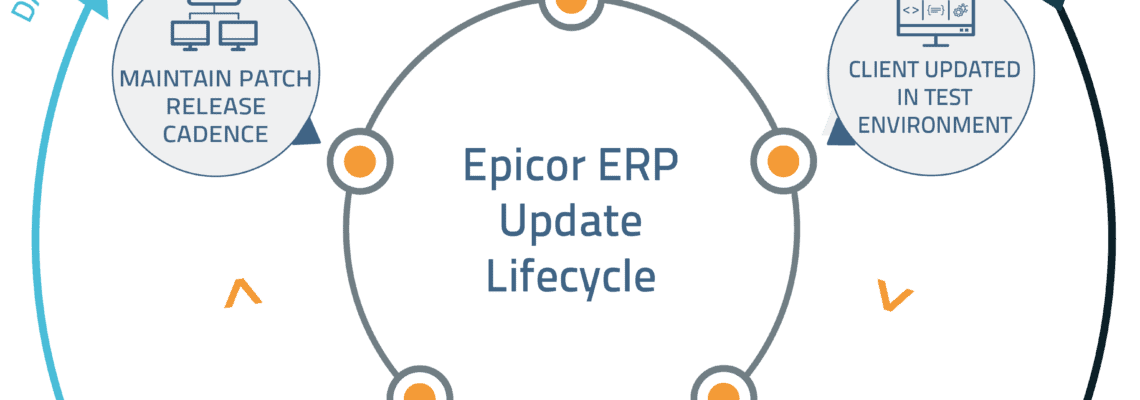
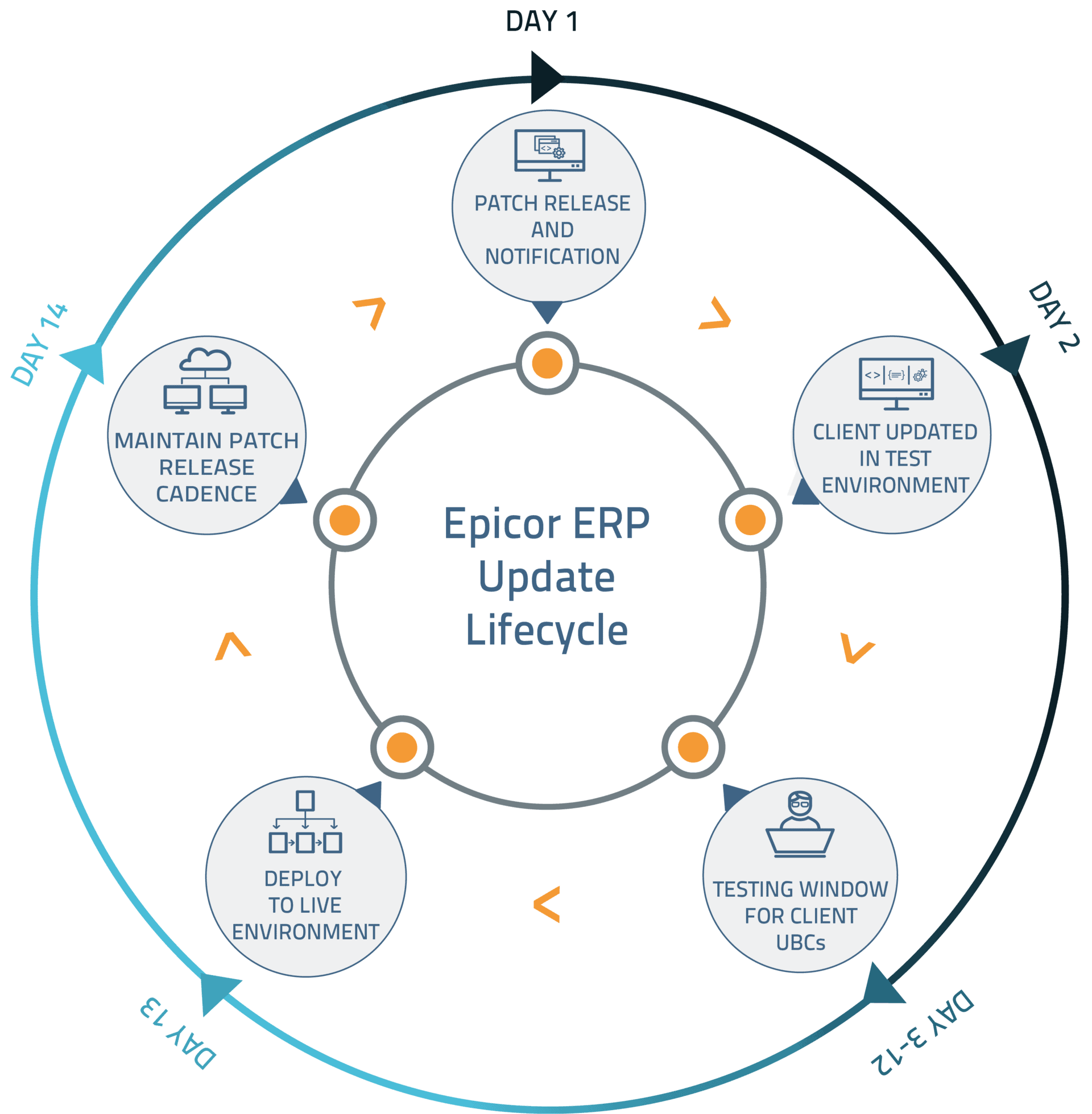
The whole patch process takes roughly two weeks to complete before the cycle is ready to start anew. Here’s how the Encompass Solutions Patch Management Service works:

Day 1 – A new patch is released from Epicor Software Corp. and notification follows

Day 2 –  Epicor ERP system patch updates are disseminated and installed

Days 3 through 12 – Testing of processes and Unique Business Cases (UBCs) takes place in the test environment to ensure no process is impeded with new patch rollout.

Day 13 – After testing is completed, the new patch is pushed to the live Epicor ERP environment.

Day 14 – A new patch is released from Epicor Software Corp. and notification follows

an image of the encompass solutions Epicor ERP Update Lifecycle - Managed Services patch management

About Encompass Solutions

Encompass Solutions, Inc. is an ERP consulting firm, NetSuite Solution Provider and Epicor Gold Partner that offers professional services in business consulting, project management, and software implementation. Whether undertaking full-scale implementation, integration, and renovation of existing systems or addressing the emerging challenges in corporate and operational growth, Encompass provides a specialized approach to every client’s needs. As experts in identifying customer requirements and addressing them with the right solutions, we ensure our clients are equipped to match the pace of Industry.
For customers on cadence, the Epicor Cloud Operations team will deploy your Epicor ERP Cloud update version 10.2.500.10 next week. This routine update includes enhancements to product quality and Kinetic user experiences. Testing is optional. For more details, please read this email and refer to the release notes in the 10.2.500 folder on your EpicWeb Customer Portal.

What To Expect During Epicor ERP Cloud Update Version 10.2.500.10

Pilot Update 

  • Tuesday, February 11, 7:00 PM to 11:00 PM Local Server Time

Production Update

  • Saturday, February 15, 4:00 PM to Sunday, February 16, 8:59 PM Local Server Time

While the 10.2.500.10 update deploys, your application may be unavailable for 30-60 minutes during the update window. Once complete you will be prompted to update the Epicor ERP Smart Client. If you happen to encounter unexpected behavior, please open an EpicCare case and include 10.2.500.10 in the details.

More Kinetic Experiences Are Here In 10.2.500.10, we’ve updated five reports and five processes (below) with the sleek, new Kinetic User Interface. As these and other Kinetic forms are periodically enabled in your environment, there will be nothing you need to do. All business logic is exactly the same. Simply enjoy the ease-of-use, modern design, and clear interface.

Like what you see? We rely on your feedback to drive our Kinetic innovations, so we encourage you to share your thoughts. Epicor’s customer experience team will randomly contact several customers to gather input, but please email Kinetic-Feedback@epicor.com at any time to send your comments or request a call.

For more information about the new Kinetic experiences, watch this 90-second video and check out Frequently Asked Questions.

Kinetic Reports in 10.2.500.10:

  • Sales Order Backlog
  • Sales Order on Hold
  • Scheduled Shipments
  • Open RMA
  • Stock Status

Kinetic Processes in 10.2.500.10:

  • Build Project Analysis
  • Build WBS Phase Analysis
  • Capture Project Revenue Recognition
  • Capture WBS Phase Revenue Recognition
  • Project Invoice Preparation

Epicor Cloud ERP Update Schedule

Here is the latest information on the release and update schedule for Epicor Cloud ERP.

To learn more about Epicor version numbering and deferred release upgrades, see the bottom section of this post.

​The Cloud ERP environment is updated as indicated in the table below. Each date represents the day your update is complete. Keep in mind that these dates and update notes are subject to change without notice at the behest of Epicor Software Corporation.

​Update ​Pilot ​Production
​10.2.500.5 ​19 Nov 2019 ​23 Nov 2019
​10.2.500.7 ​17 Dec 2019 ​21 Dec 2019
​10.2.500.8 ​14 Jan 2020 ​18 Jan 2020
​10.2.500.10 ​11 Feb 2020 ​15 Feb 2020
​10.2.500.13 ​24 Mar 2020 ​28 Mar 2020
10.2.600.2
(Release 10.2.600)
​17-18 April 2020
(one month to test)
​16-17 May 2020
The Public Cloud Deferred Customers environment upgrade options for major release are as indicated in the tables below. Subject to change.
​​Upgrade 400 to 500 Pilot​ ​Production
Flex Option 1: ​10.2.500.xx ​Week of 16 Dec 2019 ​25-26 Jan 2020
​Flex Option 2: 10.2.500.xx ​Week of 20 Jan 2020 ​22-23 Feb 2020​
NotePrior to 10.2.500, if you chose to defer your upgrade, you continued to receive 400.x updates up to your scheduled deferred upgrade date.
With 10.2.500, if you choose to defer your upgrade, you will not receive any 400.x updates after the 10.2.400.11 update.
​​Upgrade 500 to 600 Pilot​ ​Production
Flex Option 1: ​10.2.600.xx ​Week of 22 June 2020 ​25-26 July 2020
​Flex Option 2: 10.2.600.xx ​Week of 20 July 2020 ​22-23 August 2020​
NoteWith 10.2.600, if you choose to defer your upgrade, you will not receive any 500.x updates after the 10.2.500.13 update.

Epicor ERP Cloud Version Numbering and Timing

A typical Epicor ERP version number is ‘10.2.500.7’. In this example, ’10’ represents the Product, ‘2’ represents the Version, ‘500’ represents the Release, and ‘7’ the Update level.

  • Updates. Updates are generally applied on a bi-weekly or monthly basis. Updates are applied to the customer’s ‘pilot’ environment on Tuesday or Wednesday evening, and then promoted to ‘production’ environments during Saturday night local datacenter time. You may test if you like, but these are non-disruptive updates to our system, and do not introduce schema changes. We avoid month-end and calendar year-end for your convenience.
  • Releases. Releases are scheduled twice a year with black-out dates to avoid calendar year end. Because they tend to be larger releases and may introduce new functionality release upgrades are installed into a customer’s pilot environment no less than one month before their promotion to production, allowing customers to test the new features and updates.
  • Versions. Version upgrades occur approximately every 18-24 months. These often include changes to schema, user interface, and business objects. Like release updates, testing is required, so the upgrades are applied to the customer’s pilot environment thirty days prior to the scheduled production upgrade. Customers also receive an additional sandbox environment for more extensive testing.
  • Products. Product updates are typically more involved; and accordingly, we allow extended time and support to test and prepare before introduction into production.

Deferred Release Upgrades

If your business is subject to fluctuating seasonal demands or other time constraints, Epicor offers its premium “Epicor Public Cloud Flex Option,” which allows clients to defer upgrades for up to 90 days, for an additional subscription fee.  With the Epicor Public Cloud Flex Option you may select among two or three alternate pre-selected dates for your upgrade.

Regardless if you select this option and choose to stay on cadence or select a later date to upgrade, you still receive the standard one month to test releases in the pilot environment. Customers with this option would not have the full 90 days to test upgrades, but rather have the option to test and upgrade up to 90 days later if business needs require. Please contact your Epicor Sales Representative for more information.

Change Notifications Preferences

Use these steps to manage your notification preferences in order to receive alerts regarding Cloud releases.

  1. Navigate to System Setup > System Maintenance > System Monitor. From the Actions menu, select Notifications Preferences.
  2. The In-App Notifications User Preferences window opens. In the Select Roles section, specify the following:
    – In the Titles/Levels field, to receive notifications, you must select either User-PowerExecutive, or Manager.
    Note: If you select a different option, or if you enter your own title, you will not be included in the scheduled in-app messages or email notifications.
    – In the Functions/Departments field, you can specify your specific business detail.
  3. In the Types of Business section, define your Primary Sector and Primary Industry.
  4. Use the Select Interests section to indicate what type of notifications you want to receive. Note: This area is configurable and depends on your admin settings.
  5. Verify your email address in the Email field.
  6. Select the Send Notifications via email too checkbox if you are not a regular user of Epicor ERP and you want to receive notifications using email.
  7. Click Close.

Upgrading Custom Items in Cloud Environments

If you are upgrading your cloud environment, you can use the Unique Business Component Dashboard to locate and then update your custom items. To learn how to upgrade your custom items, watch the free, self-paced Epicor University course “Upgrading Custom Items in Cloud Environments”. This course is designed to assist System Administrators in understanding the tools and processes to effectively manage Unique Business Components during a system upgrade. To take the self-paced course, click here.

Alternatively, Encompass is here to help as your Certified Epicor Partner. We can help you upgrade custom business items in cloud environments any time you like. Reach out using the Contact Us link below to discuss your next project.

About Encompass Solutions

Encompass Solutions, Inc. is an ERP consulting firm, NetSuite Solution Provider and Epicor Gold Partner that offers professional services in business consulting, project management, and software implementation. Whether undertaking full-scale implementation, integration, and renovation of existing systems or addressing the emerging challenges in corporate and operational growth, Encompass provides a specialized approach to every client’s needs. As experts in identifying customer requirements and addressing them with the right solutions, we ensure our clients are equipped to match the pace of Industry.


With Industry 4.0 taking the lion’s share of headline space, smart manufacturing technologies are bigger than ever. For many manufacturers, these concepts can seem more than just a little intimidating, if not worthy of some cautious skepticism. Fortunately, there are manufacturing technologies that have been proven by years of practical application. Industry 4.0 concepts support them with more informed data and more efficient process improvements. We’re looking at you EDI. The concept of a digital twin is another one of these manufacturing technologies anyone can implement to improve operations.

What Is A Digital Twin?

The term “digital twin” refers to a digital replica of a physical asset. This asset can be any common hardware found on any factory floor. This includes heavy equipment, a smart machine, a robot, a work cell, an inspection station, or a manufacturing line. These “Physical Twins” are anything that can provide data to the Digital Twin for interpretation. Connection bridges the physical and digital to create a cyber-physical system, whereby data flows through and informs a process.

The digital twin concept can be broken down into three distinct parts:

  • a physical product
  • a digital/virtual product
  • connections between the two products

Digital Twins birthed in the Apollo Missions

The digital twin is a true example of the Industrial Internet of Things (IIoT) at work. However, the concept outdates the term Internet of Things by decades.  The term was coined by John Vickers of NASA in a 2010 Roadmap Report. however, the concept goes back even further in the NASA toolbox when the Apollo program utilized digital twins of the Command Module, Lunar Module, and Lunar Rover to carry out maintenance, support, and troubleshooting activities.

How Are Digital Twins Used In Manufacturing?

As we stated before, the connection between physical and digital twins creates a cyber-physical system that feeds real-time performance data to operators, analysts, and managers.

Individuals and groups fulfilling these roles within an organization can leverage Industry 4.0 concepts to analyze and interpret data to make sound predictions and carry out appropriate actions. Here, the Industrial Internet of Things (IIoT), Artificial Intelligence (AI), and Machine Learning (ML) all come together to troubleshoot, raise alarms to identify potential problems, view maintenance conditions, and support the various condition-based maintenance required to maintain seamless operations.

How Do The Components Of A Digitial Twin Work Together?

Analytics, Industrial Internet of Things (IIoT), Artificial Intelligence (AI), and Machine Learning (ML) technologies all have a hand in making Digital Twins work for manufacturers. Here’s how they come together to deliver leaps in process and operational improvement:

  • Industrial Internet Of Things (IIoT): Connects the physical and digital systems to provide accurate data in real time.
  • Artificial Intelligence (AI): Intelligent software analyzes the data, and provides an interpretation of what is physically taking place, what outcomes or problems may arise, and what actions should be carried out to maximize performance.
  • Machine Learning (ML): Builds on scenarios, both experienced and potential, to execute analysis more quickly and orchestrate improvements for the physical counterpart, ideally, without human intervention.
  • Analytics: Additional tools that simplify the data to communicate, diagnose, predict, and prescribe actions to optimize the operation of physical systems.

How Do Digital Twins Optimize Or Diagnose To Improve Operations?

By leveraging the data they receive, Digital Twins get a snapshot of how machinery or other physical systems operate throughout a process. The data serve to build a picture of what is good performance and what is bad or what is streamlined and what is bottlenecked.

Optimization comes into the picture when historical data can inform future operations to “say” This didn’t work well last time, let’s try something else. One example of how digital twins are used in optimizing machines emerges with the maintenance of power generation equipment such as power generation turbines, jet engines, and locomotives. How can we make this piece of machinery more efficient? Let’s look at the historical data and improve on past performance by trying other tweaks our engineers and machinists can implement. Or, better yet, what hypothetical concepts can we experiment with within the digital realm? The same is true for Enterprise Resource Planning (ERP) software. In enterprise architecture (EA), architects create EA blueprints as a digital twin for the organization.

A more relatable example may be found in autonomous vacuums. Many homes now employ robotic servants to clean while their owners are away. Digital twin technologies could effectively map the optimal vacuum path of a room and then employ that strategy to mitigate wasted energy and clean living spaces more quickly.

Diagnostics are another huge component of digital twins’ utility. By referencing historical data for machinery, a digital twin may be able to predict maintenance intervals, make service recommendations, and ensure downtime is kept to a minimum. In his case, the digital twin isn’t relegated to just one machine or just one plant. IIoT technology can connect like machines across an organization or several organizations to show a more complete picture of how machines perform under an array of conditions. This includes when they are most likely to break down or characteristics that can indicate a serious issue is looming on the horizon.

Leveraging The Digital Twin

To be certain, a digital twin and the technological concepts it relies on are no substitute for a skilled workforce. Those autonomous vacuums don’t dust or polish just yet. However, digital twins can inform and supplement your skilled workers to better utilize their machinery and improve operations overall. By now, it should be clear that implementing the concept of a Digital Twin within your organization can yield real benefits. Consider adding this invaluable tool as a complement to your business operations and remain competitive.

Epicor ERP delivers this technology in the form of a production environment. This component of the solution allows users to map their entire production process or even back-office process for simulated activities. This way, any company using Epicor ERP can experiment with their mad scientist, and what if we tried this idea on how to improve operations without the hassle of interrupting day-to-day operations? The result is a fine-tuned approach to process improvement that can be utilized in real time after pushing the changes into the live Epicor ERP environment.

About Encompass Solutions

Encompass Solutions, Inc. is an ERP consulting firm, NetSuite Solution Provider, and Epicor Gold Partner that offers professional services in business consulting, project management, and software implementation. Whether undertaking full-scale implementation, integration, and renovation of existing systems or addressing emerging challenges in corporate and operational growth, Encompass provides a specialized approach to every client’s needs. As experts in identifying customer requirements and addressing them with the right solutions, we ensure our clients are equipped to match the pace of the Industry.


Encompass Solutions recently celebrated another successful go-live with a longtime partner and client. This company has several divisions, though this project took focus on Medical Device Manufacturing With Epicor ERP. The project focused on on-site locations in the United States and Costa Rica. The company’s primary Epicor team consists of three resources, supporting approximately 700 employees. The medical device manufacturing company utilizes several Epicor ERP components including all major modules, Advanced Material Management (AMM), Quick Ship, and Manufacturing Execution System (MES).

The Project

The project scope was to upgrade an existing Epicor 9.05.702a to Epicor 10.2.400. The upgrade project would also need to account for hundreds of custom BPMs, Dashboards, Reports, SQL Tools, and linked systems that had built up over the years. Additionally, a transition to an FDA validated environment with proper change control was necessary. All of this happened on a typical non-holiday weekend, with some manufacturing departments on-site and actively working.

The Encompass Solutions Team was responsible for:

  • Project planning and estimating
  • Project management
  • Technical assistance uplifting customizations, reports and dashboards,
  • Hardware configuration and sizing recommendations
  • All aspects of the data conversion
  • Conversion planning and preparation
  • System test planning

The Plan

An Encompass Solutions project manager was handed the sequencing and timing authority to map the timeline, deliverables, and overall upgrade project plan. At a high level, there were timelines created for Test Conversions, Technical Uplift Tasks, UAT, and Validation.

The project would follow Encompass Solutions’ standard upgrade methodology. This began by estimating the uplift effort, as that would drive the remainder the schedule.

The Execution

Once the project plan was established, Encompass and the client stood up the new 10.2.400 environment and performed the first pass conversion.

The next phase of the project, and most lengthy, focused on uplifting and unit testing over 800 objects (UI customizations, reports, BPMs, dashboard, and more)

Once the uplift was complete, a second pass conversion was performed. This served as the first conversion where we started to look at the length of the conversion, cleaning up errors and started to put together the conversion validation steps. This conversion served as the basis for system test.

System test planning started three months prior to the test. The actual test was conducted over a three-week period by the client and Encompass Solutions.

Upon completion of system test, we executed a third pass conversion.  This served to further test our conversion process and procedures. This also provided a clean database for the client to perform their validation process as required by the U.S. Food and Drug Administration. After FDA validation was complete, we executed a fourth pass conversion to finalize all conversion weekend steps, processes validations, timing, and reconciliation.

As part of planning, a series of test and practice installs took place prior to Go Live. During the weekend of Go Live, the project was within15 minutes of the anticipated Go-Live time. Encompass was onsite for the event, and post-Go Live, as needed.

“Perhaps the most surprising detail was that [Encompass] have taken ownership of most errors and bugs and seen them through resolution, which takes a lot of work off our team.”

– IT Business Analysis Manager

The Results

Go live was a smooth process. The client was able to successfully make jobs, ship parts, and collect payments. Aside from a few hiccups, 90% of the users are having a better experience with the updated Epicor ERP system. Of the 10% that didn’t have as great of an experience, these were mostly due to changes in behavior from Epicor 9 to Epicor 10, almost all of which were discovered during UAT. This means that during Go-Live there were very few surprises.

Next Steps

The company’s next steps including taking the Epicor 10 foundation and expanding it to two more locations in 2020 and a third in 2021. The client has already invited the same Encompass Solutions project team to assist in those future projects.

Encompass has also been engaged to support projects that will provide order integration with the client’s European operations, implement a vendor management inventory solution, as well as bring additional sites onto Epicor ERP.

Company Details

  • Established: 1999
  • Location: USA, Costa Rica
  • Industry: Manufacturing, Medical Devices
  • Previous System – Epicor ERP 9.05.702a
  • Current System – Epicor ERP 10.2.400
  • Deployment – On Prem

About Encompass Solutions

Encompass Solutions, Inc. is an ERP consulting firm, NetSuite Solution Provider and Epicor Gold Partner that offers professional services in business consulting, project management, and software implementation. Whether undertaking full-scale implementation, integration, and renovation of existing systems or addressing the emerging challenges in corporate and operational growth, Encompass provides a specialized approach to every client’s needs. As experts in identifying customer requirements and addressing them with the right solutions, we ensure our clients are equipped to match the pace of Industry.


Epicor Insights Executive View 2020 Update

After careful deliberation, it was decided that this year’s Insights event should be canceled over COVID-19 concerns. However, the Executive View component of this year’s event is still being offered as a virtual conference. A series of four industry-focused and very informative talks are being held on the following topics and dates:

Webinar 1: Industry 4.0 in a Changing World with Robert Parker, IDC

Date: Thursday, May 7 at noon CST

Webinar 2: Plan with Confidence: 2020 and Beyond with Brian Beaulieu, ITR Economics

Date: Thursday, May 14 at 1:00 pm CST

Webinar 3: Manufacturing and the New Now: Financials with David Mehok, Epicor

Date: Friday, May 22 at 11:00 am CST

Webinar 4: Manufacturing and the New Now: Operations and Security

  • Date: Thursday, May 28 at 1:00 pm CST

Epicor Insights 2020 Executive View

Held at Epicor’s annual Insights user conference, the Epicor Insights Executive View is an invite-only exclusive, interactive, educational seminar focused on helping you grow your manufacturing business, enhance productivity, and differentiate. Over two days, you’ll experience a mix of:

  • Live demonstrations from Epicor trainers and customers
  • Educational seminars from industry experts
  • Interactive discussions with peers from around the country
  • Opportunity to network with the largest collection of Epicor customers. A benefit of attending Epicor Insights

The conference will again be held in Nashville at the Gaylord Opryland on Monday, May 4 (full day) and Tuesday, May 5 (half day), with an evening reception to kick off the conference on Sunday, May 3.

Epicor Insights Executive View FAQs

Here you’ll find answers to the most commonly asked questions regarding the Epicor Insights Executive View conference.

What is Epicor Executive View at Insights?

Held at Epicor’s annual Insights user conference, Insights Executive View is an exclusive, interactive, educational seminar focused on helping you grow your business, enhance productivity, and differentiate. Over two days, you’ll experience a mix of live demonstrations from Epicor trainers and customers, educational seminars from industry experts, and interactive discussions with peers from around the country.

Why attend Epicor Executive View at Insights?

  • Obtain a better understanding of who Epicor Software is and what we do
  • Opportunity to network with current customers and get honest and open feedback
  • Access to network with Senior Epicor Leadership

When and where is Epicor Executive View held?

Insights Executive View 2020
May 4 – 5, 2020
Gaylord Opryland Resort & Convention Center
615-889-1000
2800 Opryland Drive, Nashville, TN 37214

Are meals provided during Epicor Executive View?

All meals are covered with your registration for Executive View.

Monday – Breakfast, Lunch, Dinner and Entertainment

Tuesday – Breakfast and Lunch

What is the dress code for Epicor Executive View?

The attire for Insights is business casual. The meeting space can be cold, so please bring a jacket or a sweater for your comfort.

How do I book my hotel at Epicor Executive View?

Epicor will make your hotel reservation on your behalf based on the check-in/out dates and information entered in your registration.
*Epicor will cover 2 nights (May 3rd and May 4th) for 2 Executives from each company.

What if I want to extend my stay in Nashville pre/post-Epicor’s Executive View?

If you would like to extend your reservation, please enter this in your registration or contact sara.scandiffio@epicor.com and we will make every effort to accommodate this request at the group rate.

Epicor’s discounted group rate is $199 (9.25% sales tax and 6% tax plus $2.50 city tax per room night and $18 resort fee). Dates that are pre/post-May 3rd and 4th will be based on availability

Epicor Insights Executive View Registration

Epicor Insights Executive View is an event reserved for prospects entering the sales cycle with Epicor and Epicor Resellers. As a result, attendees are limited to those companies currently evaluating Epicor products as a complement to their business processes and systems. Epicor will cover event registration costs, event meals, and a two-night hotel stay for two attendees per certified partner.

How do I register?

You can register for the event – HERE. Be sure to get in touch with your Encompass Solutions sales representative to ensure your registration will be accepted. All you’ll need to cover are the travel and incidental costs to attend the event.

What if I need to cancel?

If you have already registered for the event and need to cancel your registration, please reach out to Sara.Scandiffio@epicor.com to cancel your registration and hotel reservation.

About Encompass Solutions

Encompass Solutions, Inc. is an ERP consulting firm, NetSuite Solution Provider, and Epicor Gold Partner that offers professional services in business consulting, project management, and software implementation. Whether undertaking full-scale implementation, integration, and renovation of existing systems or addressing emerging challenges in corporate and operational growth, Encompass provides a specialized approach to every client’s needs. As experts in identifying customer requirements and addressing them with the right solutions, we ensure our clients are equipped to match the pace of the Industry.


Once upon a time, ERP systems were reserved for companies with hundreds and often thousands of employees, multiple locations, and even global points of operation. Who ever thought of evaluating ERP For start-ups?

Those days are gone, ERP has been re-imagined and redesigned to fit the build for companies of just about any size. These powerful and affordable software solutions can streamline your daily operations and make your start-ups success much easier to achieve.

While you may still think your start-up, small or medium business isn’t ready for ERP, you may be missing out on some essential tools that will set you up for positive outcomes and scale as you grow. You may be small now, but that won’t be the case for long. You may already have more business than you can handle.

In any case, you need to be able to manage the company operations and responsibilities to your stakeholders, staff, and customers. Evaluating ERP for start-ups is the first step into satisfying those responsibilities and making good on your obligations.

ERP will make your start-up run more efficiently, drive consistent outcomes, and deliver the data you need to inform business decisions.

This data comes from all the departments of your organization, including finance, sales, operations, inventory, and more. It delivers your staff a single source of truth they can rely on to improve their performance and deliver on the expectations your start-up must satisfy to succeed.

Here are just a few ways to begin evaluating ERP for start-ups.

When to Begin Evaluating ERP For Start-Ups

While each unique situation will dictate the process of evaluating ERP for start-ups, these indicators will reinforce the idea that it’s time to start looking. The more these examples crop up in your day to day, the stronger a candidate you are for implementation.

Waste Is Plentiful – Whether it’s time or capital, waste is one of the biggest contributing factors to a start-up’s success. Whether you are building widgets or delivering a service, processes that produce waste leave room for improvement. This is one of the areas of business management that ERP shines most.

Consolidating software and housing all your data in one central location is perhaps one of the most valuable moves your start-up can make. It cuts out the time spent searching for reports and invoices or delays when production materials can’t be found in the warehouse or worse, were never ordered when safety stock ran low.

Demand Is Outpacing Delivery – Not entirely a bad problem to have, right? Think again. If you get a reputation for missing deadlines and leaving customers with a sour taste in their mouth after doing business with you, know your competitors are waiting to step in and deliver.

Customer Relationship Management, production planning, scheduling, and Sales Management tools provided by ERP solutions ensure you have the tools you need to manage volume with a lean staff, budgets, and space.

Erroneous and Duplicate Data Is Abundant – Multiple points of data entry between disparate systems slow down your operations. It also leaves room for errors and errors can end up costing your critical customer accounts.

ERP ensures you only need to enter data once. That data can easily be verified within that same system. Add to that the risk of human error at the point of entry is kept to a minimum and your business does not suffer.

This means data used downstream is more likely to be accurate and ensure your orders, supply chain, and analytics give a true picture of your start-up’s performance.

You’re Missing the Forest For The Trees – the metaphor may seem obscure, but it’s about as apt as can be when we’re talking about access to the bigger picture of your business’ performance.

ERP will give your start-up the visibility it needs to see how you’re delivering on KPIs, grant access to analytics that illustrate where investments need to be made or scaled back, and superior reporting tools that show everyone you’re on the right track.

What to look for when Evaluating ERP For Start-Ups

By now, it should be clear that ERP can be a real boon to businesses at any size. However, for the start-up environment, there are specific qualities that make some ERP solutions better suited than others. Here are the most basic qualities you can evaluate in your search.

Cost vs. Price – while the two words may seem interchangeable, when it comes to ERP they most certainly are not. The true cost of not implementing an ERP system can easily be higher than shouldering the price of purchase.

Price is also not about what you can afford right here, right now. Keep in mind that sticker shock is just as real for enterprise-wise software. However, we have to remember that these are powerful systems that take a lot of time and engineering to develop. Not to mention save resources immensely but cutting down errors and non-revenue generating tasks. Fortunately, grants, tax write-offs, and financing are available to make the lessen the impact of the purchasing process on your overall business operations.

That said, the price of your system should be in line not only for the tools you need now but also those necessary to facilitate easy expansion as you grow. Which leads to the next characteristic to consider when Evaluating ERP for start-ups, scalability.

Scalability – Often, businesses evaluate ERP software vendors and decide what they have to offer is too rich and expansive for what they need here and now. That may be true. Instead, they may opt for a static product that is meant for small-scale operations that don’t expand capability or functionality as a business grows.

You also need to consider the future development of the product. Patches, updates, and versions that build on the ERP’s current state are essential to keep up with Industry as a whole.

It’s important to understand where your ERP vendor’s vision for their product will lead. Does that vision for the future include the functionality your business will need to remain competitive? Are they developing tools to enhance UI, automate manual processes, and facilitate superior eCommerce or self-service portal interactions?

Scalability is also a consideration for those evaluating open-source ERP solutions. Open source ERP vendors might only develop a product up to a certain point, package it, and sell it. Further development may cost significantly, fall on your shoulders directly, or be left up to the user community at large.

Accessibilitythink about who is going to use this system. Will they find it intuitive? How much training will they need before they can use the ERP system to its full potential? What about ongoing maintenance and customization to your unique business components?

Accessibility also means permission. Can you easily segment who gets to see what in the system or is it a free for all with the data available?

When evaluating ERP for start-ups, make sure to get plenty of demos that include your company workflow. If possible, get an NDA in place so you can see that workflow in real-time with your own data. This will give you the best picture of what is possible and how transactions, projects, and reporting progress within any given ERP solution.

Who to consider as a partner when Evaluating ERP for Start-Ups

If you’re currently Evaluating ERP for a start-up, this information is probably quite intimidating. Fortunately, you don’t have to go through the process alone. Vendors, consultants, value-added resellers, industry peers, investors and stakeholders all have a vested interest in your success.

Consider what it means to partner with an experienced implementer and reap the benefits of streamlined project methodology, knowing where to avoid pitfalls, achieve quantifiable milestones, and lead to Go-Live success.

Encompass Solutions here to help, let’s talk about where you’re going next.

About Encompass Solutions

Encompass Solutions is a business and software consulting firm that specializes in ERP systems, EDI, and Managed Services support for Manufacturers. Serving small and medium-sized businesses since 2001, Encompass modernizes operations and automates processes for hundreds of customers across the globe. Whether undertaking full-scale implementation, integration, and renovation of existing systems, Encompass provides a specialized approach to every client’s needs. By identifying customer requirements and addressing them with the right solutions, we ensure our clients are equipped to match the pace of Industry.

Cloud ERP deployments benefit businesses in a big way. They offer security, agility, and can enable your business’ adoption of other modern technologies. However, Information Technology (IT) departments can be one of the greatest sources of resistance when it comes to the adoption of cloud ERP solutions.

Cloud ERP Solutions

Business leaders looking to leverage the benefits of cloud ERP solutions don’t just need to do their own research on cloud ERP deployments. They also have to be able to make the compelling case for transition and convert resistance from IT staff. Adopting a Cloud ERP system is a significant change for the business as well as the departments charged with maintaining integral systems. Namely, your IT department. Here are 7 ways to get IT teams on board with cloud ERP software.

1. Understand And Communicate The Need To Take Action

A healthy sense of urgency can move things in the right direction more quickly than one might think. The call to action from the top of the food chain can grab attention and get all of your business’ moving parts moving towards a much-needed change. It takes compelling arguments and exceptional storytelling skills to communicate why the move to the cloud is what your company needs.

Features, functionality, and, most importantly, benefits to how business gets done every day need to be conveyed. Help your staff to understand that if you are not in control of your digital transformation, your competitors will make that choice for you. Doing nothing can leave you in a poor position to capitalize on beneficial tools as well as leave you vulnerable to the shortcomings of traditional ERP deployments. Advancing your business with more advanced technology signals to top talent that your business is doing what it takes to excel in a competitive marketplace.

2. Don’t Short-Sell The Impact Of This Transition

Transition to the cloud isn’t just an infrastructure change, it’s a change in how your company operates both physically and philosophically. A new way of thinking and working can upset the way your IT department has functioned for years, if not decades. Acknowledge it is a huge change and show your teams you are committed to equipping them with the tools they need to thrive in a new environment.

3. Actively Listen To IT Concerns

Spending time with your IT employees and listening to their questions and concerns will impact buy-in considerably. In many ways, it is your IT staff’s job to think about what could go wrong in ay given scenario involving your business’ technology. Here are some examples of what you might hear:

  • “Cloud ERP providers won’t understand how unique and complicated our business is.”
  • “Putting our data in the cloud is way too risky.”
  • “Our compliance regulations won’t allow us to use the cloud.”
  • “What will my job be after we move to cloud-based ERP?”

Show your staff that you are actively listening by taking notes, repeating back what you heard, and commit to coming back with answers at a later time. This effort of active listening and showing that you are genuinely interested may well be the best thing you can do to remedy concerns.

4. Get Help In Addressing Concerns And Answering Questions

You may have the perspective needed to move the business forward, but IT staff have the benefit of boots on the ground when it comes to working with technology hands-on. Their concerns are valid and may appear as imposing roadblocks. However, their intent isn’t to scare you into submission. The challenges created by new technology are those keeping your IT staff up late at night and working long weekends. If you are not equipped to provide answers to their concerns, consider enlisting the help of experts to make your case. An experienced partner, vendor, or consultant can provide credibility to your arguments and lay IT fears to rest with the information they are looking for to confidently follow your lead.

5. Learn From Experience

At this point, your company isn’t the first in your industry to move to the cloud. More and more companies are making the move to cloud ERP, from small and medium business to enterprise-sized organizations. Your industry counterparts can deliver invaluable wisdom when it comes to approaching the problem of how best to make the transition to cloud-based ERP systems. This includes both what to do and what not to do. Alternatively, you can enlist the help of a trusted ERP partner to connect you with reference customers that can share their experiences. Value can often be found in following.

6. Make It Clear What IT Will Look Like Post-Transition

IT arguably has the best vantage of a company’s business processes, not to mention how data and customers “move” through the organization. Cloud ERP is designed to help free them of cumbersome tasks, like troubleshooting. When left unencumbered by the burden of these activities, opportunities for cross-functional business process improvements emerge. This can take the form of helping users leverage technology more effectively or assisting with the cleaning and maintaining important data. Essentially, IT transitions from a non-revenue generating department and one of enabling your revenue-generating business components.

It’s important to understand and communicate that the nature of technology work will change for your IT staff. Though, development, configuration, and break/fix work will still exist—along with the need to manage your relationship and activities with cloud ERP vendors. Help your IT employees understand the tremendous technology and business value they will provide after you’ve made the move to the cloud.

7. Create The Plan. Execute The Plan.

Undertaking digital transformation and owning your company’s technological evolution is wrought with distractions and pitfalls. It can be easy to lose your way along the path to your goal. Without a sound change management strategy, you may find yourself very far from your intended outcome, if you ever reach your destination at all. Set up milestones and clear goals for your IT staff to ensure your project is a success.

Maintaining a team mentality may be your biggest asset of all. It cannot be overstated how important it is to offer consistent support and provide the assistance and advice teams need. Don’t forget to celebrate the little victories along the way to complete your transition to the cloud. With discipline and determination, your project will be a success and you’ll be experiencing the benefits of cloud solutions before you know it.

About Encompass Solutions

Encompass Solutions, Inc. is an ERP consulting firm, NetSuite Solution Provider and Epicor Gold Partner that offers professional services in business consulting, project management, and software implementation. Whether undertaking full-scale implementation, integration, and renovation of existing systems or addressing the emerging challenges in corporate and operational growth, Encompass provides a specialized approach to every client’s needs. As experts in identifying customer requirements and addressing them with the right solutions, we ensure our clients are equipped to match the pace of Industry.


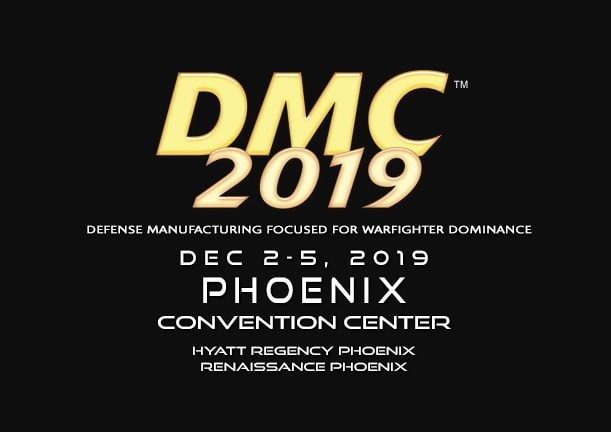
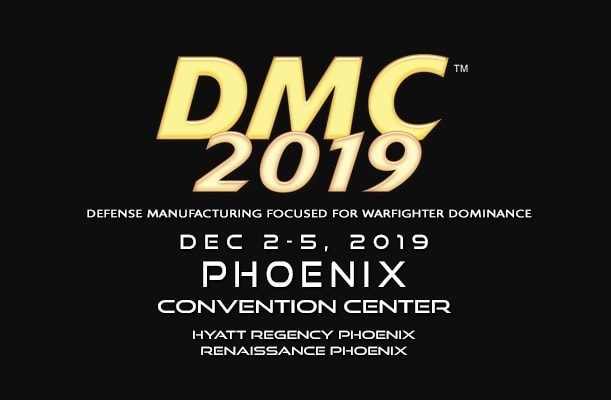
The Encompass team has returned from DMC 2019 / DMSMS 2019 in Phoenix. We had exceptional conversations, learned quite a bit from industry leaders, and started on the path to a few strategic partnerships. All of these activities will benefit our current and future customers. Like all conferences, there are ups and downs, as well as ways in which the event delivered and fell short. This event was no different we’re glad to have the opportunity to share our findings with you. Here’s a high-level account of what we learned.

The Big Picture At DMC 2019

We had the opportunity to hear from and speak directly to the leading manufacturers supplying our defense forces. Companies like Boeing, Lockheed Martin, and General Dynamics headlined the event. However, smaller manufacturers far outnumbered industry heavyweights. These SMBs keep the United States at the top of aerospace and Defense technology. Their achievements and efforts are no less integral or noteworthy.

At the Defense Manufacturing  Diminishing / Manufacturing Sources and Material Shortages Conference, additive manufacturing took center stage. This technology is a solution to the problem of parts and material shortages. Aerospace and defense industries, forces, and researchers are looking to additive manufacturing technology to deliver on the acquisition of parts and components that no longer have reliable procurement sources.

Unfortunately, according to the university professors, high-ranking military personnel, and manufacturers we spoke with, additive manufacturing is not where the technology’s marketers would have you believe it is. The technology is still very much in its infancy. It doesn’t have the reliability that industrial manufacturing processes possess. In short, 3D printing can’t yet meet the tolerances, conformance and compliance requirements that many aerospace and defense applications require. The tech is too new to be reliable. So, for now, 3D printing is relegated to consumer markets and non-essential components. However, everyone agreed that in a few year’s time, this technology will be much closer in delivering on those expectations.

Where We Fit In

Encompass Solutions maintains a wealth of industry knowledge in manufacturing, sourcing, and distribution. Not only this, but the Epicor ERP solution and peripheral products are perfectly aligned to assist our most integral and transformative defense industries. This helps in keeping our servicemen and women at the forefront of technological superiority. Many of the manufacturers supplying our defense forces have engaged Encompass to leverage our expertise and solutions. We look forward to continuing the conversations started at DMC/DMSMS 2019.

About Encompass Solutions

Encompass Solutions, Inc. is an ERP consulting firm and Epicor Gold Partner that offers professional services in business consulting, project management, and software implementation. Whether undertaking full-scale implementation, integration, and renovation of existing systems or addressing the emerging challenges in corporate and operational growth, Encompass provides a specialized approach to every client’s needs. As experts in identifying customer requirements and addressing them with the right solutions, we ensure our clients are equipped to match the pace of Industry.


Epicor recently sent out an Epicor ERP 10.2 Costing Issue Alert. This notification details a costing issue reported within the Core Application. If you use backflushing within job costing and are on an earlier version of 10.2 than the versions listed below, please contact Encompass Solutions, Inc. at support to receive an expedited fix:

  • 10.2.200.34 GA 11/31/19
  • 10.2.400.14 GA 10/25/19
  • 10.2.500.3   GA 10/23/19

You may have received this notification because records indicate you are on a prior version of 10.2.  If you feel you received this in error, you can update your version information on the portal by going to the Configurations > Product Configuration Profiles menu, or please let us know so we can help correct the version information on record. If you did not receive the notification and have observed any of the issues below, it may be because your version is incorrect in the Epicor ERP customer database. You can contact Encompass Solutions support to have the information updated.

Epicor ERP 10.2 Costing Issue Alert Details

Description of issue(s):

  • Incorrect job costing when backflushed is being used.
  • This is causing incorrect variance (MFG-VAR) calculations on jobs.
  • Multiple scenarios were found and corrected
  • Dollars to Inventory are not correct
  • Dollars seem to be doubled using the Qty x Cost Components
  • Dollars remain in WIP despite the job being closed

This may also be causing Negative Material depending on the costing components of the part.

Example:

  • Unit Material:
  • Unit Labor: (too high of an amount going to inventory)
  • Unit Burden: (too high of an amount going to inventory)
  • Unit Subcontract: (Not cleared out of WIP)
  • Unit Material Burden: (Not cleared out of WIP)

Epicor ERP 10.2 Costing Issue Alert Solution

How we’ll approach the fix is simple. We would install the latest version of Epicor 10 to your Pilot system and assist you with running the necessary tests to ensure this issue is addressed, as well as ensure that the patch doesn’t have negative implications to other system areas. This includes EDI and critical reports.

Finding your Current Version of Epicor ERP

Not sure of your current Epicor version? Follow the steps below to find your current Epicor software version.

For Active Homepage Users:

  1. Navigate to the main menu and follow the path: Epicor Education > Main > System Setup > System Maintenance > About Epicor
  2. A new window will pop up displaying your Epicor system information. The current version of your software will be located next to the Epicor logo in large black text.

For Classic users:

  1. Navigate to and click the help icon in the top right-hand portion of the Epicor ERP interface.
  2. Then, click the About Epicor link located towards the bottom of the options on the left-hand side of the screen.
  3. A new window will pop up displaying your Epicor system information. The current version of your software will be located next to the Epicor logo in large black text.

About Encompass Solutions

Encompass Solutions, Inc. is an ERP consulting firm, NetSuite Solution Provider and Epicor Gold Partner that offers professional services in business consulting, project management, and software implementation. Whether undertaking full-scale implementation, integration, and renovation of existing systems or addressing the emerging challenges in corporate and operational growth, Encompass provides a specialized approach to every client’s needs. As experts in identifying customer requirements and addressing them with the right solutions, we ensure our clients are equipped to match the pace of Industry.


1 14 15 16