The Epicor ERP 10.2.600 update is the first of two Cloud release upgrades planned for 2020. This is a major update that brings greater usability, performance, and strategic value in a single upgrade.

Epicor ERP 10.2.600 Highlights

As with past releases, the breakdown of what’s been added has been categorized into four major components: Experiences, Industry, Cloud and Analytics, and Global updates.

Epicor ERP 10.2.600 Experiences Updates

  • Epicor ERP Kinetic Dashboards and Trackers
  • Epicor ERP Kinetic Application Studio
  • Kinetic Help and Support Panel
  • Epicor Collaborate Phase 2
  • EVA Skills

Kinetic Highlights For Epicor ERP 10.2.600

  • 184 reports and processes
  • 20 Trackers (Located on a new Trackers – Kinetic menu)
  • Ability to deploy dashboards to Kinetic UI
  • Ability to create BAQ Reports in Kinetic UI
  • Ability to personalize and customize Kinetic forms
  • Epicor Application Studio (version 1)*
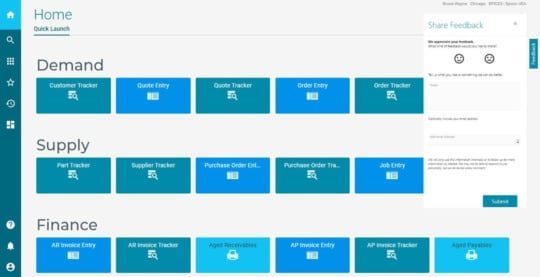
  • Enhancements to Kinetic Home Page
  • Kinetic App Maintenance*
  • Kinetic version alert banner*

*coming in 10.2.600.2

Refer to Release Notes for a cumulative list of Kinetic forms.

Kinetic Help and Support Panel

  • One-click access to videos, articles, and guided learning
  • Context-sensitive results
  • Easy access to Epicor Learning Center, EpicCare, and EpicWeb
  • Display field help

an image of the epicor erp cloud 10.2.600 kinetic help and support panel

New In-App Feedback

  • Give Epicor your direct feedback
  • Not a replacement for Support calls

an image of epicor erp cloud 10.2.600 in-app feedback

Epicor Collaborate

  • Cloud-based, collaboration solution within Epicor ERP
  • Simple, intuitive experience
  • New in 10.2.600:
    • Editing, sharing, flagging and tagging messages
    • Creating groups to make communication easier, including private groups
    • Creating custom notification rules
    • Designing BPM workflows to post notifications to Collaborate
    • Integrations with EVA, EDD, IoT, and Microsoft Teams
    • Support for 11 additional languages
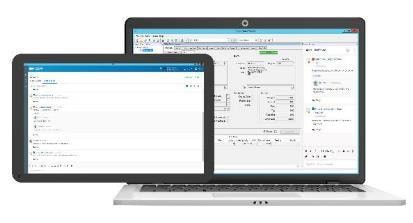
an image of epicor erp cloud 10.2.600 epicor collaborate

Epicor Virtual Agent (EVA)

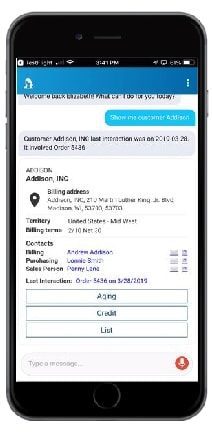
  • Conversational digital agent
  • EVA is enhanced with new skills each release:
    • Collaborate API – @EVA user posts message to a Collaborate group or individual
    • Return Material Authorization (RMA) Skill – “Create RMA for X pieces of [part] to [Customer]”
  • Available for iOS and Android

an image of epicor erp cloud 10.2.600 epicor virtual agent eva


Epicor ERP 10.2.600 Industry Updates

  • Epicor Financials Enhancements
  • Epicor Quick Ship
  • Epicor Cash Collect
  • DocStar ECM 2020.1
  • Epicor AMM PCID Transfers

Epicor ERP Core Financial Enhancements

  • Centralized AR collections
  • AR/AP netting settlement
  • AP invoice cancellation
  • AR/AP invoices-WHT timing option through interim accounts

Epicor Quick Ship (Manifest)

  • Cloud enablement on Microsoft Azure
  • Data mapping tool
  • New carrier integrations with:
    • CH Robinson’s freightquote.com
    • Canadian carriers Loomis and Canada Post

Epicor Cash Collect

  • User-friendly Customer Portal empowers businesses to better serve their customers
  • New Communications Assistant enables collection representatives to record, transcribe and store calls
  • Document Creation gives users a PDF print driver that enables printing a batch of invoices
  • Advanced Workflow allows the ability to create custom workflows within Epicor Cash Collect

Epicor Data Analytics Financial Reporting

  • Replaces Advanced Financial Reporting with a modern, cloud-based BI and analytics solution
  • All-in-one easy-to-use solution
  • Robust financial reports such as financial statements, balance sheets, and cash flow reports in a pre-packaged format
  • Offers Financial Planning and Analysis (FP&A)
  • Device-agnostic

Epicor Advanced Project Management

  • Provides integrated project management for customers with modules for:
    • Project Contracts
    • Project Accounting
    • Project Subcontracts
  • Simplifies and streamlines the contract management process and tracks at the sub-ledger level

DocStar Enterprise Content Management 2020.1

  • Provides automation to route and process business documents more efficiently, faster, and more accurately
  • Integrates to Epicor ERP for storage of documents and attachments, pre-built automated processing of documents for sales order entry and accounts payable
  • New features include AP Automation enhancements, integration with Epicor ERP identity, supporting multi-factor authentication, and new Kinetic screens

Package Control Identification Transfers

  • Reserve and allocate Advanced Materials Management PCIDs for sales orders
  • Enables customers to supply multiple sites with raw materials from a central location
  • Allow a customer to receive a single PO line or job info multiple PCIDs in a single transaction

Epicor ERP 10.2.600 Cloud and Analytics Updates

  • EDA Financial Reporting
  • Multi-Region Multi-Company Transactions
  • Azure Germany Datacenter
  • Functions and File Storage

Core Cloud Enhancements

  • Functions Enhancements – low code/no code customizations
    • Scheduling Functions
    • Functions calling other Functions
    • Solution Workbench support
  • File Attachment Storage now supports
    • Google Drive
    • Dropbox

Note: Microsoft has ended support for Windows 7

Epicor ERP Public Cloud Multi-region Multi-company Transactions

  • Run Epicor ERP in multiple company locations from any geography, in the cloud or on-premises
  • Enable intercompany transactions such as purchasing, sales orders, and reporting across multiple databases
  • Roll out a cloud strategy in phases, meet local requirements, and gain global visibility and alignment

Epicor ERP Cloud Regions
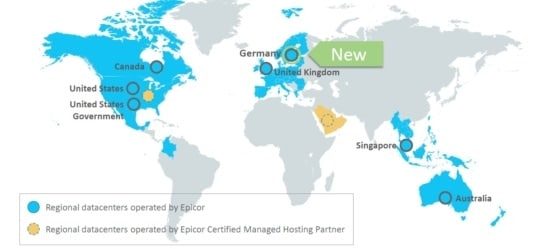
an image of epicor erp cloud 10.2.600 new epicor erp cloud data center in Germany

Epicor Cloud Communication

  • The email address on the In-app user profile is now where you enter your preferred communication email address
  • Need to update your notification preferences?
    • Access your profile from the System Monitor -> Action Menu
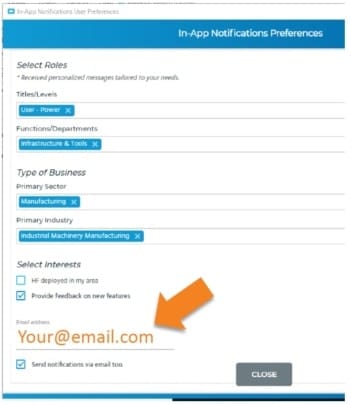
an image of epicor erp cloud 10.2.600 update notification preferences


Epicor ERP 10.2.600 Global Updates

  • Country-Specific Functionality updates
  • Epicor Electronic Reports

Epicor Country Specific Functionality

  • Countries providing updates for:
    • China
    • Colombia
    • France
    • Germany
    • India
    • Indonesia
    • Malaysia
    • Mexico
    • Netherlands
    • Norway
    • Poland
    • Portugal
    • Sweden
    • Taiwan
    • Thailand
    • UAE
    • UK
    • and all countries in the European Union (EU) with support for the EORI (Economic Operators Registration and Identification) number.

Epicor Electronic Reports

  • Prepare electronic reports for third-party organizations
  • Work efficiently with advisory companies and auditors
  • Leverage simple e-invoicing
  • Strengthen your global business management with legally required electronic reports

Timeline for 10.2.600
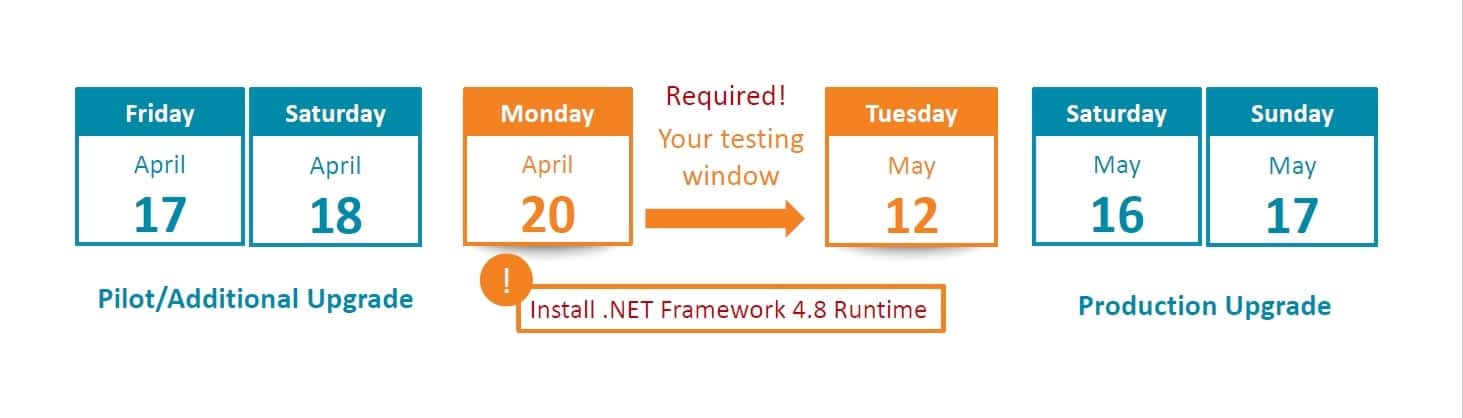
epicor erp cloud 10.2.600 update timeline

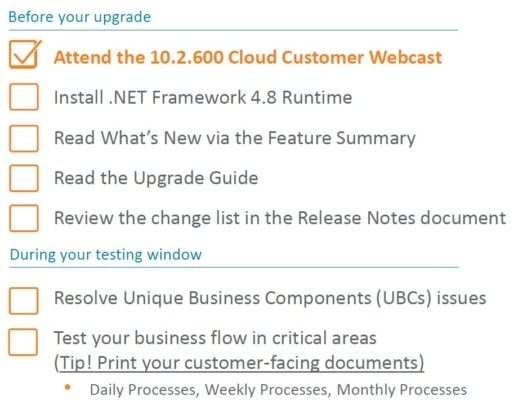
Preparation Checklist

epicor erp cloud 10.2.600 update checklist

Pilot/Additional Env Upgrade Weekend

  • Pilot/Additional Systems offline Friday 12:01 AM local data center time
    • Not able to log in during upgrade process

Timeline

  • For live Public Cloud customers: We start copying your Production data to Pilot on Wed April 15 at 8:00 PM CDT and through Thurs
  • For MT, Express: We start copying your Production data to Pilot on Thurs at 8:00 PM CDT
  • Additional environments are not auto refreshed
  • When upgrades are complete, your users can login
    • Download happens automatically
    • No changes to Users \ menu \ permissions
    • 10.2.600 in the Pilot system available for testing on Sunday, April 19

Production Upgrade Weekend

  • Production System offline Saturday 12:01 AM local data center time
    • Not able to log in during upgrade process
    • Approximate time for an upgrade 4-10 hours once your upgrade has started
  • During this time the Epicor Cloud Ops team will…
    • Upgrade your Production
    • Install UBCs solution from Pilot if requested by Tuesday, May 12
    • Send “all clear” messages
      ▪ First to administrators, second to all users
  • When complete, your users can login
    • Download happens automatically
    • No changes to Users \ menu \ permissions
    • Local system admin import UBCs previously saved to local drive and not included in the solution
    • Pilot changes will be retained on a backup copy until May 29 if needed

Data Refreshes for Customers in Public Cloud

  • All live customers staying on cadence—your pilot database will be automatically refreshed Wed, Apr 15 and upgraded Fri, Apr 17
    • Additional environments are NOT automatically refreshed. But if you would like a refresh prior (so you test the latest data) please raise a ticket in EpicCare – this must be completed ASAP, to be ready for 12:01 Friday AM local data center time.
  • All implementing customers –your pilot database will not be automatically refreshed. You will be upgraded on Fri, Apr 17 with the data in place.
    • But if you would like a refresh prior (so you test the latest data) please raise a ticket in EpicCare – this must be completed ASAP and ready for 12:01 Friday am local data center time.
    • Implementing customers will not be able to have the database refreshed from Production to Pilot during the upgrade testing month – so if you want this done it must be done by Thurs, April 16.

Customers with Option to Flex Their .600 Upgrade

  • The deadline was Wed, April 8 to submit your Flex request
  • Updates:
    • Note: if you choose to defer your upgrade, you will NOT receive any scheduled 500.x updates after 10.2.500.10.
    • However, Kinetic forms (User interface refresh) will continue to be turned on during this Flex period, regularly, with no downtime required

Option 1

  • Week of June 22 – your pilot system will be refreshed from live and upgraded
    • Additional will be upgraded and not refreshed. But if you would like a refresh prior
      (so you test the latest data) please raise a ticket in EpicCare – this must be completed ASAP and ready for 12:01 Friday AM local data center time.
  • Saturday, July 25 at 12:01 AM – your live system upgrade will start

Option 2

  • Week of July 20 – your pilot system will be refreshed from live and upgraded
    • Additional will be upgraded and not refreshed. But if you would like a refresh prior
      (so you test the latest data) please raise a ticket in EpicCare – this must be completed ASAP and ready for 12:01 Friday AM local data center time.
  • Saturday, Aug 22 at 12:01 AM – your live system upgrade will start

Testing in Pilot

  • Use this time to test end-to-end
    • A sample test plan is available for download on EpicWeb
    • Personalize the test plan and distribute it to your power users
  • Monitor for any failed Unique Business Components
    (UBCs)

    • Tues, May 12 is your last day to fix any UBCs and “opt-in” by requesting via EpicCare that the Epicor Cloud Ops team moves your UBCs to Production
    • If you need changes later, that’s ok. You’ll just have to update your Production after go-live.
    • Export all UBC changes to a known local location (Don’t take the default location)
  • Pilot/Additional will be upgraded to 10.2.600.2 May 12 just before the Live upgrade May 16-17
  • If you need help, please submit an EpicCare ticket

Testing Your SSRS Reports in Pilot

  • Open both your Production and Pilot applications from the same computer
  • Print the report in Production
  • Download your Production report from Production
  • Upload the report into the Pilot
  • Print the report in the Pilot
  • Compare the two documents
  • If you need to make modifications, make them in Pilot, and take notes so that you can move them post-upgrade
  • If you need help, please submit an EpicCare ticket

Unique Business Components (UBCs)

Vendor/Partner-side Teams Will: Upgrade your UBC items to 10.2.600

You need to:

  • Use the UBC Tracker to prioritize what needs your attention: clean up old data and fix issues
  • Use the sample test plans to walk through your business processes end-to-end (including reports)
  • Work to resolve items by Tuesday, May 12
  • Create an EpicCare Ticket IF YOU WANT* Epicor Cloud Ops to move your UBCs from Pilot to Production for you

Note: *In 10.2.400 and earlier, Epicor moved your modified UBCs files automatically, unless you opted out by requesting that they not be moved. Like the 10.2.500 process, with 10.2.600 Epicor will only move your modified UBC files if you choose to opt-in by submitting an EpicCare ticket.

Unique Business Components Tracker

  • Provides a read-only overview of your UBCs in one spot
    • Tabs organize your items so you can see what is good to go
    • Use it to identify obsolete or prototype items for cleanup
  • Dynamically reads your data
  • Customization panel refreshed every 4 hours

UBC Customization Tab

  • Three fields help you identify and prioritize customizations needing resolution
    • On the menu – Any customization used on a menu that has a problem is your highest priority
    • Is Cosmetic – These customizations have fields that may need attention
    • Duplicate – Review and delete
  • These fields are updated in Customization Maint by the verification process
  • Access a “how-to” video on the EpicWeb Cloud Documentation site
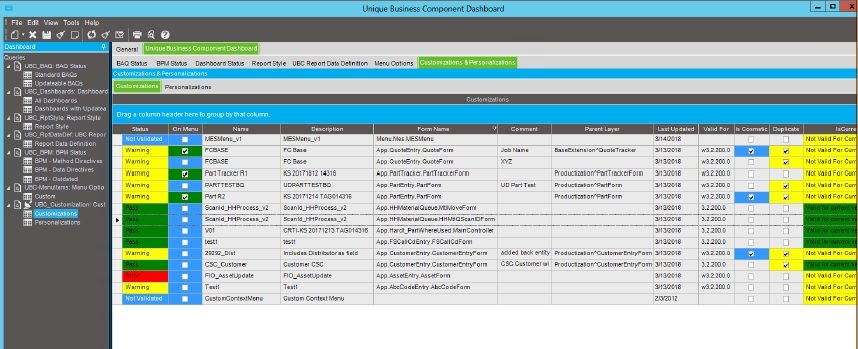
epicor erp cloud 10.2.600 UBC customziation tab

Training Courses

  • Epicor ERP Cloud 10.2.600 features over 60 new and updated titles in our Training on Demand library
  • Epicor ERP Cloud Embedded Education has over 100 courses with several updates
  • Remember to leverage the cloud upgrade training:
    • Getting Started with Epicor ERP in the Cloud
    • Epicor Support and Cloud Operational Excellence
    • Leveraging the Unique Business Component Tracker to Manage Your Customizations During an Upgrade


Watch the What’s New In Epicor 10.2.600 Webcast

What’s New In Epicor Cloud 10.2.600

About Encompass Solutions

Encompass Solutions is a business and software consulting firm that specializes in ERP systems, EDI, and Managed Services support for Manufacturers and Distributors. Serving small and medium-sized businesses since 2001, Encompass modernizes operations and automates processes for hundreds of customers across the globe. Whether undertaking full-scale implementation, integration, and renovation of existing systems, Encompass provides a specialized approach to every client’s needs. By identifying customer requirements and addressing them with the right solutions, we ensure our clients are equipped to match the pace of the Industry.


Are you getting the most out of your people? It’s complicated. Increasing employee engagement is a critical component of a healthy workplace. If you’re looking for ways to improve this important metric, keep reading to learn how you can get more from your talented workforce.

Employee Engagement Metrics

According to a recent Gallup Poll, only 33% of employees are engaged in their work.  Another survey cites a lack of appreciation as one of the most significant reasons people are disengaged or leave their jobs.  Well then, the problem is solved; to get your employees engaged and retain them, you only need to make sure you show them more appreciation. If only it were that simple.

As managers and leaders, we are bombarded with statistics that tell us or imply the reasons ALL employees are more engaged or less engaged, and why they leave or stay in a job.

The problem with this approach is it tries to apply a one-size-fits-all solution. It attempts to answer the problem in simple terms.

The challenge is understandable by anyone who has tried on a shoe that is two sizes too small…it just doesn’t fit. It fits many people but not everyone.

As leaders, we are challenged to find solutions that motivate and engage everyone to the best of our ability and that solution is not a one-size-fits-all possibility as much as we would like it to be.

“The old ways — annual reviews, forced rankings, outdated competencies —
no longer achieve the intended results.”

Jim Clifton, Chairman and CEO, Gallup

What Appreciation Means To You Versus Your Employees

The truth is even if the survey that cited lack of appreciation is generally correct, it doesn’t go deep enough. What does appreciation mean to you?  If asked that question, you probably have a very quick answer that is solid and real… but it’s just for you. Personally, appreciation to me means I received a raise or bonus for the good work I did. For someone else, it might be my manager praising me in front of all the staff. For another, having a manager come into my office and tell me quietly and in person how much they appreciate my contribution would do the trick.

The point is we are all motivated by different things. The leader’s job is to understand how each of us is motivated and work to make sure the job rewards what motivates us.

Understanding Staff On An Individual Level

Over time we can observe if a person is more or less dominant, more or less outgoing, detail-oriented or not; in other words, HOW they go about doing their work. Understanding WHY they do their work or, more accurately, what motivates them is challenging and requires more sleuthing on the part of the leader.

It’s natural for us to project our own “WHY,” and that’s the biggest trap leaders face. We have developed our assessments that take the guesswork out of those processes and accurately identify an individual’s WHY, making a Leader’s job much easier.

The key is to put your notions of need aside and understand your people’s needs may be very different from your own.  It takes a little more time upfront but, in the end, it will save you time in refilling positions and improve your organization’s performance.

About Jamesson Solutions

Specializing in workforce development, talent selection, and personality assessment and evaluation, Jamesson Solutions provides numerous proprietary tools and methodologies to find the right people to fit the right roles, provide visibility and action plans for management, and Business Simulations that allow people to learn through self-discovery and by doing.

Each Jamesson Solutions Associate brings her/his own unique experience in developing individuals and improving organizational effectiveness to each client engagement. Their interest, their passion, and their commitment are in supporting you, the client, and your organization in achieving your objectives NOW and in the future.

About Encompass Solutions

Encompass Solutions is a business and software consulting firm that specializes in ERP systems, EDI, and Managed Services support for Manufacturers and Distributors. Serving small and medium-sized businesses since 2001, Encompass modernizes operations and automates processes for hundreds of customers across the globe. Whether undertaking full-scale implementation, integration, or renovation of existing systems, Encompass provides a specialized approach to every client’s needs. By identifying customer requirements and addressing them with the right solutions, we ensure our clients are equipped to match the pace of the Industry.



As we near the Epicor ERP Cloud 10.2.600 Update, here are the important dates and enhancements you should know.

Epicor ERP Cloud 10.2.600 Update Important Dates

  • Tuesday, April 7, 2020, New Kinetic forms are turned on in your pilot environment. Your systems will not experience any downtime during this simple enhancement, and your version will not change. Details can be found in the Epicor ERP Kinetic FAQ for Customers.
  • Wednesday, April 8, 2020 Deadline for Flex customers to submit an EpicCare ticket indicating their preference to defer their upgrade to one of the alternate upgrade dates. This has been extended from April 6.
  • Saturday, April 11, 2020, The new Kinetic forms are turned on in your production environment. Your systems will not experience any downtime, and your version will not change.
  • Tuesday, April 14, 2020, and Wednesday, April 15, 2020 Upgrade webinars are held live, recorded, and posted as documentation. Please plan to join or watch the replay so you are aware of the upgrade process. Registration information will be sent shortly.
  • Friday, April 17, 2020 – Saturday, April 18, 2020 Pilot system upgrade to 10.2.600. During this time, your pilot system will be unavailable while Epicor performs your upgrade, but don’t worry—your production system will not be affected by the new release. Once it is complete, log in to your pilot system and start exploring what’s new.
  • Tuesday, May 12, 2020 Pilot system update to 10.2.600.2 and UBC Opt-In Deadline. The final version that will be loaded into your Production system will be 10.2.600.2, so we’ll update your Pilot environment on this date. Also, if you want Epicor to move your UBCs from your Pilot environment to your Production environment, you must submit an EpicCare ticket to opt into the process. If you do not submit an EpicCare ticket to opt into the process, the UBCs from your Pilot environment will not be moved by Epicor to the Production environment.
  • Saturday, May 16, 2020 – Sunday, May 17, 2020 Production system upgrade to 10.2.600.2. Your upgrade weekend arrives! While Epicor upgrades your production system to Epicor Cloud ERP 10.2.600.2, your system will be unavailable for several hours during this time.

Note that dates are subject to change.

What’s New in Epicor ERP Cloud 10.2.600

A few highlights include:

  • Multi-region Multi-company Cloud Transactions—Accelerate your growth plans. New in 10.2.600 is the ability to connect separate instances of Epicor ERP across Azure datacenters—or even across Azure datacenters to on-premises locations—through multi-company transactions to enable a distributed cloud or hybrid cloud business model.
  • User Experience—Ease of use continues to be a top priority. We’re introducing new personalization tools, enhancing Epicor Functions, and updating visuals throughout the application. You get new file attachment options with Google Drive and Dropbox. And for your mobile time and expense apps, get the ability to edit timesheets and expense reports in offline mode.
  • Epicor Collaborate—Get connected to get it done. Building on the first release of Epicor Collaborates in our last release, 10.2.600 features so much more. Epicor Collaborate will offer custom notifications, multiple channels and groups, filtering options, translation support for eleven more languages, and fit-for-purpose integrations with Epicor Data Discovery, Epicor Virtual Agent, Epicor IoT, and Microsoft Teams.
  • General Enhancements—This release features enhancements throughout the applications, including Epicor Advanced Project Management, Financials for Epicor Data Analytics, four new modules in Epicor Cash Collect, full cloud enablement for Epicor Quick Ship, and more.

How to Prepare Epicor will upgrade your pilot system one month before your production system so you have the opportunity to explore the updates in 10.2.600 without affecting your production system. As a best practice, please use this time to review and make any necessary changes to your Unique Business Components—custom reports, BPMs, User Interface customizations, etc.—to ensure everything continues to operate as expected. If you submit an EpicCare ticket for help with moving your UBCs from Pilot to Production, Epicor will do so for you during the upgrade weekend.

Flexing Your Upgrade Subscribers to the Epicor Public Cloud Flex Option can follow the same schedule, but you have the option to defer your upgrade to Epicor Cloud ERP 10.2.600. Below are the two date options for your flex upgrade.

Epicor ERP Cloud 10.2.600 Upgrade Pilot/Production Schedule

Option 1: Week of Jun 22, 2020

Jul 25/26, 2020

Option 2: Week of Jul 20, 2020

Aug 22/23, 2020

If you choose to defer, you must submit an EpicCare ticket with your selected upgrade date (Option 1 or Option 2) and we will send you a personalized confirmation with your instructions. We must receive your deferral no later than Wednesday, April 8, 2020. If you do not choose to defer, we’ll keep you on cadence and automatically upgrade your system in April 2020.

Note: If you choose to defer your upgrade, you will not receive any 600.x updates after the 10.2.500.10 update, but you will continue to receive any planned Kinetic form enhancements that we turn on during the Flex period. We only host the upgrade webinars on April 14 and 15, but replays are accessible at any time afterwards as documentation on EpicWeb. If you defer, you are strongly encouraged to either attend or watch the replay so you are aware of the upgrade process.

About the Upgrade Epicor Cloud ERP, 10.2.600 is the first of two major upgrades planned for 2020, as part of our regular cadence and commitment to helping your business grow through innovation. Unlike the more frequent monthly updates that are minor yet enhance your daily experience, major releases like this bring you greater usability, performance, and strategic value in a single upgrade. That’s why we give you advance notice and the opportunity to test and explore the updates in the pilot before upgrading your production system.

Next Steps You are invited to join educational webinars on April 14 and April 15 to learn more about Epicor ERP 10.2.600, how to prepare, and ways to leverage the new functionality for driving business growth. Documentation will also be made available on the Epicor customer portal EpicWeb. And as a reminder, reach out to EpicCare anytime you have a question or need application support.

What’s New in Epicor ERP Cloud 10.2.600 and How to Prepare Webcast Option 1

  • Date: Tuesday, April 14, 2020
  • Time: 9:30 am – 10:30 am CT

What’s New in Epicor ERP Cloud 10.2.600 and How to Prepare Webcast Option 2

  • Date: Wednesday, April 15, 2020
  • Time: 3:00 pm – 4:00 pm CT

We hope you are excited about the innovations coming soon in Epicor ERP 10.2.600.

About Encompass Solutions

Encompass Solutions is a business and software consulting firm that specializes in ERP systems, EDI, and Managed Services support for Manufacturers and Distributors. Serving small and medium-sized businesses since 2001, Encompass modernizes operations and automates processes for hundreds of customers across the globe. Whether undertaking full-scale implementation, integration, and renovation of existing systems, Encompass provides a specialized approach to every client’s needs. By identifying customer requirements and addressing them with the right solutions, we ensure our clients are equipped to match the pace of the Industry.


Unfortunately, we are seeing an uptick in opportunists using COVID-19 ransomware attacks across customers in many different industries.  Ransomware attacks encrypt all files on your network, leaving you with no recourse but to rebuild your system, and worst case, to start over.

How To Protect Your Business From Opportunists And COVID-19 Ransomware Attacks

There are some steps that you can take to protect yourselves that we wanted to share. Encompass would be happy to assist you with any of these conversations, we have experience working with customers who have had to recover from critical system failures – up to and including rebuilding systems from scratch. We are happy to share our thoughts on how to harden your systems to ensure this does not happen to you.

Backups. Make sure you have a backup plan in place, that it is running, and that it has been tested. Make sure your backups are not stored on your network – we have seen customers following good backup plans, but by leaving their backups on the network, have found that the backups have also been lost due to encryption. Make sure you have recent backups, that they are stored off-network, and that you periodically run a trial restore, to ensure that the backups are indeed comprehensive – there may be critical components on other servers (custom reports, custom labels) that are not included in your backup plan.

Media and license keys. This is a great time to locate media to install business-critical applications, and that you have the appropriate license keys. Often the software may have been purchased many years ago, and with role changes in your organization, it may not be apparent that they are not available, until they are needed.

Key reports. Frequently generate and store copies of critical reports, ideally both on paper, and electronically that can be used to ensure your business can keep running should the system need to be rebuilt. Things like Aging Reports, Production Schedules, and other critical reports can be automatically generated and sent to an email address should they be needed during a system outage.

Business Continuity plans.  Make sure each department has ‘run on paper processes that can be used if needed – preprinted packing slip templates, inventory move templates, production data capture templates. These can be used while a system is restored, and can be re-keyed once the system is online to ensure accuracy.

Be proactive. There are things you can do to protect yourself from these kinds of attacks. Evaluate true failover systems that allow a shadow installation to come online if needed.  Ensure you have multiple-factor authentication configured for your email systems to prevent unauthorized access. Run anti-malware software on key servers that can detect mass file changes and quarantine that program.

Recovery Documentation. Keep all documentation, receipts, expenses, emails, etc. for any legal or insurance needs in the future. Creating a folder within your email program and minimizing email subject threads are two tips for managing this process.

Quick Reference Guides. Have these been created for your most critical servers and business applications? These might contain items like usernames and passwords, support contacts, and other important information. Make sure to have these in printed format and kept in a secure location. Some companies put these in a fire-proof safe to protect them from fire or flood damage.

Contact Financial Institutions. You will want to contact your financial institutions (credit cards, banks, retirement, etc.) to make sure they are aware of any suspicious-looking activity. The cyber crooks have your data and can easily unencrypt it to gain important information.

User Education. Educate users to bring awareness on ways to prevent future disruptions. Often we hear of stories where an email came from a contact that looked legitimate but later found out it was a phishing scam to get a user to provide their username and password. Programs are available to help companies better prepare their user community.

Review Network Access. A regular audit of all network shares, user accounts, and security groups to close off any vulnerable access points.

Stop the Spread. Cryptoware and Ransomware spread via network shares. Once this gets into your network, it can take over your entire business infrastructure. If you detect this is happening, immediately shut down all servers and/or pull the network cables. Doing so will increase your chances of recovering some of your data.

Contact Law Enforcement. This may not be the first thing on your mind, however, once you have neutralized the ransomware from spreading contacting your local FBI cyber criminal division is a necessary step.

Do Not Pay the Ransom. Whatever you do, if at all possible, do not send any money to them. Doing so only makes you vulnerable to future attacks. Exhaust all your resources, backups, and data recovery options before paying any monies.

About Encompass Solutions

Encompass Solutions is a business and software consulting firm that specializes in ERP systems, EDI, and Managed Services support for Manufacturers and Distributors. Serving small and medium-sized businesses since 2001, Encompass modernizes operations and automates processes for hundreds of customers across the globe. Whether undertaking full-scale implementation, integration, and renovation of existing systems, Encompass provides a specialized approach to every client’s needs. By identifying customer requirements and addressing them with the right solutions, we ensure our clients are equipped to match the pace of the Industry.


How to Apply for SBA Loans: A Step-by-Step Guide was previously published by Justin Biel, here. You may also follow the steps and resources outlined by the Small Business Administration at sba.gov.

SBA Paycheck Protection Program (PPP) Loan Update

The Small Business Administration has released its 11-page Paycheck Protection Program Loan Forgiveness Application.

Experts from Tuggle Duggins P.A., TowneBank, and Smith Leonard PLLC provided the following tips for the best chance of receiving forgiveness:

    • Start by reading through the forgiveness application a couple of times.
    • Be patient. The application is complex and time-consuming.
    • You must apply for forgiveness through the lender who processed your PPP loan.
    • Don’t try to figure it out yourself. Work with your lender or another trusted adviser to ensure the application is completed properly.
    • Provide your lender with lots of documentation. This is easier if you keep your PPP money in a separate account. Make sure there’s a paper trail of how COVID-19 is affecting your sales, current and 2019 payroll costs, and any layoffs that would have happened without PPP.
    • Employees who decline to return to work after being furloughed or laid off will not impact their ability to get the loan forgiven. However, your offer to return and the employee’s refusal must be documented in writing.

How to Apply for SBA Loans: A Step-by-Step Guide

If you’re a growing business in the U.S., you’ve probably heard the news: The federal government’s Small Business Administration (SBA) is offering its Economic Injury Disaster Loans to small businesses across the country and its territories that are experiencing a temporary loss of revenue due to COVID-19.

Here, we’ll break down how to apply for these loans, including the site you’ll need to visit, the information you’ll need to provide, and what to do after clicking “submit.”

What is the SBA Economic Injury Disaster Loan program?

The program existed before the coronavirus changed the financial landscape for businesses across the U.S. However, some of its details changed with the passage of The Coronavirus Aid, Relief and Economic Security (CARES) Act on March 27. Currently:

–The program provides “small businesses,” or those with fewer than 500 employees, with working capital loans of up to $2 million.

–During the application process, businesses can also apply for a $10,000 loan advance, which, if granted, they’ll receive within three days of a successful application, per the SBA. Unlike the working capital loans above, these advances will not have to be repaid.

–Each of these loans “may be used to pay fixed debts, payroll, accounts payable and other costs but are not intended to replace lost sales or profits,” according to the SBA.

To learn more straight from the SBA, visit the Administration’s page about Disaster Loans.

How do I apply for an SBA Disaster Loan?

The application is a short and simple online survey you can complete in less than 30 minutes. To get started, visit the application page.

Information required to apply for an SBA Disaster Loan

While filling out the application page, here is the information you’ll be required to give.

I. Business information

–Business name/trade name

–Organization type (also known as your business structure)

–For nonprofits and franchises: check a box stating your business’s identity as such

–For sole proprietorships: provide your EIN/SSN

–Gross revenue, in dollars, for the 12 months before the date of the event warranting the need for a loan. (For COVID-19, this is Jan. 31, 2020.)

–Cost of goods sold, in dollars, for the 12 months before the date of the event (Jan. 31, 2020)

–Business contact info (address, phone, email)

–Date business was established

Current ownership date

–Your “business activity.” (The drop-down list includes categories like “Communications,” “Eating & Drinking Places,” “Freight,” etc.)

–Number of employees

II. Business owner(s) information

This basic form includes information like your name, email, address, and social security number. You’ll also state your percent ownership in your business.

*A note on the amount of your loan

You will not state the amount of the loan you’re seeking in your application. Once you apply, a loan officer will check your credit rating, income statements, and tax returns “to determine how badly your business needs the loan,” explains bookkeeping company Bench.

The current application page does, however, allow you to check a box that denotes you’d like to be considered for the $10,000 loan advance and provide details for a bank account to which the SBA can send that money. (Again, the Administration says the funds should arrive within three days of a successful application.)

Completing the application process

Once your business information has been submitted, you will receive a 10-digit application number. Print that page, and save the application number for your records.

Congratulations, you have now completed your application for the COVID-19 Economic Injury Disaster Loan!

Okay, I’ve applied. What do I do now?

Unfortunately, there’s nothing to do but wait. The SBA will contact you at the email address provided if they need additional information after your application has been processed. They’ll likely connect you with a loan officer and case manager who will request additional paperwork including income tax returns and profit and loss statements.

We’ve asked businesses in our network whether they’ve received a loan and, if so, how long it took. So far, we haven’t gotten any reports back. It looks like the Twitterverse is in the same boat: Many reports have applied for loans, but we’ve yet to spot a tweet from someone who received SBA funds. We’ll update this post as soon as we have stories to share.

Are there other federal loan options for small businesses?

Yes, but you can’t apply just yet. The government’s Coronavirus Aid, Relief and Economic Security (CARES) Act made available an additional $350 billion to help small businesses. The new program that will distribute that money, known as the Paycheck Protection Program, will provide low-interest, federally-backed loans to small businesses. According to the small business checklist provided by the U.S. Chamber of Commerce, “the administration will soon release more details including the list of lenders offering loans under the program.”

We’ll provide a rundown of how to apply for the Paycheck Protection Program in an upcoming article, as well as stories from businesses that obtained these loans. For now, we recommend reviewing the Chamber of Commerce’s guide so you’ll be prepared to apply when the program kicks off:

Coronavirus Emergency Loans Small Business Guide and Checklist

PPP Loan Forgiveness Calculator

How to apply for SBA Loans

About Encompass Solutions

Encompass Solutions is a business and software consulting firm that specializes in ERP systems, EDI, and Managed Services support for Manufacturers and Distributors. Serving small and medium-sized businesses since 2001, Encompass modernizes operations and automates processes for hundreds of customers across the globe. Whether undertaking full-scale implementation, integration, and renovation of existing systems, Encompass provides a specialized approach to every client’s needs. By identifying customer requirements and addressing them with the right solutions, we ensure our clients are equipped to match the pace of the Industry.


As more and more of our ERP implementation and Upgrade customers find their business operations slowing and project teams moving into remote-based roles, I am frequently asked:

  • Does it make sense to continue our project?
  • Can we be successful while working remotely?

Maintaining Project Continuity

It may not seem like it, but slower times in your business can be turned to your advantage, and work to drive a rapid, and successful project.  Some typical project challenges are listed below, along with how you can turn a period of slowness in your business, into an accelerated plan to implement or upgrade, such that your new system is ready when your business is. Project continuity will ensure that any active or planned undertakings continue to make use of any momentum that preceded a period of disruption.

Systems Design

While we move to design a system for our clients that correctly supports their desired future state, it’s very important to be able to model end-to-end processes with subject matter experts in the business.  This can be challenging as these individuals are almost always key business roles, and it is normally difficult to get dedicated time.  With more bandwidth for each subject matter expert (SME) to work remotely with the lead on our side, the process modeling that can sometimes take months or more can be compressed into just a few weeks, leaving us plenty of time to complete any gaps – like custom screens, reports, or integrations –  so that the system is ready for your team.

Education 

It is common during a project for end-users to struggle to find time to attend education classes, and workshops and to make time to do their homework while they keep up with the demands of their 9 to 5 jobs.    This can be a good time to allocate some time each day for them to focus on learning the system and ensuring readiness for UAT and cutover.

User Acceptance Testing

Ideally, project team members all need to get together to run high-value business streams through the designed system, to validate all gaps are closed, and the system is ready for production use.  These UAT exercises take key people out of their jobs, for several days.  While things are slower, an activity like this can be tightly scheduled, such that this demanding exercise is out of the way, and the system is ready when business picks up.

As a consulting firm, we are accustomed to working remotely.  As such, we can assist your project team to be able to be effective and productive, even if much of the team is working from their homes.  The key is to define roles and tightly scheduled tasks within our client’s organization, build a collaborative way for issues to be logged and addressed, and with a good schedule in place, set periodic meetings to review issues, answer questions, adapt to change, and foster constant communication.

Things Encompass can work with your project team to do are:

  • Define a point (SME) for each business group
  • Set up a tracking system that the client and ESI can collaboratively use to track issues.  We are currently opening our system to customers, via a web-based portal, free of charge.
  • Set periodic team meetings with SMEs to review critical issues, and let them get updates from Encompass on anything that we have been asked to assist with.  Early morning,  and right before lunch are typically times to meet.
  • Have each SME/Lead funnel all issues from their department to the portal at the end of the day- including questions from their team.  The SME can then set a priority on issues, which might range anywhere from ‘I can’t perform a process’ to ’nice to have in Phase 2.  This is the input for the morning meetings, where the customer’s internal project manager, and the Encompass project manager can set further prioritization as needed.

We realize that while you probably do not want to cut over to a new system while most of the team is remote, we can plan intelligently for project continuity.  By leveraging some of the available time your team has right now, work together to accelerate your project, such that your business can go live as soon as you are ready, rather than trying to restart a project right as things get busy.

I am always available to take a call and help you work through a process that will work for your organization, ensure project continuity with remote team members, and prepare for success when things return to normal.

About Encompass Solutions

Encompass Solutions is a business and software consulting firm that specializes in ERP systems, EDI, and Managed Services support for Manufacturers and Distributors. Serving small and medium-sized businesses since 2001, Encompass has helped modernize operations and automate processes for hundreds of customers across the globe. Whether undertaking full-scale implementation, integration, and renovation of existing systems, Encompass provides a specialized approach to every client’s needs. By identifying customer requirements and addressing them with the right solutions, we ensure our clients are equipped to match the pace of the Industry.


To address the increasing call for our services and the remote requirements businesses currently need to adopt, we’ve expanded our emphasis on remote consulting and implementation services. This slower time could be an opportunity, while people have the bandwidth, to prepare to scale up for future growth.

You can tailor these combined training seminars and implementation services to topics specific to projects currently underway or planned in your organization. The benefit of combining these two services remotely results in better use of your time and money.

We are also discounting consulting blocks to make these services more easily available to businesses.

ESI Discounted Consulting Blocks

Adapting to constrained means of producing and delivering your products and services doesn’t have to impact business continuity. To ensure your organization suffers minimal disruption of day-to-day operations, we want you to be able to take advantage of our experience at a much lower cost to your business.

There are a few scenarios where only one or two hours of consulting work may be needed in training or implementing new systems and components. That said, Encompass Solutions will discount consulting hours by a significant amount.

You can choose to make these seminars group sessions, where the audience sits in on actual project work being done in real-time. Alternatively, you may opt for these sessions to be 1-on-1 consulting engagements or as purely discounted work based on your project specifications. Remain operational and profitable, while your staff can participate in on-the-job training as the work is being completed by our implementation specialists and consultants.

Sample Workshops And Initiatives

We’ve listed several of our more popular projects to give an idea of how these discounted consulting hours can be used to benefit your business. Packages to guide you through value-added tasks while operations are slow or idled include:

Physical Inventory and Cycle Counting

If a factory is idle, this is a great time to perform a full physical while inventory is not moving.  With accurate inventory, once business picks up, you can be sure you can effectively use MRP and purchase suggestions with trusted output, and make better inventory decisions.

Once you have your inventory trued up, cycle counts, when used properly, will let you keep your inventory accuracy high and remove the need for a year-end full physical inventory.

Typically we can remotely assist a client that has no prior knowledge of performing a Physical Inventory with a couple of hours of training, a hands-on workshop, and some remote support during the physical inventory itself.

Discounted Cost: $1,200 – includes seminar, training, set-up, and follow-up questions

Preventative Maintenance

Epicor sells the Maintenance Management module to manage the maintenance department and its requests. The module also provides the framework for setting up preventative maintenance schedules, as well as planning and creating maintenance jobs.

With a factory idled, it’s a great time to schedule maintenance and set up this module for maintaining machinery, define maintenance plans by machine so that after a certain number of hours it can be flagged for maintenance, and be able to design and test so that when the plant is at full operational capacity, maintenance runs itself.

Discounted Cost: $600 – includes seminar, training, set-up, and follow-up questions

Fixed Assets

Many companies own this module, but its typically brought online after an initial implementation project as a Phase 2 component.  The Fixed Assets module lets you track your fixed assets and set deprecation schedules, that integrate automatically to the general ledger, reducing the need for manual depreciation calculations at the end of your financial year.  It’s also integrated with the Maintenance Management module to align with the same equipment – setting up for one module will ease the implementation of the other.

Using downtime to set up and automate the handling of depreciation now, will mean one less task to be performed at the end of every financial year.

Discounted Cost: $300 – includes seminar, training, set-up, and follow-up questions

Costing

Many of our customers have questions about how Epicor handles job costing. This can be a complex area. Every company will have a costing model that works best for them – standard costing, average costing, FIFO, and Last Cost are all different costing methods supported by Epicor ERP, and choosing the correct costing model has big implications for how costing is reported to the general ledger.

Having accurate costing will also highlight red-flag materials (both raw materials and finished goods) that need to be focused on to improve and maintain profitability. This targeted consulting event would be specific to your organization and would be comprised of a training component, recommendations from us based on conversations with your business, and support in setting this up in your environment.

Discounted Cost: $2,400 – includes T account explanation and costing model comparison, discovery and design, system configuration, testing, and rollout.

Project Management Module

The Project Management module lets you tie all the activities for a project, and get an overview of all the costs involved.   This is especially good for long-term projects, allowing you to track sales expenses, orders, engineering design time, purchasing and manufacturing costs, and provide a full overview of the entire project from beginning to end.   Being able to tie all this information together automatically is a huge timesaver, you no longer have to write custom reports, or manually pull information together.  For many customers, especially those selling to government agencies, for example, being able to set milestone billing,  or providing a percentage of completion billing that would other be a very manual and cumbersome process.   Epicor’s Project Management module also provides for revenue recognition, both at the phase, and project level.  It also fully integrates with the general ledger within Epicor ERP.

Discounted Cost: $3,600 to $4,800 (depending on requirements) – includes T account explanation and costing model comparison, discovery and design, system configuration, testing, and rollout. Note: Typical consulting time around a Project Management engagement takes 2-3 days, depending on the customer requirements

Case Management

This is a Customer support tool, that many people have licensed, and are not leveraging.  Case Management allows an organization to use a case as a ‘binder’ to track customer issues, and tie together the relevant quotes,  sales orders, jobs, materials, RMA processing, and solutions together for a holistic view of the customer’s resolution – it’s particularly useful in the quality area.  The use of Case Management allows your organization to build up a knowledge base, to be referred to should another customer have a similar issue in the future.  With this module, you can track KPIs, like time to resolution, and SLA commitments.    Epicor’s Task Management system can also be leveraged here.

Discounted Cost: $300 – includes training and follow-up questions

Task Management 

Many people have access to Epicor’s Task Management system.  Task Sets are embedded into Epicors Quotation, Engineering, and Case Management modules. Having a structured set of tasks within a case, quote, or engineering workflow, aids in ensuring that your team adheres to your company’s best-practice standard procedures, and ensures compliance.

Discounted Cost: $300 – includes training and follow-up questions

Enhanced Quality Module

Epicor’s Enhanced Quality module builds on the foundations of the standard quality module, allowing you to design and configure inspection plans that tie to your organization’s quality needs using out-of-the-box software.    This is often used to ensure correct equipment calibration, in conjunction with the Maintenance module.

Discounted Cost: $1,200 – includes training and workshop to design a simple ‘first quality configurator’. Note: Typical consulting time around an advanced quality engagement could be several days depending on the complexity of the configurations and different product lines involved.

Discounted Consulting Terms and Conditions

We don’t want to introduce a menagerie of needless rules regarding these discounts, but we also need to be respectful of our consultants’ livelihood and schedule. To be eligible for discounted consulting hours, one must:

  1. Make your purchase of consulting hours by the end of April 2020.
  2. Bulk packages must be paid for upfront.
  3. Hours must be used by the end of 2020.
  4. Prices are based on estimates. This may increase or decrease based on the customer’s unique business processes and requirements.
  5. Services discounts only apply to new services deals.
  6. Discounted consulting engagements will require a deposit.
  7. Discounts are off the list price, not a currently negotiated rate.
  8. Discounts are capped at rates depending on the type of work and volume. 

About Encompass Solutions

Encompass Solutions is a business and software consulting firm that specializes in ERP systems, EDI, and Managed Services support for Manufacturers and Distributors. Serving small and medium-sized businesses since 2001, Encompass has helped modernize operations and automate processes for hundreds of customers across the globe. Whether undertaking full-scale implementation, integration, and renovation of existing systems, Encompass provides a specialized approach to every client’s needs. By identifying customer requirements and addressing them with the right solutions, we ensure our clients are equipped to match the pace of the Industry.


What’s your hull?

What’s your hull?  When was the last time you dry-docked your business?  How can you leverage COVID-19 shutdowns and downturns to revitalize your core business systems to emerge stronger, faster, and leaner after the pandemic storms have passed?

If you’re like us, you’ve spent a lot of time asking critical questions about how COVID-19 will affect you, your employees, and the future of your business.   At Encompass, we’ve been talking a lot about the dry dock.  When a ship needs critical work on its hull, it is pulled out of the water into a ‘dry dock’ for inspection and repairs.

This is hugely expensive.  It’s hugely inconvenient, too.  Taking a ship out of water is the equivalent of locking the doors of your business.  We all do that for holidays (fun and predictable), year-end inventories (predictable but never fun), and occasionally because life is unpredictable and sends us surprises like snowstorms and power outages.  But most of us have never shut down our businesses for an extended period of weeks or months the way a ship is taken out of the water for months in dry dock.

COVID-19 changes that.  Some of you sent staff home and locked the gates.  Some of you feel like the gates are locked anyway because your customers are sheltering in place at home.  Some of you saw your entire supply chain shut down and fall apart.  In some way or another, most of us are in dry dock right now.  It’s expensive, outside our control, and hugely inconvenient.

If we’re all dry-docked anyway, how can we take advantage of a complete system shutdown and upgrade our business ships?

When was the last time you dry-docked your business?

If your business is a ship in a dry dock, the hull represents your critical systems.  Do you have areas of your business that desperately need overhauling, but they are too integrated into your daily routine to ever take them offline?  This could be:

  • Network and server setup that impacts the security of your systems.
  • ERP modules you paid for but never implemented.
  • Part BOMs have been inaccurate for years.
  • Financial, engineering, and manufacturing configurations that drive you and your staff crazy.
  • Cleaning up old, bad MRP data so your ERP can run MRP, scheduling, and purchasing accurately.

Encompass is using our own dry-dock time to upgrade and improve the systems that run our business.  We’re keeping staff engaged on continuous improvement projects we never have time to work on when we’re running at full capacity.  And since we are working on systems, this can all be done remotely.

What can you do to improve your systems?  Right now, your best staff members are probably sitting idle.  They’re afraid of COVID-19.  They’re afraid of losing their jobs.  And they’ve been frustrated for years because they know how to improve your systems but never have time to work on them.

How can you leverage the recent shutdowns and downturns?  Can you use idle time to revitalize your core systems?  What will make you stronger, faster, and leaner once this storm blows past?

Do you need our help?

If you’re reading this, know that Encompass chooses who we partner with.  We pick and choose customers, and we’re with you today because we fundamentally believe in your business.  We want you to survive and thrive.

If you do need help, we started preparing ‘dry dock support’ packages for our customers in late January, and we’re geared up to offer support with:

  • Remote workshops on all core Epicor modules to help your team identify best practices, plan, prep, implement, and process improvements across the system.
  • Rapid implementation of new modules. Right now is the easiest time you’ll ever have implementing scheduling, quality assurance, landed cost, and other new functionality.
  • Report development and customer and supplier communications right out of Epicor.
  • Coaching on how to optimize projects when your team is working from home.

Let us know what you need.  Or just touch base and let us know you, your team, and your families are OK.  We like you as people, and we like being in business with you.  We’re all in this together.

About Encompass Solutions

Encompass Solutions is a business and software consulting firm that specializes in ERP systems, EDI, and Managed Services support for Manufacturers and Distributors. Serving small and medium-sized businesses since 2001, Encompass has helped modernize operations and automate processes for hundreds of customers across the globe. Whether undertaking full-scale implementation, integration, and renovation of existing systems, Encompass provides a specialized approach to every client’s needs. By identifying customer requirements and addressing them with the right solutions, we ensure our clients are equipped to match the pace of the Industry.

Business continuity can be disrupted in several ways, such as natural disasters, scaled-back staffing, security breaches, and infrastructure failure. Most businesses have a hard time adapting to new ways of working when every day is interrupted. Manufacturing companies tend to have unique business cases and their own unique set of circumstances to address when external forces alter the here and now. However, preparedness and technology can support business continuity and ensure operations continue to run smoothly. Here is how some of Encompass Solutions’ customers are currently managing operations in a disruptive environment.

M Holland Company – Business Continuity Amid Disruption

At M. Holland Company, our IT support staff is used to providing remote work support to our international team of sales employees, but with the recent change in safety and health hazards, our entire operations office location has gone fully remote. This proved to be a challenge when employees who are usually in the office are now working from their homes. We have found that a lot of the pain from these users is the fear of the “unknown”. New types of issues arise when they are working from home; these are different than the normal ones we see every day in the office. We’ve been able to provide top notch issue resolution and training for our newly remote workers by utilizing instant messaging, video, and voice solutions through Microsoft Teams. Taking the extra time to call our users, normalizing the use of video chat, and screensharing has helped our team be more accustomed to the work from home setting. IT support can still deliver the same level of support, with “digital” face to face contact. This extra support in these challenging times has improved morale for our operations users, which helps them continue to support our sales teams efficiently while working in their new remote environments.

Lauren Palmer-Smith – Team Lead, Innovation and Technology at M. Holland Company

National Tube Supply – How Encompass Is Bridging The Gaps

I want to let you know that the partnership we have with Encompass is invaluable.  The support you continuously give our organization and the expediency with how you react to our ever-needing changes is sincerely appreciated.

I found out yesterday that we are the only steel tube distributor in Illinois that is “set up” the way we are.  We had the vision and expertise on our side that allowed us to react quickly to this current environment.  Our competitors still have all their employees going to work and are not able to have them work remotely.  Since our business is deemed “essential”, we remain open and we have the piece of mind knowing our employees are safe at home and still able to be 100% productive.

We had a project slated for Production at the end of Q2 and as a result of COVID-19, many customers requested this be expedited. Jarrad Kitching and John Ramsay (and our own Eileen Hankosky) once again, came though for us and hit it out of the park.  We went live on Tuesday. Three months ahead of schedule.

Michele Markowski – Board Member at National Tube Supply

Manufacturing is an essential industry, for some, now more than ever. We remain a dependable partner for our customers to turn to when their process and technology needs demand expert assistance. Our commitment to supporting our partnerships has been in place since the beginning of each relationship and will continue to grow through these trials and what may come.

About Encompass Solutions

Encompass Solutions is a business and software consulting firm that specializes in ERP systems, EDI, and Managed Services support for Manufacturers and Distributors. Serving small and medium-sized businesses since 2001, Encompass has helped modernize operations and automate processes for hundreds of customers across the globe. Whether undertaking full-scale implementation, integration, and renovation of existing systems, Encompass provides a specialized approach to every client’s needs. By identifying customer requirements and addressing them with the right solutions, we ensure our clients are equipped to match the pace of the Industry.


Join us for an upcoming webinar hosted by our supply chain technology partner, SourceDay, on the topic of COVID-19 supply chain disruption.

COVID-19 Supply Chain Disruption – A Procurement Professional’s Perspective

Featuring Global Interconnect’s Director of Global Procurement, Troy Mauk, and SourceDay’s CMO Sarah Moore, the event includes a live Q&A taking place on April 7, 2020, at 11:00 AM CST.

The presenters will discuss how Troy used SourceDay to proactively communicate with his suppliers and triage the most important open orders and resolve them quickly. To date, none of their sites has had any downtime despite global supply chain disruption.

Additional topics discussed in this webinar include:

  • Expediting updates from suppliers
  • Getting quick supplier confirmations
  • Focusing on the most critical exceptions
  • Preventing production impact
  • Containing costs through communication

If you can’t make it to the event, register anyway. That way, you’ll have access to the recorded presentation to review at your convenience.

We hope to see you there.

About SourceDay

SourceDay’s platform provides a digital interface between a manufacturer’s ERP system and hundreds of suppliers, automatically updating changes to delivery dates, pricing, and quantities throughout the order lifecycle and across the supply chain. Replacing manual processes with software improves customers’ understanding of the many changes that occur throughout the lifecycle of an order. Procurement teams stop spending their time on fire drills and reacting to expensive surprises. Now they have time to manage suppliers more strategically, proactively addressing pricing and quality issues and ensuring their factories receive the materials they need to meet customer commitments on time.

About Encompass Solutions

Encompass Solutions is a business and software consulting firm that specializes in ERP systems, EDI, and Managed Services support for Manufacturers and Distributors. Serving small and medium-sized businesses since 2001, Encompass has helped modernize operations and automate processes for hundreds of customers across the globe. Whether undertaking full-scale implementation, integration, and renovation of existing systems, Encompass provides a specialized approach to every client’s needs. By identifying customer requirements and addressing them with the right solutions, we ensure our clients are equipped to match the pace of the Industry.