As part of the Epicor Cloud ERP 10.2.700 Update, Epicor Cloud ERP pilot instances will upgrade to the newest release in September 2020. Read on to learn what new business value awaits and how to prepare.

What’s New In The Epicor Cloud ERP 10.2.700 Update

More details will be released as we near September 2020, but a few highlights include:

  • Cloud Read-only Data Access—Safely and securely view your data in a read-only environment. Epicor ERP Cloud Data Access is a new offering that allows for read-only access to your Epicor ERP instance. This new offering gives freedom of access while also safeguarding data security and system integrity. Access to the database will be on a read-only basis, but also near real-time (within seconds) to provide high value, whether leveraged by you directly or by ISV partners via APIs.
  • Epicor Advanced Unit of Measure—Seamlessly conduct business in a different unit of measure. A new capability, primarily aimed at the metals industry and adjacent industries, provides the ability to buy and value material in one unit of measure and transact in a different unit of measure.
  • Epicor Data Analytics (EDA) Financial Reporting—Budgeting, forecasting, and planning simplified. EDA Budgeting and Planning will provide an easy-to-use solution for budgeting, forecasting, and planning. With EDA Budgeting and Planning, you will be able to create financial budgets from scratch or prior year actuals and generate a budgeting workflow process, eliminating the need for Excel spreadsheets.
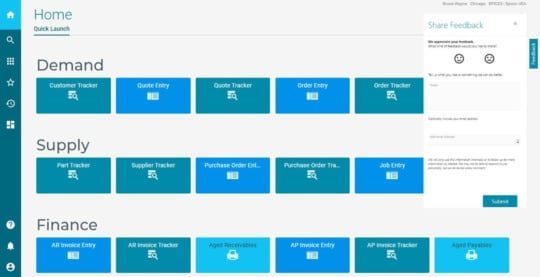
  • Epicor Kinetic—Continuing the journey to provide a modern and intuitive user experience with Epicor Kinetic. With this release, Epicor Kinetic is focused on the transformation of maintenance screens and quotes to cash process forms targeting high-impact maintenance and entry screens. New enhancements will be made to Epicor Application Studio, which allows you to tailor Kinetic forms with low/no code that won’t break during an upgrade.

How To Prepare For The The Epicor Cloud ERP 10.2.700 Update

Epicor will upgrade pilot systems one month before production systems. This will provide Epicor Cloud ERP customers with a chance to explore the updates in 10.2.700 without affecting production systems.

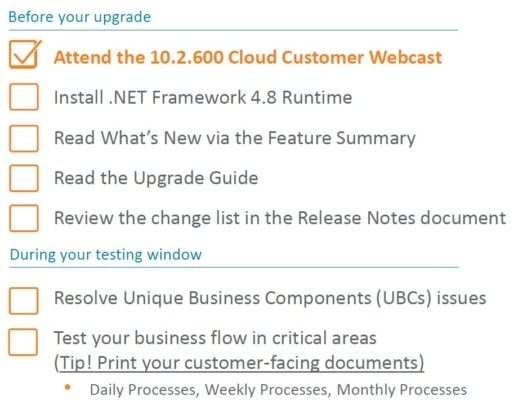
As a best practice, please use this time to review and make any necessary changes to your Unique Business Components (UBCs). This includes any custom reports, BAQs, BPMs, User Interface customizations, etc. Effective testing will ensure everything continues to operate as expected.

If you submit an EpicCare ticket for help with moving your UBCs from Pilot to Production, Epicor will do so for you during the upgrade weekend.

Important Dates

  • Friday, September 11, 2020
    Deadline for Flex customers to submit an EpicCare ticket indicating their preference to defer their upgrade to one of the alternate upgrade dates
  • What’s New in Epicor ERP Cloud 10.2.700 upgrade webinars are scheduled for mid-September. Register for one of the sessions to learn the latest about Epicor Kinetic, AppStudio, and Identity. If you cannot attend, they will be available on demand.
  • Friday, September 18, 2020 – Saturday, September 19, 2020
    Pilot system upgrades to 10.2.700. During this time, your pilot system will be unavailable while Epicor performs your upgrade, but don’t worry—your production system will not be affected by the new release. Once it is complete, log in to your pilot system and start exploring what’s new.
  • Tuesday, October 13, 2020 
    A pilot system update to 10.2.700.2 and UBC Opt-In Deadline. The final version that will be loaded into your Production system will be 10.2.700.2, so we’ll update your Pilot environment on this date. Also, if you want Epicor to move your UBCs from your Pilot environment to your Production environment, you must submit an EpicCare ticket to opt into the process. If you do not submit an EpicCare ticket to opt into the process, the UBCs from your Pilot environment will not be moved by Epicor to the Production environment.
  • Saturday, October 17, 2020 – Sunday, October 18, 2020
    Production system upgrades to 10.2.700.2. Your upgrade weekend arrives! While Epicor upgrades your production system to Epicor Cloud ERP 10.2.700.2, your system will be unavailable for several hours during this time.

 Note that dates are subject to change.

Flexing Your Upgrade

Subscribers to the Epicor Public Cloud Flex Option can follow the same schedule.

Alternatively, you have the option to defer your upgrade to Epicor Cloud ERP 10.2.700.

Below are the two date options for your flex upgrade.

                      Pilot                                                                              Production

Option 1:    Week of Dec 14, 2020                                               Jan 23-24, 2021

Option 2:    Week of Jan 18, 2021                                                Feb 20-21, 2021

If you choose to defer, you must submit an EpicCare ticket with your selected upgrade date (Option 1 or Option 2) and we will send you a personalized confirmation with your instructions. We must receive your deferral no later than Friday, September 11, 2020. If you do not choose to defer, we’ll keep you on cadence and automatically upgrade your system in September 2020.

Note: If you choose to defer your upgrade, you will not receive any 600.x updates after the 10.2.600.11 update. We only host the upgrade webinars on September 16 and September 17, but replays are accessible at any time afterwards as documentation on EpicWeb. If you defer, you are strongly encouraged to either attend or watch the replay so you are aware of the upgrade process.

About The The Epicor Cloud ERP 10.2.700 Update

The Epicor Cloud ERP 10.2.700 update is the second of two major upgrades in 2020, as part of the regular cadence and commitment to helping your business grow through innovation.

Unlike the more frequent monthly updates that are minor yet enhance your daily experience, major releases like this bring you greater usability, performance, and strategic value in a single upgrade. That’s why we give you advance notice and the opportunity to test and explore the updates in the pilot before upgrading your production system.

Next Steps

Watch for additional information about the upcoming upgrade. You will be invited to join educational webinars on September 16 and September 17 to learn more about the Epicor Cloud ERP 10.2.700 update, how to prepare, and ways to leverage the new functionality for driving business growth. Documentation will also be made available on the Epicor customer portal EpicWeb. And as a reminder, reach out to EpicCare anytime you have a question or need application support.

About Encompass Solutions

Encompass Solutions is a business and software consulting firm that specializes in ERP systems, EDI, and Managed Services support for Manufacturers and Distributors. Serving small and medium-sized businesses since 2001, Encompass modernizes operations and automates processes for hundreds of customers across the globe. Whether undertaking full-scale implementation, integration, and renovation of existing systems, Encompass provides a specialized approach to every client’s needs. By identifying customer requirements and addressing them with the right solutions, we ensure our clients are equipped to match the pace of Industry.


As of June 2020, Epicor is no longer delivering enhancements for Epicor Advanced Financial Reporting (AFR), but bug fixes are still available for existing customers on maintenance, and the product is still in the Active Support stage. However, AFR is expected to move to Sustaining Support by 2021.

If your organization is looking for an alternative product by Epicor that gives more value and benefit to your business, Epicor can offer you three great financial reporting products that are fully integrated with Epicor ERP and provide the same capabilities as Epicor Advanced Financial Reporting and much more.

Epicor Advanced Financial Reporting (AFR) Resources

To support the migration to these products, a new, very beneficial, non-time limited migration offer is available to every Epicor ERP customer on active AFR maintenance when migrating to Epicor XL Connect or EFP.

EDA Financial Statements is also a great option at your discretion, however, for this product, the new non-time limited migration offer does not apply.

Further information:

Contact us using the link below for further details on the offer!

About Encompass Solutions

Encompass Solutions is a business and software consulting firm that specializes in ERP systems, EDI, and Managed Services support for Manufacturers and Distributors. Serving small and medium-sized businesses since 2001, Encompass modernizes operations and automates processes for hundreds of customers across the globe. Whether undertaking full-scale implementation, integration, and renovation of existing systems, Encompass provides a specialized approach to every client’s needs. By identifying customer requirements and addressing them with the right solutions, we ensure our clients are equipped to match the pace of the Industry.


An Encompass customer in the Industrial Heating industry recently fell victim to an opportunistic ransomware attack that had encrypted all internal system files, as well as their Epicor application files. As a result, work was unable to continue, bringing operations to a standstill. Encompass’ Managed Services (MS) were enlisted to help get things back up and running. The company requested this case study on their ransomware recovery project be posted anonymously.

Ransomware Recovery Project Background

The company’s network fell victim to a severe ransomware attack. Unfortunately, it affected all internal systems, including backups. The attack took down the company’s systems completely in a matter of hours, forcing the company to rebuild from scratch.  Fortunately, the company was able to save its Epicor Database.

The Plan

Initially, there was no internal plan in place at this company to address the initial attack or the fallout from such an event. The results from the attack were a focused effort to get systems up and running as fast as possible as well as restore a state of operational functionality.

Objectives for the engagement with Encompass Solutions’ Managed Services team were to recover system use, rebuild what was lost, and establish backups.

A plan to instate standard operating procedures that would minimize the potential for reoccurrence and maximize the efficiency of response and ransomware recovery followed.

The Execution

The company’s staff were able to provide Encompass with the necessary documentation, in the form of a blueprint of the existing Epicor environment, to rebuild the system in a more structurally sound way than the original.

Encompass’s Managed Services team worked with corporate IT staff to ensure backups and other security precautions were in place moving forward.

Overall, Encompass has just been a great asset to our organization. We have been through both a major Epicor upgrade and recovery process with them, and I am extremely impressed with everything they have done.  They definitely make my job easier.

– C.R., IT Manager

The Results

Encompass’ ‘s managed services team was able to work with the parent company to reestablish a stable network and functional Epicor system in less than one week.

Next Steps

Documented SOPs were put in place to routinely establish backups and test recoverability regularly.

This company was pleased with Encompass’ level of service and expedient reaction to the situation. The two organizations will continue to work together on future Epicor projects and system maintenance.

About Encompass Solutions

Encompass Solutions is a business and software consulting firm that specializes in ERP systems, EDI, and Managed Services support for Manufacturers and Distributors. Serving small and medium-sized businesses since 2001, Encompass modernizes operations and automates processes for hundreds of customers across the globe. Whether undertaking full-scale implementation, integration, and renovation of existing systems, Encompass provides a specialized approach to every client’s needs. By identifying customer requirements and addressing them with the right solutions, we ensure our clients are equipped to match the pace of the Industry.


The article “It’s 2020 — Should Business Owners Fear The Cloud?” was written by Epicor Software Corp. CEO Steve Murphy and published by Forbes on March 2, 2020. You can read the original article here.

The cloud. It’s a small word that packs a big punch. Defining what a cloud is can confuse some while implementing it raises concerns for others.

We should consider three key factors as we continue into a new decade and business owners ask if they should fear the cloud: privacy, interoperability, and cost.

But first, what is the cloud, and why are businesses migrating to this solution?

Essentially, the cloud is a delivery method for your software. It’s a network of servers that are linked together and operate as a single system. The cloud can perform a variety of functions (e.g., storing data, running applications, delivering content, etc.), and you can access it online. There are both public and private cloud options. The biggest difference with the cloud is what it doesn’t require. You don’t need any hardware or networking gear on-site – all you need is a tablet or a phone to run the software.

One of the major reasons I believe cloud adoption continues to grow is the flexibility and productivity enhancements it offers. As the CEO of a company that offers cloud platforms, I’ve found that these features are particularly attractive for business owners looking to build resiliency in the face of unpredictable trade wars and other geopolitical changes. Business owners often look to business management software to provide stability. According to Goldman Sach’s 2020 review (via CNBC), 23% of IT workloads are now in public clouds.

So, should business owners fear the cloud when it comes to privacy, interoperability, and cost?

Should I fear privacy in the cloud?

There is no denying privacy is a major concern when it comes to data. Data breaches continue to increase, as does the projected production of data. To keep pace, both software solutions and IT departments will have to up their game.

First, I’ll share the bad news. According to Hiscox’s 2019 Cyber Readiness Report, most businesses are unprepared for cyber threats. In fact, in the U.S., 73% of businesses are “novices” at cyber readiness.

The good news, however, is that the public cloud has proven safer than on-premise data center environments. Specifically, Gartner found that “to date, there have been very few security breaches in the public cloud” and that “through 2020, public cloud Infrastructure as a Service (IaaS) workloads will suffer at least 60% fewer security incidents than those in traditional data centers.”

If you decide to move to the cloud due to these safety findings, you should still be mindful of cloud vulnerabilities. Take stock of what kinds of sensitive information you are putting in the cloud, and ensure you understand how the cloud provider will protect that data. The time needed to safely migrate systems and data can be lengthy, but it shouldn’t be rushed at the expense of security infrastructure. Select a provider who prioritizes security during the migration process and who has a solid reputation for getting the configuration right, and communicate with your team so that they understand the migration timeline and can manage their expectations.

Regardless of your software solution, privacy issues will continue to be a concern. One of the most important things business leaders can do is ensure they have a crisis management protocol in place if and when a breach should occur.

Should I fear cloud interoperability challenges?

I have great news on this front. There have been major strides toward interoperability. Multiple systems can exchange and use information easier than ever before. This is due to a variety of reasons: Many application programming interfaces (APIs) continue to get better, standards continue to improve, and, notably, I see tech giants such as Google, Amazon, and Microsoft Azure frequently expand the universe of applications that can easily be put in their clouds. I believe their efforts have significantly moved the needle.

While interoperability isn’t perfect, there’s a lot of upward momentum. I expect that to progress.

Should I fear the cost of the cloud?

If you’re a business owner and you aren’t sure cloud makes sense for you from a cost perspective, ask yourself if you have a good grip on how much it costs to have your own data center in your business. Do you already have the IT skills in-house to run your system? If so, the cloud may not make sense.

However, many business owners are surprised to find that their IT operations cost them a lot more than they think and that implementing cloud solutions can save them both time and money when it comes to issues such as automatic upgrades (which keep your company current and competitive), labor and maintenance costs, or increases in workforce productivity, to name a few.

Just remember that the decision between on-premise and cloud will be unique for each business. When you’re evaluating your IT operations cost, ask yourself how scalable you need your solution to be in the future. How adept is your IT department at staying up to date with evolving technology? Will you need additional data storage, and do you have the physical space to accommodate an expansion of your on-premise data center? Do you need access to data on the go? If a natural disaster hits your business, how will you back up your data?

What it comes down to is the total current cost of your on-premise data center versus a cloud solution. For business leaders who are still on the fence about expenses, make sure you evaluate your options regularly. Cloud providers will have to continue to be cost-competitive, which could work in your favor.

Bottom line: Don’t fear the cloud. It could be a safer option than on-premise data. Its interoperability continues to improve. It can be highly effective at increasing productivity. It can save you money long-term. And the cloud will likely continue to improve over time. The year 2020 may be the one for you to move forward with implementation.

About Encompass Solutions

Encompass Solutions is a business and software consulting firm that specializes in ERP systems, EDI, and Managed Services support for Manufacturers and Distributors. Serving small and medium-sized businesses since 2001, Encompass modernizes operations and automates processes for hundreds of customers across the globe. Whether undertaking full-scale implementation, integration, and renovation of existing systems, Encompass provides a specialized approach to every client’s needs. By identifying customer requirements and addressing them with the right solutions, we ensure our clients are equipped to match the pace of the Industry.


The latest update for Epicor ARM (Advanced Requisition Management) has been released as Epicor ARM 10.3 SP7. The developer, Precise Business Solutions, is an Independent Software Vendor (ISV) creating Epicor ERP solutions and more tools dedicated to minimizing waste and maximizing efficiency for small and medium-sized businesses.

What is Epicor Advanced Requisition Management?

Epicor Advanced Requisition Management (ARM) is online requisition management and workflow solution designed to deliver full-cycle procurement functionality securely to your organization’s desktops or mobile devices. ARM’s real-time budget visibility empowers your company to make informed purchasing decisions, while consolidated purchase orders allow you to negotiate contract pricing with your suppliers-ultimately reducing costs and maximizing efficiency across your entire enterprise.

Solution Benefits

Epicor Advanced Requisition Management (ARM) is an online solution for managing the cycle of requisitioning, ordering, and receiving. Benefits include:

  • Reduce purchasing costs and effort
  • Improve communication internally and with vendors
  • Assign preferred suppliers or default supply locations
  • Gain visibility of the purchasing process

Features

The web browser-based application allows easy deployment throughout the enterprise and facilitates the entire requisition process electronically-from requisition submission through to purchase order creation and optional distribution to vendors.

Epicor ARM automates and streamlines the procurement process, utilizing a web browser to integrate with and extend the Epicor Supply Chain Management module. Multiple approval methods provide a flexible framework that can be configured to meet the requirements of any organization.

Epicor ARM 10.3 SP7

In addition to features incorporated as part of the Epicor ARM scheduled product roadmap, the updates in this release have been influenced by requests received from Epicor ARM customers.

Epicor 10.2.600 compatibility, enhanced attachment capability, and support for multiple invoices against a single purchase order receipt are just some of the features we have incorporated in this release to enhance your overall ARM experience.

An overview of some of these enhancements is outlined below.

New features and enhancements in Epicor ARM 10.3 SP7

  • E10.2.600 Compatibility (E10) – ARM 10.3.7 is compatible with E10.2.600.
  • Split BIL for APM and non-APM Environments (E10) – ARM has now split BIL with one version supporting APM and the other supporting non-APM environments. Choose the appropriate version when installing this product in your environment.
  • Support Edit Tax at Line level in AP Module (E10) – This is a ‘Manual Tax Override’ function that enables you to edit and override the tax on the line. Note that the line tax will be reset to the default values when copying the Invoice.
  • Support Project, Phase, and Cost Code (APM) in AP Module (E10) – AP Invoice and Debit Memo now support Project, Phase, and Cost Code (APM).
  • Support Hold Invoice and Hold Payments in AP Module (E10) – When selected, the ‘Hold Invoice’ check box represents a hold status on the entire Invoice. If you post a group that contains an Invoice on hold, this Invoice will not be posted. You will need to clear this check box and then re-post the group. When selected this check box also indicates that payments will not be made against the Invoice. ARM only enables this check box functionality in the time before the AP document is approved.
  • Support PO Receipt Attachments (E10) – Users can now attach a receipt document when entering PO receipts. ARM receipt attachments will not be integrated into Epicor at this time.
  • Support Receipt Attachment Visibility in AP Approval (E10) – In addition to the support for PO Receipt Attachments (above), ARM also supports the ability to view the Receipt Attachments during the AP Approval process.
  • Original Order Value on AP Invoice (E10) – Some new read-only fields have been added to the AP Invoice screen. The Ordered field shows the original value of the order raised. The Un-receipted field shows the value of the line that is not received yet.
  • AP Invoice Filter Settings Enhancement (E10) – The AP Search filtering criteria are retained for each ARM user.
  • Support Multiple Invoices Against a Single PO Receipt (E10) – ARM now supports partial Invoices for a single Purchase Order receipt. After adding a PO Receipt line to an AP Invoice, a new check box entitled ‘Final’ is shown on the main Invoice screen. When ticked, this action indicates the line is finished with Invoicing stage. To perform partial Invoicing the AP documents need to be within the same Invoice Group. When the first partial Invoice is created and approved, it will move from the ARMUNAPP Group to the nominated Invoice Group. If a second Invoice is raised, an error will be shown in ARM due to the two Invoices present in different Groups. Therefore, the first Invoice will require posting in Epicor to proceed with creating any subsequent Invoices. This functionality requires configuration in Epicor. Go to Company Configuration> Modules> Finance> Accounts Payable and enable the ‘Allow Multiple Invoicing of Receipts’ check box.
  • AP Invoice Search Results Set and Export (E10) – The Export feature now includes the Vendor name and Invoice Date on the export file.
  • AP Approval Process Enhancement (E10) – A new <Next> button feature has been added to the AP document screen. This allows the user to move and load the next AP document from the AP Search results.
  • Punchout Enhancement (E10) – The PunchOut processing has been altered to conform with the SameSite cookie policy that was introduced in newer versions of Google Chrome and Microsoft Edge browsers.

Read the Epicor ARM 10.3 SP7 Release Guide for further detail on all the features and enhancements outlined above.

Epicor ARM 10.3 SP7 Upgrade Eligibility

Epicor ARM 10.3 SP7 is compatible with Epicor 10, Epicor 9.0.5, and Enterprise 7.4 SP7.

Users upgrading to Epicor ARM 10.3 SP7 should note the following:

  • If you are upgrading from ARM versions 10.0 SP6, ARM 10.1.0, or ARM 10.1 SP1 – SP4, you must run the Upgrade Manager to migrate data so that it will be compatible with the enhanced approvals process that was introduced in ARM 10.1 SP6.
  • If you are upgrading from ARM 10.1 SP5 (or above) you do not need to run the Upgrade Manager to migrate your data as it will already be compatible with the enhanced approvals process (introduced in ARM 10.1 SP6).

Users upgrading to this version should perform a full synchronization on the GLAccountDefinition and GLAccount jobs within the Integration Manager

Spotlight on ‘Blanket Order’ functionality

Two common questions we receive are “What is a blanket order?’ and “Can I use it for the ordering of maintenance and repair services?”

‘Blanket Orders’ go by a few names – sometimes called ‘blanket purchase agreements’ or ‘call-off orders. These orders allow an organization to create a requisition for a contracted amount with a supplier, to be consumed over some time. Expenses can then be ‘drawn down from this approved amount incrementally, as required. This makes it very convenient for utilities and services-related expenses, where the exact amount cannot be known in advance.

Epicor ARM Blanket Order Demonstration

To see how ARM Blanket Order functionality works, click the demonstration video below:

About Precise Business Solutions

An award-winning and market-leading provider of ERP software solutions. Precise provides global software solutions, coupled with local business expertise. Precise is a leading provider of business software solutions and associated services to the Australian and international marketplace. A wholly-owned Western Australian company, Precise has been in business since 1989. Over the last 25 years, Precise has assisted organizations to maximize efficiencies and gain a competitive advantage. Precise Business Solutions is also the developer of integrated companion solutions for Epicor ERP  – Epicor Advanced Requisition Management (ARM) – Precise Point of Sale (POS) These solutions are distributed worldwide through their alliance partner Epicor Software Corporation. Precise continues to be a market leader in implementation, support, and services. Partnering with their customers to help them be the best they can be, has always been Precise’s primary focus.

About Encompass Solutions

Encompass Solutions is a business and software consulting firm that specializes in ERP systems, EDI, and Managed Services support for Manufacturers and Distributors. Serving small and medium-sized businesses since 2001, Encompass modernizes operations and automates processes for hundreds of customers across the globe. Whether undertaking full-scale implementation, integration, or renovation of existing systems, Encompass provides a specialized approach to every client’s needs. By identifying customer requirements and addressing them with the right solutions, we ensure our clients are equipped to match the pace of the Industry.


Sudden and abrupt changes can interrupt anyone’s mode of operation. This couldn’t be truer than in the manufacturing and distribution industries. When that change affects supply chains, livelihoods, and communities, anxieties are compounded. In these situations, people look for business leadership as a source of answers to the unknowns that are feeding their anxiety. Here are 3 ways to lead your organization through a crisis and towards a better outcome.

Business Leadership – Success From Uncertainty

Many qualities make a great leader, such as passion, delegating, owning responsibility, honesty, and active listening. However, not all leadership qualities are created equal when it relates to business. This is punctuated when situations are considered critical. Our current business and economic climate qualify soundly for this designation. From this point of view, below are three of the most effective and essential business leadership qualities that will help your organization endure a tough situation and lead to overall business success.

1. Give Clear Direction

A light in the dark can be more than a means of finding your way around after the power goes out. A clear path delivers comfort and confidence to move forward. In the dark, your teams may stumble over their anxiety about what may or may not come next. Direction delivers many essential signals to your organization, here are four among the most effective:

Be Calm – “Calm is Contagious” I’m not sure if it’s an idiom, but it should be. People react to the signals they are given every day. The most primal of which is behavior. Your calm and reassuring body language, sincerity, and timeliness reinforce the reassuring effect that is essential to every level of your organization. Understanding you’ve provided a behavior to emulate every member of your organization can move forward focused and unencumbered with anxiety.

Communicate Openly – By maintaining direct and open communication, you negate the inherent anxiety that comes with moving through the dark. Whether delivering good or bad news, your communications need to come when they are needed and provide details that lead forward. You don’t have to have all the answers, but you must let your teams know the ones you do have.

Be Precise – Clarity is an important part of giving direction. Don’t leave room for misinterpretation. Keep your workplaces free of inefficient language and processes. By communicating in clean, clear, crisp directives, everyone remains on the same page and works towards the common goal.

Maintain Your Connection – Your organization may have been founded by an individual, but I guarantee it was built by people. Some of them may be senior members of your organization, and some of them may have joined you days before any significant change upended your day-to-day. It’s important to remember that they are all invested in your continued success. If you don’t treat them as though they have a stake in the game, you may be compounding the problems you are already facing.

By giving your teams a clear direction moving forward, you enable them to keep their focus and put the unanswered questions out of their path. This leaves them free from distractions to continue towards their goal. This leads us to the next point.

2. Outline achievable goals

One of the biggest components of business leadership is to include yourself as part of the solution. Having a goal in mind helps to maintain focus. To that effect, the notion of “here’s what I, you, and we can do now…” can be real foundational support for those who can let their minds wander into the great expanse of what comes next.

By ensuring everyone has a goal, is on task, and maintains accountability throughout your organizational structure, your place in the supply chains remains uninterrupted, your products reach their destinations, and your relationships remain in good standing.

3. Identify Opportunity And Implement

This is where you show your organization that you are in control of the situation. You’ve given everyone the rundown on what’s happening from an operational standpoint and measures being taken to alleviate constraints. With the staff at ease, they can go about achieving goals and completing tasks in their “new now” modes of operation.

By identifying key opportunities that you can take advantage of during this change of pace, you communicate to everyone that growth is still happening, even if it may not be apparent on the surface. Big ships take time to steer and those efficiency projects that kept being pushed onto the back burner due to high volume orders fulfillment or staff shortages are now primed and ready to be implemented. At the very least, you can outline your strategy to achieve the implementation of new ideas and projects so that you can hit the ground running when the conditions permit.

About Encompass Solutions

Encompass Solutions is a business and software consulting firm that specializes in ERP systems, EDI, and Managed Services support for Manufacturers and Distributors. Serving small and medium-sized businesses since 2001, Encompass modernizes operations and automates processes for hundreds of customers across the globe. Whether undertaking full-scale implementation, integration, and renovation of existing systems, Encompass provides a specialized approach to every client’s needs. By identifying customer requirements and addressing them with the right solutions, we ensure our clients are equipped to match the pace of the Industry.


The Epicor ERP 10.2.600 update is the first of two Cloud release upgrades planned for 2020. This is a major update that brings greater usability, performance, and strategic value in a single upgrade.

Epicor ERP 10.2.600 Highlights

As with past releases, the breakdown of what’s been added has been categorized into four major components: Experiences, Industry, Cloud and Analytics, and Global updates.

Epicor ERP 10.2.600 Experiences Updates

  • Epicor ERP Kinetic Dashboards and Trackers
  • Epicor ERP Kinetic Application Studio
  • Kinetic Help and Support Panel
  • Epicor Collaborate Phase 2
  • EVA Skills

Kinetic Highlights For Epicor ERP 10.2.600

  • 184 reports and processes
  • 20 Trackers (Located on a new Trackers – Kinetic menu)
  • Ability to deploy dashboards to Kinetic UI
  • Ability to create BAQ Reports in Kinetic UI
  • Ability to personalize and customize Kinetic forms
  • Epicor Application Studio (version 1)*
  • Enhancements to Kinetic Home Page
  • Kinetic App Maintenance*
  • Kinetic version alert banner*

*coming in 10.2.600.2

Refer to Release Notes for a cumulative list of Kinetic forms.

Kinetic Help and Support Panel

  • One-click access to videos, articles, and guided learning
  • Context-sensitive results
  • Easy access to Epicor Learning Center, EpicCare, and EpicWeb
  • Display field help

an image of the epicor erp cloud 10.2.600 kinetic help and support panel

New In-App Feedback

  • Give Epicor your direct feedback
  • Not a replacement for Support calls

an image of epicor erp cloud 10.2.600 in-app feedback

Epicor Collaborate

  • Cloud-based, collaboration solution within Epicor ERP
  • Simple, intuitive experience
  • New in 10.2.600:
    • Editing, sharing, flagging and tagging messages
    • Creating groups to make communication easier, including private groups
    • Creating custom notification rules
    • Designing BPM workflows to post notifications to Collaborate
    • Integrations with EVA, EDD, IoT, and Microsoft Teams
    • Support for 11 additional languages

an image of epicor erp cloud 10.2.600 epicor collaborate

Epicor Virtual Agent (EVA)

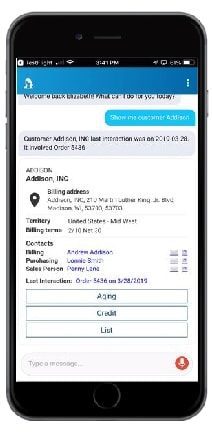
  • Conversational digital agent
  • EVA is enhanced with new skills each release:
    • Collaborate API – @EVA user posts message to a Collaborate group or individual
    • Return Material Authorization (RMA) Skill – “Create RMA for X pieces of [part] to [Customer]”
  • Available for iOS and Android

an image of epicor erp cloud 10.2.600 epicor virtual agent eva


Epicor ERP 10.2.600 Industry Updates

  • Epicor Financials Enhancements
  • Epicor Quick Ship
  • Epicor Cash Collect
  • DocStar ECM 2020.1
  • Epicor AMM PCID Transfers

Epicor ERP Core Financial Enhancements

  • Centralized AR collections
  • AR/AP netting settlement
  • AP invoice cancellation
  • AR/AP invoices-WHT timing option through interim accounts

Epicor Quick Ship (Manifest)

  • Cloud enablement on Microsoft Azure
  • Data mapping tool
  • New carrier integrations with:
    • CH Robinson’s freightquote.com
    • Canadian carriers Loomis and Canada Post

Epicor Cash Collect

  • User-friendly Customer Portal empowers businesses to better serve their customers
  • New Communications Assistant enables collection representatives to record, transcribe and store calls
  • Document Creation gives users a PDF print driver that enables printing a batch of invoices
  • Advanced Workflow allows the ability to create custom workflows within Epicor Cash Collect

Epicor Data Analytics Financial Reporting

  • Replaces Advanced Financial Reporting with a modern, cloud-based BI and analytics solution
  • All-in-one easy-to-use solution
  • Robust financial reports such as financial statements, balance sheets, and cash flow reports in a pre-packaged format
  • Offers Financial Planning and Analysis (FP&A)
  • Device-agnostic

Epicor Advanced Project Management

  • Provides integrated project management for customers with modules for:
    • Project Contracts
    • Project Accounting
    • Project Subcontracts
  • Simplifies and streamlines the contract management process and tracks at the sub-ledger level

DocStar Enterprise Content Management 2020.1

  • Provides automation to route and process business documents more efficiently, faster, and more accurately
  • Integrates to Epicor ERP for storage of documents and attachments, pre-built automated processing of documents for sales order entry and accounts payable
  • New features include AP Automation enhancements, integration with Epicor ERP identity, supporting multi-factor authentication, and new Kinetic screens

Package Control Identification Transfers

  • Reserve and allocate Advanced Materials Management PCIDs for sales orders
  • Enables customers to supply multiple sites with raw materials from a central location
  • Allow a customer to receive a single PO line or job info multiple PCIDs in a single transaction

Epicor ERP 10.2.600 Cloud and Analytics Updates

  • EDA Financial Reporting
  • Multi-Region Multi-Company Transactions
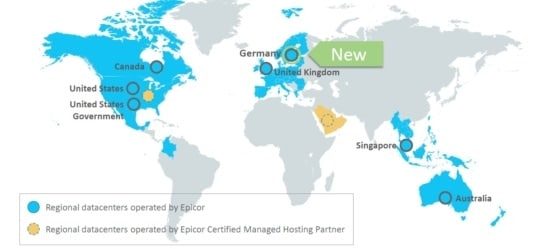
  • Azure Germany Datacenter
  • Functions and File Storage

Core Cloud Enhancements

  • Functions Enhancements – low code/no code customizations
    • Scheduling Functions
    • Functions calling other Functions
    • Solution Workbench support
  • File Attachment Storage now supports
    • Google Drive
    • Dropbox

Note: Microsoft has ended support for Windows 7

Epicor ERP Public Cloud Multi-region Multi-company Transactions

  • Run Epicor ERP in multiple company locations from any geography, in the cloud or on-premises
  • Enable intercompany transactions such as purchasing, sales orders, and reporting across multiple databases
  • Roll out a cloud strategy in phases, meet local requirements, and gain global visibility and alignment

Epicor ERP Cloud Regions

an image of epicor erp cloud 10.2.600 new epicor erp cloud data center in Germany

Epicor Cloud Communication

  • The email address on the In-app user profile is now where you enter your preferred communication email address
  • Need to update your notification preferences?
    • Access your profile from the System Monitor -> Action Menu

an image of epicor erp cloud 10.2.600 update notification preferences


Epicor ERP 10.2.600 Global Updates

  • Country-Specific Functionality updates
  • Epicor Electronic Reports

Epicor Country Specific Functionality

  • Countries providing updates for:
    • China
    • Colombia
    • France
    • Germany
    • India
    • Indonesia
    • Malaysia
    • Mexico
    • Netherlands
    • Norway
    • Poland
    • Portugal
    • Sweden
    • Taiwan
    • Thailand
    • UAE
    • UK
    • and all countries in the European Union (EU) with support for the EORI (Economic Operators Registration and Identification) number.

Epicor Electronic Reports

  • Prepare electronic reports for third-party organizations
  • Work efficiently with advisory companies and auditors
  • Leverage simple e-invoicing
  • Strengthen your global business management with legally required electronic reports

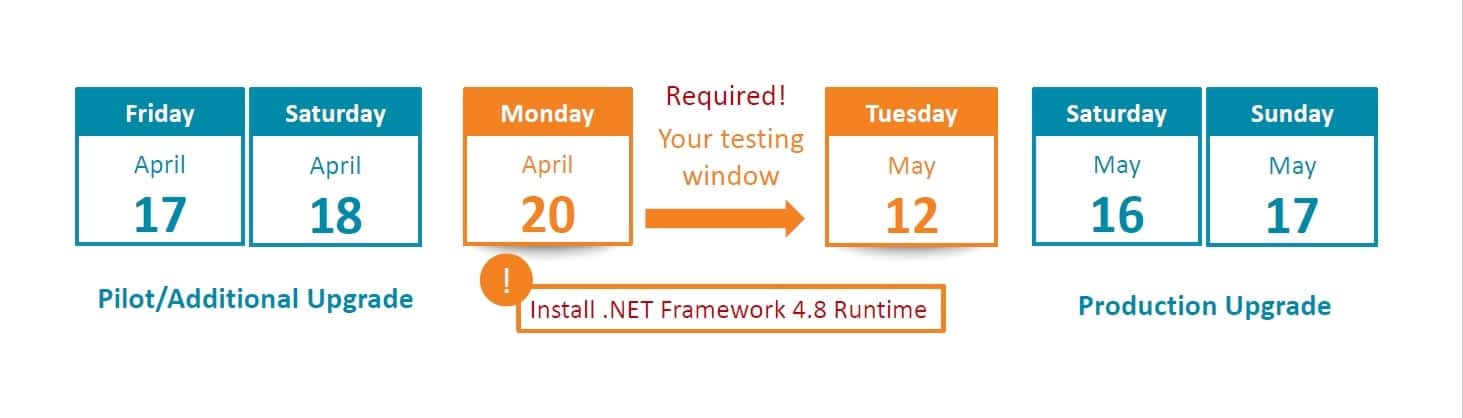
Timeline for 10.2.600

epicor erp cloud 10.2.600 update timeline

Preparation Checklist

epicor erp cloud 10.2.600 update checklist

Pilot/Additional Env Upgrade Weekend

  • Pilot/Additional Systems offline Friday 12:01 AM local data center time
    • Not able to log in during upgrade process

Timeline

  • For live Public Cloud customers: We start copying your Production data to Pilot on Wed April 15 at 8:00 PM CDT and through Thurs
  • For MT, Express: We start copying your Production data to Pilot on Thurs at 8:00 PM CDT
  • Additional environments are not auto refreshed
  • When upgrades are complete, your users can login
    • Download happens automatically
    • No changes to Users \ menu \ permissions
    • 10.2.600 in the Pilot system available for testing on Sunday, April 19

Production Upgrade Weekend

  • Production System offline Saturday 12:01 AM local data center time
    • Not able to log in during upgrade process
    • Approximate time for an upgrade 4-10 hours once your upgrade has started
  • During this time the Epicor Cloud Ops team will…
    • Upgrade your Production
    • Install UBCs solution from Pilot if requested by Tuesday, May 12
    • Send “all clear” messages
      ▪ First to administrators, second to all users
  • When complete, your users can login
    • Download happens automatically
    • No changes to Users \ menu \ permissions
    • Local system admin import UBCs previously saved to local drive and not included in the solution
    • Pilot changes will be retained on a backup copy until May 29 if needed

Data Refreshes for Customers in Public Cloud

  • All live customers staying on cadence—your pilot database will be automatically refreshed Wed, Apr 15 and upgraded Fri, Apr 17
    • Additional environments are NOT automatically refreshed. But if you would like a refresh prior (so you test the latest data) please raise a ticket in EpicCare – this must be completed ASAP, to be ready for 12:01 Friday AM local data center time.
  • All implementing customers –your pilot database will not be automatically refreshed. You will be upgraded on Fri, Apr 17 with the data in place.
    • But if you would like a refresh prior (so you test the latest data) please raise a ticket in EpicCare – this must be completed ASAP and ready for 12:01 Friday am local data center time.
    • Implementing customers will not be able to have the database refreshed from Production to Pilot during the upgrade testing month – so if you want this done it must be done by Thurs, April 16.

Customers with Option to Flex Their .600 Upgrade

  • The deadline was Wed, April 8 to submit your Flex request
  • Updates:
    • Note: if you choose to defer your upgrade, you will NOT receive any scheduled 500.x updates after 10.2.500.10.
    • However, Kinetic forms (User interface refresh) will continue to be turned on during this Flex period, regularly, with no downtime required

Option 1

  • Week of June 22 – your pilot system will be refreshed from live and upgraded
    • Additional will be upgraded and not refreshed. But if you would like a refresh prior
      (so you test the latest data) please raise a ticket in EpicCare – this must be completed ASAP and ready for 12:01 Friday AM local data center time.
  • Saturday, July 25 at 12:01 AM – your live system upgrade will start

Option 2

  • Week of July 20 – your pilot system will be refreshed from live and upgraded
    • Additional will be upgraded and not refreshed. But if you would like a refresh prior
      (so you test the latest data) please raise a ticket in EpicCare – this must be completed ASAP and ready for 12:01 Friday AM local data center time.
  • Saturday, Aug 22 at 12:01 AM – your live system upgrade will start

Testing in Pilot

  • Use this time to test end-to-end
    • A sample test plan is available for download on EpicWeb
    • Personalize the test plan and distribute it to your power users
  • Monitor for any failed Unique Business Components
    (UBCs)

    • Tues, May 12 is your last day to fix any UBCs and “opt-in” by requesting via EpicCare that the Epicor Cloud Ops team moves your UBCs to Production
    • If you need changes later, that’s ok. You’ll just have to update your Production after go-live.
    • Export all UBC changes to a known local location (Don’t take the default location)
  • Pilot/Additional will be upgraded to 10.2.600.2 May 12 just before the Live upgrade May 16-17
  • If you need help, please submit an EpicCare ticket

Testing Your SSRS Reports in Pilot

  • Open both your Production and Pilot applications from the same computer
  • Print the report in Production
  • Download your Production report from Production
  • Upload the report into the Pilot
  • Print the report in the Pilot
  • Compare the two documents
  • If you need to make modifications, make them in Pilot, and take notes so that you can move them post-upgrade
  • If you need help, please submit an EpicCare ticket

Unique Business Components (UBCs)

Vendor/Partner-side Teams Will: Upgrade your UBC items to 10.2.600

You need to:

  • Use the UBC Tracker to prioritize what needs your attention: clean up old data and fix issues
  • Use the sample test plans to walk through your business processes end-to-end (including reports)
  • Work to resolve items by Tuesday, May 12
  • Create an EpicCare Ticket IF YOU WANT* Epicor Cloud Ops to move your UBCs from Pilot to Production for you

Note: *In 10.2.400 and earlier, Epicor moved your modified UBCs files automatically, unless you opted out by requesting that they not be moved. Like the 10.2.500 process, with 10.2.600 Epicor will only move your modified UBC files if you choose to opt-in by submitting an EpicCare ticket.

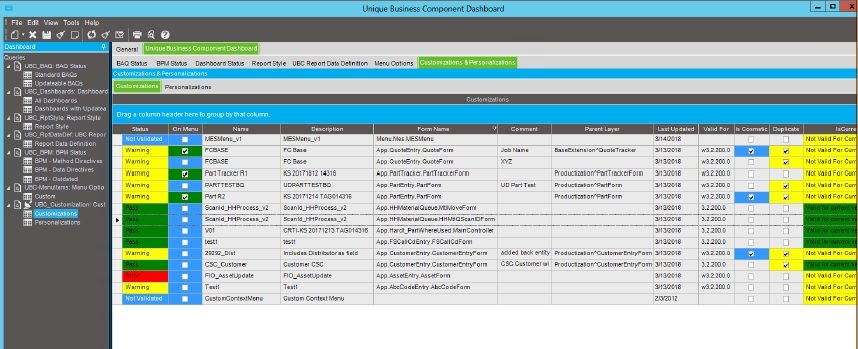
Unique Business Components Tracker

  • Provides a read-only overview of your UBCs in one spot
    • Tabs organize your items so you can see what is good to go
    • Use it to identify obsolete or prototype items for cleanup
  • Dynamically reads your data
  • Customization panel refreshed every 4 hours

UBC Customization Tab

  • Three fields help you identify and prioritize customizations needing resolution
    • On the menu – Any customization used on a menu that has a problem is your highest priority
    • Is Cosmetic – These customizations have fields that may need attention
    • Duplicate – Review and delete
  • These fields are updated in Customization Maint by the verification process
  • Access a “how-to” video on the EpicWeb Cloud Documentation site

epicor erp cloud 10.2.600 UBC customziation tab

Training Courses

  • Epicor ERP Cloud 10.2.600 features over 60 new and updated titles in our Training on Demand library
  • Epicor ERP Cloud Embedded Education has over 100 courses with several updates
  • Remember to leverage the cloud upgrade training:
    • Getting Started with Epicor ERP in the Cloud
    • Epicor Support and Cloud Operational Excellence
    • Leveraging the Unique Business Component Tracker to Manage Your Customizations During an Upgrade


Watch the What’s New In Epicor 10.2.600 Webcast

What’s New In Epicor Cloud 10.2.600

About Encompass Solutions

Encompass Solutions is a business and software consulting firm that specializes in ERP systems, EDI, and Managed Services support for Manufacturers and Distributors. Serving small and medium-sized businesses since 2001, Encompass modernizes operations and automates processes for hundreds of customers across the globe. Whether undertaking full-scale implementation, integration, and renovation of existing systems, Encompass provides a specialized approach to every client’s needs. By identifying customer requirements and addressing them with the right solutions, we ensure our clients are equipped to match the pace of the Industry.


As we near the Epicor ERP Cloud 10.2.600 Update, here are the important dates and enhancements you should know.

Epicor ERP Cloud 10.2.600 Update Important Dates

  • Tuesday, April 7, 2020, New Kinetic forms are turned on in your pilot environment. Your systems will not experience any downtime during this simple enhancement, and your version will not change. Details can be found in the Epicor ERP Kinetic FAQ for Customers.
  • Wednesday, April 8, 2020 Deadline for Flex customers to submit an EpicCare ticket indicating their preference to defer their upgrade to one of the alternate upgrade dates. This has been extended from April 6.
  • Saturday, April 11, 2020, The new Kinetic forms are turned on in your production environment. Your systems will not experience any downtime, and your version will not change.
  • Tuesday, April 14, 2020, and Wednesday, April 15, 2020 Upgrade webinars are held live, recorded, and posted as documentation. Please plan to join or watch the replay so you are aware of the upgrade process. Registration information will be sent shortly.
  • Friday, April 17, 2020 – Saturday, April 18, 2020 Pilot system upgrade to 10.2.600. During this time, your pilot system will be unavailable while Epicor performs your upgrade, but don’t worry—your production system will not be affected by the new release. Once it is complete, log in to your pilot system and start exploring what’s new.
  • Tuesday, May 12, 2020 Pilot system update to 10.2.600.2 and UBC Opt-In Deadline. The final version that will be loaded into your Production system will be 10.2.600.2, so we’ll update your Pilot environment on this date. Also, if you want Epicor to move your UBCs from your Pilot environment to your Production environment, you must submit an EpicCare ticket to opt into the process. If you do not submit an EpicCare ticket to opt into the process, the UBCs from your Pilot environment will not be moved by Epicor to the Production environment.
  • Saturday, May 16, 2020 – Sunday, May 17, 2020 Production system upgrade to 10.2.600.2. Your upgrade weekend arrives! While Epicor upgrades your production system to Epicor Cloud ERP 10.2.600.2, your system will be unavailable for several hours during this time.

Note that dates are subject to change.

What’s New in Epicor ERP Cloud 10.2.600

A few highlights include:

  • Multi-region Multi-company Cloud Transactions—Accelerate your growth plans. New in 10.2.600 is the ability to connect separate instances of Epicor ERP across Azure datacenters—or even across Azure datacenters to on-premises locations—through multi-company transactions to enable a distributed cloud or hybrid cloud business model.
  • User Experience—Ease of use continues to be a top priority. We’re introducing new personalization tools, enhancing Epicor Functions, and updating visuals throughout the application. You get new file attachment options with Google Drive and Dropbox. And for your mobile time and expense apps, get the ability to edit timesheets and expense reports in offline mode.
  • Epicor Collaborate—Get connected to get it done. Building on the first release of Epicor Collaborates in our last release, 10.2.600 features so much more. Epicor Collaborate will offer custom notifications, multiple channels and groups, filtering options, translation support for eleven more languages, and fit-for-purpose integrations with Epicor Data Discovery, Epicor Virtual Agent, Epicor IoT, and Microsoft Teams.
  • General Enhancements—This release features enhancements throughout the applications, including Epicor Advanced Project Management, Financials for Epicor Data Analytics, four new modules in Epicor Cash Collect, full cloud enablement for Epicor Quick Ship, and more.

How to Prepare Epicor will upgrade your pilot system one month before your production system so you have the opportunity to explore the updates in 10.2.600 without affecting your production system. As a best practice, please use this time to review and make any necessary changes to your Unique Business Components—custom reports, BPMs, User Interface customizations, etc.—to ensure everything continues to operate as expected. If you submit an EpicCare ticket for help with moving your UBCs from Pilot to Production, Epicor will do so for you during the upgrade weekend.

Flexing Your Upgrade Subscribers to the Epicor Public Cloud Flex Option can follow the same schedule, but you have the option to defer your upgrade to Epicor Cloud ERP 10.2.600. Below are the two date options for your flex upgrade.

Epicor ERP Cloud 10.2.600 Upgrade Pilot/Production Schedule

Option 1: Week of Jun 22, 2020

Jul 25/26, 2020

Option 2: Week of Jul 20, 2020

Aug 22/23, 2020

If you choose to defer, you must submit an EpicCare ticket with your selected upgrade date (Option 1 or Option 2) and we will send you a personalized confirmation with your instructions. We must receive your deferral no later than Wednesday, April 8, 2020. If you do not choose to defer, we’ll keep you on cadence and automatically upgrade your system in April 2020.

Note: If you choose to defer your upgrade, you will not receive any 600.x updates after the 10.2.500.10 update, but you will continue to receive any planned Kinetic form enhancements that we turn on during the Flex period. We only host the upgrade webinars on April 14 and 15, but replays are accessible at any time afterwards as documentation on EpicWeb. If you defer, you are strongly encouraged to either attend or watch the replay so you are aware of the upgrade process.

About the Upgrade Epicor Cloud ERP, 10.2.600 is the first of two major upgrades planned for 2020, as part of our regular cadence and commitment to helping your business grow through innovation. Unlike the more frequent monthly updates that are minor yet enhance your daily experience, major releases like this bring you greater usability, performance, and strategic value in a single upgrade. That’s why we give you advance notice and the opportunity to test and explore the updates in the pilot before upgrading your production system.

Next Steps You are invited to join educational webinars on April 14 and April 15 to learn more about Epicor ERP 10.2.600, how to prepare, and ways to leverage the new functionality for driving business growth. Documentation will also be made available on the Epicor customer portal EpicWeb. And as a reminder, reach out to EpicCare anytime you have a question or need application support.

What’s New in Epicor ERP Cloud 10.2.600 and How to Prepare Webcast Option 1

  • Date: Tuesday, April 14, 2020
  • Time: 9:30 am – 10:30 am CT

What’s New in Epicor ERP Cloud 10.2.600 and How to Prepare Webcast Option 2

  • Date: Wednesday, April 15, 2020
  • Time: 3:00 pm – 4:00 pm CT

We hope you are excited about the innovations coming soon in Epicor ERP 10.2.600.

About Encompass Solutions

Encompass Solutions is a business and software consulting firm that specializes in ERP systems, EDI, and Managed Services support for Manufacturers and Distributors. Serving small and medium-sized businesses since 2001, Encompass modernizes operations and automates processes for hundreds of customers across the globe. Whether undertaking full-scale implementation, integration, and renovation of existing systems, Encompass provides a specialized approach to every client’s needs. By identifying customer requirements and addressing them with the right solutions, we ensure our clients are equipped to match the pace of the Industry.


Epicor invites you to a series of Epicor ERP webinars, deep-diving into the typical needs of a financial team and how these can be fulfilled by the Epicor ERP software and its add-on products. We picked a week in our calendar and scheduled several live sessions on Epicor financials as below. All webinars will be recorded and made available.

Epicor ERP Webinars

Every business needs to perform financial accounting and reporting periodically in one or another way. Epicor ERP has a vast range of financial core capabilities, modules and add-on products available to our customers helping streamline their financial processes by doing more with fewer resources in a shorter time. It is all about making their life as a financial professional easier and helping them to do their day-to-day job more efficiently.

Epicor ERP Financials Core Overview

Review of the Epicor ERP Financials Core capabilities, what’s new in the Epicor ERP 10.2.500 version and what is expected in Epicor ERP 10.2.600. Highlights of the optional Epicor ERP financial modules and a quick overview of the add-on products delivered by our ISV partners.

Date/Time: Monday, March 30, 2020 at 10:00 am CT

Registration Link

Epicor Data Analytics (EDA)

The new Financial Management package in EDA is the latest addition to our BI and Analytics product portfolio. Learn how to make intuitive, easy-to-use, dynamic, device-agnostic financial reports and dashboards with EDA in the cloud.

Date/Time: Tuesday, March 31, 2020 at 10:00 am CT

Registration Link

Epicor Electronic Reports

The delivery of electronic reports and e-invoicing solutions has never been easier than with Epicor Electronic Reports. You can extract any data from your Epicor ERP system in a structured format and use it for integration with any third-party systems, for audit processes, e-invoicing, legally required electronic reports and more.

Date/Time: Tuesday, March 31, 2020 at 11:30 am CT

Registration Link

Epicor XL Connect

The best Excel-based reporting product offers direct connection to the Epicor ERP database. You can create arbitrary reports with the REST API utilizing your own BAQ in Epicor ERP. Send reports and the underlying data to business analysts with the PackNGo or schedule repeated report delivery with the Broadcast functionality.

Date/Time: Wednesday, April 1, 2020 at 10:00 am CT

Registration Link

Epicor Financial Planner (EFP)

EFP is a great financial budget planning product integrated with Epicor ERP. This cloud-based product features an Excel add-in and a web-based interface, allowing a real-time collaboration with all stakeholders in a workflow-based budget approval process, as well as the comparison of budgeted figures and actuals.

Date/Time: Thursday, April 2, 2020 at 10:00 am CT

Registration Link

Epicor Cash Collect

If you need to tackle with late payments and outstanding customer invoices, Epicor Cash Collect is an excellent product to establish an efficient credit and collection process at your organization. Automate customer communication processes, transcribe and search calls, attach invoices to e-mails. Key customers can manage their invoices with the Customer Portal functionality.

Date/Time: Friday, April 3, 2020 at 10:00 am CT

Registration Link

Epicor Tax Connect

Sales and use tax determination at the best quality. Thanks to our partner, by connecting to an industry-leading, always up-to-date service through Epicor Tax Connect, you can save a lot of time on looking up the appropriate tax rates and preparing tax returns for all the states you do business in.

Date/Time: Friday, April 3, 2020 at 11:30 am CT

Registration Link

Epicor ERP Credit Card Processing

Description: Many elements of the entire credit card payment process are covered now by Epicor, helping you to save costs on processing credit card transactions securely, absolutely complying the industry standards. Review and manage transactions in real-time, make the payment experience to your customers flawless and easy by allowing them to pay with their credit cards.

Date/Time: Friday, April 3, 2020 at 1:00 pm CT

Registration Link

About Encompass Solutions

Encompass Solutions is a business and software consulting firm that specializes in ERP systems, EDI, and Managed Services support for Manufacturers and Distributors. Serving small and medium-sized businesses since 2001, Encompass modernizes operations and automates processes for hundreds of customers across the globe. Whether undertaking full-scale implementation, integration, and renovation of existing systems, Encompass provides a specialized approach to every client’s needs. By identifying customer requirements and addressing them with the right solutions, we ensure our clients are equipped to match the pace of Industry.



Epicor Advanced Projects Module addresses the industry need for project-based ERP software with embedded contract management and billing. With this unique tool, you can manage projects, contracts, claims, subcontractors, variations and revenue recognition within one single user-friendly system. Take advantage of a tool that gives you full ERP functionality, including manufacturing and supply chain management, for a complete solution.

Advanced Projects for Epicor ERP

Advanced Projects for Epicor ERP is built in the Epicor development framework and is a fully integrated software solution. Built for businesses that have a need to manage complex contracts and multi-faceted projects within their Enterprise Resource Planning (ERP) system Epicor Advanced Projects is the solution.

Advanced Projects for Epicor ERP is a specialist solution, addressing the challenges of complex contract management in a world-class modern ERP environment. Enjoy a consistent experience while unique business requirements can be easily accommodated within the flexible toolset.

Capture all costs and invoice everything, on time, as per the contract

Many companies involved in the design, delivery, fabrication and construction of major projects need to capture costs on a project for labour, equipment usage, material, expenses and subcontractors. These costs then need to be invoiced based on the agreed contractual billing terms which could be fixed price, progress percentage, quantity-based or a complex combination of all of these. On top of this, these businesses also need to manage retentions, claims and variations, all of which add another layer of complexity to the billing process.

Improve cash flow and forecasting through effective management of contracts and projects

Large, complex projects present a lot more risk to the business. Managing cash flow is critical, and if claims are missed, it impacts more than just the bottom line. Businesses need the visibility to enable them to bill or claim everything they can, at the time they are allowed contractually. This process must be systemised with workflows and automation, to help the Project Managers and Cost Accounting team do their jobs effectively and keep the projects on a profitable track.

Get control of the numerous subcontractor obligations and on-charges

Complex projects are rarely a 1:1 relationship between the customer and the vendor. More often than not, many aspects of the job are contracted out to other companies and this web of multiple contracts must be managed very carefully. The management of subcontractor terms and deliverables can prove challenging, especially if they are not linked with the one or more customer contracts they are working on. Spreadsheets and memory soon become unreliable and more revenue is lost through charges not being billed.

Eliminate spreadsheets and manual journals from your revenue recognition process

Long term contracts are not unusual in these industries, so the management of revenue recognition is key, especially with the changes to the revenue recognition standards. Gone are the days when Cost Accounting teams battled with spreadsheets to manipulate period accruals at month and year-end, hoping they have captured all costs and revenue. What they need is an easy to use workbench that generates proposed accruals but allows them to make changes to the calculations as required. When the accruals are agreed, the GL journals are posted automatically upon commitment. What they want and need is flexibility.

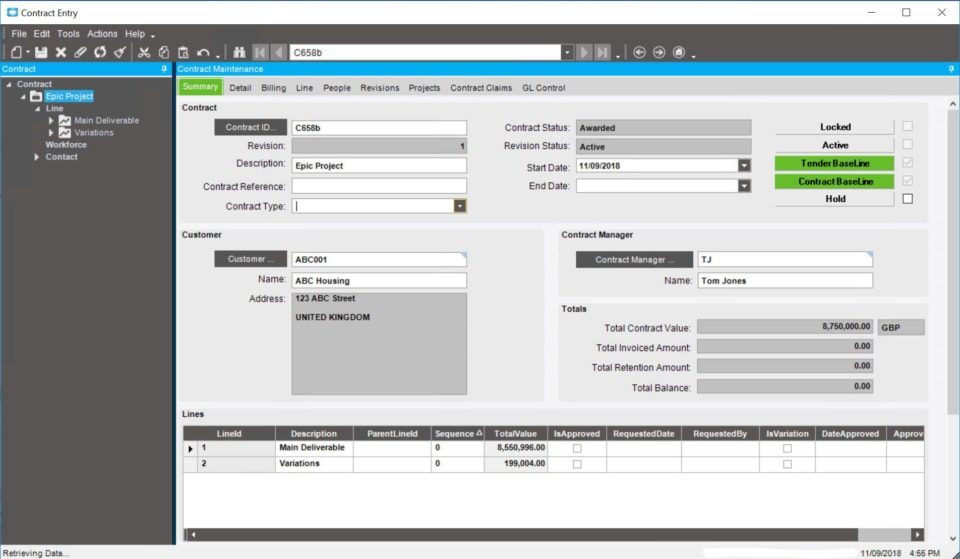
Epicor Advanced Projects module contract summary dashboard

Epicor Advanced Projects Contract Management

• Manage complex contracts.
• Contracts can be tied to a single project, or many projects.
• Manage small and long-duration contracts.
• Multi-level item/scope definition.
• Revision control and variation controls.
• Retention management.
• Ability to do complex invoices with a mixture of fixed-price, progress, and quantity-based billing methods.

Epicor Advanced Projects Project Accruals

• Financial recognition of revenue and expenses based on various valuations methods, including; amount billed, progress percentage, cash received.
• Enables true project profitability based
on current performance and expected completion.
• Ability to adjust accrual calculations as required.
• Automatic posting of accruals to the GL.
• Manual journal adjustments to projects as needed.

Epicor Advanced Projects Claims Management

• Cumulative claims management.
• Applications for payment/proforma invoice processing.
• An approval process to validate prior to submission to the customer.
• Integration to Accounts Receivable to enable holistic customer reporting.
• Invoicing based on valuations, not just part shipping.
• Flexible invoice and claim layouts to show summary or detailed lines.

Epicor Advanced Projects Enhanced Project Budgeting

• A budget approval process to lock in an original/baseline budget.
• Cost code/cost head budgets.
• Comparison of spent vs recognised.
• Budget and capture costs by phase and by cost code.

Epicor Advanced Projects Subcontract Management

• Manage complex contracts.
• Subcontracts can be tied to a single deliverable or many.
• Revision control and variation controls.
• Retention management.

Epicor Advanced Projects Subcontract Claims

• Cumulative claims management.
• Integration to accounts payable to enable holistic vendor reporting.
• Payments based on valuations, not just goods received.

Epicor Advanced Projects Built-in ERP Benefits

• Advanced workflows and approval functionality to manage everyday business functions.
• Integrated procurement functionality to manage the requisition, purchase and invoicing lifecycle.
• Full project sub-ledger with cost capture from the core ERP system.

Managing the financial aspects of large and complex contracts is not an easy task, and if it isn’t done well, can result in costly mistakes.

• Variations not billed, resulting in missed revenue.
• Penalties and potential lawsuits through not meeting contractual obligations.
• Manual integration of disparate systems, costing time and facilitating mistakes.
• Cashflow stress caused by the mismanagement of claims and subcontractor payments.
• Lack of collaboration across the business due to misalignment of contract obligations within departments.
• Poor customer, subcontractor and employee experience due to lack of visibility, inaccurate invoicing and processes that aren’t consistent.
• Reporting that is slow, manual and always historical, with no real-time visibility of the health of the business and the status of the projects.

Ask yourself can your business afford to continue working like this?

How many more contracts can you take on when it is a challenge handling the ones you already have? What you really need is an integrated system that works for you. One that generates efficiencies in the business, automates manual tasks and streamlines processes so that mistakes are kept to the bare minimum, if at all. You need to ensure that every project is profitable so that your business flourishes.

The benefits are endless and extend beyond systemisation. Epicor ERP teamed with Advanced Projects has been built with your challenges and goals top of mind. We know and understand the importance of managing complex contracts and multifaceted projects within companies like yours.

About Encompass Solutions

Encompass Solutions is a business and software consulting firm that specializes in ERP systems, EDI, and Managed Services support for Manufacturers and Distributors. Serving small and medium-sized businesses since 2001, Encompass modernizes operations and automates processes for hundreds of customers across the globe. Whether undertaking full-scale implementation, integration, and renovation of existing systems, Encompass provides a specialized approach to every client’s needs. By identifying customer requirements and addressing them with the right solutions, we ensure our clients are equipped to match the pace of Industry.

 

1 9 10 11 12 13 21