To compete, manufacturers in regulated industries need to be agile and innovate at a high velocity. Epicor® ERP is a leading manufacturing platform for life science manufacturers as it offers the product traceability, system controls, and more needed to respond to your growing business while allowing you to meet regulatory challenges. The availability of critical business systems in the cloud improves your ability to compete. Cloud enables both business agility and the increased speed at which technology is delivered to better meet business needs for innovation. Additionally, the Epicor ERP Cloud Validation Bundle for Life Sciences offers a cloud solution designed to reduce the risk of compliance with support for the software validation needs of FDA-regulated businesses.

Epicor ERP Cloud Validation Bundle Benefits

As a Life Sciences Manufacturer, take advantage of the benefits of the cloud with reduced risk of compliance:

  • Stay current in the cloud with an annual upgrade cadence for extended validation testing and documentation.
  • Ensure your business is ready for every upgrade by leveraging customer-proven best practices that minimize disruption.
  • Meet demands for high growth with flexible cloud solutions, easily scalable and adaptive to current and future business needs.
  • Drive strategic business outcomes with an Epicor ERP Cloud system to better align with your organizational goals.

FDA 21 CFR Part 11 Compliance Requires Validation of Software

Companies must validate that the software and systems used to create and maintain electronic records and signatures can ensure the integrity of the electronic results and information. This is done through software validation. The guidance offered by the FDA for software validation is in terms of installation qualification (IQ), operational qualification (OQ), and performance qualification (PQ). The Epicor ERP Cloud Validation Bundle for Life Sciences supports IQ documentation on your Epicor cloud solution to supplement IQ documentation for internal systems within your validation plan.

Validation Documentation Available with the Bundle

The Epicor ERP Cloud Validation Bundle for Life Sciences supports IQ documentation on your Epicor cloud solution to supplement IQ documentation for internal systems within your validation plan.

Note: You are responsible for IQ validation documentation and testing of any installed software and devices at their location. Also, as you are responsible for your validation state, Epicor makes our documentation available for review. The following reports are available:

  • Epicor ERP IQ Software Validation Plan (VP): VP-01
  • Epicor ERP IQ Software User Requirements Specification (URS): URS-02
  • Epicor ERP IQ Software Risk Management Plan (RMP): RMP-03
  • Risk Assessment / Failure Modes and Effects Analysis (FMEA): FMEA-04
  • Epicor ERP IQ Software Risk Management Report (RMR): RMR-05
  • Epicor ERP IQ Software Functional Requirements (FR): FR-06
  • Epicor ERP Installation Qualification (IQ) Software Validation: IQ-07
  • Epicor ERP IQ Software Validation Summary Report (VSR): VSR-08
  • Epicor Managed Hosting SOC 1 Type II Report
  • Epicor Cloud ERP SOC 2 Type II Report
  • Epicor SOC 2 Bridge Letter

Cloud Elements of the Bundle

The solution is a bundled offering that comprises the following cloud elements:

  • Epicor ERP Public Cloud U.S. Government Option
  • Epicor Public Cloud Validation Environment with Public Cloud Premium for your dedicated validation testing
  • IQ documentation and audit inquiry support in the event of customer or FDA audit
  • Extended validation cloud cadence of one year to provide additional time for validation documentation and testing
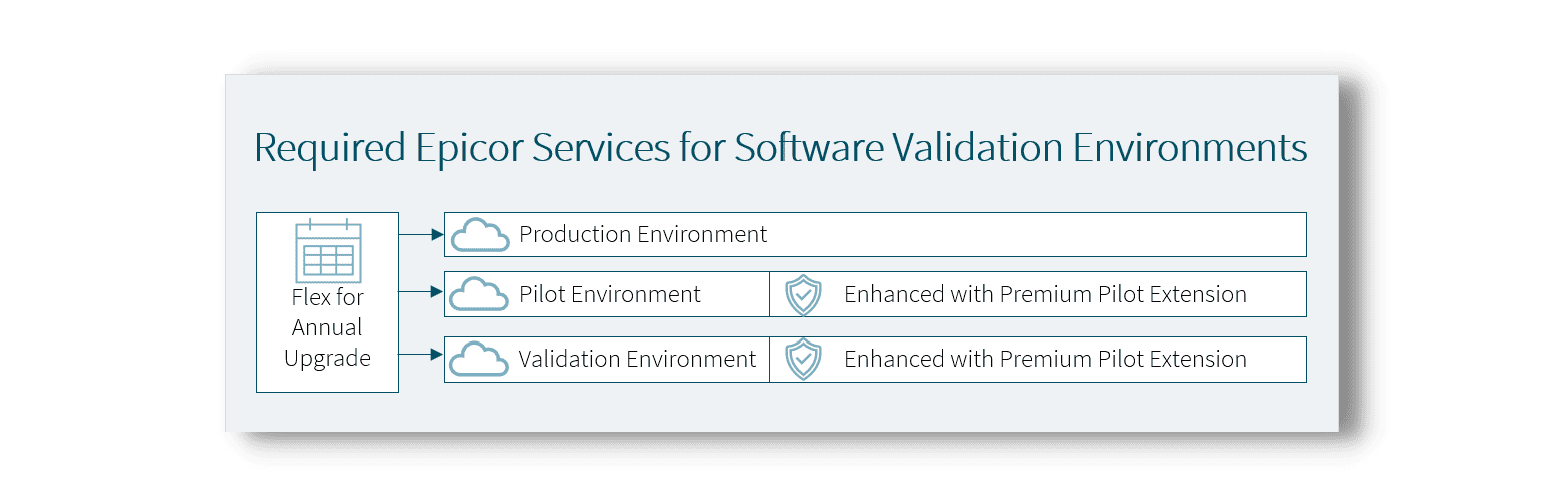
Epicor ERP Cloud Validation Bundle for life science and medical device manufacturing environments

Figure 1: Epicor ERP Cloud Validation Bundle for Life Sciences. Note the solution is available in Azure Government Cloud and that additional environments are available but must be enhanced with a corresponding Premium Pilot Extension to match your solution set.

Cloud Upgrade Cadence for the Epicor ERP Cloud Validation Bundle for Life Sciences

Supporting the needs of the life sciences business with a software upgrade cadence that delivers time for added testing is built into the solution. Users will have stages for planning, validation testing, reporting of issues that impact validation, and regression test time for their validated processes. They will also need to test their non-validation processes such as financial transactions. Below is a diagram that outlines a sample cadence for the solution. In addition to a one-year cadence for major releases, the solution will offer a quarterly update that is made available in the pilot environment the month before making it available in the live environment.
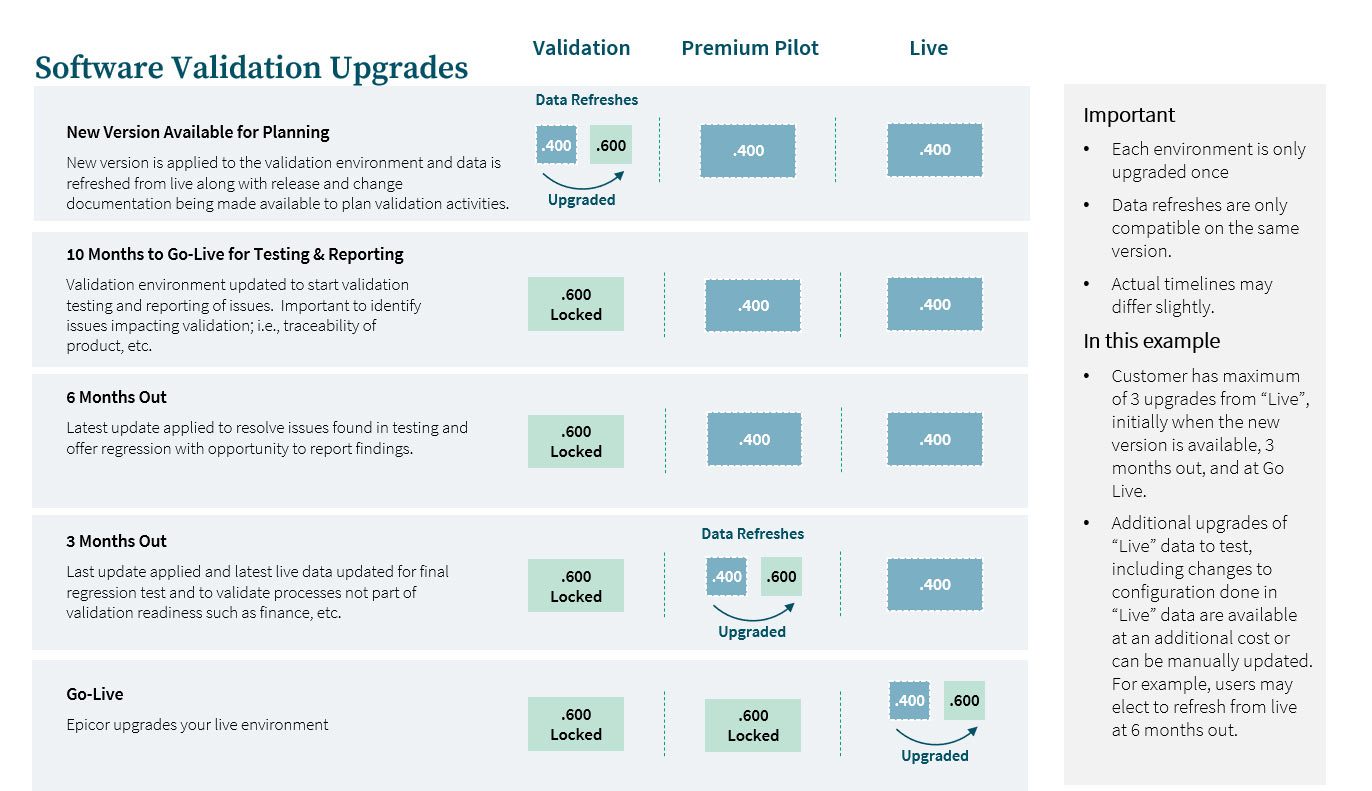
Epicor ERP Cloud Validation Bundle for life science and medical device manufacturing upgrades

Get Started With Epicor ERP Cloud Validation Bundle

Business leaders balance the pace of business innovation, fluctuating demand, and regulatory compliance requirements when deploying new technology. Reducing the risk of change in these environments provides greater business resiliency with the added benefit that the cloud delivers, including the ability to stay current with technology to drive greater results. Epicor uniquely understands the needs of a life sciences manufacturer with cloud-based ERP. You need the flexibility and control to run your business your way while benefiting from the cloud technologies and business models that fit.

About Encompass Solutions

Encompass Solutions is a business and software consulting firm that specializes in ERP systems, EDI, and Managed Services support for Manufacturers. Serving small and medium-sized businesses since 2001, Encompass modernizes operations and automates processes for hundreds of customers across the globe. Whether undertaking full-scale implementation, integration, or renovation of existing systems, Encompass provides a specialized approach to every client’s needs. By identifying customer requirements and addressing them with the right solutions, we ensure our clients are equipped to match the pace of the Industry.



If you don’t already know, Epicor users have access to EpicCare. This is Epicor’s customer self-service portal that enables the submission of issues, tickets, service requests, case creation, and more. As part of this service, there is a useful tool called Wayfinder.

What is Epicor Wayfinder

Epicor Wayfinder is a component of the EpicCare portal that shows Epicor users information about billing, contracts, service requests, and more.

The tool is a great resource for users with questions about their maintenance contract, current license ownership, and supply requests.

Epicor Wayfinder Components

With over 75 unique data points available to users, Epicor Wayfinder can help you find critical information with just a few clicks. You can also modify account information, like business name changes, billing address changes, invoice recipients, and the like.

Here is a list of all the various information you can locate or request using Epicor Wayfinder. Keep in mind, that you will need to be logged into your EpicCare account to access the following links.

ACCOUNT AND BILLING SERVICES

ACCOUNT MAINTENANCE

BILLING REQUESTS

CASE MANAGEMENT

GENERAL

PRODUCT MANAGEMENT

MAINTENANCE INQUIRY

FINANCE

LICENSE AND MEDIA

CUSTOMER EXPERIENCE

SALES

EPICOR UNIVERSITY

EPICOR USERS GROUP

EPIC WEB

INSIGHTS

SOFTWARE-GENERIC

UPGRADE SERVICES

SUPPORT

PROFESSIONAL SERVICES

About Encompass Solutions

Encompass Solutions is a business and software consulting firm that specializes in ERP systems, EDI, and Managed Services support for Manufacturers. Serving small and medium-sized businesses since 2001, Encompass modernizes operations and automates processes for hundreds of customers across the globe. Whether undertaking full-scale implementation, integration, or renovation of existing systems, Encompass provides a specialized approach to every client’s needs. By identifying customer requirements and addressing them with the right solutions, we ensure our clients are equipped to match the pace of the Industry.

Below you will find a listing of all the currently scheduled Epicor customer webinars for June 2021.

Epicor Kinetic Webcast

Kinetic: A webcast on everything related to the user experience transformation ahead of the Kinetic (the new name for Epicor ERP) 2021.1 release. During this webcast, customers will learn about adopting the new UX, a phased roll-out approach, education and training resources, and a Kinetic UX demonstration.

Kinetic

·         Date: Tuesday, June 1, 2021

·         Time: 1:00 pm – 1:45 pm CST

Epicor Application Studio Webcast

Application Studio: A webcast on the process to upgrade your classic customizations to the new user experience in Kinetic 2021.1. During this webcast, customers will learn about how to make the move from customizations to low/no code configurations done in Application Studio, the benefits that come with it, and the resources available to support them in this journey.

Application Studio

·         Date: Thursday, June 3, 2021

·         Time: 1:00 pm – 1:45 pm CST

Epicor Cybersecurity Webcast

Cyber Security: A webcast on cloud-based ERP and Epicor security controls. During this webcast, customers will learn about gaining peace of mind with antimalware, redundant backups, and disaster recovery, isolating enterprise systems to reduce the risk of ERP data exposure, controlling access with multi-factor authentication controls, complying with industry regulations such as ITAR and CMMC and extending protection to include local machines and other hardware.

Cybersecurity

·         Date: Thursday, June 24, 2021

·         Time: 10:00 am – 10:45 am CST

Epicor 1 EDI Source Webcast

1 EDI Source: A webcast on the new Amazon eCommerce Connector from Epicor EDI (formerly 1 EDI Source). During this webcast, customers will learn about how the connector automates order processing and automatically updates the inventory levels on Amazon from Kinetic so customers receive a better online buying experience while also automating manual order entry processes.

Epicor EDI

·         Date: Tuesday, June 29, 2021

·         Time: 1:00 pm – 1:45 pm CST·

About Encompass Solutions

Encompass Solutions is a business and software consulting firm that specializes in ERP systems, EDI, and Managed Services support for Manufacturers. Serving small and medium-sized businesses since 2001, Encompass modernizes operations and automates processes for hundreds of customers across the globe. Whether undertaking full-scale implementation, integration, or renovation of existing systems, Encompass provides a specialized approach to every client’s needs. By identifying customer requirements and addressing them with the right solutions, we ensure our clients are equipped to match the pace of the Industry.

Watch this short video (5:17) for an efficient and concise overview of the state of credit collections in your organization with graphs, trends, projections, team performance, and self-service usage reports.


About Encompass Solutions

Encompass Solutions is a business and software consulting firm that specializes in ERP systems, EDI, and Managed Services support for Manufacturers. Serving small and medium-sized businesses since 2001, Encompass modernizes operations and automates processes for hundreds of customers across the globe. Whether undertaking full-scale implementation, integration, or renovation of existing systems, Encompass provides a specialized approach to every client’s needs. By identifying customer requirements and addressing them with the right solutions, we ensure our clients are equipped to match the pace of the Industry.

Register for these upcoming Epicor customer webinars for May 2021. Topics for this month include Advanced Requisition Management (ARM), Intelligent Data Capture (IDC), and Epicor University.

Epicor Customer Webinars for May 2021

Advanced Requisition Management (ARM): A webcast on Epicor Advanced Requisition Management called Four New Supply Chain Resiliency Features and Enhanced Procurement with Advanced Requisition Management (ARM) for all US/CAN Current Epicor for Manufacturing & Current Partner Owned Customers alongside ISV partner Precise. During this webcast, customers will learn how to enable Kinetic (The New Name for Epicor ERP) for complete visibility and control over their procurement processes.

·         Date: Thursday, May 20th, 2021

·         Time: 10:00 am – 10:45 am CST

Epicor Intelligent Data Capture (IDC): A webcast called Eliminate Manual Data Entry with Epicor IDC (Intelligent Data Capture) for all US/CAN Current Epicor for Manufacturing & Current Partner Owned Customers. During this webcast, customers will learn about Epicor IDC and its capabilities of identifying and capturing data from nearly any business document, thus eliminating hours of manual data entry while improving productivity and accuracy.

·         Date: Thursday, May 25th, 2021

·         Time: 10:00 am – 10:45 am CST

Epicor University: A webcast called Learning Designed to Get You Where You Need to Go, with Epicor University for all US/CAN Current Epicor for Manufacturing & Partner Owned Customers. During this webcast, customers will learn how our new hands-on training courses support a better journey, explore the enhancements to our in-product support – and the evolution of training with Epicor.

·         Date: Thursday, May 27th, 2021

·         Time: 10:00 am – 10:45 am CST

About Encompass Solutions

Encompass Solutions is a business and software consulting firm that specializes in ERP systems, EDI, and Managed Services support for Manufacturers. Serving small and medium-sized businesses since 2001, Encompass modernizes operations and automates processes for hundreds of customers across the globe. Whether undertaking full-scale implementation, integration, or renovation of existing systems, Encompass provides a specialized approach to every client’s needs. By identifying customer requirements and addressing them with the right solutions, we ensure our clients are equipped to match the pace of the Industry.

It has come to our attention that recent Microsoft updates have impacted several users’ Epicor environments in terms of performance. These Epicor Client performance problems manifest most often in significantly decreased speeds and hang time when carrying out processes within the Epicor system. The updates causing the issues were released by Microsoft in both February and April of 2021. Sr Principal Engineer, Epicor ERP Technical Support, Nathan Anderson, has identified one potential resolution in the form of an Epicor Preview Microsoft Fix.

Keep in mind, that his article is not a formal recommendation for any one business in particular. This potential fix may be able to alleviate a system’s poor performance as a result of those aforementioned Microsoft updates. Each customer will need to determine whether or not this fix is appropriate for their system after due consideration of the variables as summarized in KB0108621 and elsewhere. This fix is only meant to remedy system performance issues until an official solution is provided by Microsoft through their official update channel.

A Statement From Nathan Anderson

The steps to apply the preview Microsoft fix below are provided to try to help our customers that have been negatively impacted by these Microsoft updates until the official fix can be delivered by Microsoft through their normal update channel. Epicor ERP Support has made every effort to document this process in a way that would lead to the greatest chance of success while working with the conflicting interest of doing so as quickly as possible.

The steps that follow are technical in nature, and may be beyond what a specific user can successfully execute despite ERP Support’s efforts to streamline the steps to apply a fix to a product we don’t support using a process the author of this knowledge article was first exposed to applying the preview fix being discussed in this article. If there are challenges that prevent the successful application of this Microsoft preview fix, and while ERP Support would not be able to assist there are resources available that would be able to assist further including Epicor Professional Services and Epicor’s Partner network.

-Nathan Anderson
Sr Principal Engineer, Epicor ERP Technical Support

High-level Technical Information Regarding The Preview Fix From Microsoft

  1. This is an interim delivery mechanism for this preview fix as Microsoft will be rolling it into an upcoming Patch Tuesday– the specific date of which has not been set by Microsoft at this time.
  2. The preview fix will not need to be uninstalled for the official Windows patch to be applied when it is released through regular Microsoft update channels.
  3. The preview fix will lead to the same performance behavior outcome as the official fix. This is the final production quality fix.
  4. There is a Local Group Policy adjustment to apply the preview fix (this step will not be required with the official fix from Microsoft). The only difference between the official Windows update and this preview fix is the adjustment required for the preview fix.

Steps To Apply Epicor Preview Microsoft Fix

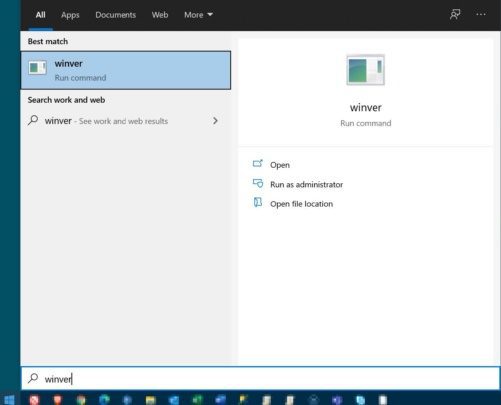
1. Log into the Windows machine in question with a user account that has local administrator rights, then click Start and launch winver.

Epicor Preview Microsoft Fix Step 1

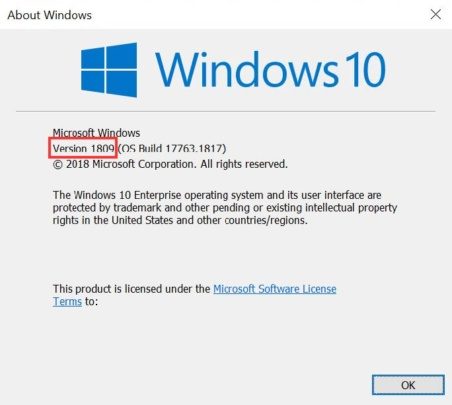
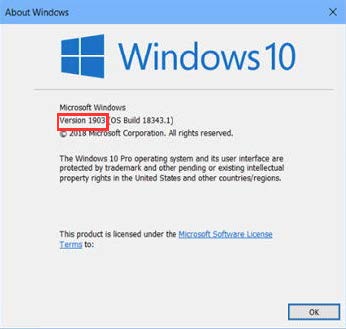
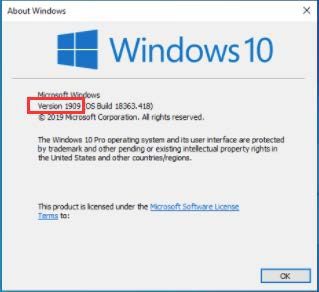
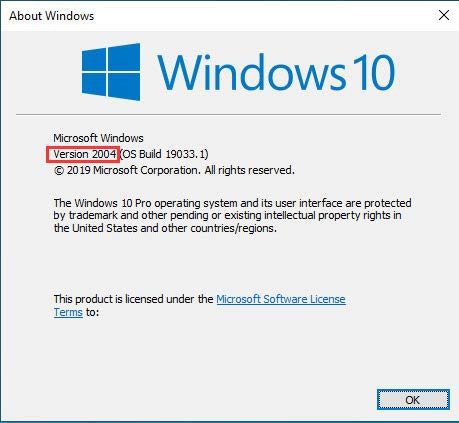
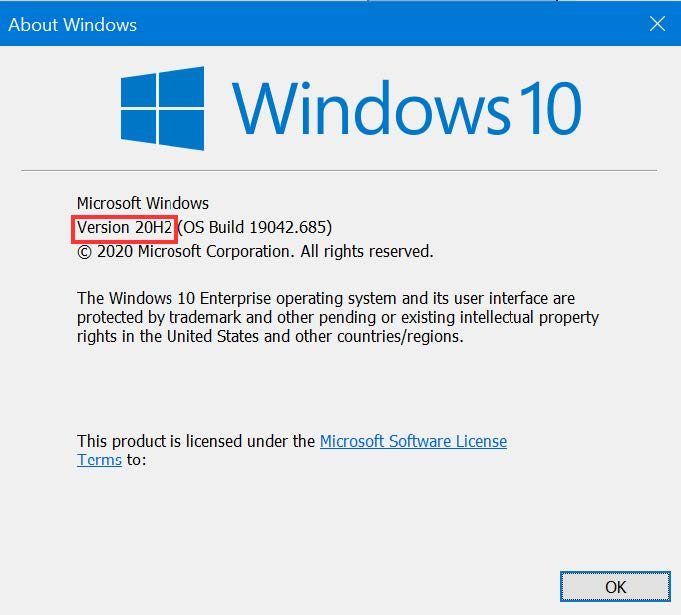
2. When the About Windows form appears, locate and make note of the Windows version.

Epicor Preview Microsoft Fix Step 2a

Epicor Preview Microsoft Fix Step 2b

Epicor Preview Microsoft Fix Step 2c

Epicor Preview Microsoft Fix Step 2d

Epicor Preview Microsoft Fix Step 2e


3. Download the Microsoft hotfix for the Windows version identified in step 2 from the table below.

Windows Operating System version Link to Microsoft hotfix
Windows version 2004 and 20H2 Windows 10 (2004 & 20H2) Known Issue Rollback 040221 01.msi
Windows versions 1903 and 1909 Windows 10 (1903 & 1909) Known Issue Rollback 040221 01.msi
Windows version 1809 Windows 10 (1809) & Windows Server 2019 Known Issue Rollback 032321 01.msi


4. Locate the downloaded Microsoft hotfix .msi, and right-click > Install.

Epicor Preview Microsoft Fix Step 4

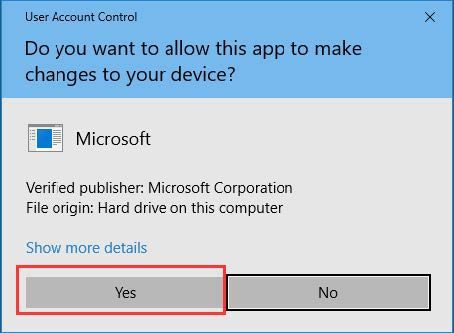
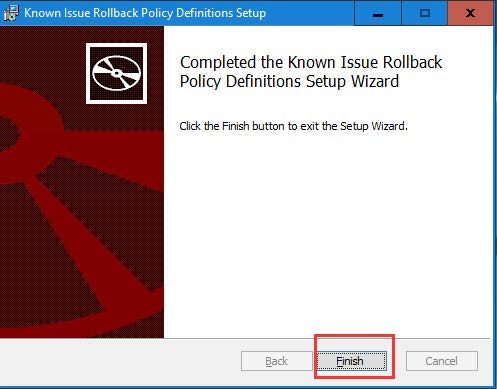
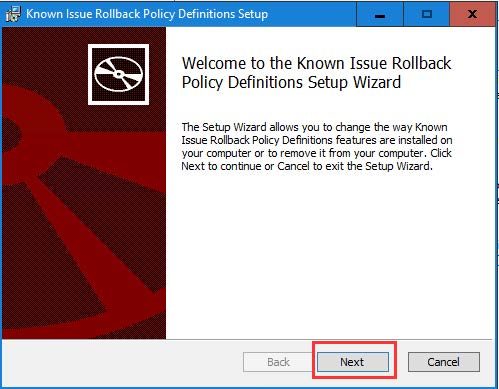
5. Click Next/Yes through the setup wizard, then click the Finish button when the Completed the Known Issue Rollback Policy Definitions Setup Wizard window appears.

Epicor Preview Microsoft Fix Step 5a

Epicor Preview Microsoft Fix Step 5b

Epicor Preview Microsoft Fix Step 5c

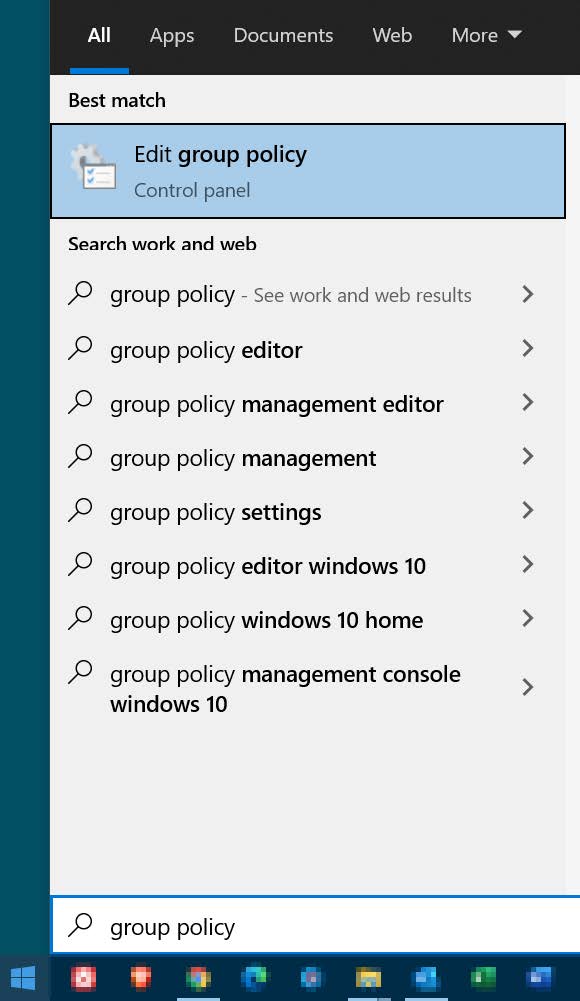
6. Click Start and launch Edit group policy.

Epicor Preview Microsoft Fix Step 6

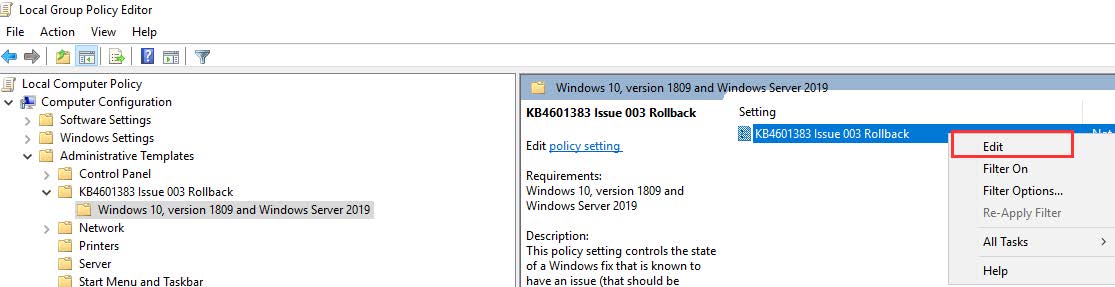
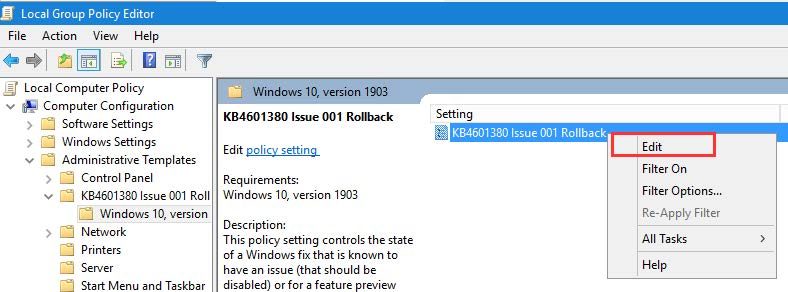
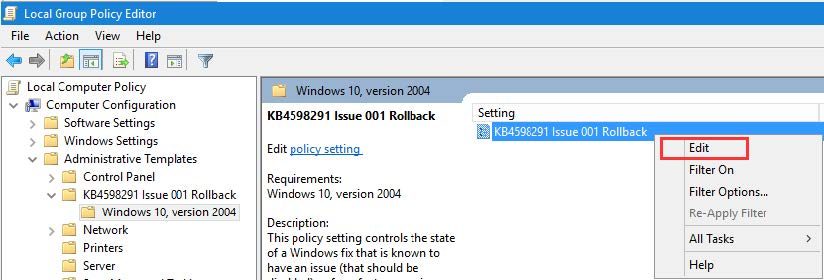
7. Within Local Group Policy Editor, navigate to:

NOTE: The specific navigation for this step will be different based on the Windows version of the Microsoft fix installed. Only one of the following will be available–navigate to the subfolder node that begins with Windows 10

Computer Configuration > Administrative Templates > KB4601383 Issue 003 Rollback > Windows 10, version 1809 and Windows Server 2019

Epicor Preview Microsoft Fix Step 7a

OR
Computer Configuration > Administrative Templates > KB4601380 Issue 001 Rollback > Windows 10, version 1903

Epicor Preview Microsoft Fix Step 7b

OR
Computer Configuration > Administrative Templates > KB4598291 Issue 001 Rollback > Windows 10, version 2004

Epicor Preview Microsoft Fix Step 7c

8. Right-click on one of the following settings and select Edit
NOTE: The specific setting name for this step will be different based on the Windows version of the Microsoft fix installed. Only one of the following will be available– right-click > Edit on that setting.

Epicor Preview Microsoft Fix Step 8a

OR

Epicor Preview Microsoft Fix Step 8b

OR

Epicor Preview Microsoft Fix Step 8c

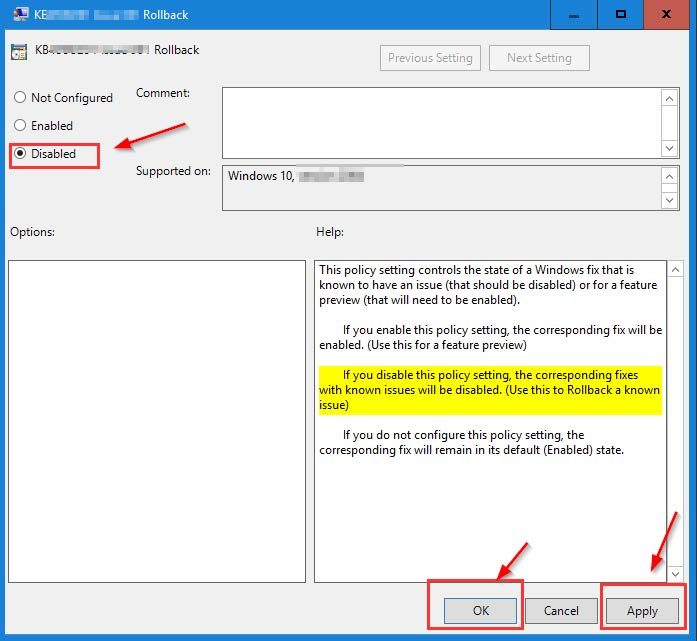
9. Select Disabled, then click Apply and OK.

Epicor Preview Microsoft Fix Step 9

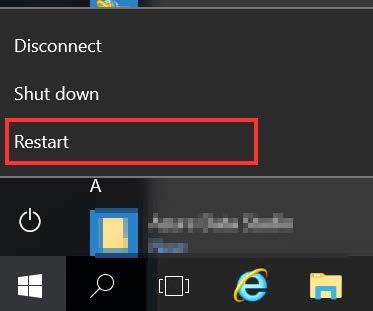
10. Restart the machine to complete the process.

Epicor Preview Microsoft Fix Step 10

Video Recording of Epicor Preview Microsoft Fix Process

About Encompass Solutions

Encompass Solutions is a business and software consulting firm that specializes in ERP systems, EDI, and Managed Services support for Manufacturers. Serving small and medium-sized businesses since 2001, Encompass modernizes operations and automates processes for hundreds of customers across the globe. Whether undertaking full-scale implementation, integration, or renovation of existing systems, Encompass provides a specialized approach to every client’s needs. By identifying customer requirements and addressing them with the right solutions, we ensure our clients are equipped to match the pace of the Industry.

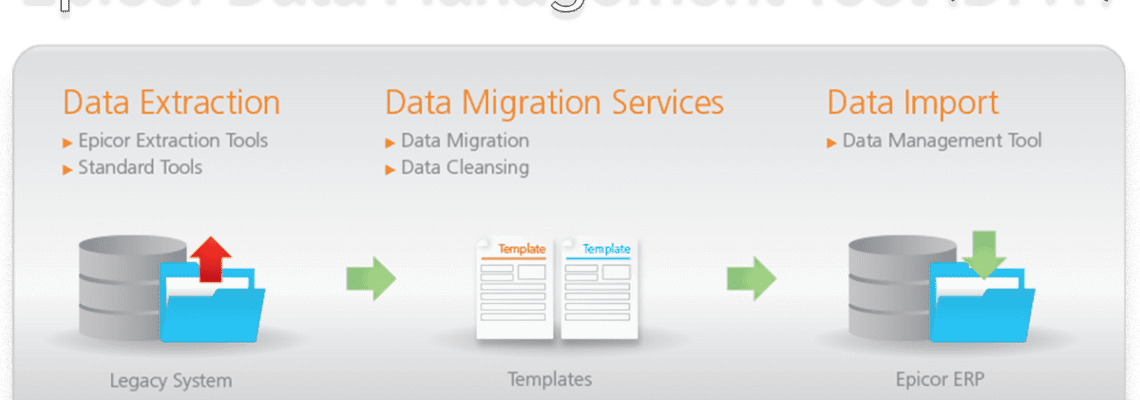
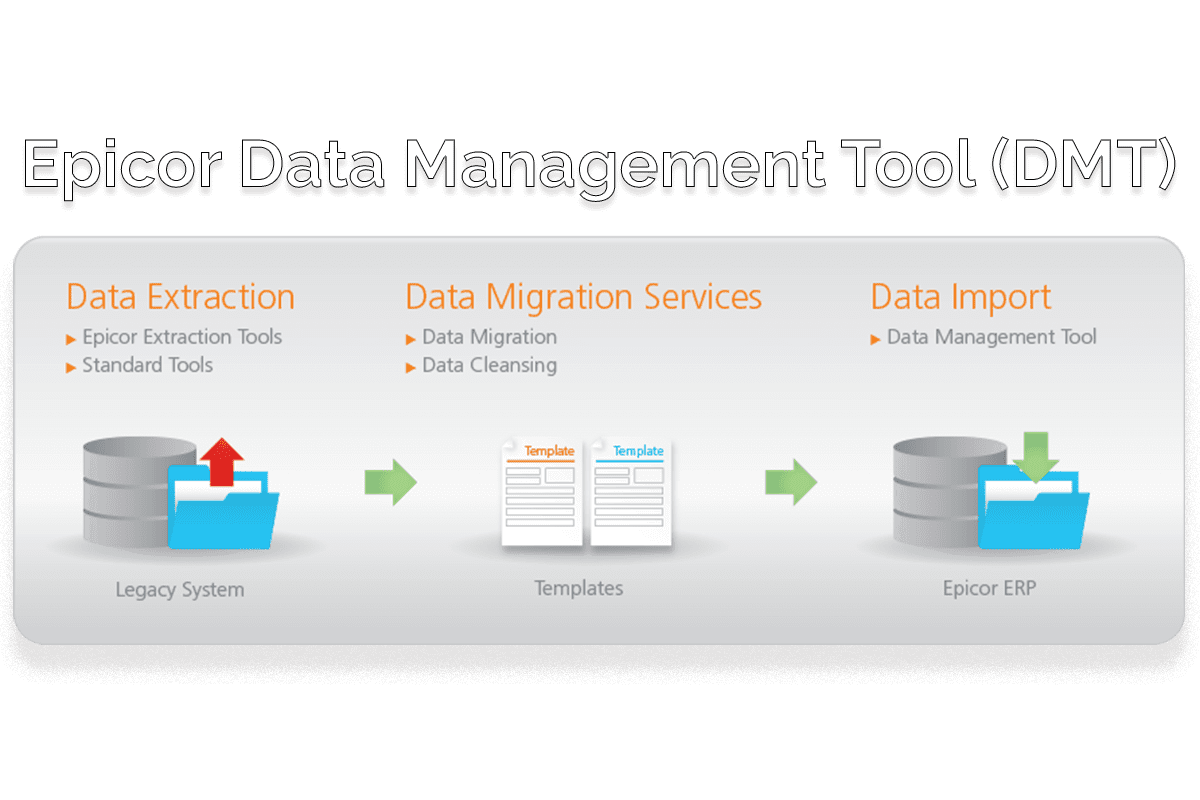
The Epicor Data Management Tool (DMT) is an application that many Epicor ERP clients use to import information into their Epicor systems and to make mass updates. Many clients already know how to use the tool through the standard UI interface. The command line interface allows for interacting with the DMT without the need for user intervention.

The Benefit of Accessing Epicor Data Management Tool via Command Line

By allowing us to interface directly with DMT, this allows for us developers/consultants to quickly import information into Epicor. Such information that can be imported for both new and updating include:

  • Parts
  • Material Issue
  • Return Material
  • Quantity Adjustments
  • Jobs
  • Job Receipt to Inventory
  • Many More

Under normal circumstances, we would need to utilize the standard Business Objects or APIs to make these transactions and updates within the system. This can add a lot of overhead when performing a large number of transactions at a time. Pushing these through the DMT usually allows for us to process a greater number of transactions more quickly, with only the need to write the CSV file and kick off the application.

Getting started with Epicor Data Management Tool (DMT) via Command Line

Epicor provides a good amount of information regarding the DMT and the command line interface. Here is some documentation on it, so long as you have an EpicWeb account. you can find those resources, here.

The above resource provides all of the options that can be used with the DMT.exe and some basic examples. Beyond that, I would recommend anybody who would want to use this to use the DMT to create the templates for what they would want to import. By default, it automatically selects the required fields, so it’s just a matter of adding in the fields that need to be updated/inserted.

Kicking off the DMT via a BPM is how I had originally done this for an Encompass client in Life Sciences manufacturing and I imagine that this would probably be the most universal way for it to be used. With that said, using the DMT in this way is not viable for Cloud clients as the DMT isn’t available for execution from the server side of things.

Cloud clients can still utilize the DMT, even with the command line, but it would need to be through a different methodology, such as a script file or through a local application that has access to the DMT install.

For more information on utilizing Epicor Data Management Tool via Command Line, reach out to Encompass using the link below.

About Encompass Solutions

Encompass Solutions is a business and software consulting firm that specializes in ERP systems, EDI, and Managed Services support for Manufacturers. Serving small and medium-sized businesses since 2001, Encompass modernizes operations and automates processes for hundreds of customers across the globe. Whether undertaking full-scale implementation, integration, or renovation of existing systems, Encompass provides a specialized approach to every client’s needs. By identifying customer requirements and addressing them with the right solutions, we ensure our clients are equipped to match the pace of the Industry.

Epicor has announced the upcoming major product upgrade of Epicor Kinetic 2021.1 in April 2021. This upgrade not only represents a major milestone in the advancement of manufacturing solutions from Epicor, but also a complete rebranding of the Epicor ERP solutions as Epicor Kinetic.

Epicor Kinetic 2021.1 represents decades of the Epicor manufacturing expertise fully reimagined for today’s modern workforce and digital business. Given the such depth of enhancements in this upgrade, the standard testing timeframe for customers on cadence has been extended from four weeks to seven weeks.

What’s New in Epicor Kinetic 2021.1

More details will be released, but a few highlights include:

A Transformed User Experience

Enjoy the fresh look and intuitive design of all your most-used screens and forms – now accessible in a web browser – as the user experience transformation is getting closer to completion.

Expanded Capabilities of Application Studio

Your daily users will appreciate what your power users already know – This robust low/no code toolset is more feature-rich and intuitive to help even the casual user personalize screens to work faster and smarter.

Improved Help & Support Panel

With so many new features, it’s important to have quick and easy access to help when you need it. The Help & Support panel now features familiar type-head predictive search results and more ways to personalize your favorite topics.

Important Dates For Epicor Kinetic Upgrades

For cadence customers

Date​

Event

​Details

Wednesday, April 14, 2021

Data Refresh in Pilot For all live Public Cloud customers staying on cadence, your pilot database will be automatically refreshed this day. Additional environments are not automatically refreshed, but if you would like them to be, please submit a case in EpicCare by Friday, April 9.

For implementing customers staying on cadence, your pilot database will not be automatically refreshed, unless you submit an EpicCare ticket requesting a refresh by Friday, April 9. Please note that you will not be able to have your database refreshed from Production to Pilot during the upgrade testing period.

Thursday, April 15, 2021

Data Refresh in Pilot for MT/Express

For all legacy Multi-tenant and Express customers, your pilot database will be automatically refreshed this day.

Friday, April 16, 2021 –

Saturday, April 17, 2021

Pilot System Upgrade to 2021.1 During this time, your Pilot system, Education environment, and additional environments will be unavailable while Epicor performs your upgrade, but don’t worry—your Production system will not be affected by the new release. Once it is complete, log in to your Pilot system (and other environments) to start exploring what’s new.

Sunday, April 18, 2021 –

Friday, June 4, 2021

Extended Testing Timeline

There are seven weeks to test in the Pilot. Between the upgrade from Pilot to Production, there will be two updates for customers on cadence.

Tuesday, May 11, 2021

Pilot System Update to 2021.1.2 Your Pilot system and additional environments will be updated to include quality enhancements.

Tuesday, June 1, 2021

Pilot System Update to 2021.1.3

This will be the second and last update before the upgrade to Production

Tuesday, June 1, 2021

UBC Opt-In Deadline
  • Multi-tenant and Express customers (legacy cloud customers)
    If Multi-tenant and Express customers want Epicor to move your unique business components (UBCs) from your Pilot environment to your Production environment, you must submit an EpicCare ticket to opt into the process. If you do not submit an EpicCare ticket to opt into the process, the UBCs from your Pilot environment will not be moved by Epicor to the Production environment.


  • Public Cloud customers (Azure)
    Customers on the public cloud that would like to move your unique business components (UBCs) from your Pilot environment to the Production environment, please refer to KB0035160 for instructions, or attend the complimentary “Learn How to Manage Your Unique Business Components” course from Epicor University.

Saturday, June 5, 2021​ –

​Sunday, June 6, 2021

Production System Upgrade to 2021.1.3

Your upgrade weekend arrives! While Epicor upgrades your Production system to Epicor Kinetic 2021.1.3, your system will be unavailable for several hours during this time.


Flex Customers

Date​

Event

​Details

Friday, April 9, 2021

Deadline for Flex Customers  Deadline for customers purchasing the Flex option to submit an EpicCare ticket indicating your preference to defer your upgrade to one of the alternate upgrade dates listed below.

Week of June 21, 2021

Flex Option #1:
Pilot System Upgrade
For Flex Option #1 customers, your Pilot system, Education environment, and additional environments will be unavailable while Epicor performs your upgrade, but don’t worry—your Production system will not be affected by the new release. Once it is complete, log in to your Pilot system (and other environments) to start exploring what’s new.

Week of July 19, 2021

Flex Option #2:
Pilot System Upgrade
For Flex Option #2 customers, your Pilot system, Education environment, and additional environments will be unavailable while Epicor performs your upgrade, but don’t worry—your Production system will not be affected by the new release. Once it is complete, log in to your Pilot system (and other environments) to start exploring what’s new.

Friday, July 24, 2021 –

Saturday, July 25, 2021

Flex Option #1
Production System Upgrade to 2021.1
Flex Option #1 customers: your upgrade weekend arrives! While Epicor upgrades your Production system to Epicor Kinetic 2021.1, your system will be unavailable for several hours during this time.

Friday, August 21, 2021 –

Saturday, August 22, 2021

Flex Option #2
Production System Upgrade to 2021.1

Flex Option #2 customers: your upgrade weekend arrives! While Epicor upgrades your Production system to Epicor Cloud ERP Kinetic 2021.1, your system will be unavailable for several hours during this time.

Note that dates are subject to change.

How To Prepare

Epicor will upgrade your Pilot system and any additional environments seven weeks before Production for customers on cadence. This will provide an opportunity to explore the functionality updates in 2021.1.1 without affecting your Production system.

As a best practice, please use this time to review and make any necessary changes to your Unique Business Components (UBCs)—custom reports, BPMs, User Interface customizations, etc.—to ensure everything continues to operate as expected. There will be more information regarding sample test plans and more that will be made available to you on EpicWeb Documentation.

Flexing Your Epicor Kinetic Upgrade

Subscribers to the Epicor Public Cloud Flex Option can follow the same schedule, but you have the option to defer your upgrade to Epicor Kinetic 2021.1. Below are the two date options for your flex upgrade. Please note the deferred upgrades still have the usual four weeks to test. If you are a Premium Flex Test subscriber, please communicate your preferences by the same deadline and process below.

Pilot ​Production
​Option 1: ​Week of June 21, 2021 ​July 24-25, 2021
​Option 2: ​Week of July 19, 2021 ​August 21-22, 2021

Pilot upgrade dates will be communicated closer to the date.

If you choose to defer, you must submit an EpicCare ticket by Friday, April 9 with your selected upgrade date (Option 1 or Option 2) and we will send you a personalized confirmation with your instructions. We must receive your deferral no later than Friday, April 9. If you do not choose to defer, we’ll keep you on cadence and automatically upgrade your system in June 2021.

Note: If you choose to defer your upgrade, you will not receive any 700.x updates after the 10.2.700.12 update. We only host the upgrade webinars on April 6 and April 7, but replays are accessible at any time afterward as documentation on EpicWeb. If you defer, you are strongly encouraged to either attend or watch the replay so you are aware of the upgrade process.

Next Steps

1. Watch the “What’s New in Epicor Kinetic 2021” Webcast Replay

The webcasts were held in early April. If you were not able to attend or need a refresher, we encourage you to watch the replay to understand how to prepare, ways to leverage the new functionality for driving business growth and be aware of the upgrade process. The link to view on demand is coming soon!

2. Before Your Upgrade

Take a look at all of your Epicor Kinetic 2021.1 resources in Documentation – available mid-April. Particularly useful documents include:

  • What’s New via the Feature Summary
  • Upgrade Guide
  • Change list in the Release Notes document

3. During Your Testing Window 

  • Resolve any issues with your configurations
  • Test your business flow in critical areas
    *Testing tip: print customer-facing documents
  • Review daily, weekly, and monthly processes

And as a reminder, reach out to your Encompass CAM or EpicCare anytime you have a question or need application support.

About Encompass Solutions

Encompass Solutions is a business and software consulting firm that specializes in ERP systems, EDI, and Managed Services support for Manufacturers. Serving small and medium-sized businesses since 2001, Encompass modernizes operations and automates processes for hundreds of customers across the globe. Whether undertaking full-scale implementation, integration, or renovation of existing systems, Encompass provides a specialized approach to every client’s needs. By identifying customer requirements and addressing them with the right solutions, we ensure our clients are equipped to match the pace of the Industry.

On Tuesday, April 6th, Epicor announced that going forward Epicor ERP, its flagship software solution for manufacturing industries, will be referred to as Epicor Kinetic and defined by the new Epicor Kinetic User Experience.

As the latest product update of Epicor ERP Cloud emerges in the form of version 11, this exciting change coincides with the many enhancements to functionality and overall user experience.

Epicor ERP Becomes Epicor Kinetic

Epicor ERP will “officially” become Epicor Kinetic with the general availability release on June 10, 2021. The initial product release will be called Epicor Kinetic 2021.1.

The ideal platform for manufacturers, Epicor Kinetic is a modern solution that serves the needs of businesses that make the things that keep the world moving. The recent evolution of Epicor Kinetic reveals a great new user experience that represents the lively, energetic impact of an entire ERP solution to accelerate business ambitions.

Top Epicor Kinetic User Experience Benefits

Technology is ever evolving. We’re continuously innovating to deliver the modern and intuitive applications your business needs to stay competitive today and tomorrow. Discover the top user experience benefits you get when upgrading to the latest release of Epicor Kinetic.

  1. Simplicity – Attract and retain talent with modern and intuitive applications that boost productivity and simplify everyday tasks. The Epicor Design System enables a simple and delightful user interface that provides a consistent experience across applications. Reduce training and user onboarding time with embedded guided learning and contextual education tools that enable users to learn as they go.
  2. Mobility – Browser-based user experience that provides the mobility you need to keep your business running anytime, anywhere. No matter if you’re visiting a client on the field, walking through the shop floor, or sitting at your desk, you’ll be able to easily access the system through the device and browser of your choice.
  3. Connectivity – Enable connections between users, business workflows, and processes. Extend technology beyond power users and incentive greater internal collaboration with solutions like Epicor Collaborate, Epicor IoT, and Epicor Virtual Agent.
  4. Efficiency – Happy employees are more productive and engaged. Complete tasks in less time and optimize processes. Everything is easily accessible through the main menu and the Home Page can be personalized by the user. Screens show the most relevant information and let you drill down into details with expandable panel cards as you need.
  5. Tailored Experience –  Create your own experience at a user or company level. We take system flexibility to the next level with Application Studio. Tailor applications with a best-practice approach in a low/no-code environment, that is compatible with the cloud and its upgrade resilient.

Reach out to Encompass for more information on how the Epicor Kinetic User Experience can help better manage your business today.

About Encompass Solutions

Encompass Solutions is a business and software consulting firm that specializes in ERP systems, EDI, and Managed Services support for Manufacturers. Serving small and medium-sized businesses since 2001, Encompass modernizes operations and automates processes for hundreds of customers across the globe. Whether undertaking full-scale implementation, integration, or renovation of existing systems, Encompass provides a specialized approach to every client’s needs. By identifying customer requirements and addressing them with the right solutions, we ensure our clients are equipped to match the pace of the Industry.


Accounts receivable is one of the largest business assets and the most accessible source of working capital. Yet most businesses fail to manage receivables effectively—resulting in back office inefficiencies, higher Days Sales Outstanding (DSO), and slower cash flow. Every $1 million in sales may potentially cost a business $40,000 annually in interest. Diminish the risk of bad debt write-offs with a more strategic credit and collection approach.

Epicor Cash Collect helps your team optimize credit decisions and resolve invoice disputes faster to unlock cash flow.


About Encompass Solutions

Encompass Solutions is a business and software consulting firm that specializes in ERP systems, EDI, and Managed Services support for Manufacturers. Serving small and medium-sized businesses since 2001, Encompass modernizes operations and automates processes for hundreds of customers across the globe. Whether undertaking full-scale implementation, integration, or renovation of existing systems, Encompass provides a specialized approach to every client’s needs. By identifying customer requirements and addressing them with the right solutions, we ensure our clients are equipped to match the pace of the Industry.
1 3 4 5 6 7 13