It has come to our attention that recent Microsoft updates have impacted several users’ Epicor environments in terms of performance. These Epicor Client performance problems manifest most often in significantly decreased speeds and hang time when carrying out processes within the Epicor system. The updates causing the issues were released by Microsoft in both February and April of 2021. Sr Principal Engineer, Epicor ERP Technical Support, Nathan Anderson, has identified one potential resolution in the form of an Epicor Preview Microsoft Fix.

Keep in mind, that his article is not a formal recommendation for any one business in particular. This potential fix may be able to alleviate a system’s poor performance as a result of those aforementioned Microsoft updates. Each customer will need to determine whether or not this fix is appropriate for their system after due consideration of the variables as summarized in KB0108621 and elsewhere. This fix is only meant to remedy system performance issues until an official solution is provided by Microsoft through their official update channel.

A Statement From Nathan Anderson

The steps to apply the preview Microsoft fix below are provided to try to help our customers that have been negatively impacted by these Microsoft updates until the official fix can be delivered by Microsoft through their normal update channel. Epicor ERP Support has made every effort to document this process in a way that would lead to the greatest chance of success while working with the conflicting interest of doing so as quickly as possible.

The steps that follow are technical in nature, and may be beyond what a specific user can successfully execute despite ERP Support’s efforts to streamline the steps to apply a fix to a product we don’t support using a process the author of this knowledge article was first exposed to applying the preview fix being discussed in this article. If there are challenges that prevent the successful application of this Microsoft preview fix, and while ERP Support would not be able to assist there are resources available that would be able to assist further including Epicor Professional Services and Epicor’s Partner network.

-Nathan Anderson
Sr Principal Engineer, Epicor ERP Technical Support

High-level Technical Information Regarding The Preview Fix From Microsoft

  1. This is an interim delivery mechanism for this preview fix as Microsoft will be rolling it into an upcoming Patch Tuesday– the specific date of which has not been set by Microsoft at this time.
  2. The preview fix will not need to be uninstalled for the official Windows patch to be applied when it is released through regular Microsoft update channels.
  3. The preview fix will lead to the same performance behavior outcome as the official fix. This is the final production quality fix.
  4. There is a Local Group Policy adjustment to apply the preview fix (this step will not be required with the official fix from Microsoft). The only difference between the official Windows update and this preview fix is the adjustment required for the preview fix.

Steps To Apply Epicor Preview Microsoft Fix

1. Log into the Windows machine in question with a user account that has local administrator rights, then click Start and launch winver.
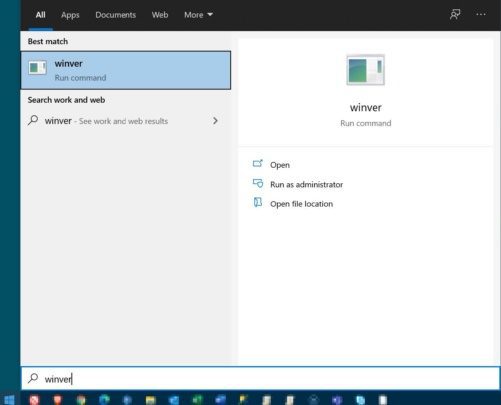
Epicor Preview Microsoft Fix Step 1

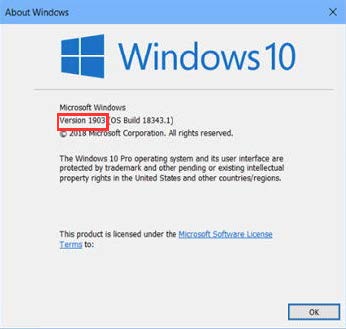
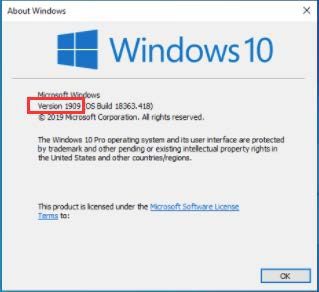
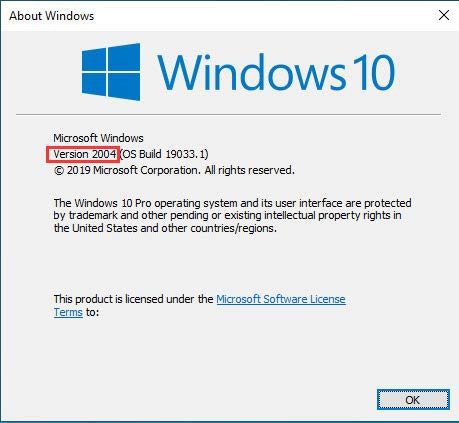
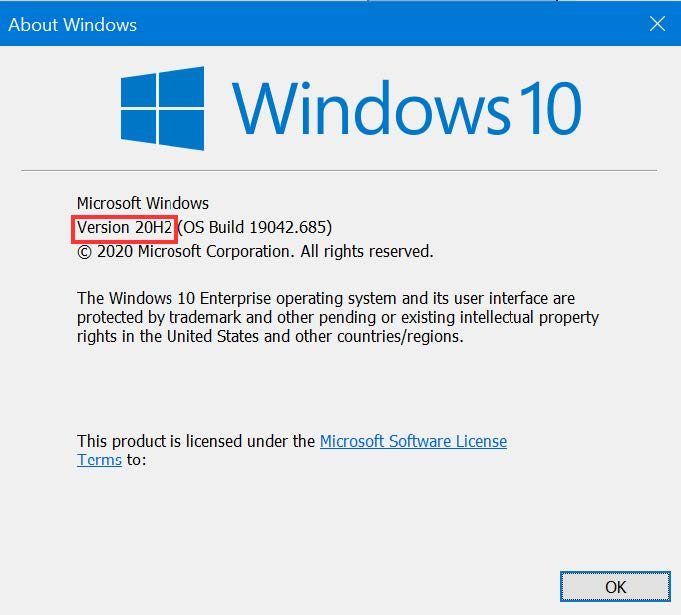
2. When the About Windows form appears, locate and make note of the Windows version.
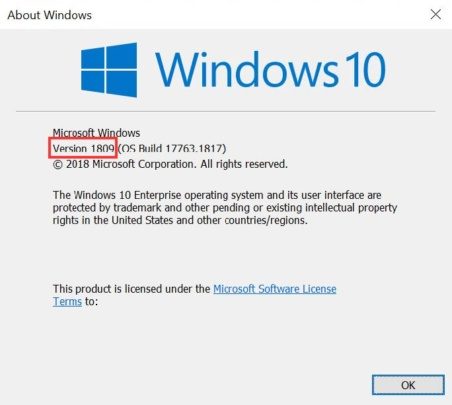
Epicor Preview Microsoft Fix Step 2a

Epicor Preview Microsoft Fix Step 2b

Epicor Preview Microsoft Fix Step 2c

Epicor Preview Microsoft Fix Step 2d

Epicor Preview Microsoft Fix Step 2e


3. Download the Microsoft hotfix for the Windows version identified in step 2 from the table below.

Windows Operating System version Link to Microsoft hotfix
Windows version 2004 and 20H2 Windows 10 (2004 & 20H2) Known Issue Rollback 040221 01.msi
Windows versions 1903 and 1909 Windows 10 (1903 & 1909) Known Issue Rollback 040221 01.msi
Windows version 1809 Windows 10 (1809) & Windows Server 2019 Known Issue Rollback 032321 01.msi


4. Locate the downloaded Microsoft hotfix .msi, and right-click > Install.

Epicor Preview Microsoft Fix Step 4

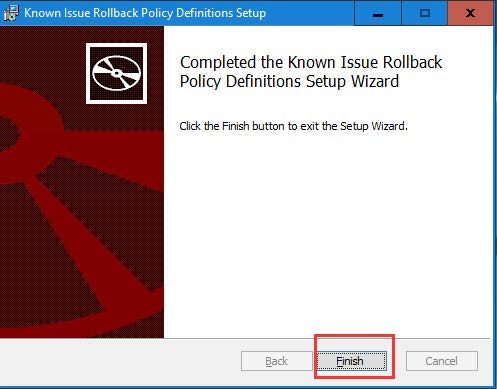
5. Click Next/Yes through the setup wizard, then click the Finish button when the Completed the Known Issue Rollback Policy Definitions Setup Wizard window appears.
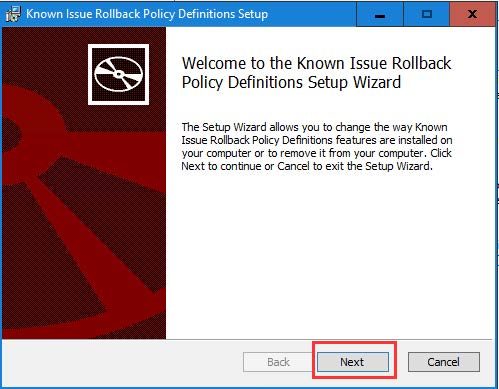
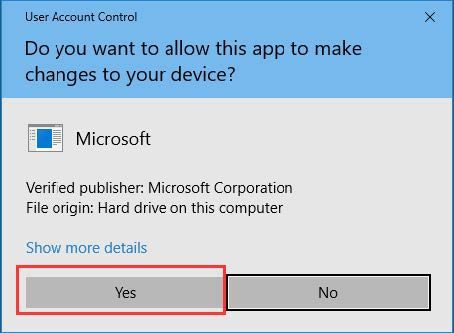
Epicor Preview Microsoft Fix Step 5a

Epicor Preview Microsoft Fix Step 5b

Epicor Preview Microsoft Fix Step 5c

6. Click Start and launch Edit group policy.
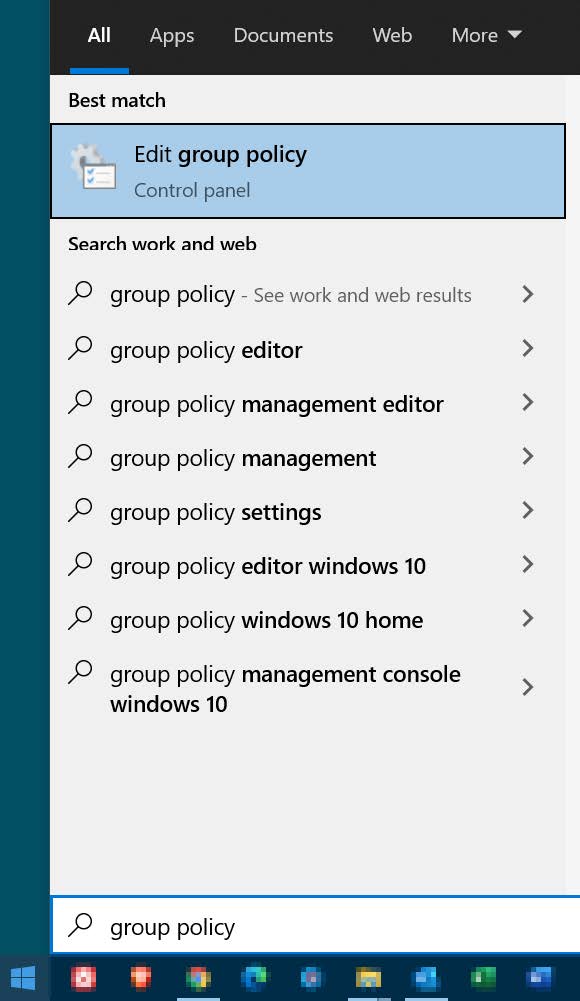
Epicor Preview Microsoft Fix Step 6

7. Within Local Group Policy Editor, navigate to:

NOTE: The specific navigation for this step will be different based on the Windows version of the Microsoft fix installed. Only one of the following will be available–navigate to the subfolder node that begins with Windows 10

Computer Configuration > Administrative Templates > KB4601383 Issue 003 Rollback > Windows 10, version 1809 and Windows Server 2019

Epicor Preview Microsoft Fix Step 7a

OR
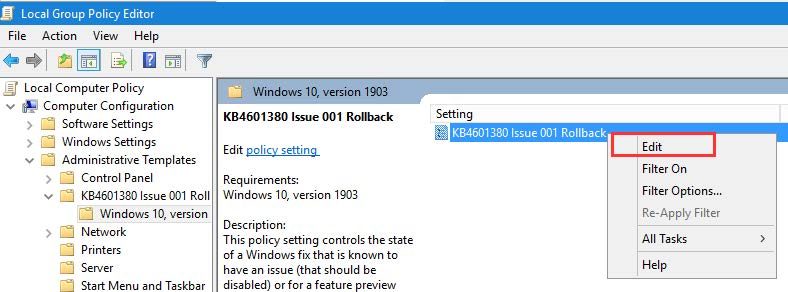
Computer Configuration > Administrative Templates > KB4601380 Issue 001 Rollback > Windows 10, version 1903

Epicor Preview Microsoft Fix Step 7b

OR
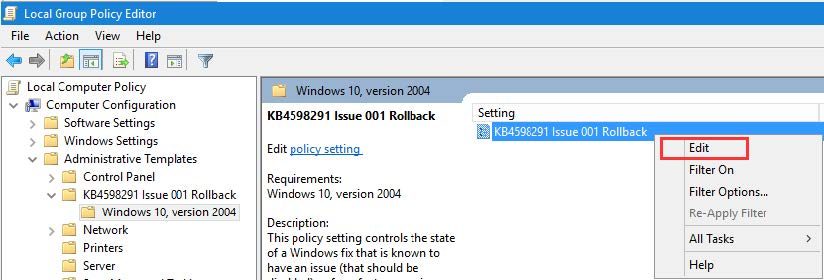
Computer Configuration > Administrative Templates > KB4598291 Issue 001 Rollback > Windows 10, version 2004

Epicor Preview Microsoft Fix Step 7c

8. Right-click on one of the following settings and select Edit
NOTE: The specific setting name for this step will be different based on the Windows version of the Microsoft fix installed. Only one of the following will be available– right-click > Edit on that setting.
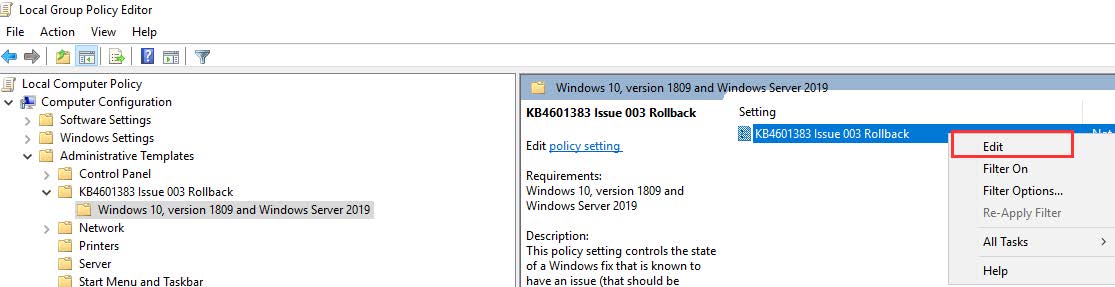
Epicor Preview Microsoft Fix Step 8a

OR

Epicor Preview Microsoft Fix Step 8b

OR

Epicor Preview Microsoft Fix Step 8c

9. Select Disabled, then click Apply and OK.
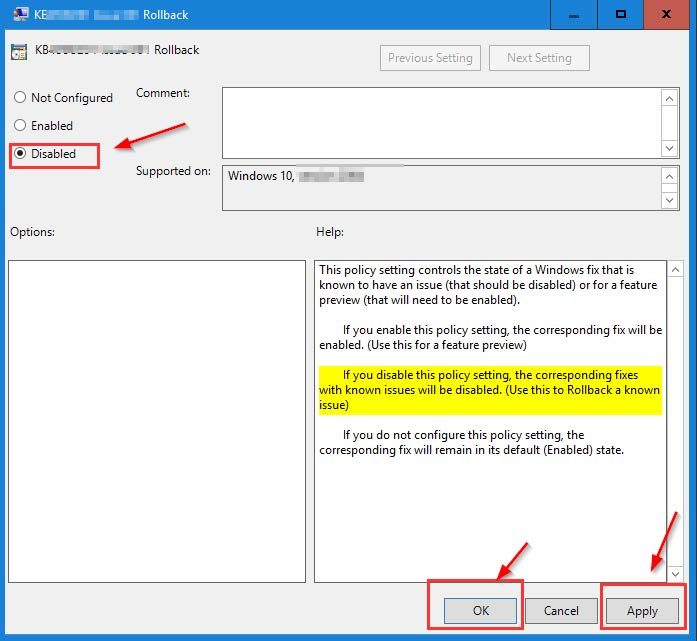
Epicor Preview Microsoft Fix Step 9

10. Restart the machine to complete the process.
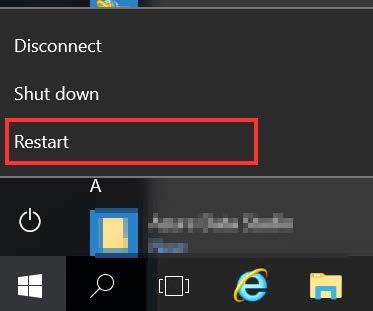
Epicor Preview Microsoft Fix Step 10

Video Recording of Epicor Preview Microsoft Fix Process

About Encompass Solutions

Encompass Solutions is a business and software consulting firm that specializes in ERP systems, EDI, and Managed Services support for Manufacturers. Serving small and medium-sized businesses since 2001, Encompass modernizes operations and automates processes for hundreds of customers across the globe. Whether undertaking full-scale implementation, integration, or renovation of existing systems, Encompass provides a specialized approach to every client’s needs. By identifying customer requirements and addressing them with the right solutions, we ensure our clients are equipped to match the pace of the Industry.
Encompass Solutions is pleased to announce our new technology partnership with EBizCharge, a provider of payment gateway solutions for manufacturers and other businesses.

What EBizCharge Does

EBizCharge is an out-of-the-box payment integration. The solution allows businesses to accept credit and debit card payments, send email payment reminders to customers, automate payment collections, and more. This all happens within the Epicor environment.

EBizCharge qualifies cards at the lowest rates, lowering your monthly processing costs. The solution is easy to install and requires no development activities.

The Benefits of EBizCharge 

The new partnership between Encompass and EBizCharge offers two tiers of benefits. The first comes in the form of benefits specific to Epicor users. The second includes benefits specific to Encompass customers. Here are the benefits you can leverage as both an Epicor user and Encompass customer.

Benefits for Epicor users

  • The latest data encryption and tokenization technology for maximum transaction security and PCI compliance.
  • Access to an online customer payment portal, allowing customers to pay invoices online.
  • Unlimited transactions/batch history for viewing and reporting purposes.
  • Powerful search functionality to run custom reports.
  • Ability to sort through transactions by category.
  • Immediate release of funds when issuing refunds.
  • Ability to assign users and manage access limits with ease.
  • The mobile app is available for iOS and Android devices.

Benefits for Encompass customers

  • Lowered processing costs.
  • A quick and seamless transition.
  • No long-term contracts.
  • Simplified statement (one instead of two to three) and one point of contact.
  • Flat rate processing options.
  • Next-day funding options.
  • Proactive chargeback management team.
  • Access to a world-class, in-house customer support team, available 24/7 and free of charge.

if you’re ready to learn more about EBizCharge’s proprietary payment gateway, with its streamlined payment integrations backed by five-star customer support, schedule a demo, here.

About EBizCharge

EBizCharge integrates over 100 major ERP, CRM, and accounting systems including Epicor 9 and 10. EBizCharge is the leading integrated payments platform in the United States allowing merchants to accept payments in their ERP system, power their online store, upload customer invoices to the online payment portal and provide mobile credit card processing, unlimited transaction history, customizable reports, electronic invoicing, email payment links, secure encryption, tokenization, and more.

About Encompass Solutions

Encompass Solutions is a business and software consulting firm that specializes in ERP systems, EDI, and Managed Services support for Manufacturers. Serving small and medium-sized businesses since 2001, Encompass modernizes operations and automates processes for hundreds of customers across the globe. Whether undertaking full-scale implementation, integration, or renovation of existing systems, Encompass provides a specialized approach to every client’s needs. By identifying customer requirements and addressing them with the right solutions, we ensure our clients are equipped to match the pace of the Industry.

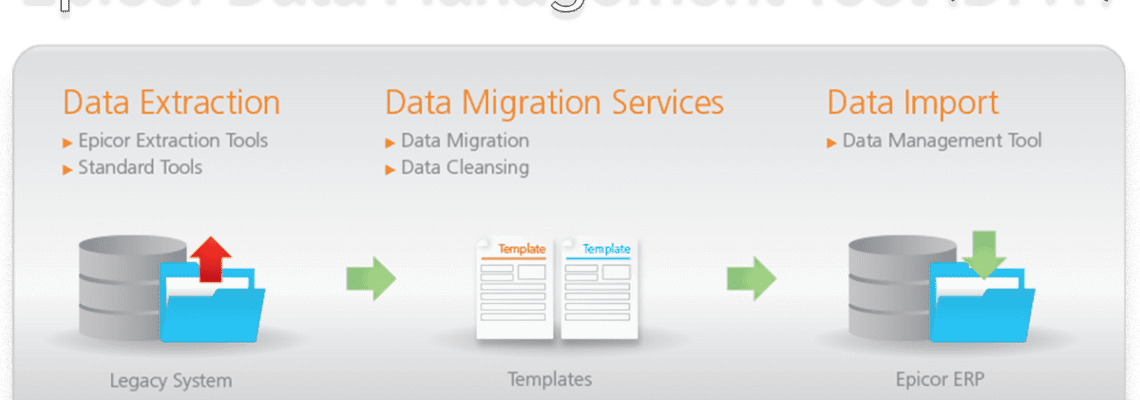
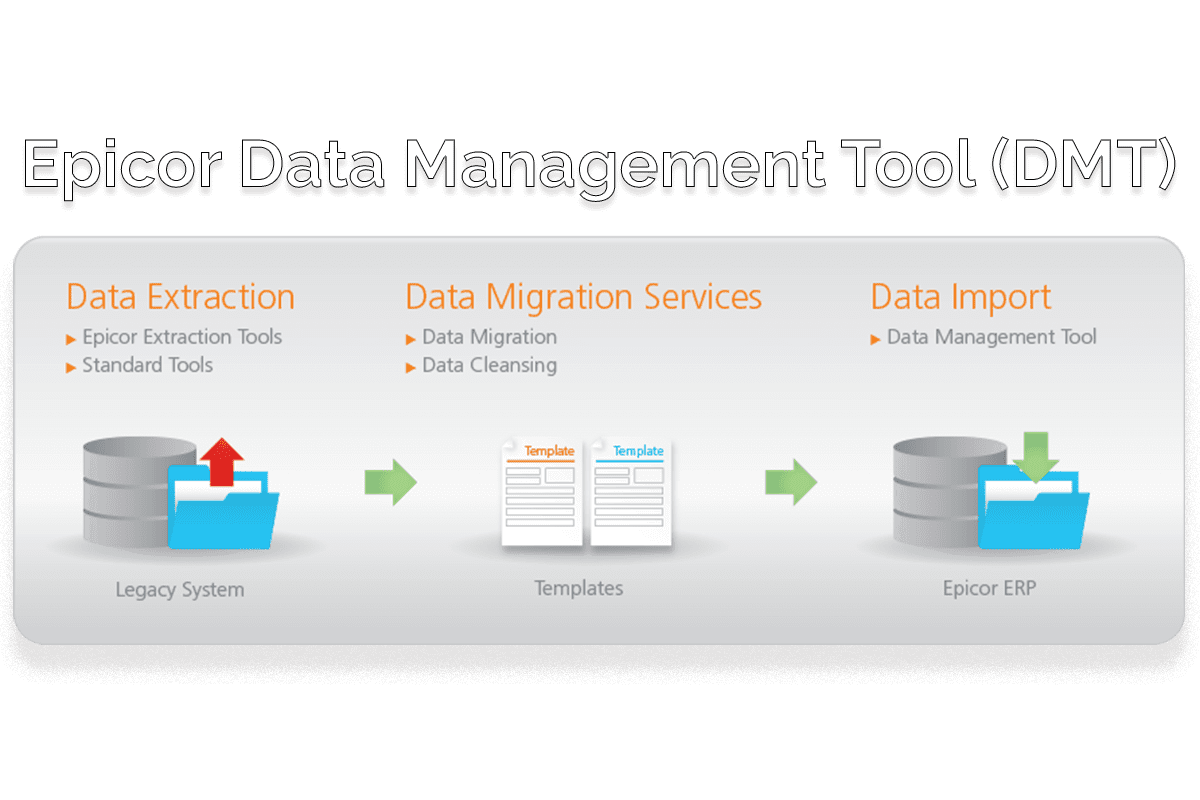
The Epicor Data Management Tool (DMT) is an application that many Epicor ERP clients use to import information into their Epicor systems and to make mass updates. Many clients already know how to use the tool through the standard UI interface. The command line interface allows for interacting with the DMT without the need for user intervention.

The Benefit of Accessing Epicor Data Management Tool via Command Line

By allowing us to interface directly with DMT, this allows for us developers/consultants to quickly import information into Epicor. Such information that can be imported for both new and updating include:

  • Parts
  • Material Issue
  • Return Material
  • Quantity Adjustments
  • Jobs
  • Job Receipt to Inventory
  • Many More

Under normal circumstances, we would need to utilize the standard Business Objects or APIs to make these transactions and updates within the system. This can add a lot of overhead when performing a large number of transactions at a time. Pushing these through the DMT usually allows for us to process a greater number of transactions more quickly, with only the need to write the CSV file and kick off the application.

Getting started with Epicor Data Management Tool (DMT) via Command Line

Epicor provides a good amount of information regarding the DMT and the command line interface. Here is some documentation on it, so long as you have an EpicWeb account. you can find those resources, here.

The above resource provides all of the options that can be used with the DMT.exe and some basic examples. Beyond that, I would recommend anybody who would want to use this to use the DMT to create the templates for what they would want to import. By default, it automatically selects the required fields, so it’s just a matter of adding in the fields that need to be updated/inserted.

Kicking off the DMT via a BPM is how I had originally done this for an Encompass client in Life Sciences manufacturing and I imagine that this would probably be the most universal way for it to be used. With that said, using the DMT in this way is not viable for Cloud clients as the DMT isn’t available for execution from the server side of things.

Cloud clients can still utilize the DMT, even with the command line, but it would need to be through a different methodology, such as a script file or through a local application that has access to the DMT install.

For more information on utilizing Epicor Data Management Tool via Command Line, reach out to Encompass using the link below.

About Encompass Solutions

Encompass Solutions is a business and software consulting firm that specializes in ERP systems, EDI, and Managed Services support for Manufacturers. Serving small and medium-sized businesses since 2001, Encompass modernizes operations and automates processes for hundreds of customers across the globe. Whether undertaking full-scale implementation, integration, or renovation of existing systems, Encompass provides a specialized approach to every client’s needs. By identifying customer requirements and addressing them with the right solutions, we ensure our clients are equipped to match the pace of the Industry.

Epicor has announced the upcoming major product upgrade of Epicor Kinetic 2021.1 in April 2021. This upgrade not only represents a major milestone in the advancement of manufacturing solutions from Epicor, but also a complete rebranding of the Epicor ERP solutions as Epicor Kinetic.

Epicor Kinetic 2021.1 represents decades of the Epicor manufacturing expertise fully reimagined for today’s modern workforce and digital business. Given the such depth of enhancements in this upgrade, the standard testing timeframe for customers on cadence has been extended from four weeks to seven weeks.

What’s New in Epicor Kinetic 2021.1

More details will be released, but a few highlights include:

A Transformed User Experience

Enjoy the fresh look and intuitive design of all your most-used screens and forms – now accessible in a web browser – as the user experience transformation is getting closer to completion.

Expanded Capabilities of Application Studio

Your daily users will appreciate what your power users already know – This robust low/no code toolset is more feature-rich and intuitive to help even the casual user personalize screens to work faster and smarter.

Improved Help & Support Panel

With so many new features, it’s important to have quick and easy access to help when you need it. The Help & Support panel now features familiar type-head predictive search results and more ways to personalize your favorite topics.

Important Dates For Epicor Kinetic Upgrades

For cadence customers

Date​

Event

​Details

Wednesday, April 14, 2021

Data Refresh in Pilot For all live Public Cloud customers staying on cadence, your pilot database will be automatically refreshed this day. Additional environments are not automatically refreshed, but if you would like them to be, please submit a case in EpicCare by Friday, April 9.

For implementing customers staying on cadence, your pilot database will not be automatically refreshed, unless you submit an EpicCare ticket requesting a refresh by Friday, April 9. Please note that you will not be able to have your database refreshed from Production to Pilot during the upgrade testing period.

Thursday, April 15, 2021

Data Refresh in Pilot for MT/Express

For all legacy Multi-tenant and Express customers, your pilot database will be automatically refreshed this day.

Friday, April 16, 2021 –

Saturday, April 17, 2021

Pilot System Upgrade to 2021.1 During this time, your Pilot system, Education environment, and additional environments will be unavailable while Epicor performs your upgrade, but don’t worry—your Production system will not be affected by the new release. Once it is complete, log in to your Pilot system (and other environments) to start exploring what’s new.

Sunday, April 18, 2021 –

Friday, June 4, 2021

Extended Testing Timeline

There are seven weeks to test in the Pilot. Between the upgrade from Pilot to Production, there will be two updates for customers on cadence.

Tuesday, May 11, 2021

Pilot System Update to 2021.1.2 Your Pilot system and additional environments will be updated to include quality enhancements.

Tuesday, June 1, 2021

Pilot System Update to 2021.1.3

This will be the second and last update before the upgrade to Production

Tuesday, June 1, 2021

UBC Opt-In Deadline
  • Multi-tenant and Express customers (legacy cloud customers)
    If Multi-tenant and Express customers want Epicor to move your unique business components (UBCs) from your Pilot environment to your Production environment, you must submit an EpicCare ticket to opt into the process. If you do not submit an EpicCare ticket to opt into the process, the UBCs from your Pilot environment will not be moved by Epicor to the Production environment.


  • Public Cloud customers (Azure)
    Customers on the public cloud that would like to move your unique business components (UBCs) from your Pilot environment to the Production environment, please refer to KB0035160 for instructions, or attend the complimentary “Learn How to Manage Your Unique Business Components” course from Epicor University.

Saturday, June 5, 2021​ –

​Sunday, June 6, 2021

Production System Upgrade to 2021.1.3

Your upgrade weekend arrives! While Epicor upgrades your Production system to Epicor Kinetic 2021.1.3, your system will be unavailable for several hours during this time.


Flex Customers

Date​

Event

​Details

Friday, April 9, 2021

Deadline for Flex Customers  Deadline for customers purchasing the Flex option to submit an EpicCare ticket indicating your preference to defer your upgrade to one of the alternate upgrade dates listed below.

Week of June 21, 2021

Flex Option #1:
Pilot System Upgrade
For Flex Option #1 customers, your Pilot system, Education environment, and additional environments will be unavailable while Epicor performs your upgrade, but don’t worry—your Production system will not be affected by the new release. Once it is complete, log in to your Pilot system (and other environments) to start exploring what’s new.

Week of July 19, 2021

Flex Option #2:
Pilot System Upgrade
For Flex Option #2 customers, your Pilot system, Education environment, and additional environments will be unavailable while Epicor performs your upgrade, but don’t worry—your Production system will not be affected by the new release. Once it is complete, log in to your Pilot system (and other environments) to start exploring what’s new.

Friday, July 24, 2021 –

Saturday, July 25, 2021

Flex Option #1
Production System Upgrade to 2021.1
Flex Option #1 customers: your upgrade weekend arrives! While Epicor upgrades your Production system to Epicor Kinetic 2021.1, your system will be unavailable for several hours during this time.

Friday, August 21, 2021 –

Saturday, August 22, 2021

Flex Option #2
Production System Upgrade to 2021.1

Flex Option #2 customers: your upgrade weekend arrives! While Epicor upgrades your Production system to Epicor Cloud ERP Kinetic 2021.1, your system will be unavailable for several hours during this time.

Note that dates are subject to change.

How To Prepare

Epicor will upgrade your Pilot system and any additional environments seven weeks before Production for customers on cadence. This will provide an opportunity to explore the functionality updates in 2021.1.1 without affecting your Production system.

As a best practice, please use this time to review and make any necessary changes to your Unique Business Components (UBCs)—custom reports, BPMs, User Interface customizations, etc.—to ensure everything continues to operate as expected. There will be more information regarding sample test plans and more that will be made available to you on EpicWeb Documentation.

Flexing Your Epicor Kinetic Upgrade

Subscribers to the Epicor Public Cloud Flex Option can follow the same schedule, but you have the option to defer your upgrade to Epicor Kinetic 2021.1. Below are the two date options for your flex upgrade. Please note the deferred upgrades still have the usual four weeks to test. If you are a Premium Flex Test subscriber, please communicate your preferences by the same deadline and process below.

Pilot ​Production
​Option 1: ​Week of June 21, 2021 ​July 24-25, 2021
​Option 2: ​Week of July 19, 2021 ​August 21-22, 2021

Pilot upgrade dates will be communicated closer to the date.

If you choose to defer, you must submit an EpicCare ticket by Friday, April 9 with your selected upgrade date (Option 1 or Option 2) and we will send you a personalized confirmation with your instructions. We must receive your deferral no later than Friday, April 9. If you do not choose to defer, we’ll keep you on cadence and automatically upgrade your system in June 2021.

Note: If you choose to defer your upgrade, you will not receive any 700.x updates after the 10.2.700.12 update. We only host the upgrade webinars on April 6 and April 7, but replays are accessible at any time afterward as documentation on EpicWeb. If you defer, you are strongly encouraged to either attend or watch the replay so you are aware of the upgrade process.

Next Steps

1. Watch the “What’s New in Epicor Kinetic 2021” Webcast Replay

The webcasts were held in early April. If you were not able to attend or need a refresher, we encourage you to watch the replay to understand how to prepare, ways to leverage the new functionality for driving business growth and be aware of the upgrade process. The link to view on demand is coming soon!

2. Before Your Upgrade

Take a look at all of your Epicor Kinetic 2021.1 resources in Documentation – available mid-April. Particularly useful documents include:

  • What’s New via the Feature Summary
  • Upgrade Guide
  • Change list in the Release Notes document

3. During Your Testing Window 

  • Resolve any issues with your configurations
  • Test your business flow in critical areas
    *Testing tip: print customer-facing documents
  • Review daily, weekly, and monthly processes

And as a reminder, reach out to your Encompass CAM or EpicCare anytime you have a question or need application support.

About Encompass Solutions

Encompass Solutions is a business and software consulting firm that specializes in ERP systems, EDI, and Managed Services support for Manufacturers. Serving small and medium-sized businesses since 2001, Encompass modernizes operations and automates processes for hundreds of customers across the globe. Whether undertaking full-scale implementation, integration, or renovation of existing systems, Encompass provides a specialized approach to every client’s needs. By identifying customer requirements and addressing them with the right solutions, we ensure our clients are equipped to match the pace of the Industry.


On Tuesday, April 6th, Epicor announced that going forward Epicor ERP, its flagship software solution for manufacturing industries, will be referred to as Epicor Kinetic and defined by the new Epicor Kinetic User Experience.

As the latest product update of Epicor ERP Cloud emerges in the form of version 11, this exciting change coincides with the many enhancements to functionality and overall user experience.

Epicor ERP Becomes Epicor Kinetic

Epicor ERP will “officially” become Epicor Kinetic with the general availability release on June 10, 2021. The initial product release will be called Epicor Kinetic 2021.1.

The ideal platform for manufacturers, Epicor Kinetic is a modern solution that serves the needs of businesses that make the things that keep the world moving. The recent evolution of Epicor Kinetic reveals a great new user experience that represents the lively, energetic impact of an entire ERP solution to accelerate business ambitions.

Top Epicor Kinetic User Experience Benefits

Technology is ever evolving. We’re continuously innovating to deliver the modern and intuitive applications your business needs to stay competitive today and tomorrow. Discover the top user experience benefits you get when upgrading to the latest release of Epicor Kinetic.

  1. Simplicity – Attract and retain talent with modern and intuitive applications that boost productivity and simplify everyday tasks. The Epicor Design System enables a simple and delightful user interface that provides a consistent experience across applications. Reduce training and user onboarding time with embedded guided learning and contextual education tools that enable users to learn as they go.
  2. Mobility – Browser-based user experience that provides the mobility you need to keep your business running anytime, anywhere. No matter if you’re visiting a client on the field, walking through the shop floor, or sitting at your desk, you’ll be able to easily access the system through the device and browser of your choice.
  3. Connectivity – Enable connections between users, business workflows, and processes. Extend technology beyond power users and incentive greater internal collaboration with solutions like Epicor Collaborate, Epicor IoT, and Epicor Virtual Agent.
  4. Efficiency – Happy employees are more productive and engaged. Complete tasks in less time and optimize processes. Everything is easily accessible through the main menu and the Home Page can be personalized by the user. Screens show the most relevant information and let you drill down into details with expandable panel cards as you need.
  5. Tailored Experience –  Create your own experience at a user or company level. We take system flexibility to the next level with Application Studio. Tailor applications with a best-practice approach in a low/no-code environment, that is compatible with the cloud and its upgrade resilient.

Reach out to Encompass for more information on how the Epicor Kinetic User Experience can help better manage your business today.

About Encompass Solutions

Encompass Solutions is a business and software consulting firm that specializes in ERP systems, EDI, and Managed Services support for Manufacturers. Serving small and medium-sized businesses since 2001, Encompass modernizes operations and automates processes for hundreds of customers across the globe. Whether undertaking full-scale implementation, integration, or renovation of existing systems, Encompass provides a specialized approach to every client’s needs. By identifying customer requirements and addressing them with the right solutions, we ensure our clients are equipped to match the pace of the Industry.



About Encompass Solutions

Encompass Solutions is a business and software consulting firm that specializes in ERP systems, EDI, and Managed Services support for Manufacturers. Serving small and medium-sized businesses since 2001, Encompass modernizes operations and automates processes for hundreds of customers across the globe. Whether undertaking full-scale implementation, integration, or renovation of existing systems, Encompass provides a specialized approach to every client’s needs. By identifying customer requirements and addressing them with the right solutions, we ensure our clients are equipped to match the pace of the Industry.


About Encompass Solutions

Encompass Solutions is a business and software consulting firm that specializes in ERP systems, EDI, and Managed Services support for Manufacturers. Serving small and medium-sized businesses since 2001, Encompass modernizes operations and automates processes for hundreds of customers across the globe. Whether undertaking full-scale implementation, integration, or renovation of existing systems, Encompass provides a specialized approach to every client’s needs. By identifying customer requirements and addressing them with the right solutions, we ensure our clients are equipped to match the pace of the Industry.


About Encompass Solutions

Encompass Solutions is a business and software consulting firm that specializes in ERP systems, EDI, and Managed Services support for Manufacturers. Serving small and medium-sized businesses since 2001, Encompass modernizes operations and automates processes for hundreds of customers across the globe. Whether undertaking full-scale implementation, integration, or renovation of existing systems, Encompass provides a specialized approach to every client’s needs. By identifying customer requirements and addressing them with the right solutions, we ensure our clients are equipped to match the pace of the Industry.

Everyone is talking about the cloud, especially manufacturers who are evaluating a cloud ERP solution for their business. However, if you don’t quite follow what they’re saying, it comes down to this—using the cloud is using data and systems through the Internet.

How You Already Interact With Cloud Technology

While The Cloud may seem abstract, you likely already interact with and use cloud technologies every day.

  • Do you update a Facebook profile?
  • Do you check your bank balance from your phone?
  • Do you stream movies or music?
  • What about playing games online?

If you answered yes to any of these questions, you are using cloud technology.

Cloud technology has permeated our everyday lives. Now ask yourself, is it as simple for businesses to leverage cloud technology? The answer is yes.

Businesses leveraging cloud technology improve operations in several ways. Examples include improving your cash flow, increasing business capabilities, and simplifying processes for their workforce. All these benefits are realized through the use of an access-from-anywhere platform that is more reliable than traditional ERP deployments that place hardware on-premises.

How Cloud Makes Innovating Easier

By enabling cloud technology at every level of an organization, businesses remove the anxiety associated with security, backups, and verification of backups. Offsite storage becomes a thing of the past and maintenance of hardware and software can be done away with completely. Troubleshooting and upgrades can all be handled with a fraction of the effort.
Perhaps most importantly, connectivity is more reliable in the cloud. This means teams can remain connected and productive anywhere and anytime they need.

Manufacturers questioning whether now is the time to move to the cloud, the answer is a resounding yes. Cybersecurity, IT projects, maintenance activities and more can be removed from the equation with a cloud ERP solution. This leaves your businesses to take care of the business, and make time for customers, employees, and partners.

Simplicity And Dependability of a Cloud ERP Solution

On-premise ERP deployments give businesses a sense of confidence that their data is safely stored just down the hall. While that peace of mind and control is reassuring in theory, in practical terms it can be quite a drain on your IT staff. Maintaining both hardware and software is a headache most IT departments would gladly do without. Cloud enables businesses to shed the tether of physical systems in favor of a more agile and simple solution. With a cloud ERP solution, your teams can focus on running your business more efficiently and taking better care of your customers’ experience.

Cloud ERP solutions operate under the safety of redundancy. Cloud technologies store data securely in multiple data centers locally, regionally, and even globally. This dependability is designed to help businesses maintain system uptime and access no matter what adverse conditions may befall a specific region. These data centers are managed by industry professionals whose sole focus is keeping systems up and running at optimal levels. This frees up resources and capital for your business to focus on growth and improving user experiences across departments. As a result, collaboration among internal teams gets better, the complexity of your information technology resources is reduced, and overall business performance improves.

“The rise of the collaborative workforce and workspace is underway. Increasingly, tech-savvy mobile users are ready for collaborative workspaces with deep integrations to the software they use daily. Collaboration is a key element that helps create the future of work.”

– Worldwide Team Collaborative Applications Forecast, 2019–2023: Collaboration Growth Impacts the Future of Work, IDC, Doc #US44662619, August 2019.

If your business is in the progress of growing or you want to grow, adopting a cloud ERP solution could be an easy way to increase capacity and output without taking on additional software, hardware, or IT personnel. A cloud ERP solution can be scaled up or down with ease, as well.

Savings found in the Cloud

Cloud ERP Solutions are a cost-savings component of business that reduces overhead.

What’s overhead? simply put, overhead is what doesn’t make you money. This includes things like accounting, insurance, and rent.

Antiquated approaches to IT can be a huge source of spending for businesses with maintenance, update tasks, and utility bills, not to mention the extra space servers take up. When working in the cloud, the costs of doing business are driven down. Here’s how.

Reduced Cost of Ownership

Cloud computing removes upfront hardware costs, and the pay-as-you-go subscription model eliminates large initial layouts for software. Easy setup and cash flow-friendly monthly payments make it even easier to see why cloud deployments are so popular—especially when you add the fact that Epicor cloud business software deployments typically cost 25–40% less* than on-premises deployments.

Competitive Advantage

Technology allows your employees to turn on a dime. The cloud provides access to data at a user’s fingertips, ensuring that no matter your company’s size you can compete with enterprise-class technology. The time and money cloud computing free up for your business translates into a lean, nimble, and competitive advantage.

Employee Productivity and Loyalty

With cloud ERP solutions, you can run your business from anywhere there’s an internet connection. Give your employees the ability to produce wherever they happen to be. This enables a better work-life balance that translates to greater loyalty and output. With improved employee loyalty and buy-in, talent turns over less often, this further improves your savings in retaining talent versus having to train new employees more often.

Minimize Downtime With a Cloud ERP Solution

Downtime can cost a company dearly. Cloud ERP solutions can ensure your apps are up and running when you need them most. Cloud-based SaaS applications are proven to minimize downtime, reduce the costs that go along with it, and keep your people productive. Epicor ERP has a service level agreement of 99.5% uptime but performs well beyond that promise with a historical uptime of 99.98%.

Safety, Stability, And Access

Backups are an integral part of any IT department. However, when your backups are stored on-site, you are vulnerable to all manner of internal and external compromises. This can include natural disasters, fire, rogue employees, malicious actors, and the list goes on. any one of these mentioned exposures could cost you irreplaceable data.

The Cloud is the only truly safe place for your backups because they are housed where natural disasters, fires, and all those other potential pitfalls can’t touch them. True backup—the safe keeping of a redundant set of data—is best left to the cloud. It’s the safest, most affordable, and most efficient way to make sure that if you lose everything, all is not lost.

When it comes to stability, cloud systems are simply more stable, better monitored, and more secure than any on-premises system. Unless you have an impenetrable data center protected by intrusion detection, fire suppression, advanced power grids, backup generators, environmental monitoring, and six separate HVAC units inspected every day—all connected by multiple T3 pipelines from multiple vendors and all in a distant geographic location—you’re not as safe as you think.

Accessibility, as in who you want to have access to your systems and who you want to keep out, is a big deal in IT. Add to that lost devices and you’ve compounded the problem. Lost laptops are a billion-dollar business problem. However, the greater problem is the loss and possible theft of the sensitive data stored on those laptops. When your data is stored in the cloud, you can access it no matter what, no matter where. Not only this, but you can lock out anyone when it comes to using that device and you can remotely wipe data from lost laptops at any time.

Now, are you ready to explore the benefits of a Cloud ERP solution for your business?


In today’s economy, there is no room for waste and inefficiency. Success is about reducing costs as much as it is about revenue. Keeping tight control over capital and operational expenditure is a critical priority for any organization. The key to efficient controlled spending lies in the ability to empower staff with requisitioning responsibilities whilst ensuring that contracted buying agreements and spending limits are enforced and that requisitions are routed to the relevant individuals for approval promptly.


About Encompass Solutions

Encompass Solutions is a business and software consulting firm that specializes in ERP systems, EDI, and Managed Services support for Manufacturers. Serving small and medium-sized businesses since 2001, Encompass modernizes operations and automates processes for hundreds of customers across the globe. Whether undertaking full-scale implementation, integration, or renovation of existing systems, Encompass provides a specialized approach to every client’s needs. By identifying customer requirements and addressing them with the right solutions, we ensure our clients are equipped to match the pace of the Industry.
1 8 9 10 11 12 32