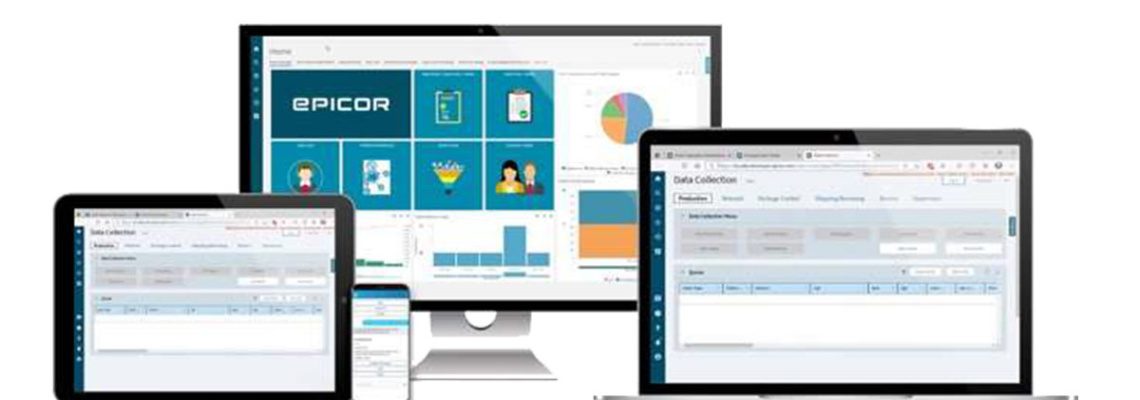
Kinetic 2021.2 utilizes the Epicor manufacturing industry knowledge to deliver a best-in-class solution for your business. 2021.2 features include Application Studio enhancements, new integrations, and so much more. For the 2021.2 upgrades, customers on cadence will have five weeks to test before the Production upgrade scheduled for October 23-24.

What’s New in Kinetic 2021.2

More details will be released, but a few highlights include:

  • Country of Origin at the Lot level​
  • Application Studio improvements
  • Integration​ with KBMax
  • Advanced Unit of Measure developments for multi-company
  • Additional enhancements to the experience transformation continue in 2021.2
  • And so much more​​

For more upgrade details please visit:

Important Dates

On Cadence Customers

Update and upgrade window information will be published closer to their dates.

Date​

Event

​Details

Friday, September 10, 2021​

Deadline for Flex customers  Flex customers must submit an EpicCare ticket indicating their preference to defer their upgrade to one of the alternate upgrade dates by 5:00 PM Central Time Friday, September 10. Flex customers that do not submit a ticket will follow the cadence upgrade and update schedule.

Friday, September 17, 2021​ – ​Satur​day, September 18, 202​1

2021.2 Pilot/additional Environments Upgrade  Your Kinetic Pilot/additional environments will be upgraded to 2021.2.1 Starting Friday, September 17 at 12:01 AM – Saturday, September 18 at 11:59 PM, your Pilot/additional Environments will be unavailable while Epicor performs your upgrade.

There are five weeks to test in the Pilot. Between the Pilot upgrade to Production, there will be one​ update (2021.2.3) for customers on cadence.​

Tuesday, October 12, 2021​​

2021​.2.3 Pilot/additional Environments Update Quality enhancements to your Pilot and any additional environments.

Tuesday, October 19, 2021

UBC Opt-in Deadline UBC Opt-in:

  • Multi-Tenant and Express customers (legacy cloud customers)
    If Multi-Tenant and Express customers want Epicor to move your unique business components (UBCs) from your Pilot environment to your Production environment, you must submit an EpicCare ticket to opt into the process by Tuesday, October 19 at 5:00 PM Central Time. If you do not submit an EpicCare ticket to opt into the process, the UBCs from your Pilot environment will not be moved by Epicor to the Production environment.
  • Public Cloud customers (Azure)
    Customers on the public cloud that would like to move your unique business components (UBCs) from your Pilot environment to the Production environment, please refer to KB0035160 for instructions, or attend the complimentary “Upgrading Custom Items in Cloud Environments – Classic” course from Epicor University.

Saturday, October 23, 2021​ – ​Sunday, October 24, 202​1

2021.2.3 Production System Upgrade It’s your upgrade weekend! While Epicor upgrades your production system to Kinetic 2021.2.3, your system will be unavailable for several hours during this time.

Tuesday, November 2, 2021

2021.2.5  Pilot/Additional
Environments Update​
Quality enhancements to your Pilot and any additional environments.

Update window: Tuesday, November 2, 7:00 PM – 11:59 PM Local Server Time​​

Saturday, November 6, 2021 – Sunday, November 7, 2021

2021.2.5 ​Production System ​Update Quality enhancements to your Production environment.​

Update window: Saturday, November 6, 4:00 PM – Sunday, November 7, 10:00 AM Local Server Time​

Tuesday, November 30, 2021

2021.2.7 Pilot/Additional
Environments Update
Quality enhancements to your Pilot and any additional environments.

Update window: Tuesday, November 30, 7:00 PM – 11:59 PM Local Server Time​​

Saturday, December 4, 2021 – Sunday, December 5, 2021

2021.2.7 Production System Update Quality enhancements to your Production environment.​

Update window: Saturday, December 4, 4:00 PM – Sunday, December 5, 10:00 AM Local Server Time

Tuesday, January 11, 2022

2021.2.9 Pilot/Additional
Environments Update
Quality enhancements to your Pilot and any additional environments.

Update window: Tuesday, January 11, 7:00 PM – 11:59 PM Local Server Time

Saturday, January 15, 2022 – Sunday, January 16, 2022​

2021.2.9 Production System Update Quality enhancements to your Production environment.​

Update window: Saturday, January 15, 4:00 PM – Sunday, January 16, 10:00 AM Local Server Time

Tuesday, February 15, 2022

2021.2.11 Pilot/Additional
Environments Update​
Quality enhancements to your Pilot and any additional environments.

Update window: Tuesday, February 15, 7:00 PM – 11:59 PM Local Server Time​​

Saturday, February 19, 2022 – Sunday, February 20, 2022​

2021.2.11 Production System Update Quality enhancements to your Production environment.​

Update window: Saturday, February 19, 4:00 PM – Sunday, February 20, 10:00 AM Local Server Time​

Tuesday, March 15, 2022​

2021.2.13 Pilot/Additional
Environments Update​
Quality enhancements to your Pilot and any additional environments.

Update window: Tuesday, March 15, 7:00 PM – 11:59 PM Local Server Time​​​

Saturday, March 19, 2022​

– Sunday, March 20, 2022​

2021.2.13 Production System Update Quality enhancements to your Production environment.​

Update window: Saturday, March 19, 4:00 PM – Sunday, March 20, 10:00 AM Local Server Time​​


Note: dates are subject to change.

Flex Customers

Pilot upgrade dates will be communicated closer to the date.​The deadline to submit your Flex option is Friday, September 10 at 5:00 PM Central Time through an EpicCare ticket. Flex customers that do not submit a ticket will follow the cadence upgrade and update schedule.​

Date​

Event

​Details

Friday, September 10, 2021​

Deadline for Flex customers Flex customers must submit an EpicCare ticket indicating their preference to defer their upgrade to one of the alternate upgrade dates by 5:00 PM Central Time Friday, September 10. Flex customers that do not submit a ticket will follow the cadence upgrade and update schedule.

Week of December 13, 2021

Flex Option #1:
2021.2 Pilot/additional Environments Upgrade
For Flex Option #1 customers, your Pilot system, Education environment, and additional environments will be unavailable while Epicor performs your upgrade to 2021.2.7, but don’t worry—your Production system will not be affected by the new release. Once it is complete, log in to your Pilot system (and other environments) to start exploring what’s new.

Week of January 31, 2022

Flex Option #2:
2021.2 Pilot/additional Environments Upgrade
For Flex Option #2 customers, your Pilot system, Education environment, and additional environments will be unavailable while Epicor performs your upgrade to 2021.2.9, but don’t worry—your Production system will not be affected by the new release. Once it is complete, log in to your Pilot system (and other environments) to start exploring what’s new.​

Saturday, January 22, 2022 – Sunday, January 23, 2022

Flex Option #1
2021.2 Production System Upgrade
Flex Option #1 customers: it’s your upgrade weekend! While Epicor upgrades your Production system to Kinetic 2021.2.9, your system will be unavailable for several hours during this time.

Saturday, March 5, 2022​

– Sunday, March 6, 2022​

Flex Option #2
Production System Upgrade to 2021.1
Flex Option #2 customers: it’s your upgrade weekend!​ While Epicor upgrades your Production system to Kinetic 2021.2.11, your system will be unavailable for several hours during this time. ​

Note: dates are subject to change.

How to Prepare

Epicor will upgrade your Pilot system and any additional environments seven weeks before Production for customers on cadence. This will provide an opportunity to explore the functionality updates in 2021.2 without affecting your Production system.

As a best practice, please use this time to review and make any necessary changes to your Unique Business Components (UBCs)—custom reports, BAQs, BPMs, User Interface customizations, etc.—to ensure everything continues to operate as expected. There will be more information regarding sample test plans and more that will be made available to you on EpicWeb Documentation.

Flexing Your Kinetic 2021.2 Upgrade

Subscribers to the Epicor Public Cloud Flex Option can follow the same schedule, but you have the option to defer your upgrade to Kinetic release 2021.2. Below are the two date options for your flex upgrade. Please note the deferred upgrades continue to have the standard four weeks to test. If you are a Premium Flex Test subscriber, please communicate your preferences by the same deadline and process below.

Pilot ​Production
​Option 1: ​Week of December 13, 2021 January 22-23, 2022
​Option 2: ​Week of January 31, 2022​ March 5-6, 2022

Pilot upgrade dates will be communicated closer to the date.
If you choose to defer, you must submit an EpicCare ticket by Friday, September 10 with your selected upgrade date (Option 1 or Option 2), and Epicor will send you a personalized confirmation with your instructions. Epicor must receive your deferral no later than Friday, September 10. If you do not choose to defer, Epicor will keep you on cadence and automatically upgrade your Production system in October 2021.

Note: If you choose to defer your upgrade, you will not receive any 2021.2 updates after the 2021.1 upgrade. Epicor only hosts the upgrade webinars on September 1 & 2, but replays are accessible at any time afterward as documentation on EpicWeb. If you defer, you are strongly encouraged to either attend or watch the replay so you are aware of the upgrade process.

About Encompass Solutions

Encompass Solutions is a business and software consulting firm that specializes in ERP systems, EDI, and Managed Services support for Manufacturers. Serving small and medium-sized businesses since 2001, Encompass modernizes operations and automates processes for hundreds of customers across the globe. Whether undertaking full-scale implementation, integration, or renovation of existing systems, Encompass provides a specialized approach to every client’s needs. By identifying customer requirements and addressing them with the right solutions, we ensure our clients are equipped to match the pace of the Industry.
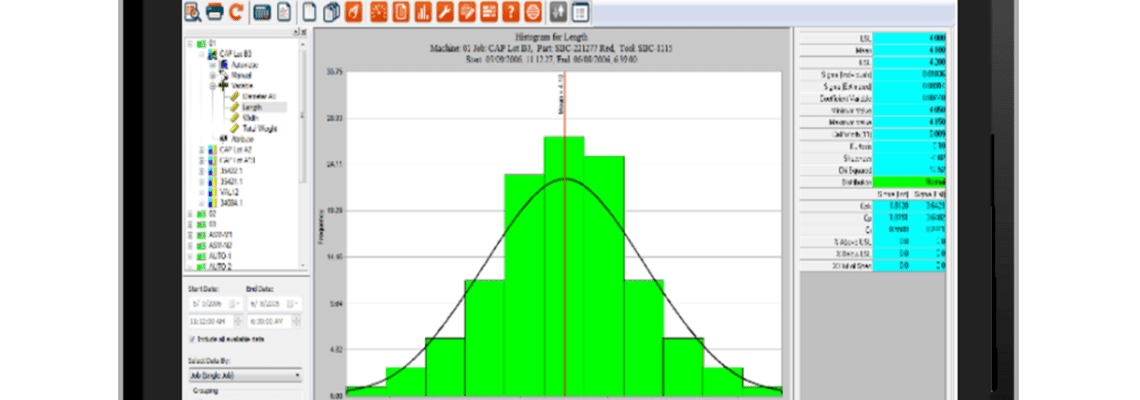

Improve your quality management program with timely feedback and pre-emptive responses with the Epicor Advanced MES Statistical Process Control and Statistical Quality Control module.

What is Statistical Process Control (SPC)?

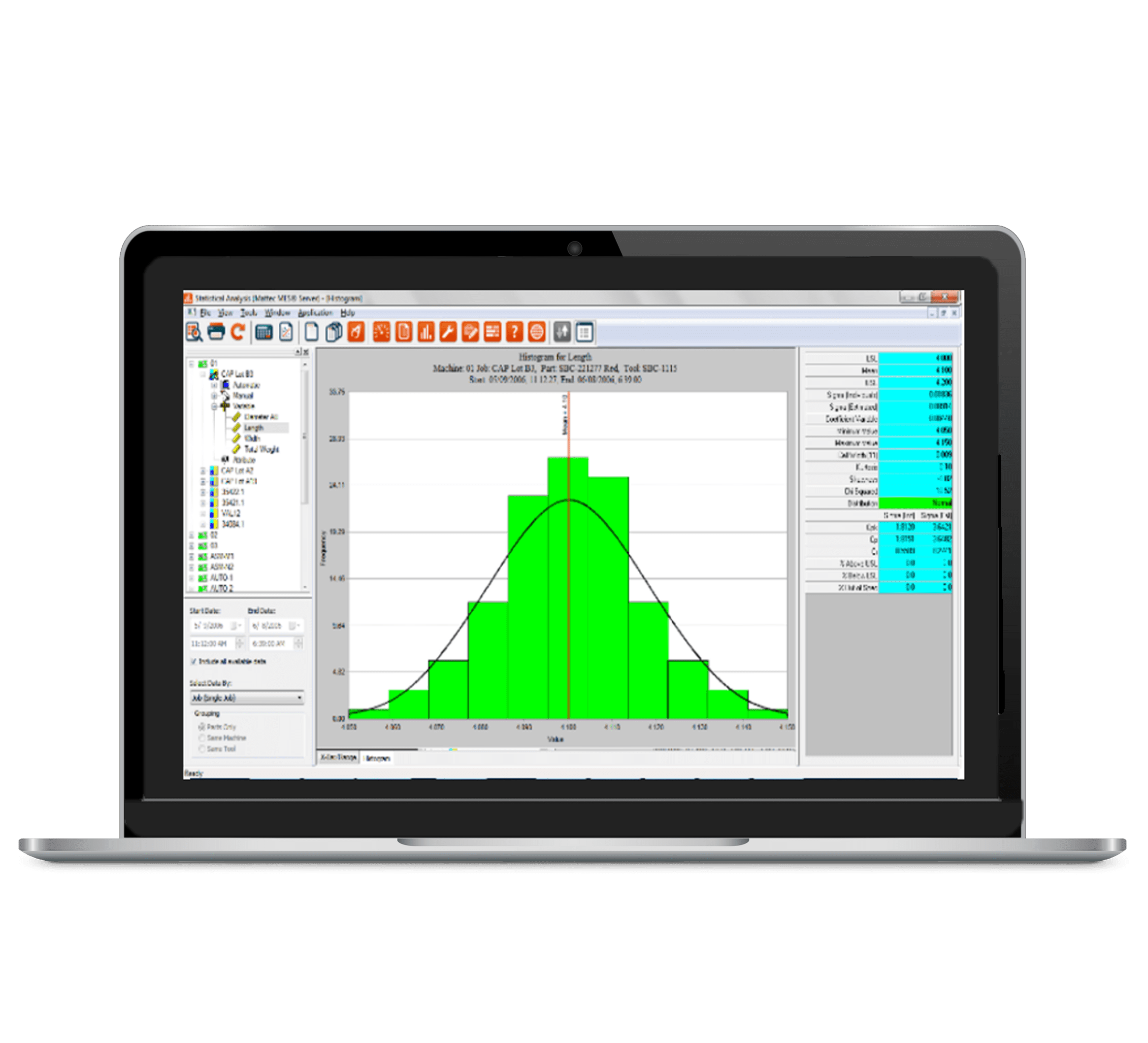
Statistical Process Control will allow you to analyze the processes from your machines using various statistical techniques. Using the data that is being automatically collected, you will be able to make adjustments to the process to help ensure the process is statistically in control and to improve the machine process capability. Without SPC your technicians can only respond to nonvisual issues when they are measured by your quality team. By the time the issue is discovered the process is already producing defective parts. Using SPC, technicians can be alerted to a process that is violating spec limits thus minimizing the production of defective parts.

What is Statistical Quality Control (SQC)?

Statistical Quality Control will allow you to analyze the variable data as well as the attribute data of the part. Using an advanced manufacturing execution system, your operators and quality technicians can use a Human Machine Interface to enter or pull in quality measurements. Using the data, you will be able to determine if the measured part dimensions are statistically in control.

Advanced MES Statistical Process Control and Statistical Quality Control

Statistical Process Control (SPC) and Statistical Quality Control (SQC) with Epicor Advanced MES use real-time, automatic data to help you respond to production conditions before making bad parts. SPC and SQC with factual data enable consistent results without constant oversight. They compare cycle time and process data to control the limits you set—providing rich, instant information to machine operators, quality and reliability engineers, and maintenance professionals.

Advanced MES SPC and SQC Features

Improve Your Quality Management Program with Advanced MES and respond to conditions before producing bad parts, thanks to:

  • Advanced MES operator interface embedded in the system
  • Easy operator interface for setup, alarming, and correction
  • Sophisticated modeling tools

Additional benefits include the ability to:

  • Conform to Quality Standards
  • Avoid charge-backs and defect penalties
  • Automatically scrap parts
  • Drive continuous improvement into your quality programs

Any machine that feeds production and process data into your Advanced MES system can benefit from the Advanced MES SPC and SQC capabilities. It’s capable of receiving any kind of data from machines—cycle time, temperature, pressure, weight, dimensions, or any other kind of measurement. Set and record process parameter control limits for each attribute, and specify sampling criteria. The system automatically administers data samples and alerts for out-of-spec conditions. It applies statistical analysis to process conditions, so operators get an alert—even before things run out of spec—that something is trending negatively.

Process Sheets

Within Epicor Advanced MES you can set up process sheets for the machine/part/tool combination that you wish to monitor. Within the process sheet, you can set up control limits for the process parameters being monitored. The process sheet allows you to configure the frequency and subgroup size for your sampling and you can set up alarms for how you wish to handle process violations.

Edge Computing and Automatic Part Qualification

Automatic part qualification can be set up based on your process sheet parameters to help determine what to do when a part violates your rules. Using our edge device – the Connect Factory Machine Interface Unit (CF-MIU) you can control what you want to have to happen when a process rule is violated.

The Mattec Machine Interface Unit (MIU) is an industrial strength data collection device conceived, developed, and manufactured by Epicor, and was designed along the lines of a SCADA (Supervisory Control and Data Acquisition) system. The term SCADA generally refers to a system that monitors machines, groups of machines, or large cells of manufacturing equipment. Much of the control is performed automatically by the MIU, however, there are host control functions that permit overriding this autonomous control through supervisory actions or intervention. For example, the MIU can control the output reject chute based on various conditions and processes. The MIU is ensuring that every part is manufactured according to engineering specs provided at the host. Its main purpose is to collect production and process information from the manufacturing machine, store, and transmit that data in real-time to the server computer.

The MIU can interface with non-OPC PLCs on the factory floor as well as read its own internal set of analog and digital inputs. The data acquisition begins here through meter readings, level indicators, pressure and temperature status readings, etc., which are then forwarded to the SCADA engine on the MIU. Data is then compiled, and formatted, various reduction analysis equations are executed, and outputs are engaged if needed. In real-time, the operator can make supervisory decisions to adjust or override normal processes and procedural functions.

Advantages of SPC and SQC together

By bringing the SPC and SQC data together, you can analyze the association of the different processes to the dimensions of the part. This gives your process techs additional insight into troubleshooting process issues, and will also assist you in determining which processes are critical and guide you on setting the specifications and control limits.

Do More for Quality Management Than Gather Data

With Advanced MES, statistical analysis is easy and accessible because it’s automated and visual. Epicor eliminates the need for a statistician—or even advanced mathematics training—to put SPC and SQC to work for your company. SPC and SQC do all of the work in the background and serve up visually intuitive graphs and charts that are designed for fast, easy understanding by operators and engineers alike. Complete, accurate, and automated data collection—combined with powerful analysis in a meaningful format – empower people at every level to use statistical analysis to plan, respond, or react to help ensure quality. The Advanced MES SPC/SQC module supports:

  • Automatic process samples
  • Intermittent or batch checkpoints
  • Continuous background analysis and computations
  • Process exception alarms
  • Real-time quality displays for operators and managers
  • Linear regression analysis
  • Exception logs and reports
  • Control of limit calculation
  • Statistical analysis historian
  • Any kind of MRO activity like cleaning, changing parts, taking measurements, making adjustments, performing inspections, and others
  • Adjustment of production schedule automatically for PM/MRO
  • Machines, tools, auxiliary equipment, and another type of assets
  • Tasks, schedules, and requirements from ERP, MRP, and maintenance systems

About Encompass Solutions

Encompass Solutions is a business and software consulting firm that specializes in ERP systems, EDI, and Managed Services support for Manufacturers. Serving small and medium-sized businesses since 2001, Encompass modernizes operations and automates processes for hundreds of customers across the globe. Whether undertaking full-scale implementation, integration, or renovation of existing systems, Encompass provides a specialized approach to every client’s needs. By identifying customer requirements and addressing them with the right solutions, we ensure our clients are equipped to match the pace of the Industry.


Improve your quality management program with timely feedback and pre-emptive responses with the Epicor Advanced MES Statistical Process Control and Statistical Quality Control module.


About Encompass Solutions

Encompass Solutions is a business and software consulting firm that specializes in ERP systems, EDI, and Managed Services support for Manufacturers. Serving small and medium-sized businesses since 2001, Encompass modernizes operations and automates processes for hundreds of customers across the globe. Whether undertaking full-scale implementation, integration, or renovation of existing systems, Encompass provides a specialized approach to every client’s needs. By identifying customer requirements and addressing them with the right solutions, we ensure our clients are equipped to match the pace of the Industry.

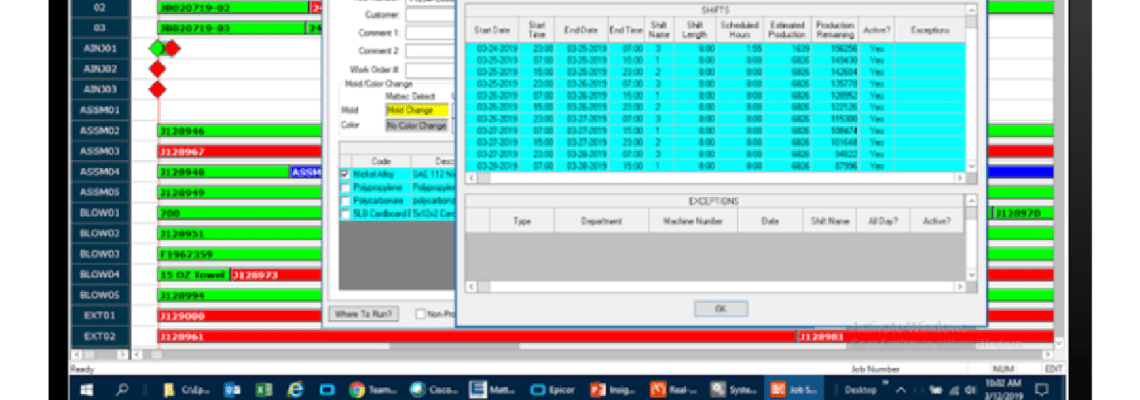
Production scheduling has an impact on the entire business—from commit-to-order to resource planning, and even job costing. Plus, your reputation, growth, and ability to conduct business profitably depend on delivering the right quantity of the right product at the right time—and effective production scheduling is essential to success. Epicor Advanced MES includes real-time production scheduling visualization tools that automatically keep pace with what’s happening on the shop floor every minute of every day, so jobs start at the right time, orders finish when they’re supposed to, and your company delivers on commitments.

Real-Time Means “Right Now”

The Advanced MES production schedule uses job information to tell the shop what to make, how much, and when. Job information comes from your ERP system, MRP, or is even entered manually. From there, the production schedule comes to life, using current production conditions and equipment constraints to create a clear, accurate production schedule.

Advanced MES constantly keeps the job schedule up-to-date in real-time—every minute of every day. Because the system knows what’s running right now, how many parts or pieces are left in the job, and how fast each machine is running, you don’t have to wait until a job is finished or until someone enters data to find out exactly when a job will finish or when a machine will be available. The information you need is there when you pull it up and refresh it continuously.

Visual and Easy to Understand

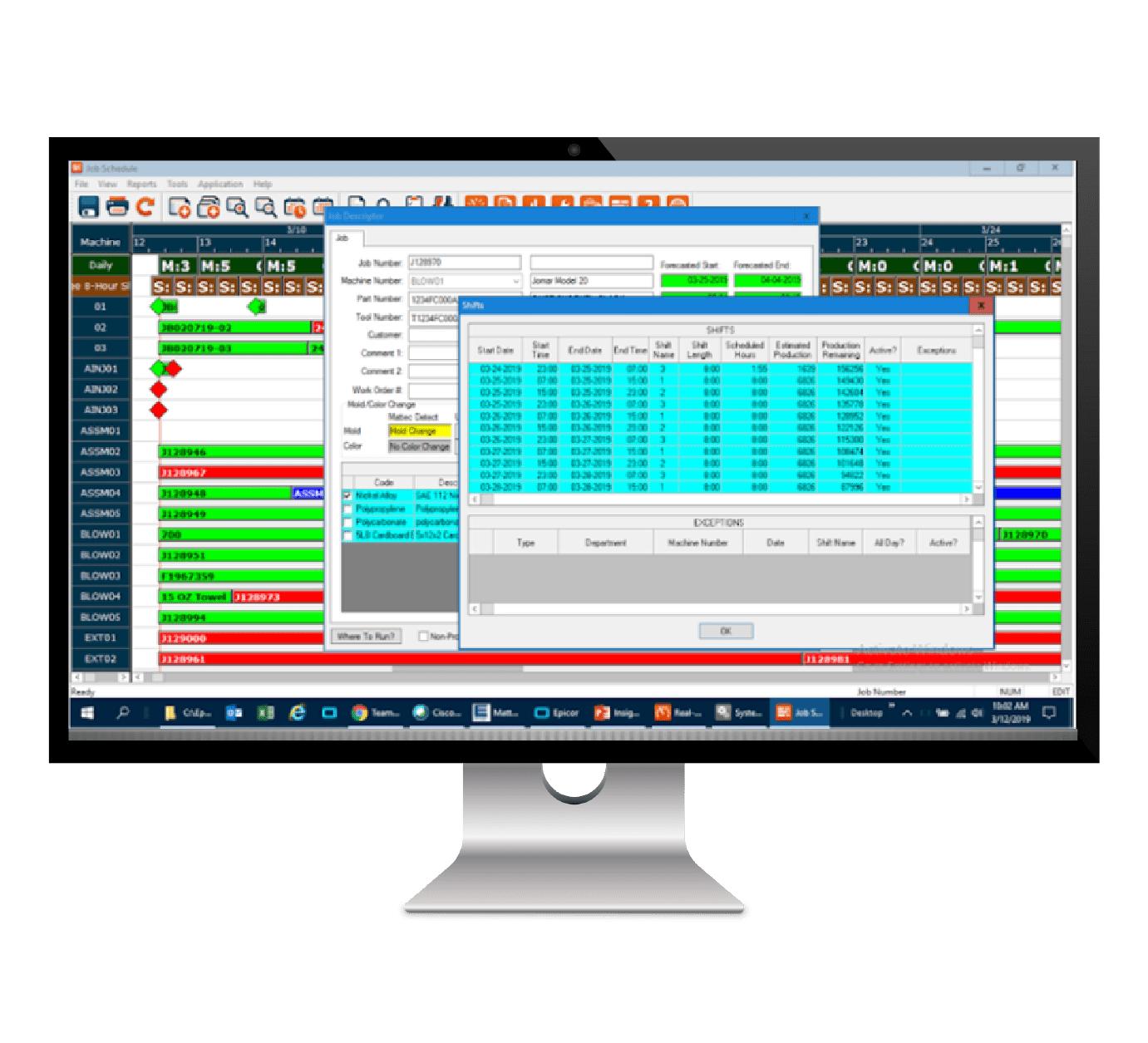
Production scheduling with Epicor Advanced MES is visual and intuitive. You can see every machine and every job, and even non-production tasks like scheduled maintenance. Color coding means that with just a glance, anyone can see what’s running on time and detect schedule problems and delays. It’s also clear where there’s available capacity to take on more work or make adjustments for greater efficiency or better margins.

Drag and Drop What-if Planning, Worry-Free Precision

Unlike a static whiteboard or spreadsheet, the Advanced MES job schedule is dynamic and interactive, so planning is quick and easy. With role-based permissions, schedulers and engineers can conduct what-if scenario planning, while material handlers and tool room techs can see what work is headed in their direction. Plus, the job schedule in Advanced MES helps ensure accuracy. The system prevents people from scheduling jobs on the wrong machine and it knows when the right tools won’t be available. The system automatically tries to resolve resource conflicts and provides visual cues where problems remain.

Dynamic Scheduling

Dynamic scheduling is one of the most powerful features of the Advanced MES scheduler. When a job is created, the forecasted end date of the job will be based on the standards in the process sheet which include factors such as:

  • Standard Cycle
  • Setup
  • Scrap
  • Downtime
  • Parts per Cycle

Once a job is started on a machine, the standards are set aside for efficiency calculations and the forecasted end date will then be based on the live performance of the job on the machine.

MES Real-Time Production Scheduling Features

  • Intuitive graphical scheduling
  • Real-time notification of job status
  • Drag and drop job allocation
  • Create and schedule individual or family parts
  • Define equipment process parameters
  • Report on capacity, labor, material needs, equipment performance, and more
  • Integration with ERP
  • Handle priorities, capacity, and constraints
  • Helps to eliminate job, machine, and tool conflicts
  • Facilitates on-the-fly schedule changes
  • Simplifies sophisticated scenarios
  • Schedule by start time or finish time
  • Easy to understand color coding
  • Drill down into past performance

Advanced MES Benefits

  • Pinpoint available capacity
  • Identify tool constraints
  • Help increase throughput for revenue growth
  • Impact labor and inventory leveling
  • Provide accurate delivery quotes
  • Improve on-time delivery performance
  • Make real-time decisions

About Encompass Solutions

Encompass Solutions is a business and software consulting firm that specializes in ERP systems, EDI, and Managed Services support for Manufacturers. Serving small and medium-sized businesses since 2001, Encompass modernizes operations and automates processes for hundreds of customers across the globe. Whether undertaking full-scale implementation, integration, or renovation of existing systems, Encompass provides a specialized approach to every client’s needs. By identifying customer requirements and addressing them with the right solutions, we ensure our clients are equipped to match the pace of the Industry.

Production scheduling has an impact on the entire business—from commit-to-order to resource planning, and even job costing. Plus, your reputation, growth, and ability to conduct business profitably depend on delivering the right quantity of the right product at the right time—and effective production scheduling is essential to success. Epicor Advanced MES includes real-time visual production scheduling that automatically keeps pace with what’s happening on the shop floor every minute of every day, so jobs start at the right time, orders finish when they’re supposed to, and your company delivers on commitments.


About Encompass Solutions

Encompass Solutions is a business and software consulting firm that specializes in ERP systems, EDI, and Managed Services support for Manufacturers. Serving small and medium-sized businesses since 2001, Encompass modernizes operations and automates processes for hundreds of customers across the globe. Whether undertaking full-scale implementation, integration, or renovation of existing systems, Encompass provides a specialized approach to every client’s needs. By identifying customer requirements and addressing them with the right solutions, we ensure our clients are equipped to match the pace of the Industry.

Medical Device manufacturers are under constant pressure to ensure they are delivering parts on time, and of the highest quality. To further challenge the industry, Medical Device manufacturers must comply with both their customers and the industry regulators’ stringent requirements. These pressures are driving medical device manufacturers to look for new ways to reduce costs, improve quality, and become more efficient on the shop floor.


About Encompass Solutions

Encompass Solutions is a business and software consulting firm that specializes in ERP systems, EDI, and Managed Services support for Manufacturers. Serving small and medium-sized businesses since 2001, Encompass modernizes operations and automates processes for hundreds of customers across the globe. Whether undertaking full-scale implementation, integration, or renovation of existing systems, Encompass provides a specialized approach to every client’s needs. By identifying customer requirements and addressing them with the right solutions, we ensure our clients are equipped to match the pace of the Industry.